

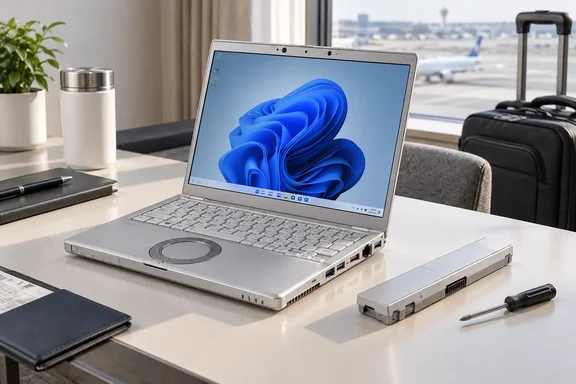
This is not a surprise September launch. Panasonic announced the SC7 in March 2026, with Japanese sales planned from April. The renewed attention follows PC Watch’s September review of a direct-sales configuration. Nor does one impressive machine settle which country is the “undisputed leader” of tiny notebooks. The more useful question is whether Panasonic’s particular mix of portability, serviceability, and business features suits the person carrying it.
Small footprint, unusually practical hardware
The SC7 pairs a 12.4-inch, 1920 × 1280 display with a 3:2 aspect ratio. That taller shape gives documents, spreadsheets, and web pages more vertical room than a similarly sized widescreen display. Its chassis measures approximately 273.2 × 208.9 × 19.9 mm. The trade-off is still a small screen: workers who spend all day juggling several windows may prefer a larger laptop or an external monitor.
The 919 g figure is a starting weight, not a guarantee for every configuration. Panasonic’s customizable Japanese retail models are advertised from approximately 949 g, while PC Watch measured its particular review unit at 925.5 g. Check the exact model code—and whether an optional mobile-data module is fitted—before comparing weights.
Then there is the round wheel pad. It works as a pointing surface, while tracing its outer edge provides scrolling. It looks like a holdover from another laptop era, but PC Watch found the familiar Let’s Note arrangement useful. Preference is personal; for someone moving between older Let’s Notes and the SC7, retaining the control layout may be a feature rather than a refusal to change.
The configuration PC Watch tested ran Windows 11 Pro on an Intel Core Ultra 5 325, with 16 GB of LPDDR5X memory and a 512 GB SSD. It included Wi-Fi 7, Bluetooth 5.4, two Thunderbolt 4 ports, two USB 3.2 Gen 1 ports, HDMI, and Gigabit Ethernet. Panasonic also lists other processor, memory, storage, and wireless-WAN options; the review unit’s specification is not the specification of every SC7. Panasonic says user memory upgrades are not supported, making the initial memory choice particularly important.
The practical takeaway: the SC7 is small, but Panasonic has not made travelers depend entirely on adapters. Its screen size and chosen memory configuration deserve more scrutiny than its headline weight alone.
What “23 hours” actually means
PC Watch recorded 22 hours and 59 minutes using PCMark 10’s Modern Office battery profile, with Windows set to Balanced power mode and display brightness at 50%. That is a defined benchmark run on a review machine—not 23 hours of uninterrupted meetings, cellular connectivity, maximum brightness, and demanding applications. PC Watch itself cautioned that actual use may produce less runtime.
Panasonic publishes different figures under the JEITA 3.0 test method: approximately 17.7 hours of video playback and 32.4 hours at idle. These numbers are not contradictory; they measure different activities under different conditions. Neither the idle figure nor the Modern Office result should be treated as a guaranteed workday.
A consequential design choice sits underneath those numbers. Panasonic says the SC7’s 56 Wh battery pack is removable and secured with screws rather than a quick-release latch. Replacement requires a Phillips screwdriver. That is less convenient than swapping a latched pack on the move, but considerably more approachable than treating an aging battery as a reason to retire the whole laptop. Panasonic says the revised attachment also helped increase capacity over the preceding SR design.
Charging claims need the same attention to conditions. Panasonic says a 30-minute charge while working, under its specified conditions, can bring the battery to about 40%. With the machine off, it quotes about 46% in 30 minutes using the standard arrangement; the higher 55% figure requires an optional 100 W adapter. These are charging estimates, not extra hours that can simply be added to PC Watch’s benchmark.
Toughness and AI, without the marketing fog
Panasonic describes shock and vibration tests based on MIL-STD-810H methods, alongside its own durability tests. PC Watch reports 76 cm drop testing, 30 cm drops in 26 orientations, and a 100 kgf pressure-vibration test. Those are useful indications of Panasonic’s design priorities, not a warranty that any individual drop will leave a laptop unharmed. Notably, the 26-orientation detail belongs to the 30 cm test in PC Watch’s account—not the 76 cm test.
The SC7 is also a Copilot+ PC. PC Watch identifies a 47 TOPS NPU in its Core Ultra 5 review configuration; Microsoft describes Copilot+ PCs as a class equipped with an NPU capable of at least 40 TOPS. That gives supported Windows features hardware for on-device AI processing. It does not mean every AI feature works offline or that every service is included without additional requirements.
For a mobile Windows user, the distinction is simple: the NPU may matter for supported software, but the immediately tangible features are the weight, ports, taller display, and replaceable battery.
The purchasing reality
PC Watch reported a Japanese direct-sales starting price of ¥298,100. That is a Japan-market starting price, not a US retail price converted into dollars. The sources reviewed establish Japanese availability but do not establish an international launch. Anyone considering an imported SC7 should first check the precise configuration, keyboard layout, warranty coverage, and access to a compatible replacement battery rather than assuming a local sales and support channel exists.
The SC7’s most interesting achievement may be less dramatic than a 23-hour headline. It shows that a sub-kilogram-class Windows business laptop can still have Ethernet, a tall display, and a battery designed for replacement. The benchmark is impressive; the design choices are what could make the machine useful long after the benchmark score is forgotten.