

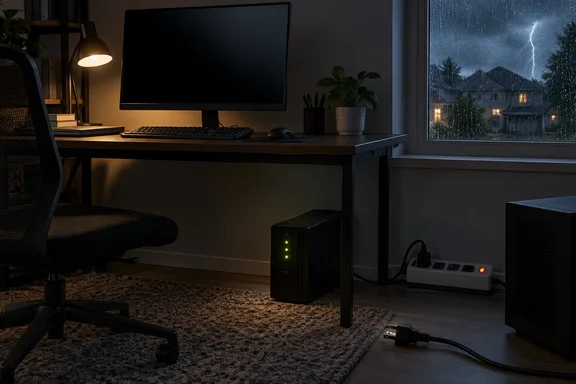
The useful distinction is between protecting equipment from an electrical disturbance and keeping a computer running long enough to save work. Unplugging addresses the first concern once the machine no longer needs power. An uninterruptible power supply, or UPS, addresses the second by providing temporary battery power—and many models also include surge protection. Those measures complement one another, but they are not interchangeable.
Unplugging a PC addresses a risk that shutdown leaves behind
An outage creates two separate problems. The immediate loss of electricity can force a computer to stop unexpectedly, putting data at risk. When service returns, a surge can damage connected electronics. The Electrical Safety Foundation International, or ESFI, identifies both hazards in its power-outage guidance; it does not say that every restoration produces a destructive spike.
That qualification matters. There is no reason to assume a PC has suffered hardware damage simply because the lights went out. Equally, the absence of running fans or an illuminated monitor does not establish that the equipment has been disconnected from the electrical supply. Ready.gov’s recommended protective action is to unplug electronics, rather than merely leave them switched off.
A power surge is an unwanted increase in voltage. ESFI identifies several possible origins, including utility-grid switching, lightning and large appliances turning on or off. An outage is therefore one reason to think about surge protection, rather than the only circumstance in which connected equipment can encounter abnormal voltage.
The evidence supports a practical precaution, not a prediction about which computer component will fail. It also does not establish a universal voltage threshold above which every motherboard, memory module or SSD is damaged. ESFI explains that damage depends on excess voltage relative to an electrical device’s intended operating conditions, and that repeated smaller surges can degrade equipment over time.
For a PC that is already off and does not need to remain available, disconnecting its power cable is the straightforward application of that guidance. It cannot recover work lost in the initial interruption. Its purpose is to remove the power connection before a subsequent disturbance reaches the equipment.
Lightning changes when you should unplug your computer
Advice to unplug electronics needs a safety condition attached to it, especially because severe weather can accompany an outage. The National Weather Service says not to touch computers, televisions or electrical cords during a thunderstorm. It specifically warns against unplugging equipment while the storm is underway because of the risk of being struck. Protecting a PC is never a reason to ignore that warning.
For a forecast storm, the useful action is preparation: disconnect equipment before the storm arrives. The weather service’s lightning guidance recommends doing this well before a thunderstorm threatens, rather than waiting until thunder, lightning or a blackout prompts a scramble behind the desk.
Power is also not the only possible route for lightning-related electrical energy. The National Weather Service identifies electrical, telephone and radio/television reception systems as paths through a building, and its advance-preparation advice calls for disconnecting equipment from conductors where possible. The implication for a connected workstation is that removing one power plug should not be described as complete isolation from every possible electrical path.
This does not turn an ordinary outage into a lightning emergency. It establishes the boundary around the unplugging procedure: act when handling the equipment is safe, prepare ahead of threatening weather, and leave cords alone during an active thunderstorm.
A surge protector and a UPS solve different PC problems
The equipment under a desk can look reassuringly similar while providing quite different protection. ESFI warns that a power strip is not necessarily a surge protector. Extra outlets alone tell you nothing about whether the device protects connected electronics against voltage surges.
A UPS adds stored energy. HP’s computer-protection guidance describes its purpose clearly: temporary battery power gives users time to save work and shut down safely. That makes a UPS particularly relevant to desktops, workstations, home servers and storage equipment where an abrupt stop would be disruptive. Capacity must be appropriate for the equipment connected to it.
| Protection choice | What it provides | What it does not provide |
|---|---|---|
| Disconnecting the PC’s power cable | Removes its connection to the household power supply. | Continued operation or recovery of work already lost. |
| An ordinary power strip | Additional connection points. | Assured surge protection or battery backup. |
| A surge-protective device | Protection against specified electrical surges. | Battery-powered operation during a blackout. |
| A UPS | Temporary backup power, with surge protection on many models. | Unlimited runtime or a guarantee against every electrical event. |
These distinctions follow Ready.gov’s disconnection advice, ESFI’s surge-protection guidance and HP’s explanation of computer battery backup.
A UPS also needs to be used correctly. APC’s buying guide distinguishes battery-backed outlets from surge-only outlets: equipment connected to the latter receives surge protection but does not get the battery runtime reserved for primary devices. A PC plugged into the wrong outlet can therefore still lose power immediately during an outage.
Sizing and runtime are separate checks. APC says neither the UPS’s watt rating nor its volt-ampere rating may be exceeded, and that adding equipment reduces available runtime. Its guidance also distinguishes features such as automatic voltage regulation, which corrects certain high- and low-voltage conditions without using the battery. Do not assume every UPS has the same capabilities.
Surge protection itself is not permanent. ESFI says point-of-use protectors require replacement over time or after a major surge event, and recommends whole-home protection be installed by a qualified electrician. It also warns that no surge protector can handle a direct lightning strike. Buying protection does not remove the need for safe storm preparation.
A PC outage plan should end with a controlled shutdown
For an ordinary outage without an active lightning hazard, the immediate decision depends on whether the computer is still running. A desktop with no battery backup may already have stopped; a UPS-supported system may still give you an opportunity to save work. HP recommends using that temporary power to save and shut down safely.
A practical sequence is:
- Establish that handling electrical equipment is safe. If a thunderstorm is active, leave the computer and its cords alone.
- If the PC is still operating on backup power, save your work and perform a normal shutdown while battery power remains available.
- Once the computer is off and no longer needed, disconnect its power connection. Ready.gov’s advice also applies to other electronics, so include the monitor and other nonessential desk equipment.
- Before relying on a UPS for the next interruption, confirm that the PC is connected to a battery-backed outlet and that the combined load remains within the unit’s ratings.
Unattended computers need another layer: a supported way to shut down without someone at the keyboard. Schneider Electric’s documentation for Easy UPS On-Line describes connecting the UPS to the protected computer by USB and using PowerChute Serial Shutdown for graceful operating-system shutdown during an extended outage. That documented setup requires a USB communication driver, and PowerChute is a 64-bit application rather than a solution for 32-bit Windows.
This is a model-specific example, not a universal installation recipe. The important planning principle is to establish communication between supported hardware and shutdown software before an outage. A battery buys time; a configured shutdown process determines how the computer uses it. Schneider’s documentation identifies both the communication connection and the software as parts of that arrangement.
What this means for your PC outage plan
Choose protection according to whether the computer needs to stop safely, remain available temporarily or simply stay disconnected until it is needed again. Eaton’s desktop UPS guidance frames battery backup around continued operation until the interruption ends or the user can safely shut equipment down—not a promise that a desktop can work through an outage of any length.
- Disconnect an unused PC during an outage when it is safe to handle its power connection; shutdown alone is not the disconnection Ready.gov recommends.
- Prepare for thunderstorms in advance, and do not handle plugs or electrical cords while lightning threatens.
- Verify that a power strip actually provides surge protection rather than assuming that its extra outlets do so.
- Use appropriately sized battery backup when saving work and completing a controlled shutdown are important, and check which UPS outlets receive battery power.
- For unattended systems, establish a supported UPS communication and shutdown arrangement before relying on it during an extended interruption.
The strongest PC outage plan deals with both sides of the interruption: enough backup power to stop safely, and reduced exposure to electrical disturbances when the machine is no longer needed. Unplugging is a useful, low-cost precaution, but timing comes first. Make the connections and shutdown arrangements part of preparation, rather than turning a blackout—or an active thunderstorm—into an improvised equipment rescue.