

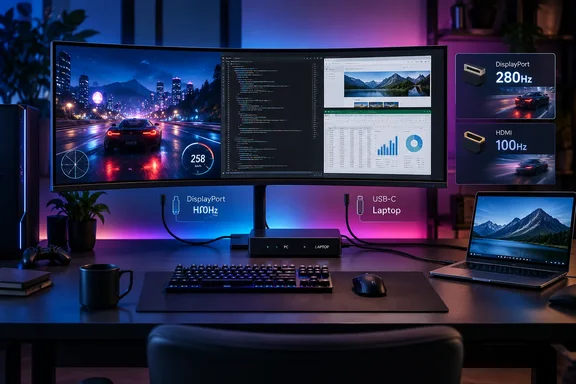
As reported by Wccftech and confirmed by Philips’ UK product listing, the Evnia 34M2C8600P is scheduled to reach retail in October 2026 for £779. Philips lists a 34-inch 1800R curved panel, 3440×1440 resolution, VESA DisplayHDR True Black 500 certification, Adaptive-Sync, an anti-reflection finish, 99.3% DCI-P3 coverage, USB-C video with up to 90W Power Delivery, a USB hub, KVM switching, and Ambiglow lighting.
The meaningful update over the older 34M2C8600 is the panel rather than the chassis. The previous model used an earlier 175Hz QD-OLED design; this version moves to Samsung Display’s newer V-Stripe RGB subpixel layout and raises the refresh ceiling to 280Hz. For Windows users who split time between games, browser tabs, terminals, spreadsheets, and code editors, the text-rendering change is more consequential than another RGB feature.
The V-Stripe panel addresses an old OLED desktop problem
QD-OLED has long offered impressive contrast, pixel response, and color volume, but it has had a practical weakness on Windows desktops: nonstandard subpixel layouts can make text and fine UI edges look fringed or softer than on a conventional RGB LCD. Windows’ text rendering and many application interfaces are designed around a familiar red-green-blue stripe arrangement. When the physical pixel structure differs, the operating system cannot always make small fonts look as clean as their nominal resolution suggests.
Philips calls the new panel fifth-generation QD-OLED and highlights its V-Stripe RGB pixel arrangement. The company’s claim is supported by hands-on reporting from Club386, which saw the display at a Dubrovnik event and reported sharper text with less color fringing than earlier models. PC Gamer likewise identified font fringing as a central problem the new generation is intended to reduce.
That wording deserves precision. A revised subpixel structure can improve the rendering of text and thin interface lines, but it does not magically turn a 109-pixels-per-inch 34-inch ultrawide into a high-density display. At 3440×1440 across 34 inches, Windows scaling will still be a personal choice: 100% scaling supplies substantial workspace but relatively small text, while 125% makes desktop work more comfortable at the cost of some usable area. The panel change addresses colored edges and softness associated with earlier QD-OLED layouts; it does not increase the number of pixels.
For users replacing the original 34M2C8600 primarily because they work on their monitor as much as they play on it, that distinction makes this a potentially material upgrade. For a buyer who uses large fonts, runs Windows at 125% scaling, or mostly plays games, the text benefit may be real but less transformative than Philips’ marketing suggests.
“HDMI 2.1” does not mean 280Hz over HDMI
The monitor’s most important caveat is connectivity. Philips and several launch reports list two HDMI 2.1 inputs, alongside one DisplayPort 1.4 input and USB-C with DisplayPort Alt Mode. But Hardwareluxx and PRAD separately report that the HDMI ports use the older TMDS signaling approach rather than full-bandwidth HDMI 2.1 FRL transport. Their reading of the specifications is that native-resolution HDMI operation is limited to 100Hz, while 280Hz requires DisplayPort.
That means a gaming desktop connected over DisplayPort can use the panel’s headline refresh rate, assuming its graphics card and cable configuration support the required mode. A Windows laptop connected through USB-C may also be viable, but only when the laptop supports DisplayPort Alt Mode and its GPU, dock path, and USB-C implementation expose enough display bandwidth. Philips itself warns that users must ensure their graphics hardware can drive the monitor’s maximum resolution and refresh rate.
The distinction is especially relevant to console owners and mixed-device setups. A console connected through HDMI may receive an image, but it should not be purchased on the assumption that it can access 3440×1440 at 280Hz. Consoles generally do not target ultrawide 21:9 output in the same way as a PC, and the reported 100Hz HDMI ceiling removes the headline high-refresh advantage even before console support is considered.
The naming here is technically defensible but buyer-unfriendly. HDMI 2.1 can describe a connector or feature set without guaranteeing the high-bandwidth FRL mode consumers associate with 4K120-class equipment. Yet a monitor sold around 280Hz needs its usable input limits stated prominently. Philips’ product page promotes “280Hz trailblazing refresh rate,” while the practical route to that mode appears to be DisplayPort, not either HDMI port.
PC Gamer’s April preview reported a different pre-release configuration: HDMI 2.0, DisplayPort 1.4, and 65W USB-C charging. The retail reporting from Club386, Hardwareluxx, PRAD, and Philips’ current product materials points instead to dual HDMI-branded inputs and 90W USB-C Power Delivery. The change illustrates why buyers should rely on the final regional spec sheet rather than early event briefings. It also leaves the HDMI bandwidth issue intact.
KVM and 90W USB-C make this more than a single-PC display
The 34M2C8600P has a credible case as a desk consolidator for Windows users with both a desktop and a work laptop. Its built-in KVM switch lets one keyboard and mouse control two attached systems, while USB-C can carry a laptop’s video and data connection and deliver up to 90W of charging. Philips also includes Picture-in-Picture and Picture-by-Picture modes, enabling both systems to remain visible simultaneously.
In a practical setup, the desktop should connect through DisplayPort to preserve the 280Hz option. The laptop can attach by USB-C, provided it supports DisplayPort Alt Mode and USB Power Delivery. Peripherals then connect to the monitor’s hub, allowing the KVM to move them between systems. This is not equivalent to a Thunderbolt dock with Ethernet and multiple downstream display outputs, but it can eliminate a separate charger and USB switch for a common two-machine desk.
The 90W figure matters more than the monitor’s integrated 5W speakers. It is enough for many thin-and-light business laptops, though it may not sustain peak performance on larger mobile workstations or gaming laptops that ship with 140W, 180W, or higher-rated chargers. Users should expect a one-cable desktop experience from compatible mainstream notebooks, not assume that every high-performance laptop can abandon its original power adapter.
Philips’ AmbiScape feature extends its Ambiglow rear lighting beyond the monitor. The company says it can pair and manage up to 10 Matter-certified smart lights, synchronizing room lighting with on-screen content. It is an optional immersion feature, not a reason to select the panel, but Matter compatibility gives it more potential value than a proprietary lighting system limited to one vendor’s bulbs.
HDR credentials are stronger than response-time marketing
The display carries VESA DisplayHDR True Black 500 certification, which is a more useful signal than a generic “HDR” badge. Philips offers dedicated HDR Game, Movie, Photo, and VESA-certified modes. Earlier reporting from PC Gamer and IT Home described 1,300-nit peak brightness and approximately 300 nits full-screen brightness for the panel, though Philips’ current UK listing emphasizes the certification rather than those brightness figures.
As with every OLED gaming monitor, HDR quality will depend on game implementation, Windows’ HDR configuration, and the selected picture mode. Deep blacks and per-pixel light control are genuine advantages in dark scenes, but users should not confuse a brief peak-brightness number with sustained brightness across a bright desktop or large white application window. An anti-reflection coating should help in brighter rooms, although no independent full review has yet established how it handles raised blacks and reflections compared with competing QD-OLED coatings.
Philips advertises a 0.03ms gray-to-gray response time. That specification describes a measured pixel transition under specific test conditions; it does not establish that the monitor has “no ghosting or artifacts,” as Wccftech’s launch coverage suggests. Motion clarity will also be affected by refresh rate, overdrive behavior, variable-refresh implementation, frame pacing, and the game itself. A proper review should test these conditions before anyone treats the 0.03ms figure as a guarantee.
A strong panel upgrade, with a port-selection rule
At £779, the Evnia 34M2C8600P is positioned below the €899 price Philips discussed at its April 2026 preview event, though regional prices, tax, and availability should not be directly compared. Philips has announced a UK price and October availability, but it has not established U.S. pricing or a U.S. release date. PC Gamer reported in April that U.S. availability had not been confirmed, and no later announcement located for this report changes that.
The upgrade is clearest for PC players and hybrid desktop users who want an ultrawide OLED with less troublesome text rendering than first-generation QD-OLED monitors offered. The KVM, USB-C charging, and 280Hz DisplayPort path make the 34M2C8600P a more practical Windows workstation monitor than a display built solely around competitive gaming.
But the buying rule is simple: plan the primary gaming PC around DisplayPort. Anyone who needs the advertised 280Hz through HDMI should wait for Philips to clarify the TMDS limitation or choose a competing monitor with explicitly documented full-bandwidth HDMI 2.1 support.
References
- Philips Brings 5th Gen QD-OLED Panel To EVNIA 34M2C8600P Monitor, Bringing Better Clarity Coupled With 280Hz Refresh Rate Wccftech · 2026-09-17T14:51:23+00:00