

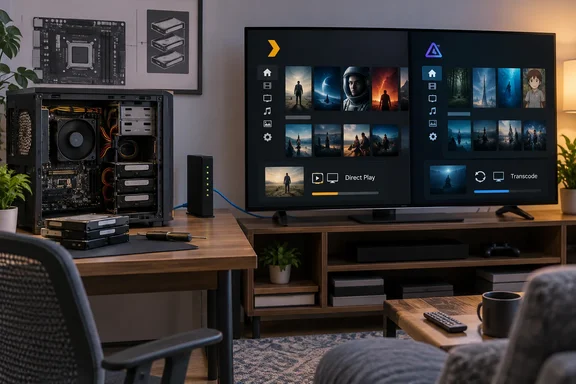
Engadget’s guide to repurposing a PC as a media server makes a useful case for extending the life of existing hardware. Separate reporting from MakeUseOf describes a Jellyfin conversion completed in under an hour, including a conventional Windows installation and selection of media folders. That is one writer’s experience, rather than a setup-time guarantee, but it illustrates how modest the initial project can be.
The more consequential decisions come after installation. Plex and Jellyfin’s documentation reveals an important correction to the idea that successful transcoding requires a dedicated graphics card: supported integrated graphics can do the job. Storage redundancy also needs a clearer boundary—it can help a server survive certain disk failures, but it does not replace an independent backup.
Plex and Jellyfin make client compatibility the first hardware decision
A media server has two sides. The server application organizes and delivers files stored on the PC; a client application on a television, phone, browser or another computer requests and plays them. How much work the old PC must do depends heavily on what that client can accept.
Jellyfin’s transcoding documentation describes the negotiation explicitly. The client sends information about supported video formats, resolutions, bitrates and other constraints. The server chooses a suitable output. A file that plays with little effort on one device can therefore require substantial processing on another.
Transcoding means converting media into a different encoded form. It is useful when a playback device cannot handle the original video or audio, or when the stream must fit a lower bandwidth allowance. But not every compatibility adjustment requires re-encoding the video.
Jellyfin distinguishes four playback modes, shown in its dashboard during playback:
| Jellyfin playback mode | What the server changes | Practical consequence |
|---|---|---|
| Direct Play | Nothing; it delivers the original file. | This places very little additional processing load on the server. |
| Remux | The container, while preserving the original audio and video streams. | The server repackages the media without re-encoding those streams. |
| Direct Stream | The audio, while preserving the original video. | Audio conversion adds work, but avoids video transcoding. |
| Transcode | The video stream. | The server must perform the much more demanding video-conversion process. |
A container is the file structure that holds the video, audio and other components. A codec is the method used to encode one of those components. This distinction explains why a server can sometimes fix a compatibility problem simply by repackaging a file, while another problem requires it to decode and re-encode the picture.
For an older PC, direct playback is the most favorable starting point. The useful inference from Jellyfin’s playback model is that hardware suitability cannot be judged from the PC alone. Your actual media, chosen client app and playback settings together determine the workload.
That makes a small trial more informative than a speculative hardware purchase. Play representative files on the devices the household will actually use and observe the server’s reported playback mode. Include the audio tracks and subtitles you normally select: Jellyfin’s hardware-acceleration documentation identifies subtitle burn-in as a possible processing stage, so testing only a video’s default presentation may miss part of the workload.
Media storage needs a backup plan before it needs RAID
Engadget suggests using multiple drives and redundant storage for additional protection. That can be sensible, but the underlying decisions are capacity, performance, availability and recoverability. Buying enough disk space answers only the first of those questions.
Jellyfin’s hardware-selection guidance separates media storage from the application’s own files. For media, it says storage with sequential access faster than the media bitrate is acceptable. For Jellyfin’s application files, which involve more random access, it recommends an SSD.
That distinction gives an existing boot SSD a useful role even when it cannot hold the entire collection. It can accommodate the operating system, application files and transcoding cache, with media stored elsewhere. Jellyfin gives a 100GB SSD as general guidance for those system-side tasks, while explicitly recommending more space for Windows 11 or large files that need transcoding. This is not a recommendation for the capacity of the media library itself.
Temporary space deserves attention because transcoding generates output as well as consuming processor resources. Jellyfin offers the largest media file multiplied by the maximum number of concurrent streams as a rule of thumb for transcoding storage. That is planning guidance rather than a universal prediction, but it explains why filling the system drive almost completely with films can leave an otherwise capable server poorly provisioned.
RAID addresses continuity, while backups address recovery
RAID is not a backup. A redundant array maintains additional information or copies across drives so that some configurations can continue operating after a drive fails. It does not, by that fact alone, preserve a separate recoverable version of a file that someone deletes or an application overwrites.
The same distinction applies to separating the boot drive from the media drive. Separation can make operating-system maintenance and capacity management easier, but a single media drive still contains a single copy. Its location outside the boot volume does not make that copy independently recoverable.
For this project, prioritize an independent copy of irreplaceable material before treating redundancy as a requirement. Home videos and personal recordings deserve a different recovery plan from files you can readily recreate. The server’s configuration also represents work worth preserving, although the exact configuration-backup procedure depends on the chosen application.
There is no responsible universal RAID recipe for an unspecified old PC. The right arrangement depends on the number of available drives, their capacities and the storage software. More importantly, a first local-playback trial does not require an array at all: you can establish whether the server and clients work together before committing the full collection or changing disk layouts.
Intel Quick Sync can spare an old PC a graphics-card upgrade
The broad claim that transcoding needs a dedicated GPU is misleading. Plex documents Intel Quick Sync Video as a hardware-acceleration path, and Jellyfin explicitly provides recommendations for servers using integrated graphics. A separate graphics card is one option, not a prerequisite.
The relevant capability is the hardware’s media engine: its ability to decode the source format and encode an output the client can use. A computer’s gaming credentials do not establish that capability. Jellyfin specifically warns that certain low-end dedicated cards, including the NVIDIA GT 1030 and AMD RX 6400, lack hardware encoding.
Processor identification matters, too. Jellyfin notes that Intel processors whose model names end in “F” do not have integrated graphics. An Intel-branded CPU alone therefore does not establish that Quick Sync is available in that machine.
Jellyfin’s current recommendations also distinguish between hardware worth retaining and hardware worth buying. Its guidance says owners of seventh- through tenth-generation Intel processors with integrated graphics can continue using them for Jellyfin, while advising new buyers to consider alternatives because the associated Intel toolkit has been deprecated. That is particularly relevant to a reuse project: a component can remain useful without being the preferred fresh purchase.
Hardware acceleration covers a pipeline, not a single operation
Jellyfin describes several stages that may be involved in a video transcode: decoding, deinterlacing, scaling or format conversion, HDR tone-mapping, subtitle burn-in and encoding. Hardware support can differ between those stages.
Consequently, enabling acceleration does not establish that the entire workload has moved away from the CPU. A graphics engine might support output encoding but not the source’s decoding format. Some processing can remain in software, leaving CPU utilization high even though hardware acceleration is working for another part of the conversion.
HDR conversion makes this especially important. Jellyfin warns that software conversion from high dynamic range to standard dynamic range can be extremely demanding. Its documentation recommends a GPU for that workload; “GPU” here includes suitable integrated graphics rather than necessarily meaning an add-in card.
Plex similarly documents automatic fallback. If its hardware engine cannot decode or encode a particular video, it can use software instead. Playback continuing successfully is therefore not proof that hardware acceleration is active.
These details argue against buying an upgrade merely because the server buffers once. First establish whether video transcoding is occurring and whether the acceleration path actually supports the file. The appropriate decision may be to configure existing hardware, use a compatible client, or reduce the required conversion workload rather than purchase a graphics card.
Plex and Jellyfin charge differently for the same important capability
Engadget characterizes Plex as the easier option and Jellyfin as the more hands-on alternative. That is a useful editorial assessment, but it is not a measured installation benchmark or a guarantee across every television and operating system. The stronger, documented comparison concerns feature access and configuration.
Plex’s support documentation says that software-based transcoding is free, while hardware-accelerated streaming on an ordinary PC requires an active Plex Pass. Jellyfin provides hardware acceleration without a subscription, but administrators must configure a method appropriate to their hardware and operating system.
| Choice | Documented attraction for an old PC | Important boundary |
|---|---|---|
| Plex | Free local streaming and software transcoding, with a documented hardware-acceleration setting. | Hardware-accelerated streaming on a PC requires Plex Pass and compatible hardware. |
| Jellyfin | Free, open-source server software, including hardware-acceleration functionality. | Acceleration still depends on the operating system, drivers, media formats and configuration. |
| Emby | Another media-server option identified in Engadget’s comparison. | Its current feature gates and prices are not established here, so it should not be treated as a verified price-equivalent substitute. |
For a household whose files Direct Play, Plex’s hardware-transcoding subscription gate may have little bearing on the initial local setup. Conversely, if an old CPU struggles with required conversions but its integrated media engine supports them, access to hardware acceleration becomes central to the software decision.
Jellyfin is attractive in that second situation because there is no subscription gate to unlock acceleration. That does not remove the setup work. Its documentation recommends the project’s own Jellyfin-FFmpeg build—the conversion software used underneath the server—and warns that unrelated FFmpeg binaries can leave acceleration only partially functional. Official Windows installers generally include the appropriate build, whereas portable installations and other deployment methods can require additional work.
Plex remote video playback has a separate entitlement boundary
Plex’s plans page distinguishes free local streaming from remote access to personal video. For remote video playback, it lists three qualifying routes: the server administrator has Plex Pass, the viewer has Plex Pass, or the viewer has Remote Watch Pass.
Those routes are not interchangeable for every purpose. A server administrator’s Plex Pass permits remote streaming for people granted access to that server. A viewer’s Remote Watch Pass permits that viewer to stream remotely from servers they can access, but does not unlock the server’s hardware-transcoding feature.
Plex also states that this remote-video subscription requirement does not apply to music and photo streaming through its dedicated Plexamp and Plex Photos apps. Older mobile applications have separate legacy activation rules, so a household using an old app should not assume that its behavior matches current clients.
The purchasing implication is straightforward: separate the need to watch remotely from the need to accelerate conversion. A local-only server may need neither paid feature. A server that frequently transcodes and serves remote viewers may place much more value on Plex Pass. Jellyfin offers a different cost structure, with more responsibility for configuring the server and its access arrangements.
Prove local playback before committing the whole media library
Start with a small local deployment and postpone hardware purchases, disk restructuring and remote exposure until the actual workload is clear. This gives you a way to distinguish a compatibility problem from an underpowered server without turning the first attempt into a full infrastructure project.
There is no single verified installer walkthrough that applies to Plex, Jellyfin and Emby across every operating system. The supported common approach is to install the chosen server, point it at media folders and use a compatible client. Preserve the original files during this trial rather than making the new server their only home.
A useful initial evaluation follows this order:
- Identify the PC’s processor and graphics hardware, then establish whether the selected server can use their media capabilities. For Jellyfin 10.11 and later, its hardware guidance also requires SSE4.1 support on x86 processors, so genuinely old machines need an instruction-set compatibility check before performance becomes relevant.
- Allocate space for the operating system, application data and transcoding cache separately from the capacity calculation for the collection. Jellyfin’s SSD guidance applies to those application-side tasks, not to every media file.
- Connect the server through Ethernet where practical. Jellyfin recommends a gigabit Ethernet adapter or faster and advises against Wi-Fi or powerline networking for the server connection.
- Add a representative selection of media and play it on the household’s intended clients. In Jellyfin, inspect the dashboard to distinguish Direct Play, Remux, Direct Stream and video Transcode.
- Evaluate any required video conversion using the supported acceleration path. Do not infer success merely because playback starts; the server may be falling back to the CPU.
The instruction-set requirement is an example of why “almost any PC” is too loose. A machine may have sufficient storage and a working operating system but still fall outside a current application’s requirements. Equally, Jellyfin’s recommended specifications are recommendations for a good experience, not evidence that every machine below them will fail at direct playback.
Plex provides a concrete acceleration check
For Plex on a compatible PC, the prerequisites are an active Plex Pass on the server owner’s account, suitable hardware and drivers, and a supported Plex Media Server installation. Plex documents version 1.9.3 as the historical minimum for this feature; that number is not a recommendation to install an obsolete server build.
Its documented configuration procedure is:
- Open the Plex Web App.
- Go to Settings > Server > Transcoder.
- Enable “Show Advanced” to reveal the advanced options.
- Turn on “Use hardware acceleration when available.”
- Select “Save Changes.” Plex says a server restart is unnecessary.
Plex also supplies a verification procedure, which is more useful than relying on the checkbox alone. Start a video in a Plex client and temporarily reduce its quality—for example, to “Convert to 480p”—to force conversion. In the Plex Web App, open Activity, visit the Dashboard, and expand the playing item’s details in the Now Playing area.
Plex says hardware acceleration is indicated by “(hw)” beside the video format. This is a diagnostic check, not a recommendation to watch permanently at the reduced test quality. A normal Direct Play session would not demonstrate the conversion path because it has no need to use it.
If the setting is absent, Plex directs users to check the server version, the server owner’s Plex Pass status and hardware requirements. If conversion works but the expected hardware indication is missing, its documented format limitations and software fallback remain relevant. That is a narrower, more useful diagnosis than declaring the entire PC unsuitable.
Jellyfin requires a hardware-specific configuration
Jellyfin’s acceleration methods vary by platform. Its documentation includes Intel Quick Sync, NVIDIA NVDEC/NVENC and AMD AMF, alongside other methods for Linux and non-PC platforms. There is no safe universal instruction to choose the same option on every Windows machine.
Use the method supported by the actual GPU, operating system and driver combination. The exact configuration cannot be specified responsibly without those identifiers. Jellyfin’s warning about partial acceleration also means that a high CPU load is a reason to inspect the conversion stages, not automatic proof that no hardware acceleration is occurring.
The decisions to carry out of the trial are concrete:
- Keep the existing hardware if it reliably serves the files and clients you intend to use.
- Consider an acceleration change only after establishing that video conversion is part of the workload.
- Treat Plex Pass and Remote Watch Pass as different entitlements with different account boundaries.
- Preserve an independent copy of irreplaceable media before moving the full collection onto the server.
- Keep the first deployment local while you establish playback compatibility, storage needs and server behavior.
Remote access turns a household appliance into an administration job
A local media server and an internet-accessible media server are different operational commitments. Jellyfin’s hardware-selection documentation explicitly says that the server is not designed to be exposed directly to the internet and should remain protected behind a properly configured firewall or other secure network environment.
That warning is more precise than suggesting that installing a tunnel automatically makes the service safe. An access mechanism changes how a client reaches the server; it does not establish that the application, accounts and underlying operating system are securely maintained. No universal router rule or remote-access command follows from the information available here.
Keeping the first deployment local avoids making public exposure a prerequisite for a useful result. You can establish the library, test television and mobile clients, and determine whether transcoding is necessary without first solving access from outside the home. Remote access can then become a separate project with its own configuration and maintenance requirements.
Bandwidth changes the calculation as well. Jellyfin recommends at least 20Mbps of upload bandwidth for remote access. Where total upload capacity is below 100Mbps, it recommends limiting Jellyfin to 70 percent of that capacity through the server dashboard to avoid consuming the entire upstream connection. These are project recommendations, not guarantees for every video format or number of simultaneous viewers.
A remote bandwidth limit can also change playback behavior: Jellyfin’s client negotiation includes bitrate constraints, which may require conversion even when the device could otherwise decode the original file. A local Direct Play test therefore establishes local suitability, not unlimited remote-streaming capacity. Plex users must additionally account for the remote-video entitlement rules described above.
Repurposing an old PC works best when the first goal is deliberately modest: deliver a protected media collection reliably to the devices already in the house. Direct playback may let the machine succeed without new components, and supported integrated graphics may handle the conversions that remain. Once those facts are established on your own clients, subscriptions, additional disks and remote access become informed choices rather than admission fees to the project.
References
- Hardware Selection | Jellyfin jellyfin.org
- Transcoding | Jellyfin jellyfin.org
- Using Hardware-Accelerated Streaming | Plex Support support.plex.tv