

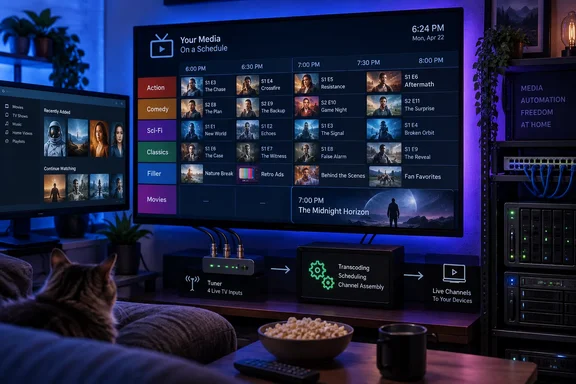
That distinction changes the workload and the limitations. The appeal described by How-To Geek—press play and watch whatever is currently on, rather than choosing another series from an infinite menu—is real. Tunarr can turn a Plex, Jellyfin, Emby, or local-file collection into channels with scheduled shows, movies, interstitial clips, and an XMLTV electronic program guide. The project’s own documentation confirms that Plex can discover it through the Live TV & DVR setup flow, where Tunarr presents itself as a tuner and supplies the guide.
For homelab users, this is less a nostalgia hack than a way to impose structure on a personal media server. A “Friday movie night” channel that begins at 7 p.m. and cannot be restarted from the beginning changes the experience in a way another Plex playlist does not. It also solves a familiar household problem: a server full of media can make deciding what to watch harder, not easier.
Tunarr creates a broadcast layer above Plex
The How-To Geek report correctly describes Tunarr’s lineage. It began as a fork of dizqueTV, which itself followed earlier pseudoTV projects intended to simulate traditional television from locally held media. Tunarr has since become a substantially rewritten project with its own scheduler, channel editor, guide support, filler-content library, and stream-transcoding controls.
The basic model is straightforward. An administrator connects Tunarr to one or more media sources, selects shows or films, arranges a lineup, and then exposes that lineup as an IPTV-style channel. The server can use simple sequential programming—one episode after another—or time-slot scheduling that forces content to begin at defined times.
That second option is what makes it behave like a channel rather than a playlist. If a 22-minute episode is scheduled in a half-hour slot, Tunarr can use flex time to fill the gap. If a movie starts at 7 p.m., someone joining at 7:15 gets the movie at its current point, assuming the channel has been running continuously. The arrangement preserves the one feature on-demand media deliberately removes: the viewer does not control the clock.
Tunarr’s documentation also makes clear that filler is more flexible than the source article suggests. It can cover schedule gaps, use custom clips, and be combined with mid-roll break tools. That permits vintage commercials, station IDs, music videos, trailers, public-service announcements, or simply neutral transition footage. The practical choice for most households will probably be shorter filler blocks than a recreation of old ad loads; the software does not require commercials in order to make a channel useful.
The hidden requirement is transcoding capacity
The novelty is scheduling, but the technical cost is video processing. Tunarr requires FFmpeg because it must normalize streams and splice programming, flex content, or breaks into a continuous channel. Its Docker images package FFmpeg, while standalone installations need an appropriate FFmpeg installation available to the service.
That means the project deserves different hardware planning than an ordinary Plex library used mostly for Direct Play. A channel made from uniformly encoded H.264 video with compatible audio can avoid much of the work, depending on the selected streaming mode and client. A library with mixed codecs, resolutions, subtitles, HDR formats, or audio layouts can force more demanding processing. Multiple viewers tuning into multiple channels can multiply that load.
The safer starting point is one channel, one local client, and a deliberately compatible batch of files. Check CPU load, memory usage, and stream stability before filling a guide with 24-hour channels. If the server has an Intel iGPU or supported Nvidia GPU, Tunarr offers hardware-accelerated transcoding paths, but hardware support is an operational advantage rather than a guarantee that every source file will play cleanly.
This is the major gap in How-To Geek’s otherwise approachable description. Building the schedule is the enjoyable part; maintaining consistent playback across a varied media library is the systems-administration part. The project’s own issue tracker includes reports involving streaming stalls, subtitle selection, library reindexing, and client-specific failures—normal territory for a young, actively developed media service, but a reason not to confuse it with a finished consumer-TV product.
Plex for Windows is the immediate catch
There is one limitation Windows users should place at the top of their test plan. Tunarr’s current Plex integration instructions warn that the native Plex for Windows client is not supported for this kind of Live TV playback and can produce a “This Live TV session has ended” error. Tunarr directs affected users to the Plex web client instead.
That warning is particularly important because Plex itself lists Windows desktop among its supported apps for ordinary Live TV. The conflict is not a general absence of Live TV capability in Plex for Windows; it is an incompatibility in this specific simulated-tuner workflow. For a Windows-based home theater PC, the difference between using the installed Plex app and opening Plex in a browser may be enough to decide whether the project is worthwhile.
The project’s troubleshooting material also identifies another practical problem: Plex native apps commonly expect secure server connections, while a Tunarr instance may be configured with plain HTTP on the local network. In that scenario, a client may load some Plex interface elements but block channel artwork or related requests because they cross from HTTPS to HTTP. That is not a reason to expose Tunarr directly to the internet. It is a reason to verify local addressing, reverse-proxy design, and client behavior before assuming that a channel works everywhere.
For Windows users who want to host Tunarr rather than only watch it, the project provides prebuilt Windows x64 binaries alongside its Docker images. Docker remains the more repeatable route for many administrators because it packages its own FFmpeg build and isolates dependencies, but it still requires careful volume mapping for configuration and a considered network setup.
“Remote access” needs more than opening port 8000
How-To Geek says its channels are available locally and remotely. That can be true, but it should not be read as a recommendation to publish Tunarr’s default web port to the public internet. Tunarr handles media-server credentials and can generate streams and guide data; it belongs behind the same access controls a careful administrator would use for Plex itself.
Plex’s own remote-playback rules have also changed in recent years. Its support documentation says remote streaming of personal media now has account requirements that can involve Plex Pass, depending on the account and sharing arrangement. That is separate from Tunarr’s ability to make a channel, but it matters for the promised “watch it anywhere” outcome. A local test that succeeds does not prove a remote Plex client will receive the channel successfully.
The sensible approach is to leave Tunarr LAN-only at first, then use a VPN or an authenticated reverse proxy if remote administration is necessary. Remote viewers should generally connect through Plex’s established sharing and remote-playback path rather than directly to a newly exposed Tunarr service. Administrators should also avoid placing Plex tokens in screenshots, support posts, or openly reachable configuration files.
This is a better fit for curation than for recreating cable
The strongest point in the How-To Geek account is not the retro-commercial gimmick. It is the deliberate reduction of choice. Modern streaming interfaces optimize for discovery, recommendations, and endless availability; Tunarr lets an owner choose the opposite model for selected material.
A curated cartoon block after school, a genre channel that rotates films without repeating the same franchise, a family dinner playlist with a firm beginning and end, or a weekend channel built around a Plex playlist all offer a concrete reason to run the software. Tunarr can also synchronize a custom show with a Plex playlist, allowing the familiar Plex interface to remain the place where a household’s lineup is edited.
The project is therefore most compelling when it adds something a Plex collection does not already have: a schedule shared by every viewer. Simply using it to play a library in alphabetical order is technically valid, but a Plex playlist already does most of that with fewer components.
Tunarr is not a shortcut to old television, and it is not a Plex add-on in the casual sense. It is a separate scheduling and streaming layer with FFmpeg, tuner emulation, guide integration, client quirks, and remote-access implications. For a self-hosting enthusiast willing to manage those pieces, it can make a personal media server feel less like a catalog and more like a place where something is actually on.