

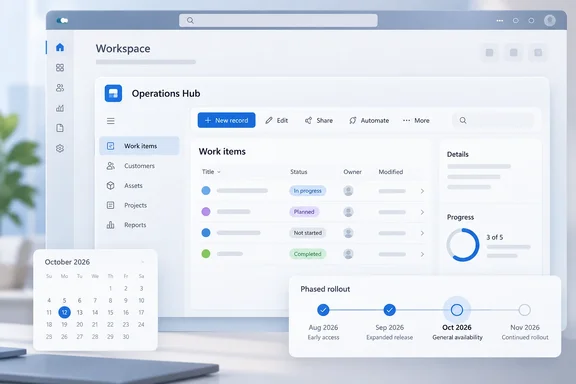
The roadmap entry says the change was enabled for the monthly channel with release 2602.1. It is now being enabled for the semiannual channel with release 2609.3. It is listed as generally available and default-on, and its status is Launched.
The facts at a glance
| Field | Roadmap value |
|---|---|
| Roadmap ID | 571682 |
| Impacted products | All model-driven apps |
| Platform | Web |
| Release ring | General Availability |
| Monthly channel | Already enabled since 2602.1 |
| Semiannual channel | Enabled with 2609.3 |
| Activation | Default on |
| Cloud instances | Worldwide (Standard Multi-Tenant), GCC, GCC High |
| GA month | October 2026 |
Summary: Organizations that kept their model-driven apps on the semiannual channel didn't receive this change in February. It reaches them in the October 2026 semiannual release.
What "embedded" covers, and what Microsoft hasn't said
The roadmap describes keeping visual consistency when model-driven app content appears inside another host. It doesn't name the hosts. It also doesn't describe host prerequisites, changes to app logic, a separate on/off switch, or exceptions. Admins should not assume any of those details until Microsoft publishes them.
Two related items help explain the wording, but neither one defines this feature:
- Embedded canvas apps go the other way. Microsoft's documentation on embedding a canvas app in a model-driven form puts a canvas app inside a model-driven form, next to Dataverse data. The roadmap item is about model-driven content shown inside another host. These are separate scenarios.
- The mail app has the same timeline. Microsoft's "Modern, refreshed look for model-driven apps" page says the mail app supports the refreshed look. It has been on by default for monthly-channel environments since the February 2026 release and is due for the semiannual channel with the October 2026 update. That matches the 2602.1 → 2609.3 path in this roadmap entry. However, Microsoft does not say the two are the same feature, so this article doesn't treat them as one.
What the refreshed look actually is
Microsoft is modernizing model-driven apps in waves. Each wave updates styling, layout, and behavior to align with the latest Microsoft Fluent design system. Microsoft says Fluent also provides a solid foundation for extensibility and future capabilities like dark mode.
Wave 1, called "The New Look," covers updated styling in forms, views, dashboards, dialogs, and controls; the floating command bar; the Power Apps grid; new field control styling. It has been required for a while. Microsoft's 2026 release wave 1 plan says the modern, refreshed look becomes the required experience for all model-driven apps across all release channels, including the semi-annual channel. It also removes the app setting New look for model-driven apps, so users can't revert back to classic look.
The Learn page has a small inconsistency. It still includes a "Revert to the classic look" procedure using that same app setting, but it also says the New Look is mandatory and that makers can't switch back. The release plan is more specific, so treat the leftover procedure as outdated documentation, not a way out.
Wave 2 is the header and navigation refresh, and it remains a separate step. Microsoft's September 2026 feature update says the header and navigation refresh feature reaches general availability, and the new display density feature enters preview. Industry coverage of that update notes that the header and navigation refresh remains opt-in for existing applications.
The embedded-experience change discussed here doesn't turn on Wave 2. It only extends the existing refreshed look to embedded hosts.
Summary: Most of your apps already use the Fluent look. This update brings the embedded experience in line with them.
How the semiannual rollout actually lands
"October 2026" does not mean every tenant gets the change on the same day. Microsoft's release-channel documentation explains the timing:
- The semiannual channel turns on GA features twice a year, in early April and early October. The October production build follows the YY09.3 pattern, and Microsoft uses 2609.3 as its example.
- The rollout goes out gradually by region. An environment gets a feature when it receives the weekly build that includes it, and region groups update on successive weekends. A full rollout takes about five weeks.
- Neither channel is a preview. Both channels deliver the same GA features. The semiannual channel is simply slower and releases in larger batches.
- The two channels don't always move in lockstep. Microsoft says a feature in the monthly channel may not appear in the next semiannual release, and some changes go straight to semiannual. For this feature, the roadmap confirms that it moved from 2602.1 to 2609.3.
A quick validation checklist for admins
If your organization deliberately stayed on the semiannual channel, it's probably because you need time to test before users see changes. These steps come from Microsoft's documentation:
- Confirm the channel and build. In the model-driven app, open Settings > About to see the active channel and current build. The feature won't appear until 2609.3 reaches your environment.
- Know which setting controls the channel. Microsoft checks settings in this order: URL override, user channel override, the app release channel (if not Auto), the environment release channel (if not Auto), and finally the default.
- Watch for Auto. When both the app and environment are set to Auto, Power Apps and Dynamics 365 environments use the monthly channel. Microsoft also says model-driven apps in Power Platform environments use Monthly whenever the app channel is Auto, regardless of the environment setting. Some apps you think are on semiannual may already have had this change since February.
- Compare channels in a browser session. Add
&channel=semiannualor&channel=monthlyto the app URL to temporarily override the channel in that tab. This lets you compare how your embedded scenarios behave on each channel. - Refresh twice after channel changes. After an environment-level channel change, users need to refresh the browser tab twice. The first refresh updates a local feature cache, and the second one uses it.
- Test your custom elements. The modern theme is passed to Power Apps component framework (PCF) controls, but Microsoft says custom pages don't currently use the modern theme. Customized chart colors are overridden unless the chart XML includes
CustomColorOverride="true". Microsoft does not say this release changes any of these limits, but your embedded content is where they're most likely to show.
Analysis: small change, practical benefit
This isn't a headline feature, and Microsoft isn't presenting it as one. Inconsistent styling still costs something, though. When an app looks different depending on where it opens, users may be confused, think something is broken, and contact the help desk. Making embedded hosts use the same Fluent styling helps model-driven apps feel like one product wherever they run.
There is one fair criticism. "Embedded app experiences" is vague for something that will turn on by default for every model-driven app in commercial, GCC, and GCC High tenants. Semiannual-channel organizations pay for predictability. They would benefit from a list of affected hosts and a clear statement on whether the change can be turned off. Without that, the best approach is to test embedded scenarios as 2609.3 reaches your region and treat any visual problems as a normal part of rollout testing.
Bottom line: If you're on the monthly channel, nothing changes, because you've had this since February. If you're on the semiannual channel, 2609.3 brings the refreshed look to embedded model-driven experiences by default. Check Settings > About, test your embedded scenarios, and keep an eye on your custom pages and charts.
References
- Power Apps: Modern, refreshed look for embedded model-driven apps Microsoft 365 Roadmap · 2026-10-02T22:01:21.517047Z
- Modern, refreshed look for model-driven apps - Power Apps | Microsoft Learn learn.microsoft.com
- Embed a canvas app on a model-driven form with Power Apps - Power Apps | Microsoft Learn learn.microsoft.com