

Microsoft’s updated Microsoft 365 Roadmap entry, ID 561026, still lists the work as in development as of September 1, with general availability targeted for October 2026. That status is significant: a May preview date on a roadmap is not evidence of a finished rollout to every Microsoft 365 tenant, and administrators should not plan a production document workflow around the feature until they can confirm it appears in their own Power Automate environment.
Microsoft’s SharePoint connector documentation does, however, already list the action by name and operation ID, SubmitDocGenForm. That confirms the preview capability has progressed beyond a roadmap concept into the documented connector surface. The same connector reference also documents companion preview operations: a Form submitted trigger and a Get form metadata action. Together, those pieces allow a flow to react to an existing SharePoint form submission, inspect the form’s structure, or generate a document from data collected elsewhere.
The action fills a specific SharePoint form template
The important limitation is in the product name: this action generates a document from a form. It does not accept an arbitrary .docx file and a handful of text replacements in the way many third-party document-automation tools do.
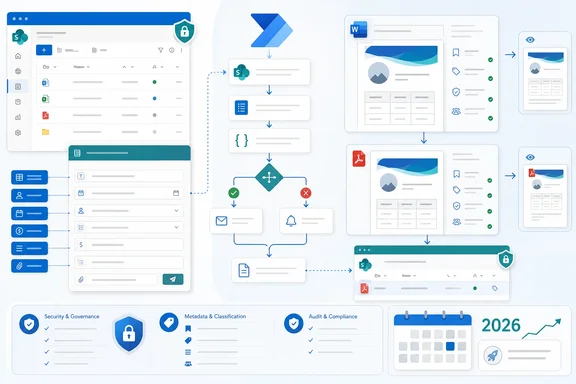
Microsoft’s SharePoint documentation describes the underlying feature as structured document generation. A content manager creates a document-generation form from a Word .docx template stored in a SharePoint document library, defines fields and optional conditional sections, and publishes it. The Power Automate action then takes that existing form, maps values to its fields, and asks SharePoint to create the final document.
In the action’s documented configuration, flow authors provide four meaningful inputs:
- The SharePoint site address is required.
- The document-library name is required.
- The document-generation form is required.
- The flow must supply dynamic field values matching the form’s defined fields.
There is also a parameter named View, but Microsoft’s connector documentation explicitly says it has no effect and should not be used. That is a small but useful implementation detail: admins should not assume a SharePoint view can constrain which form fields are presented to, validated by, or generated through a flow.
The action returns SharePoint file metadata after generation. That means the resulting file can feed subsequent steps without separately searching the library: an approval, a Teams notification, a file move, a metadata update, or an integration with a CRM or records-management process.
This is automation around governed templates, not Copilot writing
The Roadmap entry is filed under Microsoft Copilot (Microsoft 365), Power Automate, and SharePoint, but the feature’s useful core is template governance rather than generative drafting. Microsoft describes an input-to-field mapping process: the form supplies structured values, and the document template places those values into approved language and layout.
That distinction changes where this feature is appropriate. It is well suited to a sales team producing a standardized proposal cover letter from an opportunity record, HR creating an employment-verification letter from approved fields, or procurement producing a purchase document after an approval flow. It is much less suited to workflows that require a model to compose bespoke narrative text, interpret ambiguous source documents, or make decisions about contractual language.
For organizations already using SharePoint libraries as controlled repositories, the feature may be more attractive than an external document-generation service because the template, form, generated document, and associated metadata can stay in the same Microsoft 365 content boundary. Microsoft says each form submission creates structured metadata in SharePoint, which opens the door to ordinary SharePoint rules, library views, retention configurations, and downstream Power Automate flows.
The generated files also receive a site-unique reference number that can be inserted into a template. Microsoft says the identifier stays with the document when it is moved or copied, while a regenerated document receives a new number. That could help organizations create traceable correspondence or transactional records without relying solely on filenames, which are easily changed.
Preview access and licensing remain the gatekeepers
The original Microsoft 365 Message Center announcement, published in April, said the capability was restricted to organizations enrolled in the AI in SharePoint Public Preview. Microsoft’s current SharePoint connector documentation continues to describe document-generation forms as part of that public preview.
That makes the October 2026 general-availability target the main milestone to watch. Microsoft has not stated in the roadmap entry whether the eventual GA version will retain the current preview enrollment requirement, what licenses will be required for automated generation at scale, or whether any consumption limits will apply. The absence of pricing and entitlement details matters for teams comparing it with Microsoft Syntex content assembly, AI Builder, or established third-party document-generation platforms.
There is already one clearly stated license requirement on the SharePoint side: Microsoft says content managers who create and configure these forms need a Microsoft Copilot license. The documentation does not, in the same passage, spell out an additional per-run Power Automate premium requirement for the new action. Administrators should therefore validate the connector’s availability and licensing in a non-production environment before presenting the feature as included in an existing Power Automate plan.
The preview also does not alter existing flows automatically. Microsoft’s Message Center notice said organizations will only see a change if they decide to use the new action. That makes early testing relatively low-risk, provided the template library and output location are isolated from production records.
Conditional form logic does not carry cleanly into flows
The biggest operational caveat is buried in Microsoft’s SharePoint documentation: conditional field visibility affects the browser form experience, but Power Automate does not apply that visibility logic.
In practical terms, a form might hide a “Non-US privacy clause” field when a person selects a U.S. location. When data is supplied by Power Automate instead of through the interactive form, the flow does not reproduce that hide-or-show behavior. Microsoft advises making fields that would normally be hidden optional when using forms with Power Automate.
That is more than a UI quirk. It means flow designers need to own input validation and branching in the flow itself. A process that generates jurisdiction-specific contracts, offers, regulated notices, or other controlled documents should use explicit conditions before calling the generation action, rather than assuming SharePoint form rules will enforce the same logic.
The conditional-section behavior also has a separate Word limitation. Microsoft says sections selected when the document is generated do not re-evaluate if a user later changes a field in Word for the web. To apply different conditional logic after the fact, users must generate a new document or open the document in the desktop version of Word. Teams that expect documents to remain dynamically responsive after generation will need to adjust that expectation.
Security and delivery need deliberate design
Microsoft’s documentation sets clear boundaries around access. Form creators need Edit permissions on the SharePoint document library. Form submitters only need the form link, with read access to the template granted automatically—but they do not automatically gain access to the destination library or the finished document.
That prevents the action from being treated as a secure delivery mechanism by itself. If a flow generates a customer letter, an offer document, or a sensitive internal notice, the flow or its surrounding process still needs to grant access to the final file, send an appropriate sharing link, or otherwise deliver the document through a controlled channel.
There is a second limitation for compliance-heavy tenants: Microsoft says PDF generation does not work when sensitivity labels are enabled on the SharePoint site or library. Support is described as forthcoming, not present. Organizations that require labeled PDF outputs should test the complete workflow—including labeling, access grants, retention, and recipient access—before migrating an existing process.
The safer preview pattern is to begin with a narrowly scoped library, a non-sensitive .docx template, optional fields for values controlled by conditional logic, and a flow that logs the returned file metadata before triggering any downstream approval or delivery. The upcoming October 2026 GA target may broaden availability, but the current preview is already specific enough for administrators to identify where it fits: standardized, high-volume documents whose inputs can be structured before the file is created.
References
- Microsoft Copilot (Microsoft 365): Generate documents using forms in SharePoint with Power Automate Microsoft 365 Roadmap · 2026-09-01T23:00:02.5707589Z