

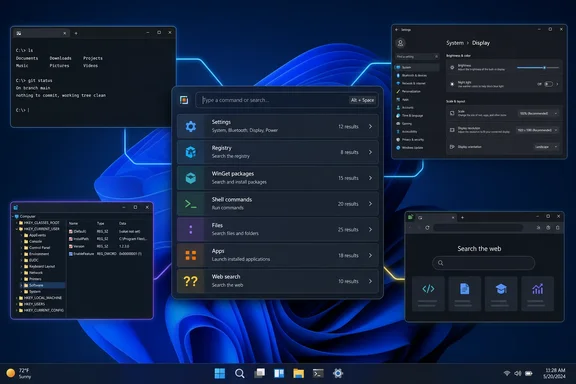
For power users, that distinction is useful. A single launcher can eliminate repeated trips through Start, Settings, Run, Windows Terminal, Registry Editor, and a browser. For administrators, it can also provide a fast path to routine local tasks. But each result still depends on the underlying Windows component, the locally installed software, and the Command Palette extension that supplies it.
Command Palette is included with the free, open-source Microsoft PowerToys suite. It runs on 64-bit Windows 10 version 2004 or later and Windows 11, requires PowerToys to remain running in the background, and uses Win+Alt+Space by default. The activation shortcut is configurable in PowerToys settings.
The prefix keys are routes, not one universal search engine
The feature works most predictably when users treat its symbols as routes to a particular provider. Typing normally searches Command Palette’s enabled sources and presents matching commands, applications, and other items. Prefixes narrow the query to a specific job.
PCWorld highlights the most immediately practical set:
>sends a query to the Run Commands or shell-oriented function, such as> ping.$searches Windows Settings pages, such as$ keyboardor$ display.:opens the Registry workflow, allowing navigation from a key path such asHKEY_LOCAL_MACHINE\Software\Microsoft.??passes a web query to the configured default browser and search engine.- The WinGet entry point searches packages available through Windows Package Manager and can begin an installation.
Microsoft documents additional built-in routes, including calculator operations, file and folder search, Windows service controls, system commands, clipboard history, Remote Desktop connections, Windows Terminal profiles, and open-window switching. Command Palette can also be extended with separately installed extensions, making the exact list on one PC different from the list on another.
That flexibility is why the “replaces several Windows search features” framing is directionally right, but incomplete. Command Palette centralizes entry points; it does not merge the back-end data sets. Searching Settings looks up settings pages. Searching WinGet queries package sources. Searching the Registry navigates registry keys. A web query leaves the app and opens the default browser.
> is not a command prompt embedded in PowerToys
The biggest practical correction to the PCWorld description concerns the greater-than symbol. Typing > does not turn the palette itself into a persistent Command Prompt or PowerShell console. It calls the command-running workflow, where a user supplies a command and invokes it; Command Palette is acting as a launcher.
That matters for anyone expecting an interactive terminal session. Commands that produce output, require follow-up input, rely on a current working directory, or behave differently under Command Prompt and PowerShell still need a real shell window and a known execution context. Microsoft’s documentation uses examples such as > cmd and > Shell:startup, which are much closer to launching a command or Windows shell location than replacing terminal administration.
There is also an unresolved reliability issue in the project’s public tracker. A PowerToys user reported that Command Palette version 0.94.0 stopped offering a way to execute some commands that worked from cmd.exe; the issue remained open when last indexed. One user report does not establish a general failure, but it is a reason not to standardize on Command Palette as the only path for scripts or operational procedures.
For desktop support and endpoint teams, the safe pattern is straightforward: use the palette for fast access to known tools, but keep written procedures based on explicit PowerShell, Command Prompt, Windows Terminal, or management-console steps. Those are auditable, repeatable, and less dependent on a user’s personal PowerToys configuration.
WinGet search makes installation easier, not automatically safer
The WinGet integration is among Command Palette’s more compelling conveniences. Rather than opening a terminal, remembering a package identifier, running winget search, and then constructing an install command, a user can locate a package in the palette and select it for installation.
That shortens a familiar sequence, especially for common desktop applications such as VLC. It does not change the trust decision involved in installing software. WinGet package availability depends on configured sources, package manifests, publisher metadata, and whether an administrator has restricted package-manager use. An organization that blocks Microsoft Store access, controls WinGet sources, or requires approved-software deployment has not gained a sanctioned app store merely because a PowerToys window can surface a package.
There is a second point PCWorld’s example leaves unstated: Microsoft also uses Command Palette’s WinGet discovery system to distribute Command Palette extensions. Developers can tag extension packages for discovery through the Search WinGet command. That makes the tool more capable over time, but it also means an extension can introduce its own commands, access patterns, quality level, and maintenance burden.
Power users should review an extension’s publisher and purpose before installing it. Administrators should decide whether user-installed PowerToys extensions fit their endpoint-management policy before encouraging Command Palette as a self-service tool.
Settings search is handy, but Windows Search still finds more in some places
The $ route makes Command Palette a fast launcher for Windows Settings pages. It can surface pages for display, keyboards, Windows Update, optional updates, restart options, and update history without navigating Settings manually. For users who know what they want to change but not which Settings category contains it, that is a real time saver.
It is not complete coverage of everything Windows exposes. A June 2026 feature request in the PowerToys project documented examples that Command Palette’s Settings extension did not find even though the same terms were discoverable through Control Panel or Start search. The examples included “Setup USB game controllers,” “File History,” and “Adjust appearance and performance of Windows.”
The specific report is a community issue rather than a Microsoft support bulletin, but it exposes the architectural limit: Settings, Control Panel, Start search, and Command Palette do not necessarily draw from identical catalogs. Users should not interpret a zero-result search in Command Palette as proof that a Windows control panel item or administrative tool no longer exists.
For that reason, the palette is best viewed as a quick first stop. When a task involves legacy Control Panel applets, buried management consoles, Group Policy, or a setting whose exact name has changed between Windows releases, Start search and direct management tools remain necessary fallback paths.
Registry access lowers friction—and deserves the same safeguards
The Registry route offers a more precise convenience. Entering : and a path can navigate the registry tree and open Registry Editor at the relevant location, avoiding the repeated expansion of hives and subkeys. Microsoft’s own Command Palette material describes Registry functionality as a way to look up and manage entries without first manually opening regedit.
That should save time when following a trusted, exact instruction. It should not turn registry editing into casual troubleshooting. Command Palette makes navigation faster; it does not validate whether a key, value name, data type, or value data is correct for the Windows build in front of the user.
Administrators should continue to distribute registry changes through policy, configuration management, signed scripts, or carefully versioned .reg files where appropriate. Individual users should export a key or create a restore point before making a manual change, and should avoid copying registry fixes from unverified forums simply because Command Palette makes the destination easier to reach.
A useful successor to PowerToys Run, with a narrower promise than the headline suggests
Microsoft describes Command Palette as the evolution of PowerToys Run, and its design reflects that ambition. The older launcher already supported direct activation commands for shell actions, registry lookup, web search, settings access, calculations, and more. Command Palette expands the model with a richer interface, more first-party functions, extension discovery, and a dock for frequently used commands.
The newer utility is therefore most valuable to people who repeatedly cross boundaries between Windows tools: a developer launching Terminal profiles and searching packages, a help-desk technician opening Settings and services, or an enthusiast jumping from an app launch to a Registry location. It reduces navigation overhead.
It does not replace File Explorer search for broad local discovery, Windows Search for every indexed Windows surface, Windows Terminal for interactive command work, Registry Editor for careful inspection and editing, or enterprise software deployment for managed installations. The practical gain is a faster front door to those tools, provided the underlying provider has the result a user needs.
PowerToys Command Palette earns a place on a well-used Windows desktop because it consolidates routine launch-and-search actions into one shortcut. The better expectation is not that it supersedes Windows search features, but that it makes several of them faster to reach while leaving their limits—and their administrative controls—intact.
References
- This free PowerToys command bar replaces several Windows search features PCWorld · 2026-09-14T15:00:00+00:00