

Three Raspberry Pi 5 Price Hikes Made Every Extra Gigabyte Expensive
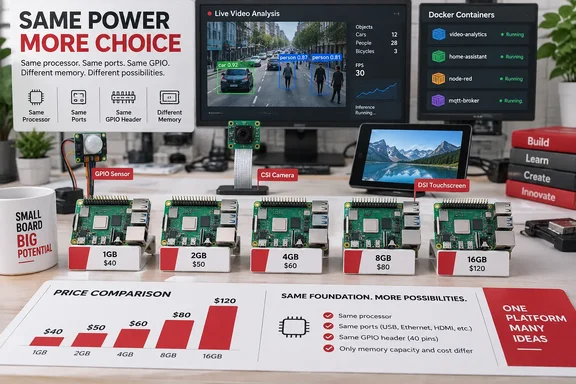
When the Raspberry Pi 5 launched, stepping up a memory tier was cheap. The 2GB board cost $50, the 4GB $60, the 8GB $80 and the 16GB $120, so doubling the RAM "just in case" often added only $10 to $20. That calculation has changed completely.
The first increase came on December 1, 2025, when Raspberry Pi launched a new 1GB variant of Raspberry Pi 5 priced at $45 and simultaneously raised prices on most higher-capacity boards due to surging LPDDR4 memory costs driven by AI demand. The new prices were $55 for 2GB, $70 for 4GB, $95 for 8GB and $145 for 16GB. The company said at the time that the prices of lower-density Raspberry Pi 4 variants, of Raspberry Pi 3+ and earlier models, and of Raspberry Pi Zero products remain unchanged.
Two months later, on February 2, 2026, Raspberry Pi said price rises had accelerated as it entered 2026, and the cost of some parts had more than doubled over the last quarter, requiring further increases affecting all Raspberry Pi 4 and 5, and Compute Module 4 and 5, products with 2GB or more of memory. The Register reported the amounts: any product with 2GB of RAM saw a $10 increase, 4GB models rose by $15, 8GB by $30, and top-of-the-line 16GB units by $60. The 1GB board was spared. The company said it had protected the pricing of 1GB products, including the $35 1GB Raspberry Pi 4 variant, and the $45 1GB Raspberry Pi 5 variant.
A third increase followed. On April 1, 2026 the company announced its third round of memory-driven price increases in five months, with the 16GB Pi 5 up by $100, citing a seven-fold increase over the past year in the price of LPDDR4 DRAM. The same round added +$50 on 8GB, +$25 on 4GB, and +$150 on the Pi 500+ kit, figures that PCVenus reported separately. Raspberry Pi's product page now lists the Raspberry Pi 5 16GB at $305, which matches those increments.
| Raspberry Pi 5 model | Launch | Dec 2025 | Feb 2026 | After April 2026 |
|---|---|---|---|---|
| 1GB | — | $45 | $45 | not reported |
| 2GB | $50 | $55 | $65 | not reported |
| 4GB | $60 | $70 | $85 | $110 |
| 8GB | $80 | $95 | $125 | $175 |
| 16GB | $120 | $145 | $205 | $305 |
The April figures for 4GB and 8GB come from adding the reported increases to the February prices. We found no reporting on April changes to the 1GB and 2GB boards, so treat those as unconfirmed and check the current list price before buying. Pande says a new 8GB board would cost him "close to $200" before adding the Active Cooler and storage, which fits a $175 board price plus accessories. The gap between the 2GB and 8GB boards used to be $30 and is now more than $100.
The cause is also documented. Raspberry Pi blamed an unprecedented rise in the cost of LPDDR4 memory, thanks to competition for memory fab capacity from the AI infrastructure roll-out. CEO Eben Upton told IEEE Spectrum, "If you have a product that's relatively low cost, the memory is going to be a relatively large portion of it". Raspberry Pi has called the pressure painful but ultimately temporary, and said it looks forward to unwinding these price increases once it abates. No date has been given for that.
Every Raspberry Pi 5 Memory Tier Gets the Same BCM2712 and GPIO Header
This part of the argument can be checked against the specification sheet. According to Raspberry Pi's product page, every Raspberry Pi 5 uses the same Broadcom BCM2712 2.4GHz quad-core 64-bit Arm Cortex-A76 CPU and VideoCore VII GPU. The memory is LPDDR4X-4267, offered in 1GB, 2GB, 4GB, 8GB and 16GB. The spec sheet does not change between tiers: dual 4Kp60 HDMI, a 4Kp60 HEVC decoder, dual-band 802.11ac Wi-Fi, Bluetooth 5.0, two USB 3.0 and two USB 2.0 ports, Gigabit Ethernet, a PCIe 2.0 x1 interface, the standard 40-pin header and two four-lane MIPI camera/display transceivers.
So a 1GB board and a 16GB board have identical sensor pins, camera connectors and display connectors. Raspberry Pi notes that on the Pi 5 the camera and DSI display connectors are interchangeable, so you can run one of each or two of the same kind on any tier. Extra memory buys capacity. It does not make the CPU faster, GPIO more responsive or Ethernet quicker.
Raspberry Pi even presented the 1GB model as the full flagship at a lower price. The launch post describes it as bringing the Pi 5, "with its quad-core 2.4GHz Arm Cortex-A76 processor, dual-band Wi-Fi and PCI Express port," down to $45. In a comment on that post, Upton said the 1GB board uses the D0 stepping of the BCM2712, the same as the 2GB model, which gives slightly better performance with single-rank 1GB LPDDR4X parts.
Sensor, CSI Camera and DSI Display Projects Rarely Stress a Small Pi
Pande's strongest examples are hardware projects. He built a weather station with a Raspberry Pi 5 and a BME280 sensor and writes that he could have used a Pi Zero with soldered GPIO pins and got the same result. In his view, most of the memory in a setup like that goes to the Linux distribution, while the sensor code barely needs any.
The reasoning holds up. A program that reads a sensor, adds a timestamp, and writes the value to a file or small database needs memory for the operating system, the interpreter or binary, and a few buffers. That footprint depends on how the software is written, not on how many gigabytes are soldered to the board. It grows only if you choose to keep large amounts of data in memory.
Cameras follow the same rule. A time-lapse rig that captures a frame from a CSI camera module every few seconds, saves it and moves on never needs to hold more than a frame or two. Pande says that for projects like this even a cheap Pi does the job, and that most display and camera projects are simple enough for a Raspberry Pi Zero, despite that board's small memory. The Pi Zero family has 512MB and a CSI camera connector, and its prices were left out of every increase. Aliteq noted that boards using older memory types, including the Pi Zero series, the Pi 1 and Pi 3, and the $60 Pi 400, all kept their prices through the April round.
Displays work the same way. Pande's example is a dashboard served by a small Flask or LAMP web server and shown on a DSI touchscreen. He says a RAM-light board handles that comfortably unless the site grows to hundreds of pages that each write records to a database. What drives memory use there is the browser or rendering engine, the database, caching and the number of concurrent users. Having a display attached costs very little.
The line moves once the project starts processing video continuously. Pande singles out Frigate and other NVR (network video recorder) tools that manage live camera feeds, and pipelines that send recordings to an AI accelerator. At that point the board is decoding, buffering and analysing streams continuously, and that workload needs memory.
Pi-hole, Uptime Kuma and Tailscale Fit on Small Boards at Home-Lab Scale
The second group is lightweight self-hosting, and here Pande's claims come with sensible limits. He names BentoPDF, IT-Tools and ConvertX as productivity containers that don't need hundreds of megabytes each, let alone a gigabyte or two. He also says the Uptime Kuma monitoring tool paired with the Gotify notification server works well on most Raspberry Pi boards.
His ad-blocking example shows that the load matters more than the software. Pande says a heavy AdGuard Home or Pi-hole setup, handling large query volumes from dozens of devices with a huge collection of blocklists, may be too much even for a 4GB Pi. A simple instance serving a few devices in a beginner home lab does not need a memory-heavy board. Raspberry Pi's own blog readers made the same point about Pi-hole on the 1GB announcement, with one saying it runs well even on the original Zero.
Pande also tested an extreme case. He turned an original Raspberry Pi Zero into a Docker host with a few services and reports that it kept up, with its old CPU a bigger bottleneck than the 512MB of RAM. For a Tailscale subnet router, which lets remote devices reach a home network through the Tailscale VPN, he says the board is more than enough for his whole home lab. That is one writer's result on narrow networking and service workloads. It does not mean a 512MB board can run a general container stack, because each application's runtime, database, caches and logs all come out of the same small pool.
The Proxmox example is a specialised job. Pande suggests fitting any Raspberry Pi with the QDevice packages so it can act as a tie-breaker for a two-node Proxmox high-availability cluster, which avoids split-brain, where both nodes believe they are in charge. In this role the Pi only supplies a quorum vote and never runs guest virtual machines, so its memory is almost irrelevant. Running Proxmox itself on a Pi is a different matter, covered below.
Windows 11 on Arm, TrueNAS and Frigate Still Earn the 8GB Raspberry Pi 5
Pande lists the workloads where low memory will hurt. He says running dozens of bulky containers would crash a low-memory model, and the same goes for DIY Windows 11, TrueNAS and Proxmox installs. He also advises against emulating newer 3D consoles on a RAM-limited Pi, and against an OpenMediaVault NAS loaded with plugins. At the top of his piece he concedes that running Windows 11 on Arm on a 1GB Pi is bound to perform poorly.
These workloads run short of memory for different reasons. Windows and virtual machines need memory for entire guest operating systems. A container-heavy host adds up many separate application footprints. NAS software uses memory for caching, indexing and plugins. Console emulation also depends on the CPU and GPU, so an 8GB board will not fix an emulator that the BCM2712 can't handle.
The Linux desktop belongs on this list too, and that is where the 1GB Pi 5 gets the most criticism. In the comments on Raspberry Pi's 1GB announcement, Pi benchmarker Jeff Geerling advised 4GB, or ideally 8GB or 16GB, for desktop use. He warned that opening a browser and a few modern web pages quickly uses more than 1–2GB on top of the base OS. Several other readers agreed that 4GB is the practical minimum for a desktop with a browser. Pande's own experience is similar. He says most projects he has covered for XDA would work as well on a 2–4GB board, and he keeps his 8GB Pi 5 for testing distros and unsupported emulators.
Choosing a Raspberry Pi 5 Memory Tier Before the Next Price Change
Pick the memory tier based on what the board will actually do, then buy the smallest one that leaves some room to grow. Headless projects built around a sensor, a camera, a small display or one network service are where 1GB or 2GB boards make sense, and where a Pi Zero may be enough at far lower cost. If the Pi will run a desktop and browser, several containers or a local development setup, 4GB is the safer floor. Keep 8GB and 16GB for virtual machines, NAS software with plugins, large databases, demanding emulation or live video analysis.
On a board already in use, check memory and swap usage under real load before upgrading. If it rarely swaps and nothing is being killed for lack of memory, more RAM won't make a sensor script, time-lapse or DNS filter any faster. If swap is always busy, you have a real reason to move up a tier.
- The 16GB Raspberry Pi 5 now lists at $305, up from $120 at launch, after memory-driven increases in December 2025, February 2026 and April 2026.
- Every Raspberry Pi 5 tier has the same BCM2712 CPU, 40-pin GPIO header, dual MIPI camera/display connectors, Ethernet and USB, so extra RAM adds no hardware capability.
- The 1GB Pi 5 held at $45 through the February increase, and Pi Zero prices did not change, which makes both good value for headless hardware projects.
- A small Pi handles Pi-hole or AdGuard Home, Uptime Kuma, a Tailscale subnet router or a Proxmox QDevice at home-lab scale, but heavy query loads and large container stacks need more memory.
- Windows 11 on Arm, a desktop with a modern browser, TrueNAS, OpenMediaVault with plugins, Proxmox guests, Frigate and 3D console emulation all justify 4GB or more, with 8GB for the heaviest.
Raspberry Pi says it will cut prices once LPDDR4 costs ease, but after three increases in five months there is no date for that. Until then, the biggest saving on a Pi project comes from matching the memory to the workload. For the sensor, camera and small-service builds that make up most Pi projects, the right board is often the cheapest one in the range.