

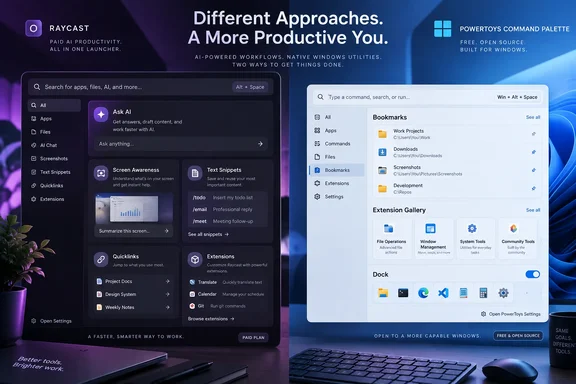
That does not erase Raycast’s advantage. It changes where it is strongest. Raycast is now a full launcher-centered productivity environment with a polished commercial service behind it; PowerToys remains a free, open-source collection of Windows utilities whose newer launcher is catching up feature by feature. For users deciding whether to replace Windows Search or their PowerToys workflow, the meaningful remaining gap is AI and system-wide text expansion—not the mere ability to open a bookmarked URL.
Raycast declared Windows 2.0 out of beta on August 25, 2026, then shipped additional Windows releases through version 2.4 on September 14. Its public-beta launch was only in November 2025, so the stable Windows version is relatively new even if the Raycast brand will be familiar to Mac users.
Raycast AI can use the active window as context
The clearest functional difference is Raycast AI, especially its Screen Awareness feature. Raycast introduced Screen Awareness for Windows in August, allowing Quick AI or AI Chat to use material from the focused window, selected text, and a screen capture as context. A user can invoke it with a command or a configured hotkey, then ask for a summary, rewrite, explanation, or response without manually copying the source material into a chat window.
That is more integrated than typing a question into a standalone chatbot. It is also more consequential than the original comparison suggests: Screen Awareness requires Windows screen-recording and accessibility permissions, and it can send the contents of an active business application to Raycast’s AI service. Administrators and employees handling customer records, internal dashboards, source code, medical information, or regulated documents should treat that permission prompt as a data-handling decision, not as a launcher convenience toggle.
PowerToys does include an optional AI-powered capability in Advanced Paste, but that is a different workflow. It works on clipboard transformations rather than providing a launcher-level assistant that can capture and interpret the active window. Microsoft’s current Command Palette documentation does not describe an equivalent focused-window AI context feature.
Raycast’s AI advantage also comes with a cost that the XDA comparison understates. AI is no longer included free during the Windows beta period. Raycast’s current individual Pro tier costs $10 per month or $96 annually, which works out to $8 per month only when paid yearly; higher Pro+ and Max plans raise both the monthly fee and included AI allowance. The seven-day trial is real, but it is a trial of a subscription product rather than a permanent feature of the launcher.
For a personal PC, that may be a reasonable trade. For an organization already paying for Microsoft 365 Copilot, ChatGPT Enterprise, Claude, or another approved AI platform, it is another AI surface to evaluate, manage, and potentially pay for.
Snippets are a real gap in the PowerToys launcher workflow
Raycast Snippets are the most practical non-AI reason to choose it over PowerToys Run or Command Palette today. A Snippet stores reusable text, can be searched and pasted from Raycast, and can optionally expand automatically when the user types a configured keyword in another application. That makes it useful for support replies, email templates, code fragments, ticket updates, addresses, command sequences, and repetitive form entries.
Raycast also supports dynamic placeholders. A Snippet can insert the current date or time, clipboard content, calculated values, another stored snippet, or a cursor position that leaves a fill-in field ready for the user. In real work, that turns a static canned reply into a reusable template: paste a standard escalation note, insert the date automatically, place the cursor at the customer-name field, and continue typing.
PowerToys provides clipboard history and Advanced Paste, both useful tools, but neither is the same as a managed library of system-wide auto-expanding text templates. Command Palette’s documented capabilities include apps, files, web search, bookmarks, extensions, and commands; it does not currently advertise native Snippets with automatic keyword expansion.
The distinction is important for IT teams because text expansion can be both a productivity tool and a secret-management mistake. Storing passwords, recovery codes, API keys, customer data, or privileged command lines in a launcher’s snippet library creates an easy path to accidental disclosure. Raycast Snippets are best used for low-sensitivity templates unless an organization has specifically reviewed the account, sync, endpoint, and access-control implications.
Quicklinks are convenient, but Command Palette already has Bookmarks
Raycast Quicklinks let users launch web addresses, Windows file paths, folders, application deep links, and search URLs from a named command. They can include placeholders for typed arguments, clipboard text, selected text, dates, or calculations. A Quicklink can therefore do more than open a saved page: it can accept a search term and launch a prebuilt query against YouTube, an internal ticket system, a documentation portal, or a repository browser.
This is a good feature, and Raycast’s implementation is mature. It supports paths such as a project directory on C: as well as deep links into applications including music, chat, and browser-based tools. It also offers a library of ready-made Quicklinks, reducing the work required to build common searches.
However, this is where the “Raycast can do what PowerToys cannot” framing becomes too narrow. PowerToys Run lacks a first-party Quicklinks feature, but Command Palette has Bookmarks. Microsoft says Command Palette Bookmarks can save files, folders, URLs, and shell commands, launch them by name, and accept placeholder values such as a query entered inline. The current Command Palette Dock can also pin bookmarked files, folders, and URLs at the edge of the screen.
Raycast still has a usability edge for users who want one unified library with richer placeholder options and polished browser autofill. But a Windows user who simply wants “open our VPN portal,” “search the company wiki,” “start a PowerShell command in this folder,” or “jump to a project share” does not need to abandon PowerToys for that capability.
The practical choice is straightforward: use Raycast Quicklinks if you want a searchable command system that also works as a lightweight personal automation layer. Use Command Palette Bookmarks if you want a no-cost, Windows-native way to launch saved locations and parameterized URLs.
The extension-store comparison is already dated
Raycast’s Extension Store is valuable because it gives the launcher a distribution channel for integrations. Its catalog includes thousands of extensions across its supported platforms, with commands and views that can connect the launcher to services such as Slack, Notion, GitHub, password managers, issue trackers, and music apps. Raycast can make those integrations feel like built-in commands rather than separate applications.
XDA Developers describes PowerToys Run’s plugin model as a manual GitHub exercise, and that characterization is fair for the old PowerToys Run architecture. PowerToys Run has a plugin manager for built-in plugins, but it was never designed around a consumer-facing marketplace with one-click discovery and installation.
Command Palette changed the equation. Microsoft now provides an Extension Gallery within Command Palette settings, where users can browse community extensions, review descriptions and screenshots, and install supported entries with a click. The gallery itself is curated, while the actual package installation uses WinGet or the Microsoft Store. Users can also manage installed extensions, configure settings, assign aliases, and set global hotkeys from Command Palette.
The remaining difference is maturity and breadth, rather than the existence of a store. Raycast has years of extension culture from macOS and a unified commercial product. Command Palette’s extensions are standalone .NET applications using Microsoft’s Command Palette extension interface and Windows packaging mechanisms. That may be attractive to Windows developers and enterprise deployment teams, because it fits familiar Store and WinGet routes, but the catalog is younger and more constrained.
Neither store should be treated as automatically safe simply because it appears inside a launcher. Extensions can reach business services, invoke commands, access local data, or direct users through authentication flows. Enterprise users should review the publisher, permissions, package source, update process, and whether an extension is sanctioned before treating a launcher integration as routine software.
Replace PowerToys Run, or move to Command Palette first?
The strongest conclusion from the comparison is not that PowerToys has fallen behind; it is that PowerToys Run is a legacy baseline. Microsoft’s own documentation calls Command Palette the evolution of PowerToys Run, and its development energy has gone into Bookmarks, the Dock, richer extension APIs, an Extension Gallery, and a configurable compact launcher mode.
Raycast’s default Windows shortcut is also Alt+Space, not the bare Windows key. It can be customized, and Raycast has added support around using the Windows key as a hotkey, but remapping that key is a deliberate replacement of familiar Start-menu behavior. Users should test the impact on standard Windows-key combinations and recovery habits before making a third-party launcher their only front door to the PC.
Raycast wins today if the requirement is a polished launcher with paid, context-aware AI and first-class text expansion. Command Palette is the better first stop for users already running PowerToys who want bookmarks, installable extensions, and Windows-oriented automation without adding a subscription. The gap is real, but it is smaller than a straight Raycast-versus-PowerToys-Run comparison makes it appear.
References
- 4 things Raycast on Windows does that PowerToys Run still can't XDA · 2026-09-17T21:30:17+00:00