

TechPowerUp’s announcement, based on Razer’s release, says the keypad is available now worldwide. Razer’s U.S. store page confirms the $199.99 price and says the device is available for pickup in select RazerStores, although its delivery estimate at publication begins September 22 for paid shipping and September 24 for free shipping. In other words, the launch has begun, but “available now” does not necessarily mean an online order will arrive this week.
The practical headline is not the 8,000Hz number. It is that Razer is bringing newer analog controls and a proper TMR thumbstick to a niche form factor whose last high-end model, the original Tartarus Pro, dates to 2019.
A $70 upgrade over the still-sold Tartarus Pro
Razer continues to sell the older Tartarus Pro for $129.99 in black and Mercury finishes, alongside the $79.99 membrane-based Tartarus V2. That leaves the new V2 Pro at roughly 54 percent more than the existing optical model, a considerable premium for a wired left-hand keypad that does not replace a conventional keyboard, mouse, or controller.
The old Tartarus Pro already offered analog optical switches, adjustable actuation from 1.5mm to 3.6mm, dual-function inputs, 32 programmable keys, and an eight-way thumb pad. Razer’s 2019 launch material pitched it as a way to get controller-like variable key input in games that support gamepads. The V2 Pro narrows its claimed actuation range to 0.1mm through 4.0mm, adds Rapid Trigger, and swaps the directional thumb-pad concept for a full-size TMR thumbstick.
That thumbstick change is likely the largest meaningful hardware difference for current Tartarus Pro owners. The old device’s thumb control was fundamentally an eight-way digital pad. A TMR, or tunneling magnetoresistance, stick is intended to provide analog positional input and avoid the wear mechanism associated with conventional potentiometer sticks. Razer calls it anti-drift, but durability claims need time in users’ hands before they can be treated as proven rather than a design target.
GamingTrend, which reviewed an early unit supplied by Razer, found the thumbstick useful but identified the key limitation behind the marketing: mapping it to WASD works, but does not feel like fully analog joystick movement. That is an important warning for buyers expecting a keypad to behave exactly like a controller in every PC game. Windows and the game have to receive and interpret the chosen input mode correctly; an analog stick on the device does not itself make keyboard-centric games analog.
The “31 programmable controls” claim needs closer reading
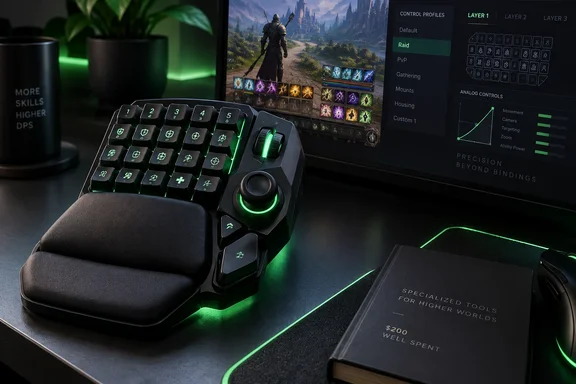
Razer says the Tartarus V2 Pro has 31 programmable controls, a full-sized thumbstick, and three dedicated buttons. Its product documentation is clearer than the announcement: there are 27 numbered key switches, a thumbstick that can be pressed, and three side buttons identified as Hypershift, keymap cycle, and profile cycle.
This makes the headline total technically understandable but potentially misleading in a comparison chart. The 31 programmable controls appear to include more than the visible 27 main keys, while the three named side controls are separate dedicated buttons. The older Tartarus Pro, meanwhile, is sold as having 32 programmable keys. Buyers who need a one-for-one replacement should therefore compare their actual bindings rather than assume the V2 Pro exposes four more primary thumb-reachable keys.
The new keypad does, however, retain the feature that makes the Tartarus line attractive to MMO players: layers. Razer says users can configure up to 24 keymaps across three onboard profiles using Synapse, while the physical profile and keymap cycle buttons permit switching without reaching for Windows software. The company also says device LEDs allow actuation and Rapid Trigger adjustments on the keypad itself.
There is a distinction worth preserving here. Onboard profile switching is useful at a desktop, at a tournament station, or when moving between PCs. Building and maintaining the profiles remains a Razer Synapse task. Razer’s own setup instructions tell users to install the latest Synapse version to customize mappings, and its FAQ specifies that one onboard profile retains the last-used Synapse configuration. Anyone buying the device specifically to avoid vendor configuration software should not interpret the onboard controls as full software independence.
Rapid Trigger and 8,000Hz serve a narrower audience
The V2 Pro uses Razer Analog Optical Switch Gen-2 hardware, with a claimed 0.1mm-to-4.0mm adjustable actuation range and Rapid Trigger sensitivity down to 0.1mm. Analog optical switches measure movement rather than merely reporting a key as pressed or released at one fixed point. That permits shallow actuation for fast commands, deeper press thresholds for deliberate inputs, and the possibility of assigning separate actions along the key travel.
For MMO and productivity-style use, that flexibility can be more valuable than raw response time. A player can set a frequently used ability to actuate early, keep a disruptive macro deeper to reduce accidental presses, and create alternate press-and-release behavior where a game’s controls benefit from it. It also comes with a learning cost: a keypad that lets nearly every key respond differently demands deliberate profile setup, especially when the thumbstick, modifier layer, and macro bindings are involved.
Razer’s “true 8000Hz HyperPolling” means the keypad can report to the PC up to 8,000 times per second, compared with the familiar 1,000Hz baseline. In simple timing terms, the interval falls from one millisecond to 0.125 milliseconds. That is a real reduction in the device’s potential report interval, but it does not mean every game action becomes eight times faster.
A keypress still passes through switch detection, USB handling, Windows input processing, the game’s input loop, frame timing, network conditions for online games, and display refresh. For most Tartarus users, the 8,000Hz mode is a refinement rather than the reason to spend $200. The deeper actuation controls, larger analog stick, and adjustable wrist rest will be easier to notice than the theoretical polling advantage.
Razer also includes Snap Tap, Snap Flex, and Dynamic Keystroke in its Advanced Input Control suite. These features are configuration tools, rather than automatic game performance upgrades. Their usefulness depends on the game and on whether a player is willing to rebuild familiar keyboard habits around press depth, release behavior, and opposite-direction inputs.
The wrist rest is an overdue physical redesign
The V2 Pro’s wrist rest can slide forward and back and rotate left or right through dedicated adjustment controls. That sounds cosmetic in a spec sheet, but it addresses a weakness of fixed-shape keypads: hand size, desk height, mouse position, and preferred thumb reach vary enough that a static palm support can force the hand into an awkward angle.
Razer describes the feature as a comfort improvement for long sessions, and that is plausible, but comfort is inherently individual. What can be established from the hardware layout is that the adjustment changes both the distance from the keys and the lateral angle of the support surface. That gives users more control over whether the thumb rests naturally on the stick and whether the ring and pinky fingers must stretch toward the outer rows.
GamingTrend’s early review praised the adjustable wrist rest and broad customization, while also noting the device’s learning curve. That combination gets to the V2 Pro’s market position. This is a specialized input device for a player prepared to tune it, not a plug-in shortcut to better performance.
What existing Tartarus owners should do
Tartarus Pro owners who are satisfied with their current key layout should not upgrade solely for 8,000Hz polling or the Gen-2 switch branding. Their existing keypad already provides analog optical inputs, adjustable actuation, programmable controls, and multiple profile options at a substantially lower current retail price.
The V2 Pro makes a stronger case for three groups:
- Players who find the older eight-way thumb pad limiting and want a thumbstick designed for smoother positional input or radial-menu control.
- Users whose hand position does not fit the fixed wrist support on earlier Tartarus models.
- Competitive players who will actually configure Rapid Trigger, shallow actuation, layered maps, and device-side profile controls for particular games.
The remaining unanswered point is whether Razer’s software and firmware support will make the full TMR stick behave consistently across the broad mix of Windows games that treat keyboards, controllers, and hybrid input devices differently. Razer’s documentation says buyers should keep both firmware and Synapse current. At $199.99, that is less a housekeeping note than part of the product’s real operating requirement.
References
- (PR) Razer Unveils the Tartarus V2 Pro TechPowerUp · 2026-09-17T16:02:45+00:00