

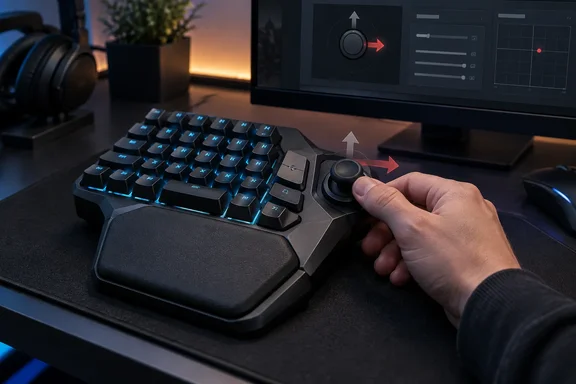
What Razer is selling
Razer announced the keypad in mid-September 2026. According to Razer's launch material, it is the first Razer gaming keypad to combine three things: 8,000 Hz polling, Gen-2 analog optical switches and the TMR thumbstick technology used in Razer's controllers. The company lists 31 programmable controls, a full-size anti-drift thumbstick, three dedicated thumb buttons and an adjustable wrist rest.
Razer's published specifications for the switches:
- Actuation is adjustable from 0.1 mm to 4.0 mm, per switch.
- Rapid Trigger resets a key with as little as 0.1 mm of upward travel, instead of at a fixed reset point.
- The rated lifespan is 100 million keystrokes.
- Actuation force is 40 g at the factory-default 2.0 mm actuation point.
- Synapse supports 24 keymaps across three onboard profiles, which is eight layouts per profile.
- Actuation and Rapid Trigger can be changed on the device itself, with an LED array showing the result.
These are manufacturer claims. Wilson did not measure them independently.
Advanced input features
Razer groups several features under "Advanced Input Control":
- Snap Flex assigns one action to a keypress and another to its release. It is off by default and toggled in Synapse.
- Dynamic Keystroke can fire up to four commands at different actuation depths.
- Snap Tap prioritizes the most recent of two paired keys. It is off by default. Razer says you can toggle it in Synapse or with Fn + Left Shift. Up to four key pairs can be saved.
- Dual-Keypress Priority handles simultaneous movement keypresses.
Wilson's practical example is Euro Truck Simulator 2. He bound W to an analog accelerator, so a light press creeps the truck through low-speed areas. Analog optical switches can send analog inputs like a thumbstick or trigger, according to Razer. Support will vary by game, and this is one reviewer's setup.
What the reviewer liked
- Key feel: the 27-key cluster has smooth linear travel. It defaults to a WASD layout, and the textured double-shot PBT keycaps suit his fingers.
- Wrist rest: it adjusts for length and angle. He stayed on the default, shortest setting. He called it more comfortable than any keyboard-and-rest combination he has used.
- Onboard profiles: the Windows Central verdict credits these with working without Synapse running.
- HyperShift: it can be rebound. He mapped it to the spacebar.
Comfort is subjective. Razer says the wrist rest slides outward and rotates left or right. Its product page also cites a 15°–20° tilt range.
Where it falls short
Most of the complaints concern the thumb.
- Stick orientation. Wilson says he can't realign the TMR stick's inputs. Pushing it toward the monitor registers as moving right, so he had to push it straight up to mean "forward."
- Default mapping. The stick presents as a controller's right stick. That is an awkward fit for a left-hand keypad, since games usually put movement on the left stick. He found little use for it unless a game offered a southpaw option. His review says "Razer is working on it" but gives no date or confirmed fix.
- Lighting timeout. The "switch off lighting" timeout didn't work for him because Synapse kept detecting his main keyboard as active.
- HyperShift feel. The button is clicky, like a controller bumper, and clashes with the linear keys. Pressing it also switched off the RGB key lighting, whatever it was bound to.
- No thumb key. Wilson says older Tartarus models had a single key under the thumbstick. He wishes this one had an analog optical key there.
Do other owners see the same thing?
A thread on Razer's Insider forum, started September 21, 2026, describes the thumbstick as rotated 90° counter-clockwise. The poster says there is no way to correct the axis in Synapse and asks for a firmware update. Other users in the thread report the same orientation problem. At least one said they were returning the unit.
The thread also describes workarounds, which are user reports and not Razer guidance:
- One user remapped the inputs with JoyToKey, setting the stick to true analog and matching the directions in that app's interface.
- Another used JoyToKey's experimental joystick logic to turn the stick into arrow keys, then set those as in-game movement keys.
Keep in mind that third-party remapping tools can cause trouble in games with anti-cheat. One forum user noted that their own keybind workaround wasn't allowed in such games.
I found no official Razer documentation or release notes confirming a Synapse or firmware fix. Razer's own advice is to keep both Synapse and the keypad firmware up to date. Updating may not fix this specific problem.
Price and the upgrade question
Windows Central lists $199.99 in the US and £199.00 at Razer UK. The Amazon UK listing was £199.99. For context, it says the original Tartarus launched in 2013 at $79.99. The V2 followed in 2017 at $99.99 and the Pro in 2019 at $129.99.
Wilson says the first Tartarus Pro can still be bought for $129.99. His conclusion is that owners of earlier Tartarus models can probably skip this one. He recommends the V2 Pro to MMO and MOBA players, and to anyone wanting a combined keyboard and gamepad setup.
Accessibility
Wilson suggests Rapid Trigger, Snap Flex and adjustable actuation may help his wife, who has hypermobile joints. They could reduce finger travel and hand movement. This is his personal observation and not a medical or accessibility assessment. It shouldn't be read as a claim that the keypad suits everyone with a disability.
Our take
The thumb problems are the main reason to hold off, and they have a clear cause. Razer's launch pitch leans on the TMR stick, and its software doesn't yet let users orient it or choose left or right stick. Synapse supports remapping, profiles and per-key actuation. As reported, it doesn't let you rotate the stick axis.
Anyone buying now should do so for the key switches, the wrist rest and the profile system. They should treat the thumbstick as unfinished until Razer ships an update. Razer's Insider forum or release notes are the place to watch for a fix. Razer sells directly with a 14-day return window, according to its product page, which gives early buyers a way out.
References
- Razer Tartarus V2 Pro review: I loved playing with this, but it needs a patch Windows Central · 2026-10-03T13:00:00+00:00
- Ergonomic Programmable Gaming Keypad - Razer Tartarus V2 Pro | Razer United States razer.com
- The analog thumbstick of the Razer Tartarus Pro V2 (released in September 2026) is physically rotated 90° counter clockwise. | Razer Insider insider.razer.com