

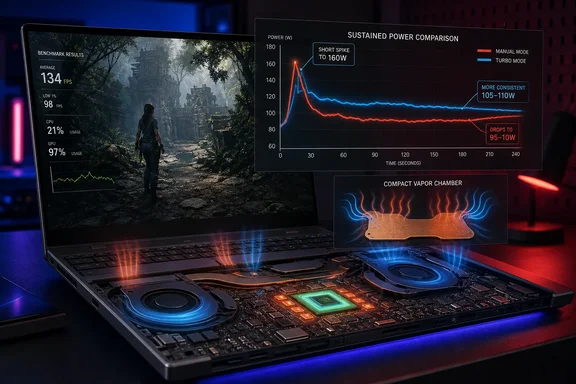
The finding changes what the G16’s headline specification means in practice. Asus advertises the 16-inch, 4.30-pound laptop as supporting an RTX 5080 at up to 160W, a notable claim for a machine this thin. But the company’s own detailed specification separates that figure into a 135W Manual setting plus as much as 25W of Nvidia Dynamic Boost, rather than a flat 160W allocation that the GPU can rely on through a long gaming session.
Notebookcheck’s measurements are the first detailed evidence that the distinction is consequential. The power ceiling exists and can be reached in GPU-only work, according to its report, but it does not appear to translate into a durable gaming advantage when the CPU is also active and the system has to dispose of heat continuously.
The 160W number is a peak, not the normal gaming state
Asus lists the RTX 5080 in the 2026 GU606 Zephyrus G16 at 135W in Turbo mode: 115W of base GPU power and up to 20W through Dynamic Boost. Manual mode raises those figures to 135W plus up to 25W of Dynamic Boost, producing the advertised 160W maximum.
That terminology matters. Dynamic Boost is not an independent power supply reserved for the graphics chip; it is a conditional allocation that depends on the laptop’s overall power and thermal situation. A game that loads both the Core Ultra 9 386H processor and RTX 5080 creates exactly the situation in which an up to rating is least useful: CPU power, GPU power, temperatures, fan limits, and firmware guardrails all compete.
Notebookcheck reports that Manual mode can reach the high figure during a pure GPU load. Under actual game-like conditions, however, it observed the GPU initially near 135W, then falling to about 105W to 110W after 20 to 30 seconds. The reviewer’s central point is not that Asus has falsely exposed a 160W limit—the setting is real—but that the chassis cannot sustain the elevated configuration in the workload for which most buyers would enable it.
That result also puts Asus’s Turbo profile in a clearer light. The G16 may advertise Turbo at up to 135W, but Notebookcheck says real gaming normally sees about 115W because Dynamic Boost is unavailable once the CPU needs meaningful power. Manual mode, in this test, eventually drove the GPU even lower than that routine Turbo result.
More watts did not produce more frames
The most practical part of Notebookcheck’s update is its direct Turbo-versus-Manual comparison. Its Manual profile was not merely a wash overall; it trailed Turbo in five of six reported tests. Steel Nomad slipped from 4,484 points to 4,465. At QHD, Baldur’s Gate 3 fell from 117.4 frames per second to 114.9, F1 2024 from 70.6 to 69, Final Fantasy XV from 125.6 to 121.3, and Assassin’s Creed Black Flag from 45 to 40 fps. Only Cyberpunk 2077 improved, rising from 83.4 to 86.4 fps.
Those are not enormous losses in every title, but that is the point: Manual mode asks the owner to accept more noise and more heat in exchange for a result that is inconsistent at best. It is not a hidden “performance unlock” that turns the Zephyrus into a 160W-class gaming laptop.
PC Gamer’s separate review helps explain why short test runs can create a different impression. Its reviewer manually raised the G16 to the 160W setting and recorded 99 fps in a Cyberpunk 2077 benchmark at 1600p with DLSS Quality and two-times frame generation—about four fps above Turbo. Yet the same review described the benefit as marginal, logged an 84°C GPU peak, and noted that Asus’s review guidance calls for the fans to run at 100% for the configuration.
That does not invalidate Notebookcheck’s result. It shows the more useful interpretation: a brief benchmark can still capture some benefit from the high-power setting before the machine’s thermal controls pull power back. A player making decisions from long sessions, repeated benchmark loops, or sustained rendering needs to care about where power stabilizes, not just where it spikes.
Independent reviews disagree on the size of the Manual-mode gain
There is an important complication: not every reviewer has reached Notebookcheck’s conclusion. Ultrabook Review reports that its fully maxed-out Manual configuration delivered roughly 5% to 10% higher gaming frame rates, while also measuring around 52 dBA of fan noise and approximately 85°C at the GPU. It specifically recommends raising the laptop for long sessions to improve airflow.
The disagreement is real, and neither outlet provides enough public telemetry to reduce it to a single universal answer. Test scenes, room temperature, firmware and graphics-driver revisions, placement on a desk versus a raised stand, fan curves, game duration, and the CPU’s concurrent power demand can all change how long a thin gaming laptop stays in a boost state. PC Gamer also saw a small Cyberpunk gain, whereas Notebookcheck’s broader comparison showed Manual mode losing most of its tests.
What the reviews agree on is more revealing than their differing percentages. Manual mode is substantially louder than Turbo, operates at higher temperatures, and is intended for users willing to configure the machine rather than leave it at the default preset. Ultrabook Review measured Turbo at roughly 46 to 48 dBA and Manual at 52 dBA or more. PC Gamer likewise characterized the full-fan setting as very loud.
For a laptop buyer, the safe conclusion is not that one review must be wrong. It is that the 160W setting is highly conditional. It may provide a small uplift in a particular game or short scene, especially with the system elevated and fans forced high. It cannot be assumed to outperform Turbo across sustained gaming simply because its menu reports a larger maximum wattage.
Asus’s cooling claim meets a thin-chassis constraint
Asus says the high-end G16 configurations use a vapor chamber, tri-fan cooling, liquid metal thermal compound, revised exhaust vents, and a redesigned intake. Its product page explicitly says the higher-end configurations receive the vapor chamber to handle the increased 160W TGP. The machine’s design still prioritizes portability: the company lists it at 0.70 inches thick and 4.30 pounds.
That sets up a straightforward trade-off, rather than a mystery. The G16 has more cooling hardware than a conventional ultraportable, and the 2026 generation does raise the RTX 5080’s Turbo capability over the preceding G16. PC Gamer identifies the older RTX 5080 G16 limit as 120W, while the new model can use up to 135W in Turbo. That is a meaningful improvement for the default profile, where most owners will actually play.
But the platform does not have the cooling headroom of a much thicker performance notebook. Asus’s own 2026 ROG Strix G16, for example, advertises an RTX 5080 at up to 175W and pairs it with a tri-fan arrangement, an end-to-end vapor chamber, and a larger chassis purpose-built around higher sustained power. The Zephyrus G16’s appeal is that it brings a high-tier GPU into a far more portable aluminum design; it cannot erase the thermodynamic cost of that compromise with a Manual-mode slider.
The comparison to Razer’s Blade 16 should be handled carefully as well. Asus and Notebookcheck can both point to a nominal 160W maximum, but matching a peak specification does not establish matching sustained behavior, noise, or performance. Laptop GPU model names already conceal major power differences. The extra complication here is that even the same G16 can behave differently depending on profile and workload duration.
Turbo is the sensible default for Zephyrus G16 owners
For current G16 owners, the evidence supports using Turbo for ordinary gaming and treating Manual mode as an experiment, not a replacement. If a specific game gains performance in Manual mode, test it over a complete play session rather than a single built-in benchmark. Use a hard, unobstructed surface or a stand, monitor temperatures and clocks with a tool such as HWiNFO, and expect a large increase in fan noise if the configuration requires maximum fan speed.
The more useful tuning target may be a custom middle ground instead of maximum GPU power. Ultrabook Review notes that Manual mode permits custom CPU and GPU settings, suggesting there may be room to reduce CPU limits or tune fan behavior for a particular game. That approach can make sense for experienced users, but it is also outside the repeatable, supported experience implied by selecting Turbo in Armoury Crate.
For prospective buyers, the purchasing rule is simpler: judge the RTX 5080 Zephyrus G16 by its 115W-to-135W real-world operating range and the performance reviews recorded there. The 160W badge describes a brief ceiling available through Manual mode, not the sustained graphics power the slim G16 delivers when a demanding Windows game is actually running.
References
- The RTX 5080 in the Asus ROG Zephyrus G16 can consume up to 160 Watts, but only for a short while Notebookcheck · 2026-09-14T19:53:00+00:00