

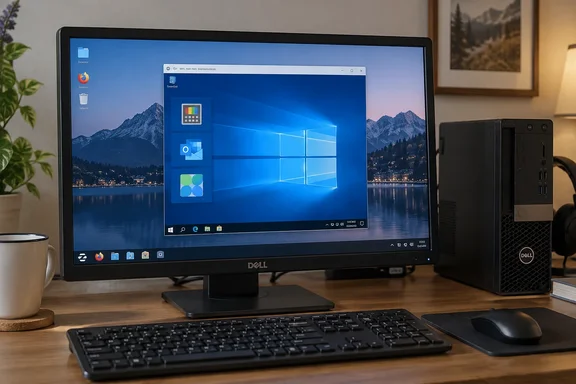
His experience makes a credible case for reconsidering dual-booting when only a few applications keep you attached to Windows. It is not, however, a universal compatibility verdict—and the Windows 10 guest he used comes with an important security qualification.
What the Linux experiment actually tested
Hein describes a gradual move toward Linux, initially to extend the useful life of aging Windows PCs. After trying Ubuntu and Linux Mint, he settled on Zorin OS and found its Windows-app compatibility layer effective for simpler applications, once some minor glitches were resolved.
For his next experiment, he installed a complete Windows environment using GNOME Boxes rather than relying on that compatibility layer.
His reported configuration was modest:
| Component | Reported setup |
|---|---|
| Host computer | Older Dell desktop |
| Processor | Intel Core i3-6100 |
| Host operating system | Zorin OS |
| Virtualization application | GNOME Boxes |
| Guest operating system | Windows 10 Pro |
| Guest memory | 6 GB |
| Guest processors | Two virtual CPUs |
| Guest storage allocation | Just under 64 GB |
Hein chose Windows 10 rather than Windows 11 because he wanted to keep the experiment lightweight. That was his configuration choice, not a measured comparison establishing how much faster one operating system would run than the other.
He then installed Microsoft PowerToys, Outlook, and Microsoft PC Manager through their normal Windows installation processes. He reports no special workarounds and describes the applications as responsive enough for comfortable use.
The newer Dell XPS laptop he uses with Windows 11 remained faster. Nevertheless, the virtual machine performed better than he expected, making a separate Windows partition feel unnecessary for his current workload.
The result is specific but useful: three named applications on one older computer met one user’s expectations.
A compatibility layer and a VM solve different problems
Zorin’s own documentation identifies Windows App Support as a Wine-based compatibility layer and explicitly warns that not every Windows application will be fully compatible. It recommends checking for a native Linux version or suitable native alternative first.
Hein’s GNOME Boxes test took a different route: the applications ran inside Windows 10 Pro, with Linux remaining the host.
GNOME describes Boxes as a graphical virtual-machine manager that can create machines from operating-system images, constrain resource consumption, take snapshots, redirect USB devices, and provide clipboard and file-sharing integration. Those capabilities help explain the appeal of keeping a Windows environment available without making it the everyday desktop. They do not establish which integration features Hein used.
The practical distinction is important: this was Windows software running in Windows hosted by Linux, not proof that those applications now run natively on Linux.
For someone who only needs occasional access to particular Windows programs, that can still be enough. The objective is completing the work, not winning an operating-system purity contest.
Usable performance is not a benchmark
The experiment’s strongest evidence is also its limitation: Hein tested software he actually uses and found the experience satisfactory.
There are no reported application-launch timings, CPU measurements, storage benchmarks, or controlled comparisons. The account also leaves several relevant details unspecified:
- Total memory available to the Linux host.
- Host storage type and available capacity.
- Zorin OS and GNOME Boxes versions.
- Windows build and application versions.
- Guest graphics configuration.
- Detailed feature-by-feature test results.
Consequently, the report does not demonstrate that every PowerToys utility worked correctly, that every Outlook workflow was exercised, or that Microsoft PC Manager provided measurable benefits.
Hein mentions Command Palette and FancyZones as tools he values, but the account does not document comprehensive testing of either. Installation success and a comfortable overall experience are meaningful findings; they are not substitutes for verifying the features your own work requires.
The same caution applies to the processor. Another Core i3-6100 computer is not guaranteed to reproduce the result when its memory, storage, and simultaneous workloads differ.
Windows 10’s support status changes the recommendation
The most consequential qualification is the guest operating system.
Microsoft confirms that Windows 10 reached end of support on October 14, 2025. Windows continues to function, but ordinary support and security updates ended. Microsoft warns that continuing without security updates increases exposure to viruses and malware.
That makes Hein’s experiment a useful application test, but not an unqualified template for a new long-term installation.
Microsoft’s current consumer Extended Security Updates documentation says eligible Windows 10 version 22H2 installations can receive critical and important security updates through October 12, 2027. ESU does not restore feature improvements or general technical support, and consumer enrollment cannot be used for commercial scenarios. Hein does not state whether his VM was enrolled.
Application updates are a separate issue. Microsoft says security updates for Microsoft 365 Apps on Windows 10 will continue through October 10, 2028, despite ordinary support for that configuration ending in 2025. The experiment does not identify Hein’s Outlook edition, so that policy cannot automatically be applied to his installation.
The decision rule is straightforward: an application launching successfully does not establish that its operating system is supported or receiving security updates.
Two practical details worth checking
Readers considering a similar experiment should pay particular attention to resource allocation and guest integration.
Leave memory for Linux
GNOME documents resource adjustments under a box’s Preferences → Resources, with controls for memory, CPU, and maximum disk size. It specifically cautions against assigning all available host memory to the guest because the host needs memory too.
Hein’s 6 GB allocation therefore should not become a universal recipe. Without knowing his desktop’s total RAM, readers cannot determine how much remained for Zorin OS.
Check guest integration before judging usability
GNOME’s Windows guest-tools documentation identifies spice-guest-tools as the integration package for Boxes. It provides improved input performance, automatic resolution adjustment, clipboard sharing, and file transfer.
Those features are relevant when evaluating whether a VM feels convenient enough for daily work. Hein does not report installing them, so they should be treated as a documented option for another experiment—not an explanation retroactively attached to his results.
The real question is whether rebooting still earns its keep
Hein’s conclusion is personal and appropriately bounded: he is not ruling out installing Windows directly on another PC, but he no longer sees a separate Windows partition as necessary for the way he currently works.
That is a more useful conclusion than declaring dual-booting obsolete.
Before making the same decision, use his account as a test plan rather than a guarantee: identify the Windows applications you cannot replace, exercise their essential features, assess the host’s remaining resources, and establish a supported security-update path. Keep the existing installation until your own results justify removing it.
The experiment does not show that Linux has replaced Windows application compatibility. It shows that, for one user, Windows can become an environment opened when needed rather than a destination reached by rebooting. That smaller change may deliver the bigger everyday benefit.
References
- This Linux experiment convinced me to stop dual-booting Windows How-To Geek · 2026-10-01T16:30:14+00:00
- Boxes – Apps for GNOME apps.gnome.org
- Adjust the system requirements of a box gnome.pages.gitlab.gnome.org