

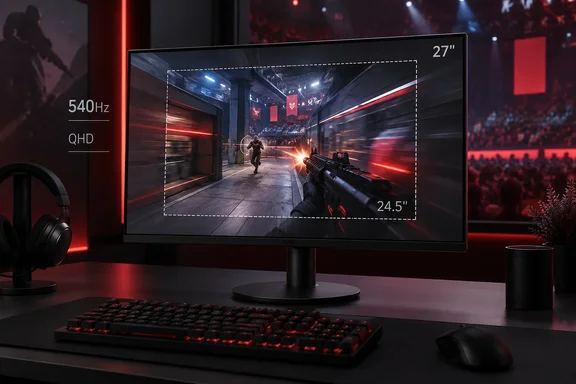
Sony's INZONE M10S II Raises the 1440p OLED Ceiling to 540 Hz
The M10S II replaces the original INZONE M10S, which ran at 480 Hz. Sony developed it in collaboration with the esports brand Fnatic, and it is an update to the 2024 M10S model. According to TFTCentral, it uses a 4th Gen Primary RGB Tandem WOLED panel from LG Display, which offers improved brightness, colours and black depth compared with earlier WOLED generations. It is the same Tandem WOLED panel found in other recent monitors such as the Asus ROG Swift PG27AQWP-W. PC Gamer points out that Sony's brightness ratings suggest the panel still uses an RGWB subpixel layout rather than a true RGB stripe. Even so, Tom's Hardware saw small text that was sharp and free of color fringing on the Windows desktop.
The main mode is native QHD at 540 Hz. A dual-refresh mode raises that to 720 Hz at HD, 1280x720 pixels. Adaptive-Sync works on both AMD and Nvidia platforms, and HDR support includes the ability to calibrate for HDR10 content. Sony rates the panel at 0.02 ms gray-to-gray. PC Gamer says every OLED gaming monitor it had reviewed before this one was rated at 0.03 ms. PC Gamer also doubts anyone can see a 10-microsecond difference, and it treats the figure mainly as a sign of where Sony is aiming the product.
For comparison, the original M10S was rated at 480 Hz, 0.03 ms and 1,300 nits peak brightness. TechRadar lists the M10S II at 1,500 nits peak. It also says the new stand tilts from –5 to 35 degrees, compared with –5 to 25 degrees on the older model. Sony added a new "Super Anti-glare Film" and a custom heat sink, which it backs with a 3-year warranty.
The price is the same as the original's launch price. Pre-orders opened at Sony UK for £1,199 with an expected shipping date of 3 July, and Sony's US site listed it at $1,099.99. Tom's Hardware quotes $1,100 at the time of its review.
Tom's Hardware Measured Class-Leading Motion and a Very Wide Gamut
Tom's Hardware tested with a GeForce RTX 4090 and saw Doom Eternal at maximum detail running between 350 and 540 fps. It called motion resolution perfect: moving objects and backgrounds stayed as clear as still elements, and camera pans showed no blur or smearing. Adaptive-Sync worked without problems. The 720 Hz mode felt very fast, although the reviewer measured only slightly lower input lag than at 540 Hz.
For color, Tom's Hardware measured a gamut volume of almost 110% of DCI-P3. Sony's own spec is 99.5% DCI-P3 coverage. These are different measurements, so they don't contradict each other. In practice, the wide gamut gives a very saturated picture in both SDR and HDR, and it is oversaturated for SDR content mastered to sRGB. A dedicated sRGB picture mode is there for photo and graphics work. It has good gamut accuracy and allows grayscale calibration, but you can't adjust its gamma.
The brightness figures also need context:
| Measurement | Figure | Source and condition |
|---|---|---|
| Full-field brightness | 283 nits | Tom's Hardware measurement |
| SDR peak, 25% window | about 475 nits | Tom's Hardware measurement |
| HDR peak, 25% window | 543 nits | Tom's Hardware measurement |
| Full-screen brightness | 335 nits | Sony specification, as listed by PC Gamer |
| HDR peak | 1,500 nits at 1% APL | Sony specification, as listed by PC Gamer |
Sony's 1,500-nit figure applies to a tiny 1% highlight, while Tom's Hardware measured a 25% window. The two numbers describe different conditions and can't be compared directly. PC Gamer counts "not the most vibrant OLED ever" among its criticisms, which fits the mid-range full-field result.
The matte finish won the clearest agreement across reviews. Tom's Hardware notes that the coating is unusual because it's matte, while nearly every OLED that reviewer sees is shiny, and it is extremely effective at rejecting ambient light. The reviewer also saw no visible grain. TechRadar says it barely saw any reflections even with ring lights and lamps pointed straight at the screen. Its one complaint is that the matte texture picks up smudges easily and is hard to clean. PC Gamer lists the matte finish as a drawback only for people who prefer glossy OLEDs.
The 720 Hz and 24.5-Inch Modes Trade Pixels for Speed
The 720 Hz mode only runs at 1280x720 when used full screen. TechRadar says running at 720p costs noticeable picture quality. Tom's Hardware describes it as a way to reach "dizzying" frame rates in esports titles.
The 24.5-inch modes are the more interesting feature for tournament players. They shrink the picture to the smaller screen size common at esports events, displayed in only part of the 27-inch panel. Tom's Hardware says these modes can run 1920x1080 at 720 Hz or 2368x1332 with 1:1 pixel mapping. Because each input pixel maps to one panel pixel, there's no scaling to soften the image. In its menu walkthrough, Tom's Hardware also describes a 24.5-inch mode that delivers 1,080 vertical pixels with 1:1 mapping. PC Gamer counts the 24.5-inch option as a real advantage, and TechRadar calls it one of the monitor's tournament-ready features.
TechRadar also notes that the INZONE Hub desktop app can import and export setups. That lets a player take a home profile to a competition and load the same settings each time. The app is a free download, and the on-screen menu offers the same controls through the joystick on the back.
Motion Blur Reduction and Anti-Flicker Come with Clear Trade-Offs
Two of the M10S II's motion features trade one thing for another, and it helps to know how.
Motion blur reduction uses a backlight strobe, similar to black frame insertion. Sony adds a Motion Blur Reduction mode designed to sharpen fast movement, with a footnote noting that enabling it cuts the refresh rate in half. That explains Tom's Hardware's result that the strobe only works below 270 Hz, which is half of 540. The reviewer found it cuts brightness by about 30% and requires Adaptive-Sync to be turned off first, after which the monitor lowers the refresh rate on its own. It worked well, with no phasing or ghosting. However, the reviewer's frame rates never dropped low enough to need it. PC Gamer also points out the brightness cost of black-frame insertion.
Anti-VRR flicker deals with a problem specific to OLEDs. Brightness can flicker when frame rates change quickly under variable refresh. Tom's Hardware watched frame rates jump by 80 to 100 fps from one second to the next and saw no flicker with the feature on. Its rule of thumb is that a graphics card fast enough to stay above 300 Hz won't produce flicker in the first place.
The OLED panel-care tools need some attention. Sony includes pixel shift, a screen saver and two separate routines. Tom's Hardware ran the lighter pixel refresh on first power-up. When it selected panel refresh, the monitor warned that it should only be run once a year, which the reviewer took to mean it is a much more aggressive process. Run the pixel refresh when the monitor asks for it. Save the full panel refresh for rare occasions, as Sony's warning says.
Standard Mode, Not Game Mode, Gets the M10S II Closest to Accurate
Out of the box, the M10S II is set to Game mode. Tom's Hardware found its grayscale ran cool and its gamma light, and while grayscale could be fixed, gamma couldn't. Standard mode was much better to start with and got close after a few RGB slider adjustments. TechRadar found a different problem out of the box: the power-saving mode is on by default, so the screen looks dim until you turn it off.
The brightness-stabilizer setting works the opposite way you might expect. With Brightness stabilizer set to Off, variable brightness is fully engaged. Mid and High limit brightness changes less aggressively. After trying all three, Tom's Hardware found the best gamma, and so the best picture, on Mid.
These are the SDR settings Tom's Hardware recommends for its review unit. Panels vary from unit to unit, so treat them as a starting point:
| Setting | Value |
|---|---|
| Picture mode | Standard |
| Brightness for 200 / 120 / 100 / 80 / 50 nits | 51 / 28 / 23 / 17 / 8 (minimum about 22 nits) |
| Contrast | 75 |
| Gamma | 2.2 |
| Color temp | User: Red 100, Green 100, Blue 98 |
| Brightness stabilizer | Mid |
The monitor switches to HDR automatically when it receives an HDR10 signal and offers four HDR picture modes. Tom's Hardware found HDR Game mode the best of them. It also supports grayscale calibration and brightness adjustment, which Tom's Hardware notes most HDR monitors can't do.
The Stand, Ports and Missing Extras Shape Your Desk Setup
Every reviewer comments on the stand. The base is a heavy metal disc about six inches across. Tom's Hardware doubted it would be stable until a shake test showed otherwise, and PC Gamer calls it "rock solid" as long as it sits on a flat, hard surface. The screen swivels 360 degrees and tilts from 5 degrees down to 35 degrees up, with 4.8 inches of height adjustment. It can't rotate to portrait. Everything assembles without tools. If you prefer a monitor arm, there's a 100 mm VESA mount with screws included.
Connections include one DisplayPort 2.1 and two HDMI 2.1 inputs, a 3.5 mm headphone jack, a USB hub with one upstream and two downstream ports, and a separate USB port used only for firmware updates. Tom's Hardware lists the upstream port only as USB 3.2. TechRadar describes it as USB Type-C. Either way, you get downstream USB-A ports for peripherals. Sony includes a DisplayPort cable in the box, and TechRadar notes a PlayStation 5 mode that turns on automatically when a console is connected.
The monitor has no speakers and no RGB lighting, which Tom's Hardware lists as its only omissions. Power comes from an external brick. Tom's Hardware measured 43.5 W at 200 nits. The unit weighs 13.64 pounds (6.2 kg) and measures 23.8 x 14.9–19.7 x 7.8 inches with the stand, according to the review.
What This Means for You
Your decision comes down to whether you play fast competitive games on a PC that can reach 300 fps or more. If you do, the M10S II is one of the strongest 27-inch choices available. If you don't, you're paying for speed you won't use. TechRadar says that if you aren't serious about competitive play, cheaper 4K monitors are a better fit for general use. It points to the Gigabyte M32UC, a 4K 144 Hz display at around $799. PC Gamer makes a similar point: at this price you can buy a 39-inch 5K2K OLED.
Competitive players have other options too. TechRadar compares the M10S II with BenQ's Zowie XL2586X+, a 600 Hz 1080p TN monitor at roughly $1,000. The Zowie is technically faster but gives up resolution and OLED color. The original M10S is still on sale at about $900, according to TechRadar. It also shares its panel generation with Asus's PG27AQWP-W. Tom's Hardware says Asus's ROG Swift models come with more features, but the Sony matches them on performance and image quality.
- The M10S II runs 540 Hz at native 2560x1440. The 720 Hz mode only works at 1280x720 or in the 1080p 24.5-inch mode.
- Switch from Game mode to Standard mode and set Brightness stabilizer to Mid to start from the most accurate picture Tom's Hardware found.
- Motion blur reduction halves the refresh rate, works only below 270 Hz, costs about 30% of brightness, and requires Adaptive-Sync to be turned off.
- Turn off the default power-saving mode if the screen looks dim when you first set it up.
- Run the full panel refresh no more than once a year, as Sony's warning advises. The lighter pixel refresh is the routine for normal use.
- Expect the matte anti-glare coating to block reflections very well but show fingerprints, so avoid touching the screen during setup.
The INZONE M10S II doesn't change what a 27-inch OLED can do, but it is a very well-made example of one. The three reviews agree that its speed, anti-glare coating and 24.5-inch tournament modes are as good as anything in this class. The main risk for buyers is paying about $1,100 for 540 Hz they won't reach. With the original M10S selling for roughly $200 less and other monitors using the same LG panel, the right choice depends on the frame rates your PC actually produces in the games you play.
References
- Sony INZONE M10S II 27-inch 540 Hz QHD OLED gaming monitor review: A major player in a crowded field Tom's Hardware · 2026-09-23T13:00:00+00:00
- Sony Inzone M10S II review: takes the best esports monitor and makes it even better | TechRadar techradar.com
- Sony Inzone M10S II review | PC Gamer pcgamer.com