

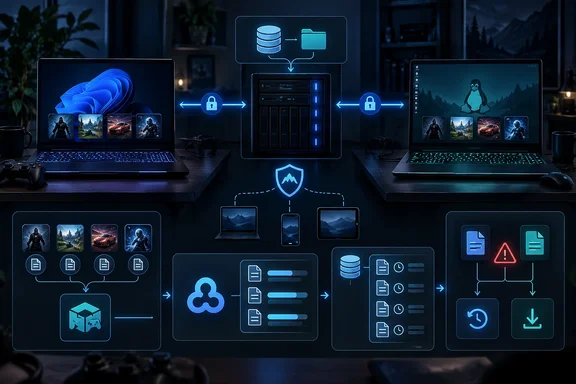
In a September 18 report for XDA Developers, a Football Manager 26 player described discovering during travel that a recent save had not followed them to a second machine. The article attributes the failure to a cloud-storage ceiling and describes replacing Steam Cloud for that workload with Ludusavi, Rclone, an SMB share hosted from a Proxmox server, and NetBird for encrypted remote access.
The core idea is sound, and it solves a broader PC problem: Steam Cloud is optional at the game level, configured by developers, and bounded by rules that are not uniform across every title. But the reported “10GB limit” needs qualification. Valve’s Steamworks material has shown a 10GB, 10,000-file user quota as a planning figure, while its current developer documentation says the absolute file-size limits can change over time. In practice, a game’s cloud behavior depends on how its developer configured Steam Cloud and which implementation it uses. XDA Developers did not establish Football Manager 26’s specific Steam Cloud allocation or whether the missed save was caused solely by capacity rather than a failed upload, a pending client sync, or an application-side save behavior.
That distinction affects the remedy. A home-server backup target can protect a large Football Manager archive and cover games without Steam Cloud support, but it does not repair an existing Steam Cloud configuration. Players who want to keep Steam Cloud enabled should first identify the exact files being stored, their current local and remote versions, and whether old saves, tactics, replays, or generated data are consuming the quota.
Steam Cloud’s limits are set per game, not by a single consumer-facing rule
Steam Cloud is often described as though it were one universal feature: exit a game on one PC, launch it on another, and the save appears. That is the intended experience, but Steam gives developers multiple integration paths and configuration choices. Steam Auto-Cloud watches designated folders, while the Steam Cloud API lets a game decide directly which files to write and retrieve; developers can also set platform behavior for cross-platform titles.
Valve’s documentation makes two relevant points. First, the maximum size of an individual cloud file is subject to Steam’s current limits, with large files potentially receiving a less optimal storage endpoint. Second, Valve’s material has presented 10GB of storage and 10,000 files as a user quota estimate, not as an immutable public promise for every game. The available evidence therefore supports the conclusion that cloud capacity exists and can be exhausted; it does not support treating 10GB as Football Manager 26’s confirmed hard limit.
The XDA Developers account also points to a common weak point in cloud-save workflows: synchronization may not happen at the moment a player presses Save. Steam’s own developer documentation describes Auto-Cloud synchronization around application launch and exit, while Dynamic Cloud Sync exists only for developers that specifically implement it. If a game writes a save locally but waits until exit to upload it, a laptop packed up, put to sleep, or taken offline before the client finishes syncing can carry an older cloud copy.
For Football Manager players, that creates a familiar high-risk scenario. Long-running careers can produce many named saves, rolling autosaves, backups, tactics, custom databases, and editor-related files. A save system that preserves every historical branch is useful until it hits a remote quota or makes the upload window long enough to expose a player to interruption. The more saves retained, the less safe it is to assume that the latest local session is already available elsewhere.
Ludusavi and Rclone change the storage destination, not the need for a recovery plan
Ludusavi is an open-source game-save backup utility that uses game-location data associated with PCGamingWiki. Its practical advantage is discovery: rather than manually maintaining a spreadsheet of %USERPROFILE%\Documents, AppData, registry keys, Proton prefixes, and per-launcher folders, a user can scan for supported games and back up the locations Ludusavi recognizes.
The important technical detail in the XDA Developers setup is Ludusavi’s Rclone integration. Rclone can reach many remote back ends, including SMB shares, WebDAV, SFTP-style services, and mainstream cloud-storage providers. Ludusavi can run a backup locally, then send its managed backup data through an Rclone remote. That makes a Samba share on a home server a storage endpoint without making Samba itself responsible for identifying a game’s save location.
Ludusavi’s automatic synchronization mode provides a valuable safeguard: before a backup, it compares the local and remote backup states. If they differ, it warns about the conflict and leaves the remote data alone rather than overwriting it automatically. That behavior is more conservative than an ordinary folder sync, and it is exactly what save files need. Two devices can each contain valid but divergent progress; choosing “newest file wins” can destroy a career save without producing an obvious error.
But readers should avoid calling this a true bidirectional sync service. Ludusavi does not continuously watch every game’s live save directory and reconcile changes in real time. It creates and manages backups, and an out-of-sync state requires an explicit decision to upload or download. That is safer than silent overwrites, but it means a user needs a routine: back up after playing, verify the destination is reachable, and restore the desired backup before opening the game on the other machine.
The best practice is to keep more than one retained backup generation. A server-side ZFS dataset, as described by XDA Developers, can provide snapshots in addition to Ludusavi’s own backup history. Those layers are not redundant clutter. Ludusavi protects game-aware backup structure; Rclone moves data; ZFS snapshots can recover an earlier version after an accidental deletion, bad restore, or later discovery that the supposedly correct save was already corrupted.
Windows-to-Proton paths need deliberate mapping
The article’s most useful detail for mixed Windows and Linux households is its use of Ludusavi redirects. A Football Manager save stored under a Windows Documents path is not physically located at the same path when the Windows version runs through Proton on Linux. Proton places the game’s Windows-like filesystem inside a per-game prefix, usually beneath Steam’s compatibility-data directory.
Without path translation, a backup made on Windows may be treated as an unrelated location on Linux, even when the files are logically the same save set. Ludusavi redirects can map a source path to a target path at backup, restore, or both. That lets a Windows Documents location and the equivalent Documents folder inside a Proton prefix be represented consistently in a backup workflow.
This is also where the setup becomes less turnkey than the source headline suggests. Redirects must be tested with a disposable save before trusting them with a long-running career. Users should verify four things:
- The backup includes the actual save file and any companion data the game requires, rather than only a parent folder that looks plausible.
- A restore on the second operating system places the files inside the path the game really reads.
- Steam Cloud is not going to present a stale-cloud-versus-local conflict immediately after the restore and replace the intended files.
- The game can load the restored save before the older source machine is used again.
The test should be mundane and intentional: create a uniquely named temporary save on PC A, back it up, restore it to PC B, confirm it loads, make a clearly visible change, then repeat the trip in reverse. A player who cannot prove that cycle works should not assume redirects are correct because the backup browser shows a familiar game title.
NetBird can keep SMB private, but the access policy is part of the security model
The remote-access layer in the XDA Developers design avoids exposing SMB directly to the internet. That is the right instinct. SMB shares should not be port-forwarded from a home router merely to synchronize game saves; doing so creates a much larger attack surface than the use case warrants.
NetBird uses an encrypted WireGuard-based mesh and supports routing to a private resource behind a connected peer, allowing a laptop to reach an SMB server without putting an agent on the file server itself. That matches the article’s Proxmox-host-as-routing-peer design. It also means the claimed convenience of using the same SMB address at home and away depends on DNS, routes, and the SMB host being configured consistently — it is not an automatic property of Rclone.
NetBird’s current documentation contains a material operational warning that the article leaves out: its older Network Routes model is deprecated for most new deployments in favor of Networks. More importantly, a legacy route without an access-control group can grant unrestricted reachability to the destination CIDR for peers in the distribution group. For a save-share setup, administrators should expose a single file-server address or hostname where possible, use a narrowly scoped policy, and avoid advertising an entire home LAN merely because the Samba container happens to live there.
A single-server home setup also remains a single point of failure. If the Proxmox host, ZFS pool, Samba container, routing peer, or home internet connection is unavailable before a trip, there is no remote save source. Keeping the latest Ludusavi backup locally on each machine is therefore essential. The home server should be treated as the authoritative archive, not as the only copy a traveler can access.
Steam Cloud remains the easiest option when it works and when a game’s save set fits its configured behavior. The Ludusavi, Rclone, SMB, and NetBird stack earns its complexity for players with oversized save collections, non-Steam games, dual-boot systems, or Windows-and-Proton machines. Its concrete benefit is not “better cloud” in the abstract; it is control over storage capacity, retention, and restore decisions when Steam’s per-game sync stops being enough.