

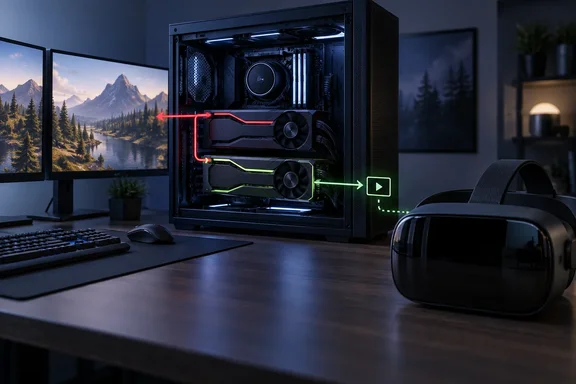
That sounds like a rule you'd never notice. It matters on one popular setup: an AMD Radeon card drives the monitors, and a second Nvidia card sits in the machine just to handle NVENC video encoding.
The machine behind the bug report
The report came from a Linux user, and it's on Valve's own tracker. Valve's SteamVR-for-Linux GitHub repository has an open issue, number 967, titled "vrLink is selecting the wrong GPU on startup." It lists SteamVR version 2.18.1 running on Fedora 44 (with fixed "freeworld" mesa packages. The reporter says they have a fairly uncommon hardware layout with two GPUs. My Primary (and Display) card is a Radeon RX7800xt. I also have an Nvidia 3070ti installed specifically for NVENC.
According to MIXED, their log shows the link starting up on "NVIDIA GeForce RTX 3070 Ti" without appearing to query the Radeon at all.
The user described these symptoms:
- The desktop showed up in the headset as a black screen.
- The host Steam window was also black.
- No Man's Sky loaded the SteamVR environment but never rendered into the headset.
- Half-Life: Alyx ran normally.
These are one person's observations on one machine. Valve hasn't confirmed which titles are affected, and nobody has shown why Alyx worked when No Man's Sky didn't. Don't treat the list as a compatibility chart.
Section summary: The problem was seen on a Fedora 44 desktop with a Radeon RX 7800 XT for display and an RTX 3070 Ti for encoding. Steam Link started on the Nvidia card, and some content went black in the headset.
What Valve confirmed, and what it didn't
MIXED quotes Valve's reply to the reporter. It gives the default order in two steps:
- Pick a discrete GPU.
- If more than one discrete GPU is present, prefer Nvidia over AMD.
Valve said this matches what the user saw. It also said there's currently no way to choose a specific GPU, and that it will add a picker as a task to look into. That is not a promise to build one. There's no delivery date either, just a request that has been written down.
So the Nvidia card you bought for OBS or streaming work is the card Steam Link will pick, even if every monitor is plugged into the Radeon. Your display adapter doesn't count.
Plenty is still unknown:
- Windows hosts: Nobody has shown whether the same rule causes the same trouble on Windows. MIXED is explicit that nothing establishes how the pairing behaves on a Windows host or on any particular laptop.
- Two cards from the same vendor: Valve's rule doesn't say what happens with two Nvidia cards or two AMD cards.
- How many people are affected: Nobody has counted how many systems are set up this way. Encoding on a second GPU is common among streamers, but that doesn't mean many of them also use VR.
Section summary: Valve has confirmed the order (discrete first, then Nvidia before AMD) and confirmed there's no override. Everything else is either one user's report or still unknown.
Why this is not the fix in SteamVR 2.18.1
The dates make it easy to mix up two separate issues. Valve's SteamVR 2.18.1 beta came out on September 23, and GamingOnLinux lists its Linux fixes as Fixed async reprojection failing on AMD GPUs. Fixed GPU selection on systems with both discrete and integrated GPUs. Fixed compatibility with systems without systemd.
The middle fix is for hybrid systems: an integrated GPU plus a discrete one, which is how most gaming laptops are built. The Fedora machine has two discrete cards, which is a different case. The GitHub issue lists 2.18.1 as the installed version, so the reporter already had that beta when the problem appeared.
The same beta changes a few Steam Link items: Fixed cases of video corruption, checkerboarding, and stuck streams. Improved automatic bitrate selection. Valve's release notes don't link any of those to choosing between two discrete cards.
The hope that a GPU picker would also help gaming laptops came from the user who filed the report, not from Valve. It's a reasonable wish, but nobody has committed to it.
Section summary: SteamVR 2.18.1 fixes GPU selection on integrated-plus-discrete Linux systems. The dual-discrete problem was reported on 2.18.1 itself, so that beta is not the fix.
The DRI_PRIME workaround, with caveats
The reporter got around the problem with DRI_PRIME. MIXED describes it as the Linux setting that pins a program to a named graphics device, written into SteamVR's launch options against the Radeon's address. MIXED also notes that that is one owner's workaround rather than guidance from Valve.
Some background from Valve's own documentation helps. Valve's known-issues page for the Steam Linux Runtime says the way Linux picks a Vulkan driver and GPU "is not fully settled." It also says the Steam container can interfere, so the wrong GPU or driver gets selected. The page mentions DRI_PRIME=1 as a way to ask for PRIME offloading on recent Mesa systems, for Steam as a whole or for single games. For desktops, it suggests the simplest route: set the discrete GPU in firmware and plug the display into it.
That guidance was written with laptops in mind, not two discrete cards and not Steam Link's VR path. Setting DRI_PRIME=1 isn't the same as pointing DRI_PRIME at one card's device address. The reporter's exact launch-option string hasn't been published, so there's no command here to copy.
If you're on a similar Linux setup and want to experiment:
- Check the log first. Confirm which GPU Steam Link reports at startup, as the reporter did.
- Treat any
DRI_PRIMEchange as a test. Keep a note of your original launch options so you can undo it. - Check for container problems. Valve's documentation says the Steam container can interfere with GPU routing, so a correct variable may still not do what you expect.
- Report your results on Valve's tracker. Include a system report. Valve asks for SteamVR bugs in its bug-report forum rather than in replies to announcement posts.
Section summary: DRI_PRIME worked for one user, but it isn't supported and there's no published recipe. Valve's documentation shows Linux GPU routing is fragile in general.
What else changed in Steam Link this month
Valve has made several streaming changes in September:
- Sharpening off by default: According to Valve's announcements, the SteamVR 2.17 line turned off Contrast Adaptive Sharpening by default. You can turn it back on under SteamVR Settings → Steam Link → Sharpen image before encoding. It now applies only to VR game content.
- Pyrowave codec: A new experimental codec for Steam Remote Play. MIXED reports that it asks for up to 10 times the bandwidth and wants gigabit ethernet. Valve's Remote Play post says it's in the Steam beta on Windows and macOS, and on Linux through the experimental SteamRT3 client. It's off by default, and you can set a manual bitrate from 100 to 500 Mbit/s.
- USB tethering: MIXED reports that 2.18.1 adds tethered Quest streaming over USB with the Steam Link beta.
None of these changes the GPU order Valve described. Pyrowave is a Remote Play codec, not a VR GPU setting. MIXED also notes that Steam Link is the path a Steam Frame uses to stream VR from a PC, which is one reason small defaults like this one are getting attention.
Analysis: a sensible default that doesn't fit every PC
This part is my own view, not something Valve has said. Valve's rule makes sense for most machines. Discrete over integrated gets the powerful card on nearly every laptop and desktop. Preferring Nvidia when there are two discrete cards probably reflects how Valve tested its encoders.
The trouble is that a default with no override assumes nobody has built their PC in an unusual way, and enthusiasts often do. A streamer with a second card for encoding has made a deliberate choice. Valve's software then treats that encoding card as the main one.
Windows users are used to setting a per-app GPU preference in Settings. Nobody has shown whether Steam Link's VR path follows that setting, so don't assume it does.
Bottom line
- Confirmed: Steam Link's VR streaming picks a discrete GPU first, then prefers Nvidia over AMD, and you can't currently override it.
- Reported, not verified: Black screens in the headset and titles that fail, on one Fedora 44 system.
- Not a fix for this: The SteamVR 2.18.1 beta's GPU-selection fix, which covers integrated-plus-discrete Linux systems.
- Unsupported workaround: Pointing
DRI_PRIMEat the display card, used by one Linux user. - Still open: Whether this happens on Windows, what happens with two cards from the same vendor, and whether a GPU picker will ever ship.
If you run an AMD display card with an Nvidia encoder and use Steam Link for VR, you'll get Valve's default order for now, and there's no setting to change it.
References
- Steam Link grabs your Nvidia card for VR streaming, and you cannot tell it not to - mixed-news.com mixed-news.com · 2026-09-29T00:02:19+00:00
- (BUG) vrLink is selecting the wrong GPU on startup · Issue #967 · ValveSoftware/SteamVR-for-Linux github.com
- steamlinuxruntime-known-issues.md github.com