

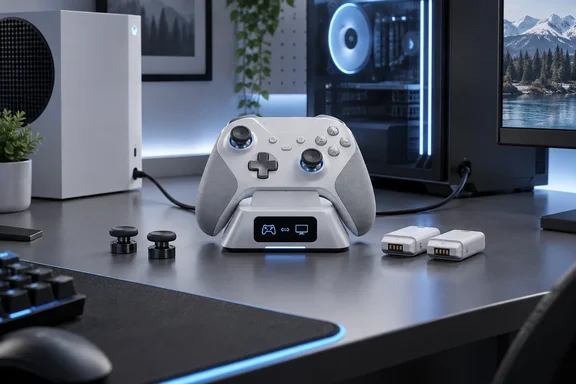
Movies Games and Tech reviewer Daniel Waite calls the Aeon Pro possibly the best controller you will own. He praises the comfort, the familiar Xbox-style layout, the Hall Effect sticks and a battery setup he describes as "never-ending." The site says SteelSeries supplied the review unit, and the review ends with a purchase link. Neither fact proves bias. Still, it helps to separate what the reviewer felt from what SteelSeries actually specifies. Where the two differ, the details matter more than the praise.
What SteelSeries actually launched
SteelSeries announced the Aeon Pro on September 8, 2026. It is a wireless controller for Xbox and PC built around a "QuickSwitch Dock System" (patent pending), two hot-swappable batteries, Hall Effect thumbsticks, mechanical switches and a small OLED screen on the controller. According to the announcement, it comes in black or white at these launch prices:
| Region | Launch MSRP |
|---|---|
| North America | $259.99 |
| UK | £229.99 |
| EMEA | €259.99 |
| APAC | $259.99 |
These are launch list prices, not current street prices. Waite reviewed the white/off-grey model.
The main selling point is the dock. As Forbes explained at launch, the desktop base station has dual USB inputs on the desktop base station let players charge the controller on their desk and switch between Xbox and PC without having to re-pair or move cables. PC Gamer described the same design: one connected to PC and the other to Xbox.
Waite says it is as simple as flicking a switch to move between systems. That matches SteelSeries' marketing, but the review doesn't test switching speed or reliability in any depth. For now, treat "seamless" as a promise, not a measured result.
Section summary: The Aeon Pro is a $259.99 Xbox/PC controller. Its main feature is a dock that plugs into both machines at once so you don't have to re-pair when you switch.
What's in the box
Waite lists the controller, the dock, two batteries, spare thumbsticks, a USB-C cable and a manual. GamingTrend's review gives the same list in more detail: the base station dock, a USB-C to A cable, two batteries (one is inside the controller at unboxing), and two additional thumbsticks.
Waite also says the batteries work with "other SS products." That's broader than SteelSeries' own claim. The product page says the packs are compatible with Arctis Nova Pro, Arctis Nova Pro Omni and Arctis Nova Elite Batteries. If you already own one of those headsets, your spare batteries can be shared. Don't assume the same for other SteelSeries gear.
Battery life: "infinite" has an asterisk
Waite reports 12–15 hours per charge. That's about right, but SteelSeries' support site gives figures that change with how you connect:
- Headset plugged into the controller: 12.5 hours
- Connected to an Xbox: 12.5 hours
- Connected to a PC, no headset: 11.5 hours
- Bluetooth: 14 hours
The "Infinite Power System" name, and Waite's "near-endless" wording, describe the two-battery swap, not one very long charge. The product page puts it this way: 2 Batteries* - Charge one in the dock while using the other. Your play only continues without a break if the spare is charged and waiting. Anyone who has left a spare AA in a drawer for months knows that isn't guaranteed.
Waite also says that putting the controller on the dock charges both batteries at the same time. SteelSeries' marketing describes the dock as connecting devices, charging batteries and storing sticks.
Polling rate: the PC-versus-Xbox gap
Windows users will care about this part. SteelSeries support confirms that the controller polls at 1,000 Hz on PC, wired or wireless. It is locked to 250 Hz on Xbox, and also on PC whenever a headset is plugged into the controller. Waite's numbers are correct.
There's a trade-off he doesn't mention. SteelSeries says the 1,000 Hz PC mode is the reason PC-without-headset gives the lowest battery figure (11.5 hours). The faster polling rate uses more power.
There's also some context worth adding. Waite writes that 1,000 Hz gives "instantaneous results." Polling rate is only one part of overall input latency, and the review includes no latency measurements. PC Gamer noted that 1K polling is fine by my books for a controller, but is a little behind some of the recent 8K competition. Whether that matters depends on the player, but at this price it's a reasonable comparison.
Section summary: You get 1,000 Hz on PC without a headset and 250 Hz everywhere else. The fastest mode costs about an hour of battery per charge.
Connectivity: where the review needs a correction
Waite suggests you can use the included USB-C cable to play wired. SteelSeries' support pages are more specific:
- Xbox: must connect through the base station. Bluetooth is not listed as an Xbox option.
- PC: base station or Bluetooth. Without the station, SteelSeries also documents a direct USB-C-to-USB-A wired connection to PC.
- Mobile: Bluetooth only.
So wired play without the dock is a PC option. Xbox owners should plan to keep the dock plugged into the console. Waite's point about phone use over Bluetooth is correct. GamingTrend's review says the controller works on your PC, Xbox Series and One consoles, and other devices via Bluetooth connectivity.
Controls, customisation and SteelSeries GG
Waite says dead zones, triggers, sensitivity and the four rear buttons can all be adjusted, and that profiles can be picked from the onboard screen. That's accurate, but it helps to know which settings live where.
On the controller's OLED menu (no PC needed), according to SteelSeries support:
- Button mapping
- Haptics
- Circularity
- Calibration
- OLED brightness
- Wake behaviour and idle settings
- Factory reset
- System select
Only in the free SteelSeries GG software on PC:
- Deadzone adjustment
- Shift-key customisation
The launch announcement also says GG handles per-motor rumble intensity across the four motors, function remapping, GG and Sonar integration, and PC power settings. In practice, you can remap buttons on the couch in front of an Xbox, but you'll need a Windows PC with GG installed for deeper tuning.
The triggers can flip between full travel and hair trigger mode with a click, and the rear paddles take any action you assign to them.
About the sticks: SteelSeries' own descriptions don't quite agree. The product page says Concave, convex, standard, and long included. The launch announcement lists standard concave, tall concave and short convex. Waite says the sticks pull off and push back on easily. That's his hands-on observation, not an official installation guide.
Waite claims the Hall Effect sticks have "zero stick drift" and will have you "topping every online leaderboard." Hall Effect sensors measure position magnetically instead of through wearing contacts, so they are generally more resistant to drift. SteelSeries promises "drift-free precision." But a few weeks with a review unit can't prove long-term durability, and no controller wins matches on its own.
Feel and layout: the reviewer's own observations
These points are Waite's opinions from using the controller, not lab results:
- Button placement, size and weight feel close to the official Xbox controller.
- The screenshot/record button sits on the back of the pad, and the menu button is in a different spot. He found both a little odd at first but not a real problem.
- The dock holds the controller securely, and its screen shows the charge level of both the controller and the spare battery.
- Build quality feels excellent and made to last.
His praise for the build matches PC Gamer's brief hands-on, which found pretty solid build quality, great grips, and comfy button presses. GamingTrend was more mixed on one point, saying My qualms with the thumbsticks still stand for Call of Duty. Not every reviewer loves the sticks straight out of the box.
The price question
Waite says the price is the only real sticking point. PC Gamer went further, calling the $260 tag a problem that does put a pretty big dampener on things. PC Gamer compared it with rivals such as the $220 Raiju V3 Pro, the $200 Razer Wolverine V3 Pro, and the $90 GameSir G7 Pro 8K. None of those has the dual-system dock, though.
Our take: the Aeon Pro makes the most sense if your desk has both an Xbox and a Windows gaming PC and you're tired of re-pairing or swapping cables. For PC-only players, you're paying extra for a dock feature you won't fully use, and you'll get 1,000 Hz polling where some cheaper rivals advertise 8,000 Hz. For Xbox-only players, polling tops out at 250 Hz and the dock is required. The battery swap is still convenient, but it isn't unique.
Bottom line: Movies Games and Tech's review is enthusiastic, based on a supplied sample, and correct on the headline specs. It's loose on some details: battery sharing only works with three named headsets, wired-without-dock play is a PC option, and "infinite" battery depends on keeping the spare charged. The Aeon Pro looks like a well-built controller aimed at a specific kind of player. Whether that's you depends on how many systems are plugged in under your desk.
References
- Review: Aeon Pro controller - Movies Games and Tech Movies Games and Tech · 2026-09-27T20:54:51+00:00
- SteelSeries Introduces the Aeon Pro: The World's … | SteelSeries steelseries.com
- SteelSeries’ New Aeon Pro PC And Xbox Elite Controller Is A ‘World First’ forbes.com