

Here's what's new, what's documented, and what's just one reviewer's opinion.
Same hardware, new colours
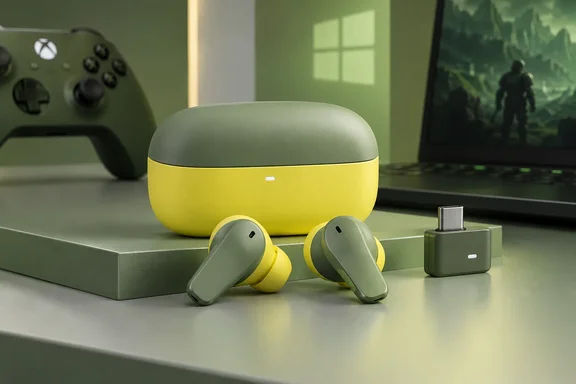
The Matcha and Yuzu finishes are cosmetic. Wccftech reviewed the Matcha Xbox unit too and said that aside from the new finish, these are functionally the same GameBuds that SteelSeries introduced previously. Digital Citizen came to the same conclusion, saying the hardware underneath remains the same premium gaming earbud package introduced earlier.
SteelSeries' press release dates availability to September 1, 2026, through SteelSeries.com and retailers worldwide. Launch prices were US$199.99, £159.99 and €179.99. Those are launch MSRPs, so check current prices yourself. Xbox Wire announced the Cozy Collection the same day and bundled the earbuds with 8BitDo keyboards, mice and controllers plus matching KontrolFreek thumb grips. The earbuds are there mainly because they match the colour scheme.
Summary: Buy these if you want green or yellow earbuds. Don't expect a new generation of audio hardware.
Official specs
Based on the Xbox Wire announcement, SteelSeries' materials and current retail listings, the specs are:
| Feature | Stated specification |
|---|---|
| Wireless | 2.4 GHz (Xbox/PC via USB-C dongle) plus Bluetooth 5.3 |
| Switching | Quick-Switch between 2.4 GHz and Bluetooth |
| Noise control | 4-mic hybrid ANC, Transparency Mode |
| Audio extras | 360° Spatial Audio, game presets via the Arctis Companion app |
| Battery | Up to 10 hours per charge, up to 40 hours total with the case |
| Case | Qi wireless charging or USB-C |
| Durability | IP55 water/dust resistance |
The retail listings add two details. First, you get 3 hours of play time from just 15 minutes of Fast Charge in the Qi Charging Case. Second, the case has a slot to store the USB-C dongle, which is where tiny dongles tend to get lost. The game presets live in the phone app: listings describe perfectly tuned audio presets for over 200 games, accessible in real time. Just hit up the Arctis Companion app on Android or iOS.
One point from the review needs correcting. It describes a "30-hour charging case" and also "up to 40 hours" of audio. SteelSeries' own figure is up to 40 hours total: 10 hours in the buds plus whatever the case adds. Most likely the 30 hours is the case's share, but SteelSeries doesn't publish that as a separate spec. As with any "up to" number, your actual runtime will depend on volume and whether ANC is on.
The dongle has two modes
This is the part Windows and Xbox owners most need to know. According to SteelSeries support, the Xbox version comes with a dual-mode dongle. It has a physical switch with one position for Xbox and one for PlayStation and PC. The PlayStation version has a single mode that covers PlayStation and PC only.
That's why reviewers keep calling the Xbox model the more flexible one. Digital Citizen noted that the PlayStation model does not offer equivalent wireless Xbox support. That makes the Xbox edition the more flexible choice even if PlayStation is your main console. Waite reported that switching between Xbox, PC and his phone was easy, which matches how the hardware is designed.
If you use a Windows laptop or handheld, note Digital Citizen's warning: the USB C adapter itself is relatively wide, however, and can block a neighboring port on some laptops or handhelds. SteelSeries includes an extension adapter to help with this problem.
Updating firmware from Windows
SteelSeries has published a 2026 firmware update. According to 4Scarrs Gaming's report on the launch, it increases connection power and adds listen-before-talk, or LBT, for channel selection. LBT checks a wireless channel before transmitting. The update isn't limited to the new colours. If you already own a pair, you can get the firmware changes without buying Matcha or Yuzu.
SteelSeries support explains how to install it on a PC:
- Set the dongle's physical switch to PC, not Xbox. In Xbox mode, SteelSeries GG won't detect the earbuds, and support says this is the usual reason updates fail.
- Connect the earbuds to your PC through the dongle.
- Open SteelSeries GG and go to the Engine section.
- Find the Arctis GameBuds in the device list. If an update is available, a blue "Firmware Update Available" banner will appear. Click it to install.
- Once it finishes, switch the dongle back to Xbox mode before using it on your console.
The review doesn't say which firmware Waite's unit was running, so his impressions tell us nothing about whether the LBT update works. If you get dropouts in a busy 2.4 GHz environment, like an apartment block or an office full of Wi-Fi, install the update first.
Summary: Use the Xbox version with the switch set to Xbox for your console and to PC for Windows, and to install firmware updates.
What Quick-Switch doesn't do
Waite gets this right. The GameBuds are not true multipoint earbuds. SteelSeries support states that the earbuds cannot connect to more than one Bluetooth device at the same time. What Quick-Switch does is flip between the 2.4 GHz dongle and Bluetooth: swap between 2.4GHz and Bluetooth instantly with a triple tap of the earbud.
Digital Citizen also points out that unlike some larger SteelSeries headsets, the GameBuds do not mix Bluetooth audio with 2.4GHz game sound simultaneously. So you can't have Discord on your phone playing over your Xbox game audio. Waite says calls take priority when he answers them, which suited him. Treat that as his experience, not a documented simultaneous-audio feature.
To pair a new Bluetooth device, SteelSeries support gives these steps:
- Open the case with both earbuds inside.
- Press and hold one earbud for three seconds until the blue light flashes.
- Pair from the new device's Bluetooth menu.
The review's verdict, with caveats
Waite likes almost everything. He says the ANC is good enough for an office or a commute without blocking everything, the microphone is clear on Discord and party chat with no echo, the bass is strong depending on the preset, and the buds and case are compact, light and durable. He ends with a clear recommendation to buy.
Some context helps here:
- The unit was a free review sample. The site discloses that SteelSeries provided it, and the page includes a purchase prompt.
- Nothing was measured. There are no test conditions, battery rundown tests, mic recordings or comparisons with other earbuds. Claims like "pinpoint accurate" audio and voice pickup with "100% accuracy" are the reviewer's opinions, not test results.
- Other reviewers are more reserved. Wccftech also liked the product, but it mentioned the wide USB-C adapter and noted that in-ear comfort always depends on the individual. Digital Citizen described the ANC as good enough to cut steady background noise, which is a more modest claim.
That doesn't make Waite wrong. Several outlets agree these are good gaming earbuds. But one sample reviewed without measurements shouldn't be the only thing you base a US$200 purchase on.
Who should buy them?
Good fit if you:
- Switch between Xbox Series X|S and a Windows PC and want one small wireless audio setup for both
- Want low-latency 2.4 GHz audio in something smaller than a headset
- Like the Cozy Collection look and want your setup to match
Look elsewhere if you:
- Need true Bluetooth multipoint or game audio and phone audio at the same time
- Only play on PlayStation and don't care about flexibility (though the Xbox version covers PlayStation too)
- Want earbuds that are new under the hood. These are an existing model in new colours, and current owners get the 2026 firmware for free.
Bottom line: The Matcha and Yuzu GameBuds are a colour refresh of a well-regarded pair of gaming earbuds. Movies Games and Tech's review is positive, but the more useful takeaways are practical: the dongle has a switch, it needs to be in PC mode for Windows and firmware updates, Quick-Switch isn't multipoint, and 40 hours is the total battery life including the case.
References
- Review: Arctis GameBuds - Movies Games and Tech Movies Games and Tech · 2026-09-27T20:58:11+00:00
- Arctis Gamebuds for Xbox Review - SteelSeries’ Premium Gaming Earbuds Now Come in Matcha wccftech.com
- Why am I unable to update my Arctis GameBuds for Xbox using my PC? – Support support.steelseries.com