

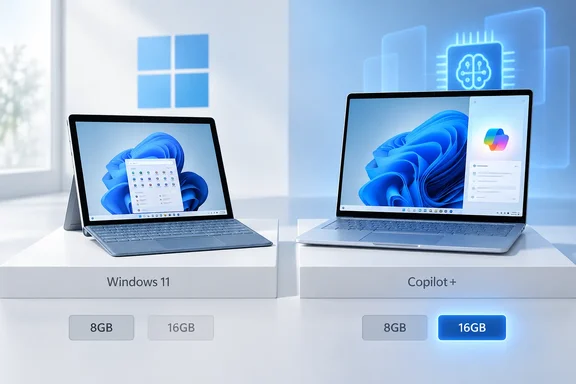
The guide doesn't announce new hardware or change any rules. What it gives you is a model list, and that list shows one detail people often miss. For two of the newest Surface models, the amount of RAM decides whether you have a Copilot+ PC or not.
What makes a Copilot+ PC
Microsoft calls Copilot+ PCs a separate class of Windows 11 PCs. They're built around a neural processing unit (NPU), a chip designed for AI workloads, that can run more than 40 trillion operations per second (TOPS). Microsoft uses "Copilot+ PC experiences" for the features that need that NPU. Its examples include Recall and automatic super resolution, and it also names Cocreator, Windows Studio Effects and Live Captions.
The NPU is only one requirement. Microsoft's Windows 11 specifications page says a Copilot+ PC also needs:
- Processor: a compatible chip with an NPU rated at 40+ TOPS. Microsoft currently lists AMD Ryzen AI 300 and 400 series, Intel Core Ultra 200V and 300V series, and Snapdragon X series.
- RAM: 16 GB of DDR5 or LPDDR5.
- Storage: 256 GB SSD or UFS.
The same page says some Windows 11 PCs have a 40+ TOPS NPU but still aren't Copilot+ PCs, for example devices with less than 16 GB of RAM or less storage. Those PCs can still run local AI workloads in compatible apps. They don't get the Copilot+-only features, such as improved Windows Search and Click to Do.
Section summary: A fast NPU is not enough on its own. The processor, RAM and storage all have to meet the bar.
The Surface lineup, sorted
Here is Microsoft's split, as listed in the support guide:
| Copilot+ PCs from Surface | Windows 11 PCs from Surface (not Copilot+) |
|---|---|
| Surface Pro 12-inch (1st Edition), 16 GB or more | Surface Pro 12-inch (1st Edition), 8 GB |
| Surface Pro 13-inch (11th Edition) or later | Surface Pro 10 for Business |
| Surface Pro for Business 13-inch (11th Edition) or later | Surface Pro 9 with 5G |
| Surface Laptop 13-inch (1st Edition), 16 GB or more | Surface Pro X |
| Surface Laptop (7th Edition) or later | Surface Laptop 13-inch (1st Edition), 8 GB |
| Surface Laptop for Business (7th Edition) or later | Surface Laptop 6 for Business |
| Surface Laptop Studio 2 |
The Surface Pro 12-inch and Surface Laptop 13-inch (both 1st Edition) appear in both columns. On those models, the name tells you nothing about Copilot+ status. The RAM does.
Microsoft's own Store page for the 12-inch Surface Pro puts it this way: "Choose 8GB RAM for everyday tasks like browsing and productivity. Upgrade to 16GB RAM for smoother multitasking, more demanding apps, and access to Copilot+ PC experiences." The business listing for the same device adds a warning about the cheaper model: 8GB configurations may experience reduced performance and are not recommended for multi-display use.
The guide also says the non-Copilot+ group is not without AI. Microsoft says those devices offer AI-powered tools, just with different features and capabilities. The business listing says every configuration includes Windows 11 Pro and Copilot, with AI assistance available through cloud-based experiences, and that the 16 GB tier adds advanced AI-powered experiences like Click to Do, and Live Captions with translation, Cocreator in Paint, Improved Windows Search and Image Creator in Photo.
Section summary: Check the RAM on any 12-inch Surface Pro or 13-inch Surface Laptop. Older models such as the Surface Pro 10 for Business and Surface Laptop Studio 2 are not Copilot+ PCs.
The features, and the conditions attached
The guide lists these features for Copilot+ PCs from Surface: Recall, Click to Do, Improved Windows Search, Live Captions, Cocreator image generation in Paint, Restyle Image, Image Creator, Windows Studio Effects, automatic super resolution, and super resolution in Photos.
Microsoft's specifications page shows that several of these come with conditions:
- Automatic super resolution works only with a curated set of games, and only on Copilot+ PCs with Snapdragon X series processors.
- Cocreator, Restyle Image and Image Creator work best with English prompts. They need a Microsoft account or Entra ID plus an internet connection, which Microsoft uses for cloud-based responsible-AI checks.
- Improved Windows Search only handles certain text, image and document formats, and is tuned for a set list of languages.
- Click to Do actions vary by device, region, language and character set, and some need a subscription.
- Recall is still labelled preview. It needs Windows Hello Enhanced Sign-in Security, and some policy-based management controls need an enterprise license.
- Windows Studio Effects needs a compatible camera. The basic effects (automatic framing, background blur, standard eye contact and voice focus) run on any Windows 11 device with an NPU rated at 10+ TOPS. The extra effects are only on Snapdragon X-powered Copilot+ PCs. So Studio Effects isn't strictly a Copilot+ feature, which fits the business listing's statement that it's available on all 12-inch Surface Pro configurations.
In short, being a Copilot+ PC gets you access to these features. Your processor, language, region, account type and license still decide which ones you actually get.
A note on Recall
The Surface guide names Recall without explaining it. Microsoft's separate Recall privacy documentation fills in the details:
- Recall is opt-in. It stays off for each user until that user turns on snapshot saving.
- It saves screenshots at intervals. It does not record audio or continuous video.
- Snapshots are processed and stored on the device, and Microsoft says it can't see them.
- Users can pause it, filter out apps and websites, delete snapshots, or remove Recall through Turn Windows features on or off.
- The controls are under Settings > Privacy & security > Recall & snapshots. Changing them requires Windows Hello authentication, and launching Recall requires a biometric Windows Hello sign-in (face or fingerprint).
IT admins will want to read Microsoft's Recall management guidance before letting users turn it on across a fleet. Being opt-in doesn't remove the need for a policy.
Practical checklist
- Buying a 12-inch Surface Pro or 13-inch Surface Laptop? Confirm the configuration has 16 GB of RAM or more if you want Copilot+ features. You can't upgrade the memory later.
- Already own a Surface? Open Settings > System > About to see your processor and installed RAM, then compare them with the table above.
- Missing a feature on a Copilot+ Surface? Check your processor (some features are Snapdragon-only), language and region, account type, and whether Windows and the apps are fully updated.
- Deploying in business? Don't assume a model name means one set of capabilities. The same name can cover different tiers.
The takeaway
Parts of the guide read like a sales page, with lines about AI transforming how you work and play, and several prompts to visit the Microsoft Store. Its useful content is the model list, and the fact that Microsoft now officially labels the 8 GB versions of two current Surface models as not Copilot+ PCs.
For buyers, that's the difference between "everyday tasks" and the full set of on-device AI features Microsoft advertises, decided by one RAM option. For IT teams, it's a reason to record hardware configurations and not just model names.
The guide also says Surface accessories are sold through the Microsoft Store and other retailers. It doesn't include a compatibility chart for which accessories work with which models, so check before you buy that pen or keyboard.
References
- Learn more about Copilot+ PCs and Windows 11 PCs from Surface | Microsoft Support Microsoft Support · 2026-09-25T00:00:00+00:00