

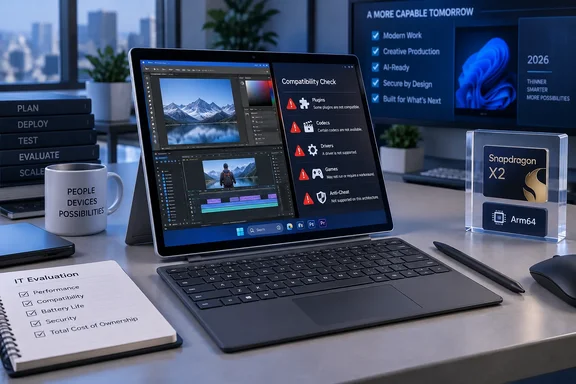
The 2026 Surface Pro replaces the Snapdragon X chips used in the Surface Pro 11 with Qualcomm’s Snapdragon X2 Plus and X2 Elite processors. MyNextTablet tested the lower-tier X2 Plus configuration with 16GB of RAM, a 512GB SSD, and an LCD panel, finding that ordinary Office-style work, Photoshop, and basic Premiere Pro editing were practical. RTINGS reached a similar conclusion from its testing of an X2 Elite OLED configuration: the detachable is a strong productivity machine with long light-use battery life, but it remains a poor fit for serious gaming and specialist workstation workloads.
The important change is not that emulation disappeared. It did not. The change is that more of the applications that used to make Windows on Arm a nonstarter are now available in native Arm64 builds. That meaningfully changes the purchase decision for a user whose job is browsers, Microsoft 365, Teams, OneNote, Photoshop, and a manageable set of modern desktop apps. It does not erase the need to audit plugins, drivers, peripherals, game anti-cheat software, video formats, and older in-house software before standardizing on the device.
Adobe’s Arm64 release closes a major Surface Pro gap
MyNextTablet’s most consequential finding is that Adobe Photoshop, Premiere Pro, After Effects, Audition, and Media Encoder now run natively on the Surface Pro’s Snapdragon hardware. Adobe confirms that those video and audio applications gained native Windows on Arm support beginning with version 26.0, joining Photoshop and other Creative Cloud tools already available for Arm.
For Windows on Arm, that is a real watershed. Adobe’s video applications were previously either unavailable, limited, or dependent on emulation, which made it difficult to recommend an Arm-based Surface Pro to anyone beyond basic image editing. The Surface Pro 13 can now open, edit, and export ordinary projects in Premiere Pro without asking the user to cross an architecture boundary first.
But “native” should not be mistaken for feature parity. Adobe’s own support documentation lists capabilities that are still missing from the Arm versions. Premiere Pro lacks support for several raw-video workflows, including Apple ProRes RAW, ARRI ARRIRAW, Canon Cinema RAW Light, Sony X-OCN and Sony RAW, R3D, and Nikon RAW. MKV import is also unavailable, and Intel-compiled third-party plugins cannot simply be carried over; plugins must themselves be built for Windows on Arm.
That gives MyNextTablet’s observed Premiere Pro stutters and slower exports useful context. Its comparison with an Apple M5 Pro MacBook is one test rather than a universal performance verdict, especially because the tested Surface used the 10-core X2 Plus rather than the 12-core X2 Elite. Still, the outlet’s finding matches Adobe’s own caveats: the platform now supports a substantial part of the workflow, but it is still a bad place to discover, on deadline, that a camera format or plugin is outside the Arm64 support envelope.
For photographers using Photoshop, illustrators working primarily in current Adobe apps, and light editors handling common H.264 or H.265 projects, the gap has narrowed sharply. For post-production shops, the relevant question remains much narrower: whether every codec, capture device, control surface, plugin, and export target is explicitly supported on Arm64 Windows.
Prism makes old applications more plausible, not guaranteed
The other half of the improvement is Microsoft’s Prism emulation layer. Windows 11 on Arm can run both x86 and x64 applications through Prism, and newer Windows 11 releases expose more emulated CPU features than earlier Arm Windows systems did, including AVX and AVX2 support. That helps explain why a much broader selection of older desktop software now launches and performs acceptably on current Snapdragon PCs.
MyNextTablet’s Hotline Miami result is revealing. The 2012 game initially failed because .NET Framework 3.5 was not present; after the required Windows component was installed, the game ran well. That is a normal Windows setup problem rather than proof that Arm emulation failed. Yet it also illustrates the ownership cost of an Arm PC: a successful install may require more investigation than it would on a conventional Intel or AMD machine.
Microsoft provides per-application Prism settings in Windows 11 for programs that misbehave under the default configuration. Those settings can alter compatibility behavior or expose newer emulated CPU features, but Microsoft warns that changing them may reduce performance or cause an application to crash. They are useful troubleshooting tools, not a deployment strategy.
For a managed fleet, the correct pre-purchase process is therefore more disciplined than launching a few popular applications on a loaner unit. Administrators should test the actual version of every business-critical application, its add-ins, device drivers, VPN client, endpoint-security agent, smart-card middleware, print stack, line-of-business database connectors, and any kernel-level component. User-mode x64 software may emulate well; drivers do not receive the same safety net.
Microsoft’s own Surface documentation still directs customers needing assistance with Arm application compatibility toward App Assure. That is an acknowledgement that the compatibility problem is now increasingly specific rather than universal. The long list of obvious failures has shortened. The remaining failures are concentrated in exactly the software categories that can derail a business rollout.
The X2 Plus Surface Pro is a productivity tablet, not a mobile workstation
Microsoft sells the 13-inch Surface Pro in two substantially different Arm configurations. The Snapdragon X2 Plus model has 10 CPU cores and is paired with the LCD display, while the 12-core Snapdragon X2 Elite is offered with OLED options and configurations reaching 64GB of RAM and 1TB of storage. Both use a 13-inch, 2,880-by-1,920, 120Hz touchscreen and both retain the familiar kickstand-and-detachable-keyboard design.
That distinction matters when reading early benchmarks. MyNextTablet tested an X2 Plus system and found an incremental CPU improvement over the previous Surface Pro generation, while noting that the outlet’s older comparison system had been a higher-end chip. RTINGS tested an X2 Elite system and likewise characterized the generational update as relatively modest in overall experience, with stronger CPU and graphics performance and a higher memory ceiling rather than a reinvention of the Surface Pro.
The practical reading is straightforward: the X2 Plus version is fast enough for collaboration, browser-heavy work, Office apps, note-taking, remote administration, light coding, and current creative applications. It is not the configuration to buy on the assumption that a high benchmark score makes it a substitute for a discrete-GPU workstation or a gaming laptop.
MyNextTablet’s game results make that point more clearly than synthetic tests. Skyrim could reach a stable 60 frames per second only after lowering resolution and visual settings. Counter-Strike 2 reached roughly 50 fps at Full HD and minimum settings but reportedly suffered frequent stutters, making it unsuitable for competitive play. RTINGS independently warns that the integrated GPU struggles in demanding games and that games using unsupported anti-cheat systems can still fail on Windows on Arm.
This is where Windows on Arm still diverges from the conventional Windows expectation. A buyer of an Intel or AMD Windows PC may reasonably expect a mainstream Windows game to at least install, even if frame rates are poor on integrated graphics. On an Arm PC, the game may confront both performance limits and architecture-level compatibility limits. Those are different failure modes, and a newer Snapdragon chip does not solve both.
Battery claims and test results are measuring different machines
MyNextTablet recorded 7 hours and 15 minutes in its battery test, which loops HD YouTube video at maximum brightness. That is substantially below Microsoft’s advertised claims of up to 15.5 hours of local video playback and 11.5 hours of active web use, but the numbers are not directly comparable.
Microsoft’s local-video test used a 1080p file in Windows Media Player with brightness set to 150 nits, auto-brightness disabled, and preproduction hardware and software in May 2026. Its web test used multiple browser tabs under the same 150-nit brightness condition. Streaming YouTube at maximum brightness keeps the display, browser, networking, video decoding path, and power draw under a much more punishing workload.
RTINGS reported more than 11 hours of light web browsing from its X2 Elite OLED test configuration. Hardware differences also matter: RTINGS says the X2 Plus configurations have a 47Wh battery, while the X2 Elite versions use a 53Wh battery. A shopper comparing reviews should therefore identify the processor, panel type, battery size, brightness setting, and workload before concluding that one test disproves another.
The safer expectation is that the Surface Pro can last a workday of mixed low-intensity activity for many users, but it should not be purchased on the strength of a maximum battery figure. Continuous video work, high brightness, external displays, emulated software, and sustained CPU loads will produce a very different result.
The expensive accessories are still part of the purchase price
The hardware remains unusually polished for a Windows detachable. Microsoft lists a weight of 895 grams without the keyboard, two USB4 ports, Surface Connect, a 1440p front camera, Wi-Fi 7, and a removable Gen 4 SSD. MyNextTablet praised the screen, speakers, keyboard, face-recognition camera, kickstand, and easy SSD access; Japanese outlet ASCII independently confirmed that the storage cover can be opened without tools and that the SSD can be replaced.
The removable drive is a practical advantage over many tablets, but it should not be confused with broad repairability. RTINGS still rates the Surface Pro as limited in upgradeability and serviceability overall. RAM is soldered, ports remain sparse, and replacing a drive is far easier than repairing the tablet or expanding its memory later. Buyers who expect to keep the machine through several Windows release cycles should decide on RAM capacity at purchase.
Microsoft’s U.S. consumer listing starts the device at $1,199.99, but the detachable keyboard and pen remain separate purchases. That is the pricing trap in every Surface Pro generation: the bare tablet is not the complete work machine depicted in most promotional photography. A keyboard-equipped configuration can cost materially more, and the Flex Keyboard with Slim Pen adds another layer of cost for users who want the Surface’s defining tablet-to-laptop flexibility.
For organizations where the Arm risk is unacceptable, Microsoft also offers a business-oriented Surface Pro 13-inch line with Intel Core Ultra Series 3 options. ASCII’s testing notes that model as the more sensible route where compatibility with traditional applications takes priority. That is a useful escape hatch, but it also undercuts any claim that Arm Windows is ready to be treated as a universal replacement for x86 Windows PCs.
The Surface Pro 13-inch (12th Edition) has crossed the line from experimental Arm hardware to a credible premium Windows tablet for mainstream productivity. Its remaining limits are no longer abstract complaints about “Windows on Arm”; they are concrete compatibility checks involving drivers, plugins, codecs, anti-cheat, and specialized peripherals. Buyers who can answer those checks in advance will get a fast, flexible, well-built device. Buyers who cannot should choose the Intel business model or a conventional Windows laptop before the return window becomes their compatibility plan.
References
- Microsoft Surface Pro 13″ (12th Edition) Review: Is ARM Windows Finally Good? - MyNextTablet MyNextTablet · 2026-09-18T13:19:09+00:00