

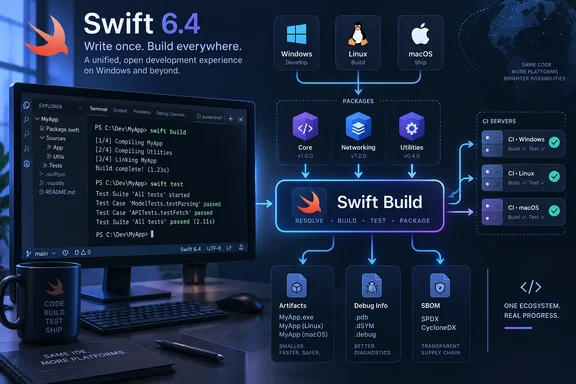
swift build, swift test, or swift run now uses Swift Build rather than Swift Package Manager’s older native build engine. Swift.org says the change makes package projects build through the same engine on Linux, macOS, and Windows, while The Register first highlighted the release’s cross-platform implications this week.
For Windows developers, the significant change is less about a new command than about what sits behind familiar commands. Existing SwiftPM projects should still start with the usual swift build; the toolchain now routes that request through the build system already used in parts of Xcode and Swift Playground. Swift’s maintainers spent the 6.2 and 6.3 cycles offering Swift Build as an opt-in preview before making it the default in 6.4.
That consolidation has a real payoff: build behavior, module handling, diagnostics, and IDE integration have a better chance of matching across developer machines and CI runners. It does not, however, mean that every Swift package will suddenly produce identical native binaries across operating systems. Windows, Linux, and macOS still have different SDKs, ABI conventions, linkers, runtime libraries, and deployment targets. What Swift 6.4 standardizes is the package build orchestration layer.
SwiftPM’s Default Has Changed, Not Its Basic Workflow
Swift Package Manager remains the dependency manager and command-line workflow most Swift developers already use. It resolves package versions, fetches source dependencies, compiles targets, runs tests, invokes plugins, and lays out build artifacts. Swift Build is the lower-level high-level build service that plans and executes the compilation and linking work.
That distinction corrects an overstatement in the initial coverage. Swift Build does not independently “test dependencies for compatibility” before compiling an application. Dependency resolution and package validation remain SwiftPM responsibilities, governed by the package manifest and its resolved dependency graph. A build can still fail because a package does not support Windows, because a C or C++ dependency assumes a Unix environment, or because a particular toolchain exposes a compiler regression.
The practical difference is that SwiftPM no longer has two build paths by default: one traditionally associated with command-line package builds and another associated with Xcode-oriented workflows. Swift’s own March development update said the migration had passed package compatibility testing against the Swift Package Index before being made the default on the project’s main branch. That testing matters, but it is not a declaration of perfect behavioral parity for every custom build flag, plugin, SDK configuration, or mixed-language package.
Developers who hit a regression should establish whether it is tied to the new engine before rewriting a package manifest or treating it as a Windows-specific compiler failure. The older implementation remains available as an explicit fallback:
swift build --build-system native
Use that comparison on the same clean checkout and with the same Swift toolchain. If the native build succeeds and the default Swift Build invocation fails, preserve both command outputs, the exact Swift version, Windows version, target triple, and package lockfile when filing an issue. That is considerably more useful to maintainers than a report that only says a package “stopped building after 6.4.”
Windows Gets a More Consistent Build Engine — With a Debugging Caveat
Swift.org’s release announcement explicitly includes Windows in the unified build-system claim. The project also says Swift 6.4 reduces the size of debug builds on Windows and Linux by no longer embedding binary Swift modules in the produced binaries. Instead, the compiler and LLDB debugger use more precise paths and dependency tracking to find the modules associated with a build.
This is more than a housekeeping change for large Windows build trees. The previous approach could pull module data into debug output in a way that scaled poorly as project graphs grew. Swift’s debugger team says the newer tracking model eliminates ambiguous module lookup by name and lets third-party build systems drop older module-wrapping steps on Windows and Linux.
There is an operational trade-off for organizations that archive artifacts and debug them elsewhere. Swift says basic local-variable inspection and object descriptions do not require embedded binary modules, but evaluating more complex expressions in LLDB still depends on the debugger finding the matching modules at their original or remapped locations. That should be routine for a developer debugging a freshly built binary locally. It deserves testing in centralized symbol-server, remote-debugging, or long-retention crash-analysis workflows.
The project’s Swift Build preview documentation also listed lack of CodeView debug-information support as a Windows limitation, with “limited debugging capabilities” as the stated impact. Swift’s 6.4 release announcement promotes smaller Windows debug builds but does not specifically say that CodeView support has been completed. Windows teams that depend on Visual Studio-style debugging rather than LLDB should therefore validate a representative debug build before treating the migration as invisible.
The same preview record identified other areas where behavior could diverge from the prior engine, including test coverage, certain sanitizers, custom toolsets, environment variables passed to package plugins, and test targets that depend on other test targets. Some of those items may have progressed during the 6.4 cycle, but the important administrative point remains: moving a build engine from preview to default changes the risk profile of automation that relied on undocumented behavior.
The Artifact Directory Is Part of the Migration
One easily missed compatibility issue is the build-output path. Swift Build can place artifacts differently from the native SwiftPM engine. Scripts that reach directly into .build using hard-coded directory names are now more likely to break even when compilation itself succeeds.
The durable answer is to stop guessing the output directory and ask SwiftPM for it:
swift build --show-bin-path
That command should be used by Windows CI jobs that launch a built executable, collect generated DLLs, package output, or hand a binary to a subsequent signing step. It is especially relevant for GitHub Actions, Azure DevOps, Jenkins, and internal PowerShell scripts where a successful build can otherwise be followed by a misleading “file not found” failure.
This is a useful dividing line between a healthy Swift package workflow and a fragile one. A package manifest describes the build graph; automation that assumes a particular internal artifact layout has coupled itself to implementation details. Swift 6.4 exposes that coupling because the implementation detail has changed.
Teams should also rerun release packaging jobs, not only debug builds. Differences in linker invocation, module construction, resource processing, and plugin execution can appear only under optimized configuration or a specific target architecture. A quick smoke test is valuable, but it is not a replacement for validating the actual CI matrix.
SBOM Generation Adds a Supply-Chain Record to SwiftPM
Swift 6.4 also implements SE-0509, adding Software Bill of Materials generation to Swift Package Manager. Swift.org says developers can generate SBOM documents in SPDX or CycloneDX formats, giving Swift projects a native path to enumerate package dependencies for compliance and security review.
That fills a gap in the default Swift tooling. Before this release, organizations generally had to derive a component inventory from Package.resolved, use a third-party scanner, or build custom automation. Those approaches can remain appropriate—particularly when applications combine Swift packages with npm modules, NuGet packages, system libraries, containers, or vendored binaries—but a SwiftPM-generated SBOM can provide a more repeatable record of the package graph the tool actually resolved.
An SBOM is not a vulnerability scan and should not be represented as one. It records components and associated metadata; security tooling still needs to map those components to advisories, decide whether a vulnerable code path is reachable, and track the remediation. But for Windows administrators maintaining internal developer platforms, the release makes it easier to require a machine-readable dependency inventory as a build artifact rather than an after-the-fact spreadsheet.
The other limitation is scope. A SwiftPM SBOM can describe SwiftPM’s view of the project. It will not automatically establish complete provenance for external native libraries copied into a Windows installer, dependencies acquired outside SwiftPM, or code generated during a build unless those inputs are represented in the package graph and SBOM metadata. Security teams should treat the new command as a stronger foundation, not as evidence that every shipped component has been accounted for.
VS Code and Open VSX Broaden the Windows Entry Point
The release arrives alongside a broader distribution move for the official Swift extension for Visual Studio Code. Swift.org says the extension is now available through the Open VSX Registry, allowing Open VSX-compatible editors including VSCodium, Cursor, Kiro, and Antigravity to use the same Swift language tooling. The extension now also integrates with Swiftly, Swift’s toolchain manager.
For Windows developers, that reduces an old point of friction: Swift development no longer has to begin inside Apple’s Xcode environment to get a supported editor workflow. The extension provides language features, debugging support, a test explorer, and Swift Package Manager project support across macOS, Linux, and Windows. Availability in alternative editors is useful, but enterprises should still standardize the compiler version used in local development and CI; an editor extension does not prevent different developers from compiling the same package with different Swift toolchains.
Swift 6.4 therefore makes the Windows Swift story more coherent, but it also makes local validation more important. The command line has stayed familiar while its default build machinery has changed. Run existing packages with 6.4, replace hard-coded artifact paths, produce an SBOM where supply-chain policy requires one, and keep the native build-system switch available as a diagnostic control while Swift Build establishes its record on real Windows projects.