

MakeUseOf writer Afam Onyimadu tested it for remote tech support, where asking a client to sign into a VPN is often too much. His report shows what the tool does well. Tailscale's own security notes show where you should slow down.
What Tailcat is
Tailscale co-founder Brad Fitzpatrick announced Tailcat on the company blog on August 31, 2026. In his words, it lets you use the open-source Tailscale data plane (WireGuard® + NAT traversal + DERP) without the Tailscale control plane. His one-line summary: "It's Tailscale without Tailscale, by Tailscale."
It comes in two parts. Tailcat is both an open-source Go package and a CLI tool using that package. It lets you run a server-side listener and a client to connect to that server, moving bidirectional bytes back and forth. Fitzpatrick compares it to netcat but flowing over Tailscale's magicsock (WireGuard encryption + NAT traversal + DERP rendezvous/fallback relay).
The blog post also lists what Tailcat doesn't have:
- No accounts, logins, passwords or SSO
- No control plane, users, admins or admin controls
- No need for root or administrator rights on the OS
- No dependence on Tailscale the company, as long as you run your own DERP relay server
He wrote the first version in September 2023 on a long flight. It stayed mostly internal until customers asked for it, and later it became his way of giving sandboxed AI agents access to faraway hardware. One example was a Windows host where an agent repeatedly created and destroyed Hyper-V VMs to track down a stack corruption bug in the Go runtime.
In short: Tailcat uses Tailscale's encrypted transport and NAT-traversal code, without the private network, accounts and management on top.
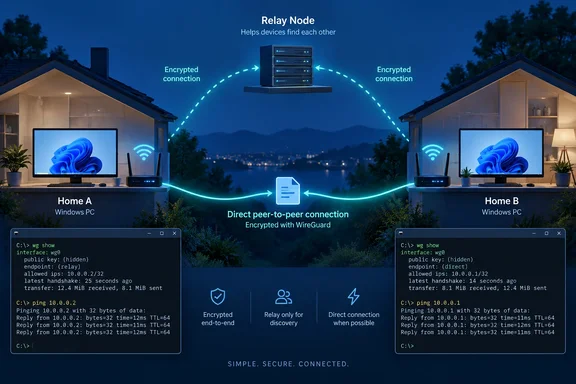
How two PCs without public IPs find each other
Tailscale's blog lays out the process. The machine running the listener:
- Creates a keypair, either temporary or named and reused
- Picks a DERP relay server, either one you name or a rate-limited relay run by Tailscale
- Builds a Tailcat address: a string starting with
tcthat encodes the public key and the relay details - Shares that string "out of band", meaning you send it yourself, directly or through a DNS TXT record
The connecting machine contacts the relay named in the address and sends a MEOW message. If the listener accepts that client's key (you can restrict which keys it accepts), it sends a MEOW back. Onyimadu reported that the reply he got said "Meowed."
After that, the connection runs over WireGuard through a userspace TCP stack built into the app. Windows never sees the internal Tailcat IP addresses. Your operating system only sends relay traffic and UDP packets that punch through each router's NAT. Tailcat also installs no virtual network adapter and doesn't change your routing table.
In Onyimadu's test, the first reply came through the relay, and the link then switched to a direct path between the two PCs. That is the good outcome, but it's not guaranteed. Tailscale says that if both sides sit behind a hard NAT with no port-mapping services, traffic stays on the DERP relay. Tailscale's hosted relays are bandwidth-limited and available in only a handful of regions. If you run your own DERP server, you set the limits.
In short: the relay introduces the two machines. A direct connection is the goal, and the relay carries the traffic when a direct path can't be made.
Installing Tailcat on Windows
Tailcat doesn't use the Tailscale client installer. GIGAZINE's Windows walkthrough describes the steps:
- Download and save the latest Windows ZIP file from the repository's Releases page. Right-click the saved file and select 'Extract All' to unzip it.
- The file tailcat.exe located in the unzipped folder is the binary for executing the command.
- On the PC you want to reach, run
tailcat. It picks a relay region and prints its newtc…address. - Send that address to the other PC by a private channel, then use it there to connect.
GIGAZINE also points out that on Windows, you can pipe 'clip' after a command to put the output into the clipboard. That's handy, because the addresses are long.
There's no installer and no admin prompt, which matters in support work. Still, the person on the other end has to download, unzip and run a command-line tool, so it's easier than a VPN signup but not effortless.
What you can do once connected
Onyimadu tried several jobs. His commands match what Tailscale describes.
Pipe a file. With no port number, the Tailcat server writes whatever it receives to standard output, just like netcat. His example:
# On the receiving PC:
tailcat > archive.tar.gz

# On the sending laptop:
tailcat tc8f9a2b1c4d...
No cloud upload is involved.
Receive-only drop boxes. tailcat recv creates a write-only share, so someone can send you files without being able to browse a folder on your machine.
Share one service and forward it to a local port. This was his favourite:
# On the remote machine:
tailcat serve 80

# On the laptop:
tailcat forward tc8f9a2b1c4d... 8080:80
Opening [url]http://localhost:8080/[/url] on the laptop loaded the web app running on the other PC. Browsers, database clients and other tools just see a local port.
Run existing programs through it. Tailscale's blog describes a client mode that starts a local SOCKS proxy and launches a program such as curl with the proxy settings already applied. Programs that know nothing about Tailcat can use it that way.
One caveat: none of this makes Tailcat a remote desktop tool. It moves bytes and TCP connections. If you want to see someone's screen, you still have to run a remote desktop service yourself.
Tailcat vs. Tailscale
Onyimadu uses the full Tailscale product every day. He argues Tailcat isn't a "Tailscale-lite" but a different tool for a different job:
| Tailcat | Tailscale | |
|---|---|---|
| Core purpose | One-off connection | Ongoing private network |
| Account needed | No | Yes |
| Managed tailnet | No | Yes |
| Central policy/management | No | Yes |
| Best fit | A single task | Repeated access across devices |
The full client is built for the long term. Tailscale's Windows documentation notes that the current version of the Tailscale client available for download requires Windows 10 or later or Windows Server 2016 or later, and you can use Windows registry values to apply system policies to Tailscale for Windows. That kind of fleet management is exactly what Tailcat leaves out. Tailcat suits a five-minute job on a machine you'll never touch again. For your NAS, your laptop and your company's endpoints, use the full product.
Security: handle the address like a password
By default, anyone who has the Tailcat address can start a connection. Treat it as a secret: don't paste it into a group chat or commit it to source control.
Publishing the address as a DNS TXT record is convenient. Onyimadu warns that bots constantly scan DNS records, though, so a published address stops being secret, and your server then needs to decide which client keys it accepts.
The bigger caveat is in the project's own security policy on GitHub. It says the Tailcat wrapper is "an early experimental tool" that was originally designed for one person running both ends. Its threat model "hasn't historically included malicious adversaries." That's awkward for remote support, where by definition two different people are involved. The project advises care about accepting addresses from people you don't trust, and about serving them "powerful things" such as shells, writable folders or exit nodes.
The same file lists bugs that outside researchers have already reported and Tailscale has fixed:
- In version 0.4.0, senders to a
tailcat recvdrop box could overwrite existing files and probe for filenames. Uploads are now stored under names the server chooses, and accepting folders requires the separate--accept-dirsflag. - Invalid addresses were passed unchecked to ssh/scp child processes.
- Mistyped addresses leaked to DNS as hostname lookups.
- A crafted
MEOWpacket could crash a listener. An anonymous stranger could trigger this through the relay.
All are fixed, which is how open-source hardening should work. They also show that the underlying WireGuard encryption doesn't cover the wrapper around it. Keep Tailcat updated.
For Windows admins and helpers:
- Share only the one service you need, never a whole shell or drive
- Send addresses over a private channel, and restrict accepted client keys where you can
- Use temporary keys for one-off jobs
- Check commands against the version you're actually running
- Before using it on managed devices, check whether the lack of central logging, identity and policy meets your organisation's rules
The bottom line
Tailcat gives two private PCs a way to talk without making either one public. For IT people who already have a terminal open on two machines and just need a file copy or a port forward, it can replace a lot of router settings and firewall exceptions. It's also experimental: its own maintainers say it wasn't built for use between parties who don't trust each other. It works well for quick jobs, as long as you're careful about who gets the address and what you expose.
References
- Tailscale’s new tool can connect two PCs even when neither has a public IP - MakeUseOf MakeUseOf · 2026-09-28T15:00:15+00:00
- SECURITY.md github.com
- github.com github.com