

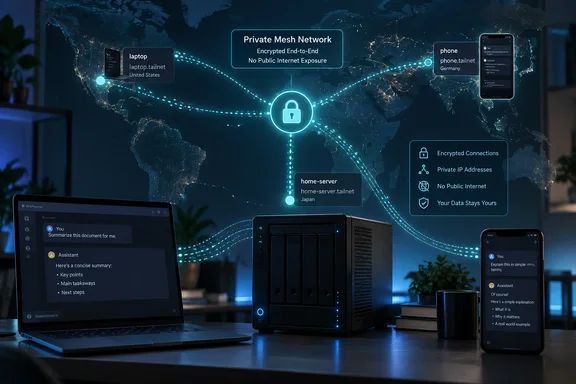
XDA’s setup uses RikkaHub on a phone and Pi on a Mac to reach an OpenAI-compatible endpoint hosted in Ireland. The writer reports using it from Portugal and Taiwan, with a more noticeable initial response delay from Taiwan but usable streaming afterward. Those are observations from one deployment, not a performance guarantee for every connection.
The broader approach has a documented precedent. Tailscale’s May 2025 guide describes remotely accessing a self-hosted AI stack built with Ollama and Open WebUI, using Tailscale Serve to provide TLS-protected access within a private Tailscale network. That is a different application stack, but it supports the same architectural choice: keep inference on your own machine and provide private remote connectivity to it.
Tailscale changes where a local LLM can be reached
A working local model already has most of what this arrangement needs. The server loads the model and handles inference—the process of generating responses—while a client sends requests and displays the results. Tailscale supplies the connection between those components when they are on different networks.
In XDA’s deployment, vLLM serves an OpenAI-compatible API. That compatibility lets RikkaHub and Pi treat the privately hosted endpoint as a configured model provider. The client still needs the correct server address, service port, API path, model selection and any authentication the deployment requires; Tailscale does not supply or translate those application settings.
The hardware in the account is substantial. XDA describes a two-DGX-Spark cluster running GLM-5.3 Flash, identified as a 320-billion-parameter model using a 4-bit-per-weight EXL3 quantization. It also reports using Qwen 3.8 27B on a home server through the same networking arrangement. Those model and serving specifications are the writer’s description of the installation; the available primary documentation here establishes the networking procedure, not those particular model configurations.
That distinction keeps the useful lesson in view. There is no need to replicate an expensive cluster to benefit from remote access. What the connection needs is a running service that the client can use, regardless of which suitable model the operator has chosen.
Tailscale calls its private network a tailnet. Its device-connectivity documentation says enrolled devices receive stable Tailscale IP addresses and MagicDNS names, allowing them to remain addressable as their underlying networks change. The same documentation makes an essential prerequisite explicit: Tailscale provides connectivity, but the destination still needs to run the service being accessed.
For a Windows laptop, this means the networking arrangement can be useful without moving the inference workload onto Windows or onto the laptop itself. The reported Pi experience was on macOS; it should not be read as a tested Windows-client configuration. Windows is, however, explicitly covered in Tailscale’s subnet-route documentation.
Direct Tailscale access and subnet routing solve different problems
The first deployment choice is whether to install Tailscale directly on the inference host or use another machine as a gateway to its existing LAN address. Both can provide remote reachability, but they have different operational boundaries.
Tailscale’s subnet-router documentation recommends direct installation where possible for configuration simplicity, security and performance. In that design, the inference server becomes a tailnet device, as do the phone and laptop. The client connects to the server’s Tailscale IP address or MagicDNS name, using the inference service’s actual port and API configuration.
MagicDNS is a naming convenience. According to Tailscale’s documentation, it automatically registers names for tailnet devices, so a memorable machine name can replace a numeric address. It is available on all plans and is enabled by default for tailnets created on or after October 20, 2022. It does not replace the running service, open a firewall rule or grant permission to connect.
XDA chose the other design: a subnet router. This is a Tailscale-connected gateway that advertises a route to a private network, letting enrolled devices reach services on that network even when those services do not run Tailscale themselves. The writer uses this to reach the head Spark node at its ordinary LAN address.
That choice preserves one endpoint address at home and abroad. At home, the client reaches the server over the LAN; away from home, Tailscale carries traffic to the subnet router, which forwards it toward the same destination. In the reported configuration, this also lets the writer turn off Tailscale while at home without changing the model-provider address.
| Connection design | Address used by the AI client | Practical consequence |
|---|---|---|
| Tailscale runs on the inference host. | The host’s Tailscale IP address or MagicDNS name. | The server is directly enrolled in the tailnet, avoiding a separate subnet gateway. |
| A subnet router provides access to the inference host. | The inference host’s private LAN address. | The same LAN address can work remotely, but the gateway, route approval and access policy become additional dependencies. |
| A subnet router provides access to a wider LAN range. | Private addresses within the advertised range. | More services become routable, making deliberately limited access rules especially important. |
Neither design requires routing all ordinary internet activity through home. Tailscale’s documentation distinguishes a subnet router, which provides access to selected private networks, from an exit node, which routes general outbound internet traffic. A private model endpoint does not, by itself, require an exit node.
An unauthenticated LLM makes tailnet policy a critical boundary
The most consequential detail in XDA’s setup is that its vLLM endpoint has no API token. The writer originally intended it for home-network use and relies on tailnet access to reach it remotely. Publicly exposing that same unauthenticated endpoint would materially change who could attempt to use it.
A private network can be a useful access boundary, but its membership and policy deserve explicit attention. Tailscale’s device-connectivity documentation says the default access-control policy allows connections among tailnet devices. Installing the software therefore does not automatically create a narrowly restricted rule permitting only one phone to reach one inference port.
The practical recommendation follows directly: limit access to the inference service to the devices or users that need it. Tailscale supports access controls through ACLs or grants in its policy file. A shared tailnet should have a deliberate rule for the server and service port, rather than relying on the assumption that every enrolled device should have equivalent access.
Subnet routing adds a second distinction that is easy to miss. Tailscale documents route approval and access permission as separate mechanisms. Approving a route makes that route available to clients; access rules determine which traffic may use it. A successful route advertisement is not evidence that the resulting permissions are appropriately narrow.
Application authentication is also a separate decision. Where the inference server supports it, requiring credentials adds a check beyond network reachability. The evidence here does not establish the exact authentication coverage of the writer’s vLLM configuration, so it would be unsafe to give a universal command and claim that it protects every endpoint. The supported guidance is to retain private network access and configure the serving application’s supported authentication for the APIs being used.
Privacy deserves equally careful wording. XDA’s workflow sends prompts to hardware controlled by the writer instead of to a hosted inference provider. That provides control over where inference runs. It does not establish what every client, server log or backup retains, and a VPN cannot decide those application-level policies.
There is also a concrete difference between the two connection designs. With direct installation, the inference host itself participates in Tailscale’s encrypted network. With subnet routing, Tailscale reaches the gateway, which forwards traffic onto the conventional LAN. Whether that final application connection also uses TLS depends on the service configuration. This helps explain why Tailscale recommends installing its client directly on endpoints where feasible.
Build the remote LLM connection in verifiable stages
The safest starting point is an inference endpoint that already works locally. Remote networking should be added to a known-good service, so that a failed request does not leave you simultaneously diagnosing the model, API client and VPN.
Before changing routing or permissions, record the endpoint settings that currently work: the server address, port, API path, model identifier and authentication requirements. These are specific to the serving application and client. XDA’s account establishes that RikkaHub and Pi worked with its endpoint, but does not provide a universal configuration screen or endpoint string for every release of those applications.
Direct installation keeps the first deployment smaller
For an inference host that supports the Tailscale client, the documented connection workflow can be applied without advertising a LAN subnet:
- Install Tailscale on the inference host and the remote client device, and enroll both in the intended tailnet.
- Confirm that the model-serving application is running on the host and identify its listening port.
- Open the Machines page in the Tailscale admin console and identify the host’s Tailscale IP address or machine name.
- Review the tailnet access policy and allow the intended client to reach the inference service.
- Configure the AI client to use the host’s Tailscale address or MagicDNS name while preserving the endpoint’s required port, API path, model identifier and credentials.
- Send a request from the remote client and confirm that the intended model returns a response.
A successful request verifies more than device membership: it demonstrates that the client can reach the running application and use its API. A device appearing in the admin console does not establish those application-level facts.
Tailscale’s troubleshooting guidance provides a useful failure sequence. Check device reachability with tailscale ping, verify the connection information, confirm that the service is running on the expected port, and check both the host firewall and tailnet policy. This is preferable to broadly relaxing access controls or creating an internet-facing port forward in response to a failed request.
An optional MagicDNS name introduces a naming layer, so the numeric Tailscale address is useful when isolating a name-resolution problem. If the address works but the name does not, keep the investigation focused on DNS configuration instead of changing the model server.
Subnet routing requires both forwarding and permission
A subnet router is appropriate when the inference host cannot run Tailscale, or when preserving a private LAN address is an intentional requirement. Setting one up requires administrative access to the gateway and tailnet.
For Linux gateways, Tailscale’s documentation requires IP forwarding and explicitly cautions that the firewall should deny forwarding by default to prevent unintended routing. The following Linux instructions are not Windows server commands and should not be applied as a platform-neutral recipe.
On a Linux system with an /etc/sysctl.d directory, Tailscale documents these commands to enable forwarding:
echo 'net.ipv4.ip_forward = 1' | sudo tee -a /etc/sysctl.d/99-tailscale.conf
echo 'net.ipv6.conf.all.forwarding = 1' | sudo tee -a /etc/sysctl.d/99-tailscale.conf
sudo sysctl -p /etc/sysctl.d/99-tailscale.conf
Its documented fallback for systems without that directory uses /etc/sysctl.conf:
echo 'net.ipv4.ip_forward = 1' | sudo tee -a /etc/sysctl.conf
echo 'net.ipv6.conf.all.forwarding = 1' | sudo tee -a /etc/sysctl.conf
sudo sysctl -p /etc/sysctl.conf
These change the gateway’s forwarding configuration. They belong after the firewall review, not before it.
With Tailscale installed on that gateway and forwarding configured, the remaining stages are:
- Advertise the private subnet containing the inference service.
- Approve the advertised route in the Tailscale admin console, unless a configured
autoApproverspolicy handles that approval. - Review or add access rules for the intended users, destination and service.
- Verify that a tailnet client can reach the subnet router.
- Ensure the remote client accepts subnet routes.
- Configure the AI application with the inference host’s LAN endpoint and test a request.
Tailscale gives this route-advertisement example:
sudo tailscale set --advertise-routes=192.0.2.0/24,198.51.100.0/24
Those are documentation example ranges, not the reader’s home network. Replace them with the actual subnet or subnets you intend to advertise. Advertising routes also deserves a scope decision: an inference task should not casually become a reason to grant access to every service on a home or office network.
For manual approval, open Machines in the admin console, locate the gateway’s Subnets entry, select Edit in its Subnets section, select the intended routes and save. Then review Access controls. Keeping those two tasks separate reflects the underlying distinction between making a destination routable and permitting a client to reach it.
The client-side behavior differs by operating system. Tailscale says Windows, Android, iOS, macOS and tvOS automatically pick up subnet routes. Linux clients require route acceptance to be enabled:
sudo tailscale set --accept-routes
That command belongs on a Linux client that needs those routes; it is not a prerequisite to paste indiscriminately onto every machine.
For verification, the gateway’s Tailscale IPv4 address can be obtained with:
tailscale ip -4
Being able to reach the gateway verifies one stage of the path. The final success condition remains a working API request to the inference host’s LAN address. If the gateway is reachable but inference is not, check the advertised route, its approval, client route acceptance, access policy, destination firewall and running service.
Keep the gateway’s authentication lifecycle visible
A subnet router adds an availability dependency beyond the inference machine. Both must remain available for remote requests to succeed.
Tailscale documents another failure case: when a connector’s device key expires, its advertised routes remain configured but become unreachable. This is intentional fail-closed behavior. The continued presence of a route therefore does not guarantee that the gateway can still carry traffic.
The documentation identifies disabling key expiry or configuring high availability as ways to prevent that disruption. For a personal deployment, the immediate decision is whether to maintain periodic reauthentication or deliberately change the connector’s expiry behavior. That choice should be made before relying on the service while travelling.
Distance adds waiting time without moving the inference workload
XDA’s travel observations illustrate the experience, but they are qualitative. The writer reports acceptable latency between Portugal and the Irish home server, and a more noticeable delay from Taiwan before tokens began arriving. Once output started streaming, the experience remained usable.
There are no timing measurements in the account that would justify a promised response time, a fixed geographical limit or a performance comparison against a particular hosted provider. The useful distinction is between waiting for a response to start and reading output as it arrives. In this deployment, longer distance was more apparent at the beginning of the interaction than during sustained streaming.
The account includes a practical workflow beyond a chat demonstration: using a local Whisper setup to transcribe audio and the home-hosted LLM to clean up the transcription while in Portugal. The remote connection made an existing model useful away from its host without requiring the writer to carry the inference hardware.
The writer also reports retaining the same models, endpoints and a 512K context length while travelling. That context capacity is a property reported for the serving configuration; Tailscale neither supplies nor increases it. Remote reachability preserves access to the configured service.
Availability and cost remain local responsibilities. The Spark machines must stay powered on, and XDA identifies their ongoing energy use as a trade-off. The account provides no power measurements or cost calculation, so it cannot establish that this is cheaper than a subscription for every reader. An existing always-on server and a cluster bought specifically for inference present very different purchasing decisions.
There is a client-side constraint as well. XDA reports Android’s single-active-VPN limitation as a choice between Tailscale and another VPN. For someone who depends on a separate VPN connection, that can be a more immediate obstacle than inference speed. The workflow should be evaluated against the phone’s actual networking requirements, particularly if another VPN is required for work.
Choose private LLM access before adding public infrastructure
Start with direct Tailscale installation when the inference host supports it; choose subnet routing when reaching an existing LAN endpoint is a real requirement. Neither choice demands changing models, buying a DGX Spark or moving all internet traffic through home.
The concrete takeaways are:
- Confirm that the inference endpoint works locally, and preserve its required API settings when changing the address used by the client.
- Use the host’s Tailscale address or MagicDNS name for direct access, and use a subnet router deliberately when the LAN address must remain the endpoint.
- Review access controls before relying on a tokenless API, because Tailscale’s default connectivity policy is broader than a single-client, single-service rule.
- Treat route advertisement, route approval and traffic permission as separate checks when configuring subnet access.
- Test the intended remote client and account for gateway availability, device-key expiry, host power consumption and competing VPN requirements.
The value of this arrangement is that a locally operated model can remain useful after its owner leaves home. XDA’s account demonstrates that experience; Tailscale’s documentation supplies the routing and access-control boundaries needed to reproduce the underlying design. For a reader with a working private endpoint, the next decision is a modest networking deployment—with explicit permissions and an availability plan—rather than a new inference platform.
References
- I put my local LLM on Tailscale, and now I can use it from the other side of the world XDA · 2026-09-22T16:30:21+00:00
- Connect to devices · Tailscale Docs tailscale.com
- Subnet routers · Tailscale Docs tailscale.com