

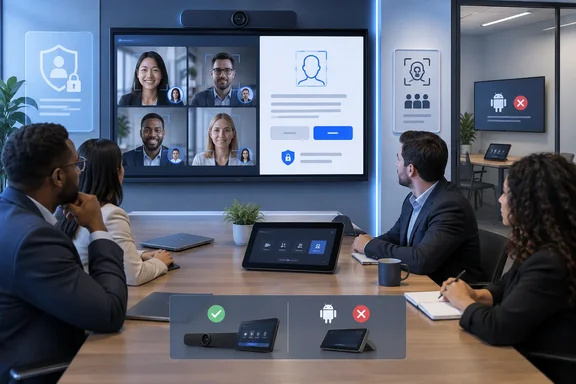
The important limitation is buried beneath the broad platform list in Microsoft 365 Roadmap item 570846. Microsoft lists Android, desktop, iOS, and Mac as rollout platforms for enrollment, but Microsoft’s current Teams Rooms documentation says face-based People Recognition is available only on Teams Rooms on Windows. Teams Rooms on Android supports voice recognition, but not face recognition.
For IT teams, this makes the November rollout less of a general Teams feature than a new onboarding path for a narrowly defined hybrid-meeting capability. Organizations considering it will need to make decisions about consent, room hardware, Teams Rooms Pro licensing, camera support, signage, and who is allowed to create biometric profiles before the user-facing prompt arrives.
The change is enrollment, not a new room-recognition engine
Microsoft’s roadmap describes Express face enrollment as a faster route to creating a face profile. Instead of requiring a user to find the Recognition settings and complete a manual setup flow, Teams will allow a user to opt in and use the device camera during eligible meetings.
That profile is then available to supported Teams Rooms experiences. Microsoft’s People Recognition documentation says face recognition uses an enrolled employee’s face profile to identify them when they appear on a room camera. The practical result is that an in-room attendee can appear by name rather than as an anonymous “Participant 1,” while their contributions can be associated with them in the meeting record.
Microsoft already positions these profiles as inputs for speaker attribution, meeting recap, Cloud IntelliFrame, and Copilot. Express enrollment does not change the purpose of the biometric profile. It removes friction from the step that has historically limited adoption: convincing employees to set one up before they enter a room where identification would be useful.
That distinction should temper expectations. A user who completes face enrollment will not automatically be identified in every Teams call, every meeting room, or every camera view. The room, meeting type, invite list, license, recognition settings, and hardware all remain part of the equation.
Windows Teams Rooms remains the actual deployment target
Microsoft’s own feature-comparison documentation draws the clearest operational boundary. Video-based People Recognition is available on Teams Rooms on Windows and unavailable on Teams Rooms on Android. Microsoft also says face recognition requires either a supported camera or a Windows Teams Rooms device using Cloud IntelliFrame.
The roadmap’s Android, iOS, Mac, and desktop labels therefore appear to describe where users may be able to enroll, rather than where face recognition will run in conference rooms. That is a consequential difference for organizations standardizing on Android room systems. Their employees may be able to create a profile, but Microsoft’s documented room experience will not use face recognition on those Android devices.
Microsoft also limits People Recognition to Teams Rooms systems with a Teams Rooms Pro license. A Windows room running a Basic license, or a standard Teams client connected to a conference-room camera, should not be assumed to gain the capability merely because users can enroll through Teams.
Cloud IntelliFrame adds another constraint. Microsoft says it can match in-room participants against invited attendees who have completed enrollment, but only in scheduled Teams meetings. Meet Now sessions are excluded. A person who walks into the room without being on the invitation will also remain unidentified, even if they have an existing face profile and have been recognized in that room before.
This prevents the system from becoming a general-purpose room surveillance tool, at least in the documented implementation. It is designed to associate people with a known meeting roster, not to identify every person a camera happens to see.
Better Copilot attribution depends on more than enrollment
The business case Microsoft is making is straightforward: Copilot summaries and recaps are more useful when Teams knows who spoke or appeared in a room. Without recognition, hybrid-meeting transcripts often attribute in-room contributions to the room itself, or label participants generically as “Speaker 1” and “Participant 1.”
Face recognition can improve the visual side of that problem, particularly where a Teams Rooms camera captures multiple people. But it does not substitute for transcription, correct meeting scheduling, attendee invitations, or room configuration. Microsoft’s Teams Rooms guidance says that unrecognized people remain anonymous in the video experience, and speaker identification also depends on the relevant room and meeting settings.
For administrators, this means the quality of downstream Copilot output remains conditional. A polished face-enrollment flow may increase the number of enrolled users, but it does not guarantee that every note, recap, or attribution will be accurate. Recognition is only as useful as the room camera’s framing, the supported hardware deployment, the scheduled-meeting roster, and the policy configuration.
There is also a feature-boundary issue worth watching. Microsoft’s roadmap language refers to “eligible meetings” but does not yet define every meeting type in which Express face enrollment will be offered. It also does not state whether the camera capture happens entirely in a desktop-style enrollment interface, during a live meeting experience, or through a distinct consent screen before profile creation. Those details matter for privacy review and help-desk documentation, and Microsoft has not published them in the roadmap item.
Admin policy review should happen before November
Microsoft says admins can enable or disable Express face enrollment for their organization. Existing Teams documentation shows that administrators already control manual face and voice enrollment through CsTeamsAIPolicy, including the EnrollFace setting, while recognition on individual Teams Rooms can be enabled separately through room device settings or meeting policies.
Microsoft’s current guidance recommends configuring recognition at the device level in the Teams Rooms Pro Management Portal or on the room console. It says the meeting-policy approach will be deprecated in the future. That means an organization needs to inspect two related but distinct controls:
- Users need permission to create and manage their recognition profiles.
- Rooms need separate permission to use those profiles for face recognition.
The November roadmap entry does not identify the exact PowerShell parameter or Teams Admin Center setting that will govern the new express flow. It is therefore too early to assume that disabling the current manual EnrollFace setting will definitively block it, or that an existing enrollment policy will automatically govern the new prompt. Microsoft needs to document whether Express face enrollment reuses CsTeamsAIPolicy, introduces a new policy setting, or applies a different control model.
That gap is significant because Microsoft’s published enrollment guidance says existing voice and face enrollment policy settings are enabled by default. Organizations that have never made an affirmative biometric-policy decision should not treat that default as a completed privacy assessment. They should verify their tenant configuration, identify Teams Rooms that have face recognition enabled, and decide whether the convenience of faster enrollment aligns with internal policy.
Consent is necessary, but it does not settle compliance
Microsoft says users must opt in to create a profile and can unenroll later. Its documentation also says voice and face profiles are encrypted, used for Teams recognition functions, and are not used to train Microsoft models. Administrators can delete enrollment data through Teams Admin Center, while profile export remains under the user’s control.
Those statements address several important controls, but they do not eliminate an employer’s responsibilities for biometric data. Microsoft’s Cloud IntelliFrame guidance explicitly tells organizations to comply with local requirements for notice, consent, and retention, and advises installing appropriate signage outside rooms where the feature is enabled. Microsoft also states that Cloud IntelliFrame is not intended for use in Illinois because of uncertainty around the scope of that state’s biometric law.
The cautious operational approach is to treat express enrollment as a new way to collect an existing class of sensitive data, not as a routine Teams client convenience. Security, privacy, labor-relations, and facilities teams may all need to be involved. A pop-up offering enrollment during a meeting can be technically opt-in while still creating practical questions about whether employees understand where the profile will be used, how long it will be retained, and how they can remove it.
Organizations should also consider the human side of the experience. If a meeting recap identifies some people by name and others as anonymous participants, the output may create confusion or perceived inequity. Clear internal communication can prevent employees from treating enrollment as mandatory when Microsoft describes it as voluntary.
November is the planning milestone, not the finish line
Roadmap item 570846 is marked In development with general availability targeted for November 2026 in Microsoft’s worldwide standard multi-tenant cloud. As with other Microsoft 365 roadmap dates, that is a deployment target rather than a promise that every tenant, client, and room configuration will receive the feature on the first day of the month.
The immediate work for Teams administrators is narrower than a tenant-wide client rollout: inventory Windows Teams Rooms Pro systems, confirm which rooms have supported cameras or Cloud IntelliFrame, review biometric enrollment and recognition policies, and decide whether room signage and employee notice need revision.
Express face enrollment may solve a real adoption problem for organizations already committed to People Recognition. But it will not make face identification universal across Teams hardware. In November, the organizations best positioned to benefit will be the ones that have prepared their Windows Teams Rooms environment and made the policy decision before Teams asks employees for their faces.