

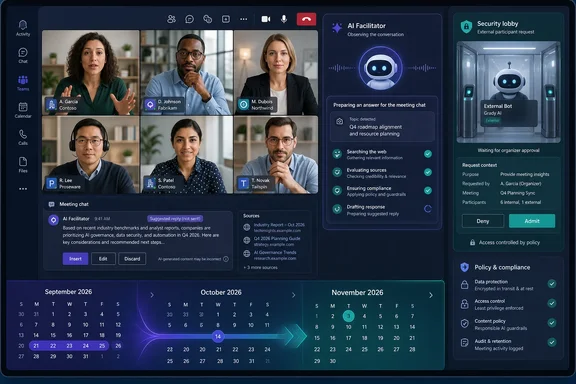
The schedule correction matters more than a routine roadmap slip. Facilitator is moving from a meeting assistant that reacts to a participant’s request into one that monitors the conversation, decides a factual gap exists, searches the web, and posts an answer into the meeting chat. Microsoft says it expects this to happen infrequently—typically less than once per meeting—but the change expands what the service processes in real time and gives IT a new configuration dependency to review before it arrives.
UC Today also flagged Microsoft’s growing administrative route for external AI meeting assistants. Microsoft Learn documentation confirms that Teams administrators now have a meeting-policy control to detect external bots and require an organizer to admit them. The two developments point in opposite operational directions: Microsoft’s own agent will become more proactive inside a meeting, while outside agents face more explicit gatekeeping at the lobby.
Facilitator’s September rollout has become a November deployment
Microsoft’s Message Center notice, MC1409304, was originally published on June 29 and updated on August 26. Its prior schedule had Targeted Release beginning in early September and worldwide availability beginning in late September. Those dates have now shifted roughly two months, even though UC Today’s September 14 article still described the functionality as a September rollout.
This is a real feature delay, not merely a documentation refresh. Administrators planning a September pilot should not expect the capability to be present yet; the present deployment target is early November for Targeted Release tenants. Organizations outside that ring should plan against mid-November through mid-December, rather than scheduling user communications or policy decisions around the original September dates.
The feature itself is Microsoft 365 Roadmap item 558341. Microsoft says Facilitator will watch meeting conversations for explicit or implicit information needs—such as an unanswered factual question or a participant expressing uncertainty—then retrieve a web result and publish an answer in the chat. It is not designed to respond constantly, and Microsoft says its responses will be limited by the meeting’s agenda signals and conversational context.
That guardrail is useful, but it is not a substitute for governance. The product is still making a judgment about whether a discussion contains a knowledge gap, whether an answer is relevant, and whether bringing an outside web result into the meeting is appropriate. The response is generated from a live interpretation of the conversation, rather than an attendee explicitly deciding to search and share material.
Web search is the actual control point
Microsoft makes Facilitator opt-in at the meeting level. A user with a Microsoft 365 Copilot Premium license must add or enable it for the meeting; other participants do not need the license to receive the agent’s messages. Tenant administrators can disable Facilitator altogether, and a participant can stop its behavior during a meeting by removing the agent.
The more consequential dependency is the Copilot web-search setting. If web search is disabled, Microsoft says Facilitator will not generate these proactive answers. In other words, turning on Facilitator alone does not create the new behavior; it requires the organization’s Copilot web-search policy to allow it.
For IT teams, that means the rollout should not be treated as an incremental note-taking update. Facilitator already produces live notes, tracks agendas and timers, summarizes decisions, and can create documents from meeting material. The new capability introduces a route for information from public web search to enter an active meeting chat based on agent detection rather than a direct user prompt.
Microsoft’s own compliance assessment acknowledges the material change: the service processes meeting conversations in real time to detect knowledge gaps and produce contextual answers. That does not mean Teams is suddenly storing meeting recordings in a new place, but it does mean organizations need to reassess the existing combination of transcription, Copilot, web grounding, retention, sensitivity labels, and meeting policy—not evaluate Facilitator in isolation.
The feature is restricted to standard Teams meetings. It does not apply to Teams calls, webinars, or town halls. Microsoft says it can operate in meetings containing external or cross-tenant participants, which is important for customer, supplier, and partner meetings. But Microsoft’s Facilitator support documentation adds a practical limitation that the rollout notice does not spell out: external participants are excluded from viewing all real-time Facilitator updates. Administrators should test the exact experience before promising a shared AI-assisted workflow to every attendee in a cross-company meeting.
Teams is also putting external meeting bots under policy control
The other September-era Teams change is less flashy but may be more immediately useful to security and collaboration administrators. Microsoft’s Teams documentation now describes controls for external meeting-assistant tools, including transcription and note-taking bots that join meetings as participants.
With bot detection enabled, Teams identifies external bots using signals from the meeting-join process, marks them as bots, and sends them to the lobby regardless of the meeting’s usual lobby configuration. Organizers—and, depending on the meeting setting, presenters—must explicitly admit the bot. Teams also displays a warning intended to make that decision deliberate rather than accidental.
Microsoft frames this as a response to a straightforward risk: a third-party assistant can record or transcribe a meeting, export meeting data to a vendor outside the organization’s compliance boundary, and do so without participants recognizing that the attendee is software rather than a colleague. Teams cannot eliminate that risk through identity labels alone, but moving detected bots into the lobby gives hosts a chance to stop an unwanted recording before content is exposed.
The policy is available under Meetings > Meeting policies > Meeting join and lobby in the Teams admin center. Microsoft documents the default posture as requiring approval when a bot is detected. The setting can be applied globally or through policies assigned to specific users or groups, allowing an enterprise to keep a stricter default while granting a controlled exception to teams that rely on an approved external meeting assistant.
This is different from Teams app governance. A third-party agent that users install in Teams is managed through app and agent controls, while an outside meeting bot is an attendee attempting to join a meeting hosted by the organization. The distinction matters: blocking a Teams app does not necessarily address an external service that arrives through the meeting lobby, and allowing a collaboration app does not automatically authorize every recording bot that uses a meeting link.
Microsoft’s bot documentation contains a PowerShell mismatch
Administrators automating the policy should be careful with Microsoft’s current documentation. The external-bot management page repeatedly says the setting belongs to Set-CsTeamsMeetingPolicy and identifies the property as ExternalBotAccessMode. Yet its pasted PowerShell examples use Set-CsTeamsEventsPolicy, a different cmdlet name.
Microsoft’s Teams PowerShell release notes and the cmdlet reference support the text, not the example: ExternalBotAccessMode was added to Set-CsTeamsMeetingPolicy and New-CsTeamsMeetingPolicy in the Teams PowerShell module’s May 2026 release. The cmdlet reference also identifies RequireApprovalWhenDetected as the default behavior.
There is a second naming inconsistency. The external-bot page’s table uses AllowBots, while the dedicated PowerShell parameter reference lists AllowAllBots as the value that disables bot detection. The safest approach is to inspect the parameter and accepted values in the installed MicrosoftTeams module before pushing a tenant-wide change, rather than copying either web-page example into a production automation runbook.
Microsoft also concedes that detection is not perfect. Some bots may evade classification, while legitimate human attendees may be misidentified as bots. A host can correct a false positive for a particular meeting by admitting the attendee and marking them as not a bot. That limitation makes the control a valuable admission checkpoint, not proof that every undisclosed transcription service will be stopped.
What Teams administrators should do before November
The combined change creates a simple priority: establish who is allowed to introduce AI-generated material into meetings, through which service, and with whose approval. Facilitator’s proactive web answers and external-bot enforcement address different paths into the same collaboration space.
Administrators should take the following steps before the Targeted Release rollout begins:
- Review whether Copilot web search is enabled and whether that setting matches the organization’s policy for meetings involving confidential projects, regulated data, customers, or external partners.
- Decide whether Facilitator should be available to all licensed users or limited to a pilot group through the built-in Teams agents controls in the Teams admin center.
- Test Facilitator in standard internal meetings and in meetings with external or cross-tenant participants, paying particular attention to what each attendee can see in chat and notes.
- Confirm that meeting organizers and co-organizers, rather than ordinary presenters where feasible, control lobby admission for detected external bots.
- Audit existing Teams meeting policies and PowerShell module versions before automating
ExternalBotAccessMode, because Microsoft’s public documentation currently contains mismatched cmdlet and value names.
Microsoft has set the default external-bot posture to require approval, which is the right starting point for most tenants. The more difficult policy decision is Facilitator: the capability will be manually enabled per meeting, but it can draw on web search and react to discussions without a participant initiating that specific query. By mid-December, the practical question for Teams administrators will be less whether Copilot can summarize a meeting and more whether their meeting rules are ready for an agent that decides when to speak.
References
- Microsoft Teams & Copilot: What's New in September 2026 - UC Today UC Today · 2026-09-14T11:01:00.343000+00:00