

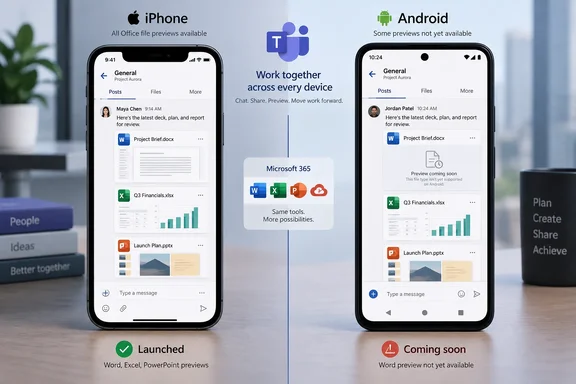
That is a material discrepancy in Microsoft’s own public-facing records. The Microsoft 365 Roadmap entry, last updated September 2, says Word, PowerPoint, and Excel files “now open” in the standardized preview in Teams on Android and iOS. Yet Message Center post MC1310683, updated August 5 and tied to the same roadmap ID, explicitly limits the new Word viewer to iOS. Neither record supplies a Teams mobile version number, a phased rollout breakdown, or a date for Word on Android.
For organizations supporting Teams on employee phones, the practical conclusion is straightforward: treat the rollout as complete for Excel and PowerPoint on both supported mobile platforms, but do not promise the same Word preview path to Android users until Microsoft resolves or updates the conflicting documentation.
Roadmap ID 558679 changed status after the rollout moved twice
Microsoft created the roadmap entry on March 19, 2026, with general availability initially listed for June. Its status is now “Launched,” and the public entry retained “June CY2026” as its availability date even though the associated Message Center announcement described a later deployment schedule.
According to MC1310683, Microsoft first expected worldwide general availability by late June. It revised that date to late July on July 7, then said on August 5 that rollout would complete by the end of August. The roadmap finally moved to launched status on September 2.
Those dates expose a common problem with using the Microsoft 365 Roadmap as an operational change calendar. The entry’s availability month is a planning field, not a reliable record of when every tenant and platform received a feature. In this case, the detail that matters to help desks — which app has which previewer — sits in the Message Center text, while the later roadmap summary compresses that qualification away.
The third-party Microsoft 365 Message Center Archive preserves the earlier notice and its revision history, including the August update. SharePoint Stuff’s March roadmap roundup repeated the original broad roadmap description, but did not add a device-level verification of how the feature behaves. No independently reported mobile test results establishing a newly available Android Word preview surfaced alongside Microsoft’s September roadmap status.
Excel and PowerPoint are cross-platform; Word is the unresolved exception
Microsoft describes the feature as a standardized preview experience intended to improve loading speed, reliability, and visual consistency when users open Office files in Teams. Its Message Center notice is more specific than the roadmap card:
- PowerPoint and Excel previewers are available in Teams for Android and iOS.
- Word preview is currently available in Teams for iOS only.
- Microsoft says Android support for the Word previewer is coming later.
- The previewer can open protected files directly within Teams.
- Microsoft says the rollout does not change existing file storage, sharing permissions, or policies.
The roadmap’s wording is therefore directionally correct — the initiative covers Teams on Android and iOS — but technically incomplete if interpreted file by file. A Teams Android user opening a spreadsheet or presentation should receive the updated preview experience. A Teams Android user opening a Word document may not, despite the roadmap’s blanket statement that Word files now open in the standardized viewer.
Microsoft has not described the rendering technology behind the new previewer, specified which Word document formats are covered, or published performance measurements. “Faster performance” and “improved reliability” are vendor claims, not a benchmark result. Teams, OneDrive, and SharePoint already support previews for common Office formats including DOC, DOCX, XLSX, XLSB, PPTX, PPTM, and CSV, according to Microsoft’s file-preview support documentation; the change here concerns the experience and handling path in Teams mobile, not basic Office-file compatibility.
The protected-file claim also deserves careful reading. Microsoft says users will be able to open protected files directly in Teams previews, but it does not identify the protection types, the licensing conditions, or whether behavior differs between Microsoft Purview Information Protection, sensitivity labels, encrypted attachments, or Intune-managed applications. IT departments should not infer a new policy bypass or a new compliance control from a viewer change that Microsoft says leaves policies intact.
A preview is still separate from an editing workflow
This rollout is about viewing files inside Teams, not a promise of full mobile editing in the Teams canvas. Microsoft’s September 2025 Microsoft 365 Insider post on related iPhone and iPad behavior said Teams, Outlook, and OneDrive would provide optimized Office-file previews but direct users to the standalone Word, Excel, or PowerPoint apps when they need to edit.
That earlier iOS change provides useful context for the latest Teams update. Microsoft has been separating lightweight in-app consumption from the dedicated Office mobile apps used for editing. The standardized Teams preview should reduce friction for someone reading a shared deck, checking a spreadsheet, or reviewing a document from a chat. It does not remove the need to deploy or permit the standalone Office apps when users must change the file.
For admins, that distinction matters most in bring-your-own-device deployments. Microsoft Intune app protection policies can control corporate data in supported managed apps and restrict data transfers between managed and unmanaged applications. Those controls remain relevant when a user leaves Teams to edit a document in Word, Excel, or PowerPoint. Teams preview behavior alone is not an endpoint-management strategy.
Microsoft’s own notice says no administrator configuration is required: the feature is enabled by default. That reduces rollout work, but it also means there is no tenant switch to use as a staging control or rollback mechanism. If the changed UI alters a support workflow, the first meaningful control is validation and user communication rather than a setting in the Teams admin center.
What IT teams should validate now
A short mobile test is justified because Microsoft’s documentation is internally inconsistent and because the feature switches on automatically. Test accounts should cover both managed and unmanaged scenarios where those are permitted by company policy.
- Open a normal and a protected Word document, Excel workbook, and PowerPoint presentation from both a Teams chat and a channel on iOS.
- Repeat the Excel and PowerPoint tests on Android, then record the actual Word-document behavior rather than assuming the roadmap text means feature parity.
- Confirm the transition from preview to editing opens only the approved Word, Excel, and PowerPoint apps and still follows the organization’s Intune app-protection rules.
- Capture the Teams app version, device OS version, account type, document location, and protection state for any preview failure before escalating it to Microsoft.
- Update internal instructions that tell staff to expect an identical Office preview experience on Android and iOS, because Word is the documented exception.
The test of protected files is particularly important for organizations that use sensitivity labels or require managed-app handling. Microsoft says protected documents can now open inside Teams previews, while also saying it has not changed sharing permissions or policies. Those statements can coexist, but only a tenant-specific test will show whether the expected label, authentication, app-protection, and edit-handoff sequence remains intact for the organization’s configuration.
The release is real, but the platform matrix is not settled
Teams mobile users should see a more uniform way to preview Office files, and Microsoft’s August Message Center schedule indicates the broad rollout finished by the end of that month. For PowerPoint and Excel, the supported Android/iOS matrix is clear. For Word, it is not.
Until Microsoft publishes a revised Message Center notice, an Android availability date, or version-specific release notes confirming that Word preview has reached Android, Roadmap ID 558679 should be read as a launched program rather than proof of identical Word behavior across both mobile platforms. The immediate operational consequence is modest but concrete: support teams should expect Teams Android Word previews to remain a separate case from Excel and PowerPoint, even after the roadmap has been marked complete.
References
- Microsoft Teams: Standardized preview experience for Word, PowerPoint, and Excel files Microsoft 365 Roadmap · 2026-09-02T22:56:59.2759925Z