

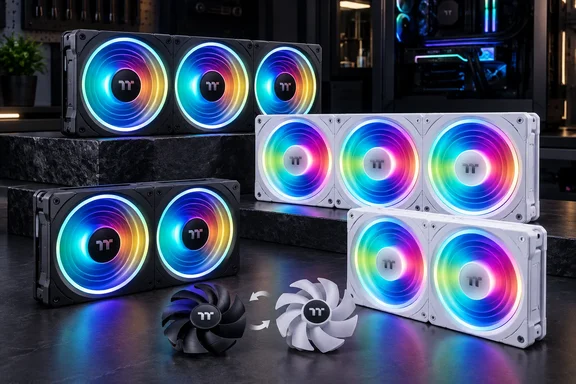
SWAFAN UNIFY folds the separate-fan install into one frame
The main change is physical. Thermaltake's product page says the frame design reduces the number of cables and mounting points, and that assembly needs just a set of cables and four screws at the corners. A standard three-fan radiator setup usually means twelve screws and several sets of fan and lighting leads. Here you secure one rigid unit at its outer corners.
The two model numbers describe the size of the fan bank. According to the Chinese outlet IT Home, the range comes in 240 (2×120) and 360 (3×120) versions, so the 240 has two 120 mm fans in a row and the 360 has three. Those are the usual lengths for 240 mm and 360 mm radiators and top-mounted fan rails. Thermaltake frames UNIFY that way too. When it first previewed the line at CES in January, it said the single-frame structure creates seamless, low-cable fan banks suited for high-end radiators or showcase builds.
Thermaltake doesn't list the exact cable count or connector layout. "A set of cables" clearly means fewer leads than separate fans would need, but it isn't a count, and nothing published so far says UNIFY uses the magnetic daisy-chain connectors found on Thermaltake's SWAFAN EX INFINITY. The CES announcement actually treats them as different approaches. It says SWAFAN EX INFINITY includes magnetic connection for quick connection, and SWAFAN UNIFY features a single-frame structure.
The frame has a clear downside. With separate fans you can space them out, mix sizes, or move one fan somewhere else in the case. A fixed frame needs mounting holes that match its spacing along the whole length. That's normally true of 240 mm and 360 mm radiators and rails, but builders with unusual cases should check before buying. Thermaltake hasn't published case or radiator compatibility guidance for UNIFY.
Swappable blades change intake and exhaust without turning the fan around
SWAFAN's signature trick carries over. The release says UNIFY comes with standard fan blades pre-installed and reverse fan blades included in the package. The reverse blades are shaped to push air the other way. So a bank facing the same direction can work as intake or exhaust depending on which blades are fitted.
The main reason for this is how the build looks. Fans normally have a "front" side with the lighting and a plain back side with the motor struts. Flip a normal fan to reverse the airflow and you show that plain side. Thermaltake says UNIFY keeps the lighting fully visible in different airflow directions. On a single-frame unit that matters more, because you can't flip just one fan. You'd be flipping all two or three together.
Thermaltake hasn't published a blade-swap procedure for UNIFY, and none is given here. For older SWAFANs, product listings describe it as simple: pop out the fan blades, switch up the blades and press them back in. There's also a maintenance point from independent testing of an earlier model. Reviewing the SWAFAN EX 12 in 2023, Hardware Busters warned that after you remove the fan's blades several times, you will have to lubricate the bearing, which can be challenging if the fan is installed vertically. That finding is about the older fan, not UNIFY. Still, if you swap blades a lot, expect some upkeep, and it's easier to do before the frame goes on a radiator.
The same review questioned how much people actually use the feature. The reviewer said the swappable blades might be innovative, but I am unsure how many will utilize them. The reasoning holds for UNIFY too: the feature helps most when you know you'll use the same fan bank in different roles, for example front intake now and top exhaust after a case change.
Thermaltake's SWAFAN UNIFY performance figures, and where they conflict
All the performance numbers come from Thermaltake. Both blade sets run on PWM control from 500 to 2,000 RPM on a 28 mm-thick fan body, a few millimetres deeper than the common 25 mm case fan. Thermaltake's rated maximums are below.
| Blade set | Max airflow | Max static pressure | Rated noise |
|---|---|---|---|
| Standard (pre-installed) | 58.13 CFM | 2.86 mm-H₂O (release figure) | 30 dB-A |
| Reverse (included) | 56.15 CFM | 2.23 mm-H₂O | 32 dB-A |
Fan specs have two headline numbers. Airflow, in cubic feet per minute (CFM), measures how much air a fan moves with nothing in its way. Static pressure, in millimetres of water, measures how well it pushes air against resistance such as radiator fins or a dense filter. On Thermaltake's own figures, the reverse blades give up a little airflow and about 22% of their static pressure, and they are rated 2 dB louder. That makes the standard blades the stronger choice for pushing air through a radiator. The reverse blades are the ones you pick for looks.
The standard-blade pressure figure doesn't match everywhere. The release says 2.86 mm-H₂O, while IT Home's September 2 report gives 2.85 mmAq. Another report puts it at 2.67. A difference of 0.01 is a rounding issue, but 2.67 would be a real gap. Until Thermaltake's spec sheet or independent testing settles it, treat the pressure rating as approximate. The reverse-blade numbers are the same in the release and in IT Home's report.
The release doesn't say how the noise was measured. It doesn't say whether 30 dB-A is for one fan or the whole frame, or at what distance and speed. So don't use it to predict how loud your PC will be. IT Home also reports that the fans use an HDB bearing (a fluid-dynamic sleeve type). The English release doesn't mention bearing type, and nobody has published a rated lifespan or warranty length yet.
For context, Hardware Busters' measurements of the SWAFAN EX 12 found that it didn't impress and suggested buyers wanting strong performance below 30 dBA should look elsewhere. UNIFY is a different product with different blades and a thicker body, so that verdict doesn't carry over. It's a reminder that this series has been sold more on features than on raw cooling.
Dual Infinity Mirror Lighting and motherboard sync on SWAFAN UNIFY
UNIFY uses the lighting design Thermaltake introduced across several fan lines this year. The CES announcement lists CT EX INFINITY ARGB, SWAFAN EX INFINITY ARGB, and SWAFAN UNIFY ARGB models, all sharing dual-depth lighting, a 28 mm thick fan body, along with screw-hiding pads. The product page describes the result as a layered effect with two rings on the hub and frame. According to the release, the inner ring is fixed white and only the outer ring can be set to any colour. If you want a fully single-colour build, for example all red, that white inner ring will always be visible.
Lighting runs on standard 5 V addressable RGB (ARGB), which means it plugs into a motherboard's 5 V ARGB header rather than a proprietary controller. The release lists compatibility with ASUS, MSI, GIGABYTE and ASRock sync software. The Snow product page goes further, saying UNIFY supports ASUS, MSI, GIGABYTE, BIOSTAR, and ASROCK sync software. That page also mentions 16.8 million colors.
Plug the lighting into a 5 V ARGB header, not an older 12 V RGB header. The two are physically different and not interchangeable. Neither the release nor the product page gives a board-by-board compatibility list.
The rubber corner pads round out the design. Thermaltake says they cover the four mounting screws to give a smooth surface that makes the lighting stand out. They're purely cosmetic, but they also mean pulling off pads whenever you need to get at the screws.
SWAFAN UNIFY pricing and availability outside Taiwan are still unclear
The release gives no US or European price and no release date. The only prices published so far are for Taiwan. IT Home reports official prices of NT$1,790 for the SWAFAN 240 UNIFY ARGB and NT$2,190 for the 360. Treat those as regional pricing, not a guide to what other markets will pay.
Thermaltake's US store already lists a SWAFAN UNIFY series filter alongside 240 mm and 360 mm fan sizes, so the line is part of the North American catalogue. The filtered listing doesn't clearly show which price belongs to which model. Thermaltake's global site has product pages for all four versions: 240 and 360, each in black and Snow.
What this means for you
Buy UNIFY if you want a tidy, uniform-looking fan bank on a standard 240 mm or 360 mm mount and value easy installation over flexibility. If you care most about quiet running or radiator cooling per dollar, wait for independent measurements. Thermaltake's specs are all you have for now, and one of them already disagrees between sources.
- The SWAFAN 240 UNIFY holds two 120 mm fans and the 360 holds three. Each mounts with four corner screws and one set of cables instead of separate hardware per fan.
- The pre-installed standard blades are the better performers on Thermaltake's own figures. Fit the included reverse blades only when you need the opposite airflow and want the lit side facing out.
- Thermaltake rates both blade sets at 500–2,000 RPM on a 28 mm-thick body. Check clearance in tight cases or thick-radiator setups, because Thermaltake hasn't published compatibility guidance.
- The lighting needs a 5 V ARGB motherboard header. The inner ring stays white whatever colour you set the outer ring to.
- If you plan to swap blades often, expect some bearing maintenance, based on independent testing of an earlier SWAFAN.
- The only published prices are Taiwan's NT$1,790 and NT$2,190, so wait for your local retailer's listing before budgeting.
The single frame is the real change here, and it's a practical one: a three-fan radiator install goes from lots of screws and cables to one rigid unit with four screws. The swappable blades and two-ring lighting are refinements of what Thermaltake already sells. Buyers will know more once independent reviews confirm the airflow and pressure figures and show how loud a full 360 frame really is, and once Thermaltake publishes pricing outside Taiwan.