

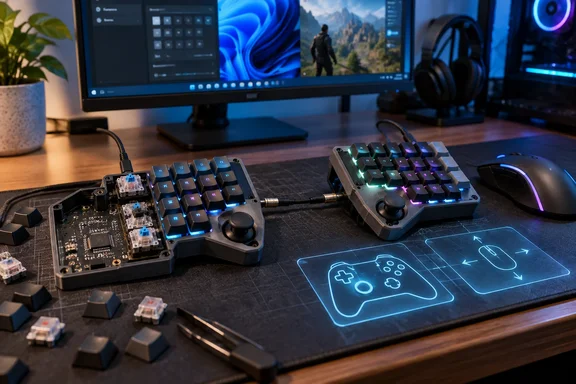
TechPowerUp first highlighted the project’s unusual combination of a 76-key ortholinear layout and two integrated joysticks. The underlying project material now provides a more useful picture for prospective builders: Tiwaz is real, its source files are public, its Crowd Supply listing is live in a “Coming Soon” state, and its maker has documented how the joystick modes work. But it is not yet a ready-to-buy keyboard, and one of its configuration claims needs more careful reading than the marketing copy suggests.
A split board that does not require both halves
Most split keyboards are built around typing posture. Tiwaz instead treats the left and right modules as symmetrical, self-contained input devices that can be joined for typing or separated for specialized jobs. Each half has 38 hot-swap MX-style switch positions, plus six auxiliary buttons intended for media controls but remappable in firmware.
That symmetry has a straightforward Windows gaming payoff. A right-handed player can use the left half as a conventional keypad beside a mouse; a left-handed player can move the mouse to the left side and place the right module on the other side. The hardware does not force a left-side-only keypad layout, which is still common in dedicated gaming keypads.
The distinction is more practical than the claim that this is among the few keyboards for left-handed gamers might imply. Split gaming keyboards such as Kinesis’s Freestyle Edge have existed for years, and specialized one-handed controllers are plentiful. What Tiwaz adds is a mirrored, open hardware design where either half has the same joystick capability, key count, and programmable controls. That could make it a compelling project for users whose preferred mouse hand is not the one assumed by mainstream keypad makers.
The halves connect through an AUX TRS connector for power and data, while USB-C connects a half to the PC. Strube explicitly warns that only one half should be connected to the host at once. The PCB includes an ideal diode intended to guard against accidental dual USB connections, as well as a resettable fuse and ESD protection, but those safeguards should not be treated as an invitation to plug both sides into a Windows machine.
The joystick is the actual experiment
Tiwaz has joystick sockets on both halves, with support for two Alps Alpine parts: a conventional tilting stick and a PSP-style sliding stick. They are ribbon-cable-connected rather than permanently soldered, and the PCB exposes joystick signal pads for custom work. That is a meaningful serviceability choice in a category where thumb controls can be the part most likely to be swapped for feel, wear, or experimentation.
The firmware offers three modes selectable at runtime. Digital mode maps four directions and a center press to ordinary key-style input, useful for arrow keys or a game-specific binding. Analog mode exposes the control as gamepad axes plus a button. Mouse mode turns the stick into a pointer, with a press acting as a click; the project documentation says a movement within 500 milliseconds of pressing starts a drag, while a longer press becomes a right-click.
Windows should recognize the analog mode through its standard USB game-controller stack rather than needing a vendor driver. The underlying QMK firmware supports HID joystick devices with analog axes, buttons, and a hat switch, so the implementation is not relying on a proprietary translation layer. QMK also supports analog joystick pointing-device input, which explains how the mouse mode can work without installing a separate Windows utility.
There is a limit hidden inside that flexibility: gamepad input and keyboard input are not interchangeable in every PC game. A title may accept simultaneous mouse-and-keyboard input but switch its interface prompts or input priority once it sees a controller. Other games accept a controller only through XInput, whereas a standard USB HID gamepad can behave differently. Tiwaz’s analog stick is potentially useful for movement, camera control, menus, or accessibility mappings, but builders should validate it in the actual games they play before designing an entire keymap around it.
QMK support is real; Vial readiness is less settled
Tiwaz runs on an STM32F401 microcontroller rather than the RP2040 used in earlier prototypes. Strube says he changed controllers after encountering BIOS and UEFI initialization failures with the RP2040 design. That is a noteworthy Windows PC detail: a keyboard that works after the operating system loads but cannot reliably register during early boot is frustrating for anyone who enters firmware setup, selects a boot device, or manages a machine without a second keyboard.
The project’s GitHub repository currently includes firmware, PCB files, and documentation, while the Crowd Supply page says final manufacturing documentation will arrive before fulfillment begins. That puts Tiwaz beyond a concept render or a hand-wired one-off. It is nevertheless still an early hardware project, not a shipping retail product with a stated price, delivery schedule, warranty policy, or final production bill of materials.
More importantly, the project’s wording around Vial configuration is ahead of its current upstream status. The GitHub README says QMK support is under a pending pull request and says Vial support will follow after the QMK submission is merged. Vial itself requires keyboards to run dedicated Vial-compatible firmware before its GUI can configure them fully.
Tiwaz can therefore be configured through its supplied firmware work today, but prospective builders should not interpret “QMK and Vial support” as confirmation that the board has already landed in the official QMK and Vial repositories. That affects maintenance: an out-of-tree firmware build can work perfectly well, but firmware updates, troubleshooting, and long-term reproducibility rest more heavily on the project maintainer until upstream integration is complete.
The supplied reporting also calls Vial browser-based. Vial does offer a web option, but its primary product is a cross-platform GUI application for Windows, Linux, and macOS. Either route still requires compatible firmware on the keyboard; the software does not eliminate the need to flash an initial Vial build when one is not already installed.
The physical layout is a trade-off, not a universal upgrade
Tiwaz uses a 7-by-5-plus-3 ortholinear arrangement on each side: 76 primary keys across the pair, six additional buttons, and one thumb joystick per half. Ortholinear means the rows and columns line up rather than staggering sideways like a standard desktop keyboard.
That layout is a deliberate fit for a compact programmable board, since layers can make normally distant functions reachable without leaving the home position. For typing, users already comfortable with ortholinear boards may appreciate the symmetry and the substantial 38-key-per-half count. The six auxiliary controls and joystick-click functions can also reduce the need for awkward chorded layers in games that use many bindings.
Gaming is less clear-cut. In the project’s Reddit discussion, Strube acknowledged the problem of reaching keys that fall in the same ortholinear column while holding a movement key, particularly in games built around the familiar WASD cluster and number-row commands. His answer is to use game-specific layouts and offload functions to the joystick and auxiliary buttons. That may suit MMOs and action RPGs with dense bindings, but it is a layout problem every buyer needs to solve personally—not something hot-swap sockets or RGB lighting can fix.
The board’s gasket-mounted plate and internal damping are also worth putting in proportion. They may improve sound and feel, but they create a thicker, more involved case than the minimal designs favored by some ergonomic split boards. Tiwaz is aiming for a customizable desktop controller with an ergonomic split, rather than the lightest possible travel or tenting-oriented keyboard.
The immediate value is for builders, not shoppers
Strube’s repository makes Tiwaz unusually approachable for a project at this stage: the design files are public, 3D-printable case options are available, the firmware is inspectable, and there is an assembly video. The maker says likely Crowd Supply offerings will include completed keyboards and modular DIY components, but neither price nor launch date has been announced.
For Windows enthusiasts, the project is most interesting as an example of what QMK-based hardware can do when a keyboard stops treating gamepad and mouse functions as external accessories. It can provide a programmable HID keyboard, a compact USB controller, and a basic pointing device from the same physical layout—with no proprietary driver or cloud account in the advertised workflow.
For now, the practical choice is clear: builders can examine the files and accept the normal risks of self-sourcing parts, printing or fabricating a case, soldering, and managing firmware. Everyone else is waiting for the Crowd Supply campaign to publish final pricing, production timing, and the actual configuration path for a finished Tiwaz.
References
- Modder Builds Split Keyboard With Integrated Joysticks and One-Handed Gaming Functionality TechPowerUp · 2026-09-19T04:43:54+00:00