

Ubuntu 26.10's Tiling Assistant Gets a Drop-Zone Layout Picker
OMG! Ubuntu's Joey Sneddon reported the change after spotting it on a test install. The story has been picked up elsewhere, but those copies are syndicated or aggregated versions of his post, not separate reporting. The code itself can be checked against a primary record: the public pull request in Ubuntu's Tiling Assistant repository on GitHub.
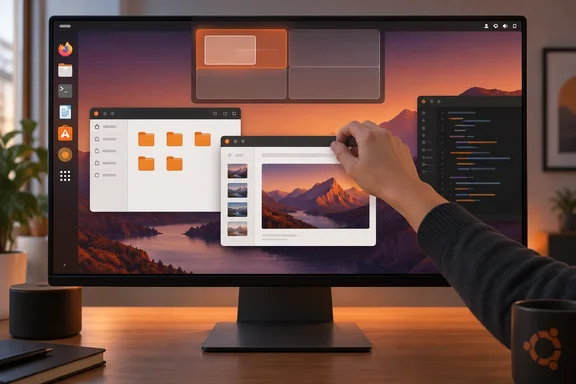
Here is how it works. When you drag a window, a layout picker with a small set of preset drop zones moves in from the top of the display. You move the window over a zone, a "ghost" preview shows where it will land, and releasing the mouse tiles it there. Sneddon calls this a "dropzone" concept and notes that Windows 11 users and people who have tried the third-party Tiling Shell extension for GNOME Shell will recognise it, since they broadly do the same thing.
Once the window is placed, Ubuntu's existing snap assist takes over. Tiling Assistant suggests other open windows to fill the remaining space, just as it does after edge-snapping. Drop a window into a quarter of the screen from the picker, and you'll be offered windows for the other three quadrants. This is not automatic tiling. Tiling Assistant is not an automatic tiling system, so windows won't be tiled when they open, and you still choose which suggested window goes where.
The comparison with Windows is fair, and the project uses it itself. Ubuntu's repository describes Tiling Assistant as "an extension which adds a Windows-like snap assist to GNOME," which also expands GNOME's 2 column tiling layout. The new picker is Ubuntu's own component, though, built into the extension's drag-to-tile handling. It is not a copy of every Windows 11 snapping feature.
The Picker Shows Ubuntu's Existing Snap Layouts in a New Place
The picker changes how you reach layouts, not which layouts exist. It offers the same arrangements you already get by dragging a window to a screen edge. You can't add or edit them. Tiling Shell, by contrast, lets you mix sizes, columns and rows. Sneddon's summary is that the picker "doesn't divvy up screen space any better" because it is still limited to two columns and two rows.
Here is the before and after for anyone running Ubuntu's default desktop:
| Before (edge-snapping only) | Ubuntu 26.10 test builds (with picker) | |
|---|---|---|
| How to tile | Drag a window to a screen edge or corner, or use a keyboard shortcut | Same methods, plus dropping the window on a zone in the top picker |
| Available layouts | Halves and quarters, up to a 2×2 grid | The same set |
| Custom layouts | Not available in the picker workflow | Not available |
| Fill-the-gaps suggestions | Offered after snapping | Also offered after using the picker |
| On/off control in Settings > Ubuntu Desktop | Not applicable | None found in the tested build |
The main gain is discoverability. Edge-snapping works, but nothing on screen tells you it's there, and corner targets can be fiddly on large or multi-monitor setups. A picker that appears the moment you pick up a window shows you the options. That is our own reading of the interaction; nobody has published measurements showing it makes people faster.
It also helps to know how new quarter tiling is on Ubuntu. Ubuntu started shipping a built-in extension called Ubuntu Tiling Assistant with 23.10 Mantic Minotaur, and quarter tiling, per Sneddon, only arrived in 2023. So the picker isn't Ubuntu catching up on geometry. It makes geometry Ubuntu already had easier to find.
Pull Request #452 Shows a Community Contribution That Landed Late
GitHub supports the reported timeline. Pull request #452, "Add Feature: Tiling option menu," was opened by contributor ochi12 on May 13, 2026. The first description lists multi-monitor testing with Mutter's devkit, a basic pop-up animation, and an open question: "prefs option to turn it off?" On June 5, a maintainer replied that it was "Very nice and a welcome addition, thanks! Will do a proper review soon!" GitHub records the merge into the repository's main branch as 30 commits on September 20, 2026, after the maintainer wrote that he had reviewed it and adjusted a few minor things. According to OMG! Ubuntu, the code came from one of the designers working on the Yaru icon theme.
The commit history shows a working interaction, not a visual mock-up. The first commit adds a layoutPicker.js file that exports LayoutPicker, "a widget where user can hover-select a tile layout." Later commits connect it to the extension's window-move handler and tiling preview, so snapping from the picker actually works. They also block normal snapping while you're choosing from the picker, add a reveal animation, and fix bugs such as the picker appearing in random positions and triggering at the wrong bounds. Other commits add a maximise tile, fix shadow clipping, redesign the icons to suit vanilla GNOME, and add signals to keep the picker correctly positioned. None of this proves the beta is bug-free, but the picker was clearly designed and reviewed as a real feature.
The timing is the awkward part. Canonical's official Stonking Stingray schedule sets User Interface Freeze for September 10, Beta Freeze for Monday September 21, the mandatory Beta for September 24, Final Freeze and Release Candidate for October 8, and final release for October 15. The merge came ten days after UI Freeze and one day before Beta Freeze. Sneddon notes that UI Freeze is the point after which major user-facing changes are not supposed to arrive. Neither the schedule nor the pull request says whether the change got a formal freeze exception, so the record shows a late merge and nothing about how it was approved.
One gap matters if you're testing. The GitHub merge confirms the code is upstream, but no public record reviewed here names the Ubuntu archive package version or beta image that contains it. Sneddon saw the picker on his test install. If you're running the 26.10 Beta, the only reliable check is to drag a window and see whether the picker appears.
No Off Switch in Ubuntu Settings, but Tiling Assistant Has One
The biggest practical catch is control. Sneddon found no off-switch for the layout picker, not in Settings > Ubuntu Desktop. He also finds it visually distracting to see the picker bar animate every time you move a window, and he doesn't expect everyone to want it on.
A switch does exist, one layer down. An off switch is available in the extension's settings – along with other settings Ubuntu doesn't expose, like configurable gaps – but you can only get to that via third-party tools, such as the Extensions Manager desktop app. The upstream history matches this: the merged pull request adds an enable/disable preference, on by default, and later moves it into its own preferences group. The two findings don't conflict. The extension has the setting, and Ubuntu's own Settings app simply doesn't show it.
This split between the two settings screens is a known pattern for Tiling Assistant. Ubuntu shows a simplified set of controls, and the "enhanced tiling" setting can be found under the Ubuntu Desktop section. The extension's full preferences have long been reached through a separate tool. It's FOSS's guide to Ubuntu 24.04 tiling says that to control the Tiling Assistant, you install the GNOME Extension Manager app.
Turning the Ubuntu 26.10 layout picker off
This applies only to Ubuntu 26.10 pre-release builds that include the picker. Menu labels and packaging could change before October 15.
- Install a GNOME extension-management app such as Extension Manager. Ubuntu doesn't include one by default.
- Open it and find Ubuntu Tiling Assistant in the list of installed system extensions.
- Open that extension's preferences and look for the layout-picker enable/disable option. Upstream code puts it in a dedicated preferences group, but the exact label in shipping builds hasn't been confirmed.
- Turn it off, then drag a window to check that the picker no longer slides in. Edge-snapping and the fill-the-gaps suggestions are separate behaviours and should keep working.
To undo it, go back to the same preference and switch it on again. Because this is an extension setting and not an Ubuntu Desktop setting, the gaps option and other controls on that screen belong to the extension too. Don't disable the whole Tiling Assistant extension when you only mean to hide the picker, since that also removes Ubuntu's enhanced tiling.
What This Means for Windows Switchers and Dual-Booters
If you're coming from Windows 11 or dual-booting, you probably don't need to do anything. Try the picker when 26.10 ships, and hide it through the extension's preferences if the animation bothers you.
People used to Windows' drag-to-top snapping will find Ubuntu 26.10 more familiar than earlier releases. Anyone who wants custom grids, uneven column widths or three-column layouts still has to look elsewhere, because the picker keeps Ubuntu's two-by-two limit. Ubuntu 26.10 is also an interim release, so organisations that standardise on long-term-support releases won't see this in their fleet until it reaches a later LTS, if it does.
- Ubuntu 26.10's layout picker appears when you drag a window and lets you drop it on a preset zone. After that, Tiling Assistant offers other open windows to fill the rest of the screen.
- The picker offers only the halves and quarters Ubuntu already supports through edge-snapping, and it can't create or edit layouts.
- The feature was merged upstream in Tiling Assistant pull request #452 on September 20, 2026, after Ubuntu's September 10 UI Freeze and ahead of the October 15 final release.
- Settings > Ubuntu Desktop had no switch for the picker in the tested build. The Tiling Assistant extension's own preferences include one, reachable through a tool such as Extension Manager.
- Tiling Shell remains the option for GNOME users who want custom mixes of sizes, columns and rows.
- If you're running the 26.10 Beta, drag a window to see whether your build has the picker, because the package version that includes it hasn't been published.
The picker is a small, useful change that makes Ubuntu's existing tiling easier to find, and its first stable test comes with the October 15 release. The main thing left for Canonical is the Settings gap. The extension already has the switch, and adding it to Settings > Ubuntu Desktop would make the picker easy to turn off for people who don't want it. Until then, Ubuntu 26.10 is likely to ship with the picker on by default for anyone who drags a window.
References
- Ubuntu 26.10 adds Windows-style snap layouts OMG! Ubuntu · 2026-09-24T22:01:28+00:00
- Add Feature: Tiling option menu by ochi12 · Pull Request #452 · ubuntu/Tiling-Assistant github.com
- Ubuntu Stonking Stingray Release Schedule - Ubuntu release notes documentation.ubuntu.com