

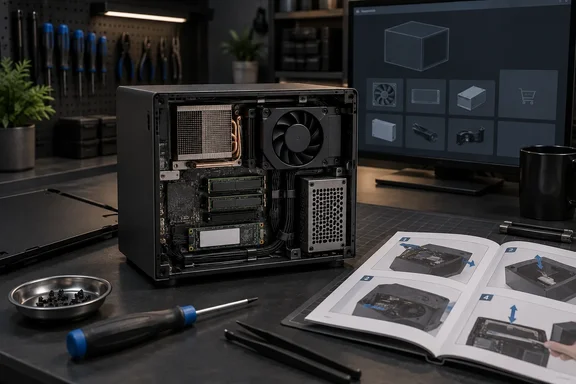
Notebookcheck first reported the guide rollout, while VideoCardz and Hardware Busters independently confirmed that iFixit’s Steam Machine hub now includes the same broad set of procedures. The published material covers 16 replacement guides plus two non-replacement guides: a cleaning and opening procedure, and Valve’s optional “Inkterface” e-ink front-panel project. Hardware Busters reports that the replacement walkthroughs are marked as OEM guides, meaning the instructions originate with Valve rather than being reconstructed solely from an iFixit teardown.
For a living-room PC that Valve has designed to be smaller and more appliance-like than a conventional desktop, that documentation is significant. It confirms that key serviceable items—including memory, storage, fan, I/O boards, and the power supply—are reachable without destructive disassembly. It does not, however, mean that every listed repair is something an owner can complete today.
The repair manual is ahead of the parts catalog
As of September 17, iFixit has not listed Steam Machine-specific replacement components in its store. The company’s existing Valve repair page still foregrounds Steam Deck and Valve Index parts and guides, while the new Steam Machine device page supplies instructions and tools rather than a purchasable parts catalog. The guides reportedly say parts are “coming soon,” but neither iFixit nor Valve has attached a date, price list, regional availability plan, or inventory commitment to that promise.
That gap changes the meaning of several of the new guides. An owner can use the SSD and RAM procedures immediately for upgrades if they source compatible hardware independently. A failed fan, front USB-and-power-button board, rear USB-and-Ethernet board, HDMI-and-DisplayPort board, dedicated SSD board, or proprietary internal power supply is different: the guide identifies the job, but it does not solve the procurement problem.
The same applies most sharply to the motherboard guide. iFixit can show how to remove the board; Valve still needs to make a replacement board available at a tolerable price. For hardware with a semi-custom AMD processor and graphics hardware integrated into the main board, motherboard replacement is likely to be the practical equivalent of replacing the machine’s core computing platform. Documentation is useful for a professional repair shop or a future donor-parts market, but official availability determines whether it is a consumer repair option.
Valve’s prior partnership with iFixit on Steam Deck parts gives the company a precedent for selling official components directly to owners. Yet the Steam Deck experience also illustrates why a repair guide and a repair supply chain should be judged separately. A device remains technically openable when stock disappears; it does not remain equally repairable in practice.
SSD and RAM are the guides owners can act on now
The most immediately useful procedures are the SSD and RAM guides. iFixit explicitly describes the SSD procedure as both a replacement and upgrade path, and its RAM guide likewise covers replacing or expanding system memory. Those are conventional PC maintenance scenarios, and the existence of dedicated guides removes much of the guesswork around cable routing, shields, fastener locations, and the sequence required to get inside the compact enclosure.
The SSD guide includes steps for changing SSD length, a detail that indicates Valve has documented more than a simple like-for-like swap. But owners should resist treating the guide as a shopping list by itself. Storage replacement also requires matching the supported physical format and ensuring that the replacement drive can be installed and recovered properly. Before ordering, users should check the guide’s current revision, examine the machine’s installed drive, and retain the original SSD until SteamOS is restored and working.
Valve’s Steam support documentation provides SteamOS installation and repair options, including recovery and reinstall functions intended to restore the operating system while attempting to preserve games and personal content. That is the missing operational step after a blank-drive swap: storage hardware is only half the repair. Anyone replacing an SSD should prepare recovery media and back up saves or other data that is not already synchronized before opening the system.
The RAM guide has a similar caveat. It establishes that the system memory is physically replaceable, which is better news than the soldered-memory route taken by many compact PCs. But memory upgrades can still create stability and compatibility problems if owners assume any module that fits is supported. The published guide proves access; it does not substitute for Valve publishing an exhaustive approved-memory list or for testing a configuration after the upgrade.
For Windows users, the distinction is worth keeping in mind. The Steam Machine runs SteamOS by default, but it remains a PC platform whose storage and memory changes may be made by people experimenting with alternative operating systems or Windows drivers. A repair guide lowers the physical barrier; it does not add official Windows dual-boot support, validate drivers after a hardware change, or guarantee troubleshooting from Valve for a modified configuration.
The compact layout makes several “replaceable” parts major jobs
iFixit’s difficulty ratings range from “Very easy” to “Moderate,” but the step counts reveal a more useful dividing line than those labels. Replacing the motherboard takes 55 steps, according to Notebookcheck. The heatsink and power-supply procedures each take 57 steps. These are not casual five-minute repairs performed through an access hatch.
The motherboard guide itself shows why. Its sequence runs through removal of internal assemblies, front-port connections, SSD-board cabling, the SSD, power-supply fasteners, and the heatsink before the board can come free. The guide also includes a thermal-material step near the end, which means a board or heatsink repair requires more than a screwdriver and a replacement part. Users need to plan for thermal paste and thermal putty, clean surfaces properly, and reapply material in the right locations during reassembly.
That is normal for a densely packed mini-PC, but it has a direct consequence: the Steam Machine is serviceable without being modular. A failed front-port board may be a modest component replacement; reaching it may still involve enough teardown that an inexperienced owner risks damaging a cable, connector, or thermal pad. iFixit’s photo-by-photo guidance reduces that risk, but it does not eliminate it.
The cleaning guide is therefore the most broadly useful of the batch. It instructs owners to power down the machine, disconnect cables, and remove any microSD card before opening it. It also explicitly connects dust buildup in the fan, heatsink, and vents with excess noise, overheating, and reduced performance. For a PC intended to sit in media cabinets—often with poor airflow and accumulated dust—that is practical preventive maintenance, not cosmetic tinkering.
iFixit also advises leaving several inches of space around the Steam Machine, avoiding carpeted placement, and opening a cabinet door or moving the system into open air if ventilation is constrained. Those recommendations matter more than a repairability score: regular cleaning and adequate airflow may prevent an owner from needing the 57-step heatsink or power-supply route in the first place.
Valve’s Inkterface guide is an unusual signal of openness
One of the 18 guides is not a fault repair at all. The Steam Machine Inkterface Assembly Guide documents a Valve project that puts an e-ink display behind the swappable front faceplate. Hardware Busters reports that the project calls for a 5.83-inch e-ink panel, an Adafruit e-ink breakout board, an ESP32-S3 Feather, five 3D-printed parts, and soldering.
It is an enthusiast project rather than a normal customer-service procedure, but it says something useful about Valve’s approach. The company is willing to document a physical modification that relies on user-supplied electronics, custom fabrication, and code rather than keeping the front panel as a sealed cosmetic surface. The guide is rated moderate and expected to take roughly an hour, so it should be treated as a hobby build—not as a plug-in accessory Valve is selling.
The Inkterface also underlines a broader point about the Steam Machine’s design. Valve has made the enclosure accessible enough to support cosmetic customization, storage and memory upgrades, maintenance, and component-level replacement. The weak link is not knowledge. The weak link, for now, is whether an owner can buy the part named in the guide.
What Steam Machine owners should do now
Owners dealing with a noisy or warm Steam Machine can use the new cleaning guide immediately, provided they follow its shutdown and microSD-removal precautions. Users considering capacity or memory upgrades can now study the relevant procedures before buying components and should prepare SteamOS recovery media before modifying the internal SSD.
For failures involving proprietary boards, the fan, internal power supply, faceplate-related parts, or motherboard, the sensible move is to document the fault and wait for Valve and iFixit to publish actual replacement listings. Disassembling a working machine solely to familiarize yourself with a 55- or 57-step repair is a poor trade while no official replacement component is available.
The new guides make Valve’s Steam Machine substantially more transparent than a sealed console, and they provide a credible technical foundation for repair. They are not yet a complete self-repair program. That status depends on the unanswered question iFixit’s store currently poses: when the documented parts fail, what can owners actually buy—and at what cost?
Update: RAM upgrades require a 49-step teardown and antenna handling (September 18, 2026)
TechRadar reports that the RAM replacement procedure is substantially more involved than the guide rollout initially suggested: accessing the memory takes 49 steps before reassembly.
The report highlights fan removal and the attached wireless antennas as particular trouble spots. One documented method calls for warming adhesive with an iFixit heat pad or hair dryer before detaching the antennas, creating an added risk of damage for inexperienced owners.
That makes RAM physically replaceable, but not a routine upgrade in practice. Steam Machine owners planning a memory change should treat it as a careful, near-full internal teardown rather than an SSD-style access job, and should have suitable heating tools and time for methodical reassembly.
References
- Steam Machine's official repair guides reveal the true trickiness of some upgrades — the RAM especially is causing some raised eyebrows TechRadar · 2026-09-18T11:54:37+00:00
- iFixit publishes repair guides for Steam Machine Notebookcheck · 2026-09-17T14:43:00+00:00