

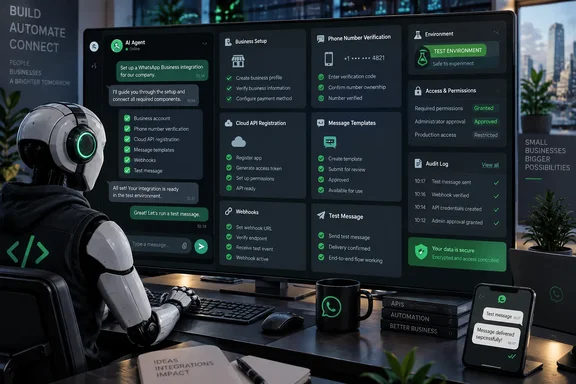
The release is formally described inconsistently across Meta’s own surfaces: the developer-news directory calls it WhatsApp Business Tools MCP, while the accompanying description calls the service Business Messaging MCP. The underlying function is clearer than the branding. It connects an MCP-compatible coding agent to the WhatsApp Business Platform and gives it permissioned access to perform specific administrative and development tasks.
Meta detailed the launch on September 15, and TechCrunch independently reported that the server is intended to handle the tedious onboarding work that precedes a usable WhatsApp Cloud API integration. Mint’s reporting adds an important limitation omitted by the broad “AI handles setup” framing: this is a gradual rollout built for development and testing workflows, rather than production-scale message sending.
An agent can operate the setup, but it does not replace the administrator
The key technical distinction is that Meta is not issuing an autonomous identity to Claude, ChatGPT, Codex, or another connected agent. The agent operates through the permissions of a real person who signs in, chooses an eligible business, and authorizes access. The New Stack reports that a connected agent is scoped to the businesses its administrator explicitly selects, rather than automatically inheriting access to every Meta business associated with that person.
That is better than the alternative, but it means organizations should treat this connection as a privileged integration, not as a convenience extension. A WhatsApp Business account may contain phone numbers, message templates, billing-related configuration, verification status, and webhook endpoints. Those are operational controls around a customer-facing communications channel, not disposable development metadata.
Meta says the server verifies that the user is an app administrator, resolves the attached business, and checks whether WhatsApp’s Terms of Service have been accepted before a tool runs. Mint reports that setting-changing actions require an authenticated user, while read operations run in the user’s own access context and tool calls are logged.
Those controls put a human authorization boundary around the agent. They do not eliminate the risk of an agent making an unwanted but authorized configuration change after an administrator has connected it. The old workflow made people click through several consoles; the new one concentrates the same authority behind natural-language instructions.
For a small business, that can remove real friction. For an IT team or agency supporting multiple brands, it creates a reason to revisit who holds Meta administrator roles before enabling the server. The person connecting an agent may have access broad enough to affect accounts they do not actively manage day to day.
WhatsApp’s approval gates remain in place
The product is most useful for the parts of WhatsApp Business that are mechanical but easy to misconfigure. Meta says an agent can create a WhatsApp Business Account, add and verify a phone number, register Cloud API access, inspect Terms of Service status, create or edit templates, configure callbacks and field subscriptions, and send test messages. It can also surface incomplete prerequisites such as payment setup or business verification.
That is a meaningful reduction in setup friction, especially for developers moving between a Windows code editor, a browser full of Meta consoles, and API references. It also helps with a familiar failure mode in business-platform onboarding: a technically valid integration can still stall because the account, phone number, payment configuration, or verification status is incomplete somewhere else.
But the MCP server does not dissolve WhatsApp’s policy controls. A business can ask an agent to draft or create a message template, but Meta’s approval process still governs whether that template is cleared for use. The same applies to business verification and Terms of Service acceptance. Meta has automated the path through its tools; it has not delegated the platform’s decisions to the connected AI.
That distinction matters particularly for templates. WhatsApp Business uses approved templates for many outbound messages outside an active customer service conversation. Generating template wording with an AI agent may speed drafting, but it cannot guarantee approval, proper categorization, or suitable customer consent practices. Teams should still review the final copy as customer communication, not as developer boilerplate.
The company also has not presented the release as a replacement for a production operations console. Meta’s stated target is development and testing. An agent can help prove that a webhook is receiving events and that test messages work; it is not, at least in this initial release, a green light to hand off campaign operations or large-scale delivery management to an AI tool.
The real benefit is state inspection across a fragmented setup
Meta’s own explanation of the problem is unusually candid: WhatsApp Business setup has required developers to jump among the Developer Console, Business Manager, API references, and an editor, often handling access tokens along the way. The new MCP server gives an agent the ability to inspect and act on that scattered configuration from one conversational workspace.
That makes troubleshooting more significant than account creation. Creating an account is largely a one-time task. Template administration, webhook changes, test-message work, and tracking down why a configuration did not become usable are recurring chores. TechCrunch reported that the new server can monitor conditions that might otherwise fail quietly, including Terms of Service status, payment method configuration, and Business Verification.
Meta recommends using this WhatsApp-specific server alongside its broader Meta Social Technologies MCP. The broader server is designed to discover Graph API endpoints, search documentation, inspect apps, and help troubleshoot errors. The WhatsApp server is narrower: it manipulates the WhatsApp Business objects and setup state. Developers building on Windows should understand that these are complementary connections with different privileges, rather than duplicate plugins.
There is a practical upside to keeping them separate. Documentation search and endpoint discovery are lower-risk activities than phone-number onboarding or template modification. Administrators can assess whether a developer needs both before connecting both to an agent.
What to check before connecting ChatGPT or Codex
The rollout is gradual, and Meta has said the initial version is discoverable through Claude, Codex, and ChatGPT. That availability statement should not be confused with general support for every application that can speak MCP. TechCrunch listed Cursor among the kinds of agents Meta intends to connect, but the current discovery limitation is more restrictive. Organizations should verify the connection path in the agent they actually use instead of assuming an MCP client will expose the service immediately.
Before granting access, the sensible preparation is administrative rather than exotic:
- Confirm that the person connecting the AI agent has only the Meta business and app privileges required for the intended WhatsApp integration.
- Use a non-production WhatsApp Business Account, test number, and test webhook endpoint for initial evaluation, because Meta explicitly positions the release around development and testing.
- Record the existing phone-number, template, webhook, verification, and billing state before an agent makes changes, so an administrator can identify what the tool altered.
- Review the connected agent’s conversation and tool-call records as part of change management, particularly when the agent is instructed to create templates or change callback subscriptions.
- Keep human approval for customer-facing templates, production webhook endpoints, and access changes, even where the MCP server can carry out the API call.
This is a small but important example of where AI agents are moving next: away from producing instructions for an administrator to follow and toward executing those instructions inside vendor systems. The security question is no longer whether an assistant can explain Meta’s configuration screens. It is whether the person who connected it should have been allowed to change those screens in the first place.
A beta that makes WhatsApp easier to adopt
For Meta, reducing WhatsApp Business setup friction serves a clear commercial goal. The company has identified business messaging as a growth area, and TechCrunch noted that paid WhatsApp messaging had crossed a $2 billion annual run rate in Meta’s fourth quarter of 2025. Making Cloud API onboarding less painful gives more businesses a route into that revenue-generating channel.
For developers, the immediate payoff is narrower and more useful: fewer context switches, better visibility into missing setup requirements, and a quicker test loop for a WhatsApp Business integration. The initial server does not make the compliance, permissions, template-review, or production-operations problems disappear. It makes those problems easier to find and act on.
That is enough to justify a careful trial. Teams should start with a test business and a tightly scoped administrator account, then decide whether the time saved in onboarding outweighs giving an AI agent direct access to a live customer messaging configuration.
References
- You can now let AI handle the setup of your Meta WhatsApp Business chats TechRadar · 2026-09-16T16:45:00+00:00