

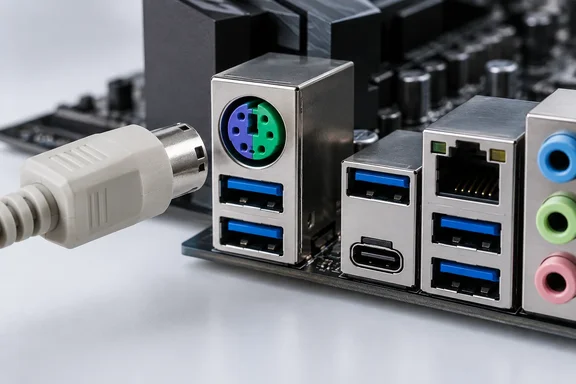
Here's what holds up, what needs correcting, and what a PS/2 port can actually do on a Windows PC today.
Where PS/2 came from and how it works
The PS/2 port took its name from IBM's Personal System/2 line, which launched in 1987. That's 39 years ago this year, which is where the headline's number comes from. The round mini-DIN shape looks like it belongs to the analog era, but PS/2 is a digital serial interface. Its pins handle data, clock, power and ground.
A widely used PS/2 protocol reference, hosted as course material by Leibniz University Hannover, describes it as a bidirectional synchronous serial protocol. The keyboard or mouse always generates the clock, but the host can pause communication at any time by holding the clock line low. The same document says the clock runs between 10 and 16.7 kHz, and that a keyboard buffers up to 16 bytes of pending keystrokes when the host is busy. That's about as simple as a peripheral bus gets.
On a traditional PC, PS/2 input goes to keyboard-controller logic, which today usually sits in the motherboard's Super I/O chip. That chip also handles fan headers, hardware monitoring and other legacy jobs. When a key is pressed, the controller raises a hardware interrupt and the CPU handles the data.
USB works differently. Devices share a bus that the host controller manages, and the host polls each device's interrupt endpoint on a schedule. The word "interrupt" in "interrupt endpoint" is misleading, because the device can't grab the CPU's attention whenever it likes. It waits to be asked. A 1,000 Hz polling rate, which How-To Geek uses as its example, means the device is checked a thousand times a second. That's a common setting, not a universal one.
Section summary: PS/2 is a simple digital bus that uses interrupts and connects to Super I/O logic. USB is a shared, host-scheduled bus. The two are built differently, but different doesn't automatically mean one is better.
The rollover myth that won't go away
The best-known "PS/2 beats USB" argument is N-key rollover (NKRO), meaning every key registers even when many are pressed at once. How-To Geek correctly says that many modern gaming keyboards support NKRO over USB, and that the six-key cap belongs to USB's boot protocol. The headline still suggests USB has a built-in weakness here. It doesn't.
As Wikipedia's entry on key rollover explains, a keyboard with full rollover can correctly detect input from each key on the keyboard at the same time, regardless of how many other keys are also being pressed. The six-key limit comes from one specific USB format. The Deskthority keyboard wiki says the boot protocol for keyboards imposes a limitation of six concurrent keys plus modifiers to be pressed at one time.
The boot protocol exists for firmware. A technical explainer on USB NKRO myths notes that because HID report descriptors are complex, it was felt that BIOS writers might be neither able or inclined to incorporate a full implementation of HID which can parse and understand arbitrary Report Descriptors. The boot keyboard format gave BIOS developers a simple, fixed layout to rely on.
Outside that mode, the limit goes away. The same explainer states plainly that the USB HID device class can support full N-key rollover (NKRO). In boot mode, a keyboard that can't fit the current key state into six slots reports an error code instead. One forensic reference notes that usage ID 0x01 (Keyboard ErrorRollOver) is reported in all key slots when more than six non-modifier keys are pressed.
So why did USB keyboards get a bad name? Partly it's cheap design. The Deskthority wiki observes that many keyboards use only the simple 6KRO boot-protocol, as being able to enter BIOS is considered a vital feature and/or because supporting only one protocol is simpler and "good enough". Good firmware can offer both: the trick for supporting both Boot Keyboard and NKRO is for the keyboard to expose two interfaces — as if it was two keyboards. One is a boot-capable keyboard interface and the other is a keyboard interface with N-key rollover, but with only one being active at the same time.
Firmware bugs can get in the way too. A Linux kernel patch for the Semitek-based "GK6X" keyboards described hardware that is capable of handling arbitrary N-key rollover, but due to a buggy report descriptor, keys beyond the sixth cannot be detected by the generic HID driver.
Section summary: If your USB keyboard drops keys in a chord-heavy RPG, blame the keyboard's matrix, firmware or selected mode, not USB. PS/2 was the easy NKRO option in the early 2000s. Today it's one option among several.
What PS/2 still does that USB can't on some boards
Some motherboard firmware documents a PS/2-only feature: turning the PC on from the keyboard.
ASUS has a support article on enabling "Power On By PS/2 Keyboard" in its BIOS. It is clear that the keyboard must be PS/2, that ASUS BIOS doesn't support power-on from a USB keyboard, and that the option won't appear at all unless a PS/2 keyboard is connected. Here are the steps ASUS gives:
- Power on the PC and press Del or F2 to enter the BIOS.
- On standard ASUS boards the BIOS opens in EZ Mode, so press F7 to switch to Advanced Mode. ROG boards open in Advanced Mode already.
- Go to Advanced → APM Configuration.
- Find Power On By PS/2 Keyboard. It's disabled by default.
- Choose Space Bar, Ctrl+Esc or Power Key, then save and exit.
What success looks like: After a full shutdown, the key or combination you chose powers the machine on.
If it doesn't work:
- The option is missing: check that a PS/2 keyboard is actually connected. ASUS says the menu item is hidden without one.
- You're using a USB keyboard through an adapter: a passive USB-to-PS/2 dongle only works with keyboards designed to speak both protocols. Treat it as a PS/2 keyboard only if the keyboard's maker says it supports PS/2 mode.
- It's a different board or BIOS version: ASUS warns that screens and steps can vary between products, so menu names may not match exactly.
Gigabyte also documents a power-on function intended for PS/2 keyboards and mice, but whether a given board offers it depends on the model. This kind of wake-from-off feature is a real reason to keep the port if you use a small form factor PC under a desk, a headless box, or a machine hidden in a cabinet.
Section summary: The most concrete, manufacturer-documented thing PS/2 can do that USB can't is keyboard power-on on certain ASUS boards, and possibly others. It's a niche feature, but it's real.
The overclocker argument: plausible, not proven
How-To Geek's main claim is about independence. Because PS/2 uses a hardware interrupt, it says, the keyboard can keep working when USB fails outright, which helps extreme overclockers navigate the BIOS on unstable systems.
That's a common belief among enthusiasts, and it fits the kind of boards that still carry the port. The ASUS ROG Maximus Z790 Apex, which How-To Geek names, has separate PS/2 keyboard and mouse ports. ASUS's own product page calls Apex boards "a record-setting platform for overclocking enthusiasts," and says the Z790 Apex was the board used when a Core i9-13900K reached 9.008 GHz.
Still, a port showing up on overclocking boards doesn't prove the port is more reliable in a crash. A hard lockup, a bad memory train or a hung CPU affects PS/2 input just as much as USB. Some failure modes probably favor the simpler interface, especially in firmware before any operating system USB stack loads, and experienced overclockers vouch for it. That's field experience, not something the manufacturers promise. Treat PS/2 as a useful backup on a tuning bench, not a guarantee.
The same caution applies to How-To Geek's claim that PS/2 has a hard 200 Hz packet ceiling and feels sluggish on high-refresh displays. We couldn't confirm that figure against a primary source, so don't take it as settled. The general point stands, though: modern high-polling gaming mice and fast-actuation magnetic keyboards are built around USB, and that's where their features and software support are.
Which boards still have it?
PS/2 isn't limited to flagship boards, which runs against the "high-end only" impression:
| Board | Chipset | PS/2 configuration | Rear USB context |
|---|---|---|---|
| ASUS ROG Maximus Z790 Apex | Intel Z790 | Separate keyboard and mouse ports | Includes USB 3.2 Gen 2x2 Type-C |
| Gigabyte B850 GAMING WIFI6 | AMD B850 | Combo port (per How-To Geek) | Modern USB-A and Type-C mix |
| ASUS PRIME H610M-K D4 | Intel H610 | One PS/2 keyboard/mouse combo port | 6 rear ports: 2× USB 3.2 Gen 1, 4× USB 2.0 |
According to ASUS's spec sheet, the PRIME H610M-K D4 is a microATX DDR4 board that supports 12th, 13th and 14th Gen Intel Core processors and lists Windows 11 and Windows 10 64-bit. On a budget office board like that, the PS/2 port is mostly about compatibility: older barcode scanners, KVM switches and existing keyboards in schools, labs and small businesses. It also leaves one of only six rear USB ports free.
Before you plug anything in: don't hot-swap
This is the practical warning that matters most. PS/2 wasn't designed for hot-plugging. The Hannover-hosted protocol reference says plugging or unplugging a PS/2 device while the PC is on can cause current surges. Older boards used a surface-mount fuse that left the board useless to the average user if it blew. Many newer boards use self-resetting polyfuses, but the reference stresses that this isn't a standard and recommends against hot-plugging altogether.
A safe routine:
- Shut down Windows fully, not just sleep, before connecting or removing a PS/2 device.
- Connect the keyboard or mouse, then power on.
- On a combo port, don't assume a PS/2 splitter will work. Check the board's manual.
- If a PS/2 keyboard isn't detected, power off, reseat it, and check whether the port is enabled in the BIOS before assuming it's dead.
Windows 10 and 11 still include the standard i8042 PS/2 port driver, so a supported board and keyboard shouldn't need any vendor software.
The verdict
For most Windows users, PS/2 is outdated but not useless. USB beats it on hot-plugging, polling options, device variety and convenience. The idea that USB is stuck at six-key rollover is a misreading of a firmware compatibility mode. What PS/2 still offers is limited: keyboard power-on on some boards, a free USB port on sparse rear panels, compatibility with legacy peripherals, and a backup input path that overclockers trust based on experience.
If your motherboard has one, it's probably not an accident. If you don't have a PS/2 keyboard, you're not missing much, and hunting down a classic IBM Model M just to use the port is up to you.
References
- This ancient PC port survived 39 years because it does one thing USB still can't How-To Geek · 2026-09-30T18:30:14+00:00
- PRIME H610M-K D4 - Specifications|Motherboards|ASUS United Kingdom asus.com
- (Motherboard) How to enable “power on by PS/2 keyboard” via BIOS setting | Official Support | ASUS Switzerland asus.com