

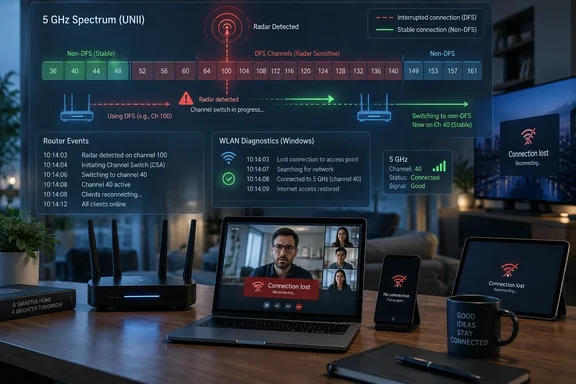
The underlying mechanism is established rather than speculative. Federal Communications Commission rules require equipment using certain 5 GHz frequencies to detect radar, stop transmitting after detection, and keep the affected channel unavailable for at least 30 minutes. Cisco’s DFS documentation describes the practical result on managed access points: clients are disassociated during the channel move, and selecting another DFS channel can add a fresh channel-availability scan before the radio resumes service.
For Windows users and network administrators, the key point is simple: if every device on one 5 GHz SSID briefly loses service at the same time, do not begin by reinstalling a laptop’s wireless driver. Check whether the access point has been using Dynamic Frequency Selection channels and whether it logged a radar-triggered channel change.
DFS is an intentional Wi‑Fi interruption
Dynamic Frequency Selection, or DFS, exists because portions of the 5 GHz Wi‑Fi band are shared with radar services. Consumer Wi‑Fi gear is allowed to use those frequencies only on the condition that it avoids interfering with radar systems. The router or access point must therefore listen before using a DFS channel and continue monitoring while it operates there.
In the United States, the usual 5 GHz DFS range includes channels 52 through 64 and 100 through 144. The familiar lower channels — 36, 40, 44, and 48 — do not use DFS, and neither do the upper 5 GHz channels beginning at 149. The exact channel choices and power limits vary by regulatory region, so an imported router or a device configured for the wrong country can create a separate problem; do not copy a U.S. channel plan blindly outside the U.S.
A radar event does not mean that a nearby airport is necessarily the culprit. Weather radar, military systems, and other protected operations may be involved, while access-point firmware can also make conservative or erroneous detections. What matters to a home or office network is the mandatory behavior after detection: the radio leaves the channel. A client cannot simply choose to remain connected to it.
Cisco documents a typical enterprise sequence: the access point stops data transmission, announces a channel switch, disconnects associated clients, and chooses a replacement channel. If that replacement is another DFS channel, it may have to listen for radar before resuming normal operation. In other words, a brief radio decision can produce a highly visible interruption at the application layer.
The strongest clue is a multi-device failure
MakeUseOf presents disabling DFS as the step that stabilized one connection. That is useful as an anecdote, but the diagnostic value comes from the pattern of the outage, not from the fact that a PC happened to be affected.
DFS is more likely when several devices attached to the same 5 GHz radio lose connectivity together: Windows laptops, phones, smart TVs, game consoles, and tablets all stall or reconnect within roughly the same period. If Ethernet-connected systems remain online while the Wi‑Fi clients fail simultaneously, that further narrows the failure toward the wireless access point rather than the ISP modem, DNS, or a single Windows installation.
By contrast, DFS is a weak explanation when only one Windows PC drops while nearby phones and other laptops remain stable. In that case, investigate the client first: wireless-driver resets, aggressive adapter power saving, roaming behavior in a mesh deployment, authentication errors, Bluetooth coexistence, and a poor signal at that PC’s location can all produce similar symptoms.
Windows can help distinguish the two cases, even though it cannot tell the router to avoid DFS. Microsoft’s netsh wlan tools support a WLAN report that summarizes recent wireless sessions and disconnect activity on Windows 10, Windows 11, and supported Windows Server releases. Run this shortly after a dropout:
netsh wlan show wlanreport
The report records connections, disconnections, adapter information, and recent activity. A Windows report that says the driver disconnected is evidence that the Windows client lost its association; it is not proof that the driver caused the loss. Compare its timestamp with router or access-point logs before replacing a driver that may only be reacting to a channel move.
On the network side, look for log messages containing terms such as “DFS,” “radar detected,” “radar event,” “channel switch,” “channel change,” or “non-occupancy.” Vendor wording differs considerably. Consumer mesh systems may hide the radio logs entirely, while enterprise products commonly expose them in controller event histories.
Disabling DFS trades spectrum for predictability
The straightforward test is to stop the 5 GHz radio from choosing DFS channels. Depending on the router, that can mean turning off a DFS option, disabling automatic channel selection and setting a fixed channel, or defining an allowed-channel list. Start with a non-DFS 5 GHz channel such as 36, 40, 44, or 48; channels in the 149-and-up range are also non-DFS in the U.S. where the router and local rules permit their use.
Keep the test controlled. Change the 5 GHz channel policy, record the time, and use the network normally for several days. Do not simultaneously update router firmware, change channel width, split SSIDs, replace a wireless driver, and alter DNS settings. If five different variables change at once, a stable week does not identify which one fixed the problem.
For a small office or household with frequent video calls, avoiding DFS may be the rational permanent configuration if the test eliminates repeated whole-network drops. The price is reduced channel choice. In a crowded apartment building, that may expose the network to more ordinary Wi‑Fi contention from neighbors, which is slower and messier but usually does not force every client off the air at once.
Channel width is the second trade-off. An 80 MHz channel can provide substantial throughput and is usually sufficient for typical broadband connections and local use. A 160 MHz configuration consumes far more 5 GHz spectrum and, in many U.S. channel plans, makes DFS difficult or unavoidable because the bonded channel block extends into DFS territory. Wider settings also make a router more vulnerable to interference affecting any portion of that larger block.
That does not make 160 MHz inherently bad. It can be valuable in a clean RF environment with compatible Wi‑Fi 6 or Wi‑Fi 7 clients and local workloads that actually need the capacity. It is a poor default when the priority is uninterrupted conferencing, remote-desktop work, VPN sessions, or voice traffic.
Router firmware and topology still matter
A DFS channel move is required behavior after a valid radar detection, but the severity of the user-visible interruption depends on the equipment. Cisco’s enterprise material describes features designed to reduce disruption, including radios that can monitor or prepare alternate channels more effectively. Many retail routers have a single 5 GHz radio and fewer options, so the entire band may go quiet while the device finds and validates another channel.
Mesh systems add another complication. A router may use 5 GHz both for client devices and for a wireless backhaul between mesh nodes. A DFS move can then affect the link between the nodes as well as the devices connected to them. Disabling DFS might stabilize the mesh, but it can also push the system onto a busier shared channel. In larger deployments, administrators should examine whether a dedicated wired backhaul or a separate backhaul radio would solve the actual design constraint.
Before ruling DFS in or out, update the router or access point to its current stable firmware. This is not because newer firmware can legally ignore radar detection; it cannot. But it can change false-detection handling, channel-selection logic, client reassociation behavior, and event logging. Then repeat the fixed-channel test with a known baseline.
The most useful result is not “DFS is bad.” DFS opens valuable 5 GHz spectrum, particularly where non-DFS channels are congested. The actionable conclusion is narrower: when an entire 5 GHz network drops in sync, and router logs show a DFS or radar event at the same time, restricting the radio to non-DFS channels is a justified stability-first choice.
References
- I disabled DFS channels, and my Wi-Fi stopped dropping without warning MakeUseOf · 2026-09-17T11:00:14+00:00