

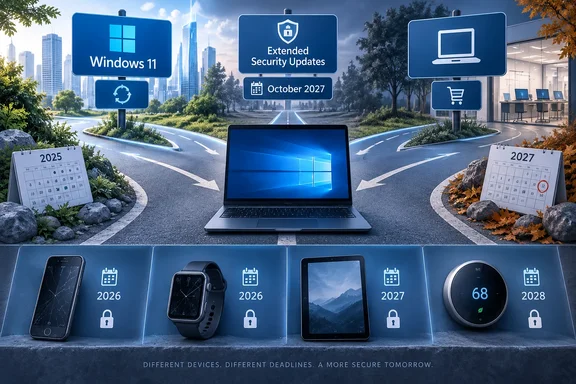
A MakeUseOf feature published September 22, 2026 grouped these products as five popular gadgets that are "much closer to losing software support than their owners probably realize." Its central observation holds: expensive, flagship-class hardware reaches end of life on the manufacturer's schedule, and that schedule is usually unrelated to whether the hardware still runs well. Several details in that piece need correcting or narrowing, though. The Windows 10 section is the one WindowsForum readers are most likely to act on, and the vendor record there is detailed enough to support a full decision tree. That section gets the most space here.
This piece checks each of the five against the manufacturer's own documentation where it exists. It separates operating-system upgrades from security patches and cloud services, and it marks the places where the original claims were imprecise. The five cases fall into three groups. For some, only feature development has stopped. For others, security support is ending. The Nest thermostats have lost the cloud connection that justified buying them.
Windows 10 22H2 End of Support Leaves One Bridge Open Until October 2027
Microsoft's lifecycle announcement is specific. Windows 10 version 22H2, released in September 2022, reached end of support on October 14, 2025, along with the Windows 10 Enterprise 2015 LTSB and IoT Enterprise LTSB 2015 editions released in July 2015. The retirement covers Home and Pro, Enterprise and Education, and those two LTSB 2015 editions. Microsoft's Windows lifecycle FAQ describes 22H2 as the last feature update ever released for Windows 10, serviced with monthly updates through that October date and unsupported afterward.
End of support has a narrower meaning than many owners assume. Microsoft's consumer support page says a Windows 10 PC "will still function" after October 14, 2025. What stops is technical support for any issue, software updates, and security updates or fixes. The machine boots and runs its installed applications, and new vulnerabilities go unpatched. Microsoft says plainly that such a PC is at greater risk from viruses and malware. People who contact Microsoft Support about Windows 10 are directed to upgrade to Windows 11 if the device is compatible, or to replace it.
The lifecycle FAQ adds a slower effect that the security discussion tends to hide. Once an operating system leaves support, it may still work with existing programs and hardware, but "the possibility increases that new programs and hardware will not be performant on an older OS." Hardware makers and software developers build for newer operating systems and may drop support for older ones as they see fit. A Windows 10 PC therefore faces two problems: missing patches, and a slow decline in compatibility with new printers, peripherals, and applications whose vendors stop testing against it.
Microsoft's own record makes Windows 10 unusual among the five products here. It is the only one with an official, time-limited way to keep receiving security fixes after the end-of-support date. The Galaxy S22 has no paid tier for extra patches, and a first-generation Nest thermostat has no subscription that restores remote control. For Windows 10, the consumer ESU program extends security coverage for eligible PCs through October 12, 2027.
The MakeUseOf summary of ESU is broadly correct. It says owners can "extend that deadline to October 12, 2027," and enroll by syncing settings to a Microsoft account, redeeming 1,000 Microsoft Rewards points, or paying $30. That matches Microsoft's published options. It leaves out the eligibility conditions, and those conditions decide whether a specific PC can use the bridge.
Consumer ESU Rules Exclude More Windows 10 PCs Than the $30 Price Suggests
Microsoft's consumer ESU page sets the scope in its first paragraph. The program delivers "critical and important security updates as defined by the Microsoft Security Response Center (MSRC)" for devices running Windows 10 version 22H2. Microsoft states that enrollment "does not provide other types of fixes, feature improvements, or product enhancements" and "does not come with technical support". ESU does not buy you continued Windows 10 support. It buys patches for the two most serious vulnerability severity classes. A non-security bug in Windows 10 that appears in 2026 is not in scope.
The prerequisites that determine eligibility
Microsoft lists these requirements for the consumer program:
- The device must run Windows 10 version 22H2 in the Home, Professional, Pro Education, or Workstations edition.
- The device must have the latest Windows update installed.
- The Microsoft account used to sign in to the device must be an administrator account.
- The Microsoft account cannot be a child account.
- The ESU license is tied to the Microsoft account used to enroll, and a user who normally signs in with a local account may be prompted to sign in with a Microsoft account.
The version requirement comes first for a reason. A PC stuck on an older Windows 10 release will not see the enrollment offer until it has been updated to 22H2 and brought current. The Windows lifecycle FAQ also notes that a device may be unable to receive updates if its hardware is incompatible, it lacks current drivers, it lacks storage space, or it is otherwise outside the manufacturer's support period. Before assuming a PC qualifies for ESU, confirm that it can reach the latest 22H2 cumulative update.
The management boundary: consumer ESU is not for work PCs
Microsoft separates consumer and commercial use explicitly. The consumer program "can't be used in commercial scenarios," and enrollment is not offered for devices in kiosk mode, devices joined to an Active Directory domain or to Microsoft Entra, devices enrolled in a mobile device management (MDM) solution, or devices that already hold an ESU license.
The rules include one exception that small offices and home workers should notice. Devices that are Microsoft Entra registered, as opposed to Entra joined, can use the consumer program. Registration is the lighter relationship, typically created when a personal device adds a work or school account. Joining places the device under organizational identity management. Microsoft also says that if a consumer-enrolled PC later enters one of the listed commercial scenarios, its consumer ESU enrollment "will be suspended until it is no longer being used as a Commercial device". An IT administrator who joins a personally enrolled laptop to the corporate domain should expect its consumer ESU coverage to stop.
Organizations have a separate path. Microsoft directs IT professionals to its commercial ESU documentation for enabling ESU across an organization, and the lifecycle FAQ confirms that organizations of all sizes, not only consumers, can enroll in a paid ESU program. The consumer page does not give commercial pricing, and the $30 consumer fee should not be read as the business rate.
Enrolling a Windows 10 PC in consumer ESU
Microsoft documents the enrollment flow as follows:
- Install the latest Windows 10 version 22H2 updates.
- Open Settings > Update & Security > Windows Update. If the device meets the prerequisites, an enrollment link appears there.
- Select Enroll now. If you are signed in with a local account, Windows prompts you to sign in with a Microsoft account.
- If the PC is already backing up its settings, Windows shows a prompt to enroll the device at no additional cost.
- If it is not backing up settings, choose one of three routes: start backing up your settings, redeem 1,000 Microsoft Rewards points, or make a one-time purchase of $30 USD (or the local-currency equivalent) plus applicable tax.
Success is visible in the same place. Microsoft says you can check enrollment status at any time under Settings > Update & Security > Windows Update, and a paid enrollment also appears in your Microsoft account order history.
One license, up to ten PCs, and every user on each PC
The consumer license stretches further than the per-PC price implies. Microsoft says an existing ESU license can be used on up to 10 devices. To add another PC, open Settings > Update & Security > Windows Update on that machine and select Enroll now. If you are already signed in with the Microsoft account used for the first enrollment, choose Add device. Otherwise Windows asks you to sign in with that account. Each additional PC still has to meet the eligibility requirements on its own.
Coverage applies to the machine, not the person. Once any user on a Windows 10 PC enrolls, every other user on that PC is protected. A household with one shared desktop needs only one enrollment on it, while a family member's separate laptop needs its own enrollment.
Children's PCs need an extra step because a child account cannot enroll. Microsoft's instructions have the parent switch to their own user account on the child's device, or have the child add the parent as a user configured as an administrator, and then complete enrollment from the parent's account.
Timing, refunds, and regional differences
You can enroll at any point until the program ends on October 12, 2027. After enrollment, the PC receives all critical and important updates released since Windows 10 end of support on October 14, 2025, so a late enrollee does not lose the earlier patches. Microsoft notes that the device is more exposed during any period before enrollment. Updates arrive through Windows Update as they are released.
Refund terms differ by route. A $30 purchase follows Microsoft's digital-purchase refund policy for your country. There is nothing to refund on the free settings-backup route. Rewards redemptions are final and cannot be returned or exchanged.
The program also varies by region. Microsoft says consumer ESU enrollment options and timing "may vary by region, such as in the European Economic Area (EEA)," while the updates themselves apply consistently across supported areas. Where consumer ESU is unavailable, Microsoft's advice is to check for a Windows 11 upgrade first and otherwise consider a new Windows 11 or Copilot+ PC. The $30-or-free framing is the U.S. version. Readers elsewhere should check the Windows Update enrollment screen for the terms that apply to them.
Enrolling does not prevent a later upgrade. Microsoft says an ESU-enrolled PC can still move to Windows 11 if it meets the hardware requirements. For a compatible PC whose owner simply hasn't upgraded yet, ESU is a delay with no penalty.
Office 2021 Loses Support in October 2026, While Microsoft 365 Keeps Windows 10 Patches Until 2028
The Windows 10 deadline has a companion schedule for Microsoft's productivity software, and one date on it falls next month. Microsoft's Windows 10 end-of-support page says support for Microsoft 365 Apps on Windows 10 ended on October 14, 2025, the same day as the operating system. The apps keep running, and Microsoft warns of performance and reliability problems over time. Microsoft will still provide security updates for Microsoft 365 on Windows 10 for three years after the OS deadline, through October 10, 2028.
That 2028 date is easy to misread. It covers the Office applications, not Windows. An unsupported, un-enrolled Windows 10 PC running a fully patched Microsoft 365 subscription still has an unpatched operating system underneath. The extended app patching reduces one attack surface and leaves the rest of the machine exposed.
Owners of non-subscription Office face a harder timeline. According to the same Microsoft page, October 14, 2025 affected perpetual Office licenses in two ways. Support for Office 2016 and Office 2019 ended on every operating system, not only Windows 10. Office 2024 and Office 2021, including their LTSC versions, continue to run on Windows 10 but are not supported there.
Microsoft also says support for Office 2021 and Office LTSC 2021 ends in October 2026, one year after Windows 10. As of late September 2026, that is weeks away. A household or small office that bought Office 2021 to avoid a subscription, installed it on Windows 10, and enrolled in ESU is about to have a security-patched operating system running an unsupported office suite. Microsoft says Office 2021, LTSC 2021, 2024, and LTSC 2024 licenses can be migrated to a new Windows 11 device, and it recommends Windows 11 plus Microsoft 365 as the supported configuration.
In practice, ESU enrollment and an Office 2021 install on the same Windows 10 PC run on different deadlines. The Windows patches continue to October 2027. The Office 2021 patches stop in October 2026. Only Microsoft 365 subscribers on Windows 10 have Office security fixes continuing to 2028.
Windows 11 Upgrades and the LTSC Workaround Carry Their Own Lifecycles
The MakeUseOf piece suggests that people who want neither Windows 11 nor ESU can keep Windows 10 running "until 2032" with Microsoft's Long-Term Servicing Channel. It concedes that for most people this is "more trouble than it's worth" and requires a clean install of a stripped-down edition "not intended for PCs." The second half of that is the important part, and Microsoft's documentation states it more strongly.
Microsoft's lifecycle FAQ says the Windows 10 Long-Term Servicing Channel "is designed to be used only for specialized devices — for example, those that control medical equipment or automated teller machines (ATMs)." It adds that to receive monthly quality updates, customers must be on a supported version, and it points to edition-specific support dates. LTSC releases have their own dates, so a later LTSC edition can outlast Windows 10 22H2. The 2032 figure only applies if you actually run such an edition, obtained and licensed as one. Microsoft does not offer this as a consumer route. Moving an ordinary home PC to it means a clean install, the loss of the standard consumer servicing model, and use of an edition that Microsoft intends for single-purpose machines. Microsoft's own documentation offers home users three supported paths: upgrade, enroll in ESU, or replace the PC.
The supported upgrade path is simpler than many Windows 10 holdouts expect. Microsoft says the Windows 11 upgrade is free, but only PCs running Windows 10 version 22H2 that meet the minimum hardware requirements can take it. To check, go to Start > Settings > Update & Security > Windows Update and select Check for updates. Microsoft notes that ISP fees may apply on metered connections. For home users, Microsoft's lifecycle announcement also points to the Windows PC Health Check app and the published Windows 11 system requirements. The lifecycle FAQ notes a floor for the Windows Update route: devices must be running Windows 10 version 2004 or later to upgrade that way.
Moving to Windows 11 does not end lifecycle planning. It replaces one deadline with a recurring one. Microsoft's FAQ says Windows 11 ships one new version per year, and each version gets monthly quality updates for a fixed period. Enterprise, Enterprise multi-session, Education, and IoT Enterprise editions are serviced for 36 months from release. Pro, Pro Education, Pro for Workstations, Home, and SE editions are serviced for 24 months. Windows 11 Home does not support deferring feature updates, so it typically receives a new version before the old one expires. The rule Microsoft states is "always install the latest version before the current version reaches end of servicing." A Windows 11 Pro PC that is kept on a two-year-old feature update because nobody installs the annual upgrade can fall out of support without anyone noticing.
For people replacing hardware, Microsoft names Windows Backup as the migration tool. It saves and transfers files, photos, settings, apps, and sign-in credentials to a new PC. For the old machine, Microsoft points to trade-in and recycling programs from PC makers and retailers, plus its own trade-in program for eligible devices. Windows Backup appears twice in this story: settings backup is also the free ESU enrollment route. Turning it on for a free extension also prepares that PC's data for moving to a replacement.
Galaxy S22 and Pixel 6 Lose Security Patches on a Separate Schedule From OS Upgrades
The two Android phone families MakeUseOf grouped together show a difference that applies to every device in this story. Major operating-system upgrades and security patches are separate promises, and they usually end at different times.
Samsung announced in 2022 that selected Galaxy devices, including the Galaxy S22, S22+, and S22 Ultra, would get up to four generations of One UI and Android operating-system upgrades and up to five years of security updates. The MakeUseOf writer, who still uses an S22 and S22+, says the phones have been upgraded through One UI 8.0 with Android 16. Under Samsung's policy, that is the last major Android version. The same writer puts the end of security updates in early 2027. That timing fits a five-year window from the phone's 2022 launch. The exact final patch for a particular unit can depend on Samsung's security-update schedule, the region, the carrier, and the model variant, so "early 2027 under Samsung's published policy" is more accurate than a single date for every S22.
The practical point is that an S22 now receives no new Android features and still receives security fixes. The writer says they may retire the phone when security patches end because they wouldn't be comfortable entering account passwords on a device without current security. That is a reasonable line for anyone using a phone for banking, a password manager, work email, or authentication apps. A phone that misses Android 17 is out of date. A phone that misses a year of security patches is exposed.
Google's schedule for the Pixel 6 is shorter and ends sooner. Google's official Pixel update table lists the Pixel 6, Pixel 6 Pro, Pixel 6a, the Pixel 7 series, and the Pixel Fold as receiving five years of operating-system and security updates from when each model first became available on the Google Store in the United States. The Pixel 6 and Pixel 6 Pro went on sale in October 2021, so their window closes in October 2026, next month. The Pixel 6a is in the same five-year category, but its clock started at its own, later U.S. launch, so owners should not assume it shares the October 2026 date.
The MakeUseOf piece notes that Pixel 6 owners will keep receiving Google Play system updates and app updates after the cutoff. Keeping Gmail or Chrome updated through the Play Store is useful, but those updates do not patch vulnerabilities in the phone's operating system, kernel, or firmware. A Pixel 6 in November 2026 can show a fully updated app list and still be missing device-level security fixes.
The Galaxy S22 and Pixel 6 launched months apart and are ending in different ways. Samsung stopped OS upgrades after four versions and keeps patching for a fifth year. Google ends both OS and security updates together at five years. For an S22 owner, the reason to replace is still a few months off. For a Pixel 6 or 6 Pro owner, it arrives in October.
MakeUseOf's buying advice looks ahead. The writer says a Galaxy S26 bought in 2026 should get updates until 2033, which reflects the seven-year commitments now common on flagship Android phones, and recommends buying the newest generation you can because "the clock starts ticking" at purchase. The writer also advises caution with products from smaller companies, using Nest as an example of a company acquired and later restructured.
Galaxy Watch 4 and Older iPads Keep Working Without New Platform Releases
Two more entries on the list describe the mildest kind of end of life, where development stops but the device keeps functioning.
For the Galaxy Watch 4 and Galaxy Watch 4 Classic, MakeUseOf says Samsung has kept its promise of four generations of software updates, that the watch "will continue to work," and that the August 2026 update was the last. Samsung's 2022 upgrade announcement set the framework of up to four generations of One UI Watch and Wear OS upgrades for eligible devices. The specific August 2026 final release comes from MakeUseOf, and no other outlet has reported that timing. Owners should treat it as the likely end point and should not assume any further updates will arrive.
The Galaxy Watch 4 is part of a wider group of watches reaching the same point. Engadget reported in August that several popular smartwatches reach end of life in 2026, including the Pixel Watch 2, Samsung's Galaxy Watch 5 and 5 Pro, and a number of Apple Watch models. It noted that these watches "won't stop working, but they'll stop receiving new features and, in some cases, security patches," and that the Pixel Watch 2, released in October 2023, has a guaranteed update window running to October 1, 2026. Fast Company counted eight smartwatches losing software support by the end of 2026 and said the upcoming watchOS 27 release will move several more Apple Watches to unsupported status. It also noted that Apple classifies products as "vintage" once it has stopped distributing them for sale more than five but less than seven years ago, which currently includes every Apple Watch through the Series 5. The Galaxy Watch 4 is simply the first of this group to reach the end.
For a watch, loss of platform updates does not mean pairing, notifications, or step counting stop the next morning. What goes away is future Wear OS features and, gradually, compatibility with new apps and phone software.
Older iPads are in a similar position. Apple's compatibility list for iPadOS 27 starts at the ninth-generation iPad, the sixth-generation iPad mini, the fourth-generation iPad Air, and newer iPad Pro models. The models MakeUseOf names as left behind are not on that list: the eighth-generation iPad from 2020, the fifth-generation iPad mini, the third-generation iPad Air from 2019, and the 2018 iPad Pro. The article calls the last one the "1st gen iPad Pro from 2018." The 2018 lineup was the first-generation 11-inch iPad Pro and the third-generation 12.9-inch model, and both miss the cut. These devices remain on iPadOS 26 or earlier.
MakeUseOf credits Apple with a long support window, describing new iOS versions for five to seven years (up to eight for some iPad Pros) with security updates continuing another two to four years. That is the writer's summary, not a figure from Apple. Apple's compatibility list shows which iPads get iPadOS 27. It does not say those left off will stop receiving every update at once. Apple's treatment of security fixes for older versions is separate from full-version eligibility, so these iPads are best described as off the current version rather than unpatched.
The Siri claim needs correcting. MakeUseOf says iPadOS 27 "finally brings Siri AI to Apple hardware," implying owners of the excluded iPads are missing it because of their age. Apple's documentation limits the major Siri and Apple Intelligence capabilities to specific newer hardware: iPad mini with A17 Pro and iPads with M1 or later, with additional memory requirements for some features. Some iPads that do qualify for iPadOS 27 lack an M-series chip or the A17 Pro, so upgrading them would not deliver those Siri features either. An eighth-generation iPad owner deciding whether to replace it should compare against the Apple Intelligence hardware list, not the iPadOS 27 list.
Nest's First Two Learning Thermostats Show What Ending Cloud Service Removes
The last device on the list shows most clearly how "end of support" can mean losing the feature you bought the product for. The MakeUseOf writer describes reaching for their phone to change the temperature on a second-generation Nest Learning Thermostat and finding that remote control had stopped working, which they describe as happening "quietly" and "with no warning."
Google's support record shows the cutoff was announced, even if the writer missed it. Google ended support for the first-generation Nest Learning Thermostat, the second-generation model, and the second-generation European model on October 25, 2025. The devices were removed from the Nest and Google Home apps and lost remote control, notifications, third-party assistant integrations, Home/Away Assist, and other cloud-connected features. Google says the thermostats can still be adjusted in person, existing schedules keep running on the device, and the affected models no longer receive software or security updates. Google published a support notice about the change, so "no warning" describes this owner's experience rather than the absence of an announcement. The effect is still the same: a connected thermostat became a programmable one.
The writer says the Nest still works locally, which matches Google's notice. The heating and cooling schedule it learned or was given keeps running. What's gone is everything that required Google's servers. Of the five cases here, the Nest is the only one where end of support removed features the owner was already using, as opposed to stopping future ones.
MakeUseOf also narrows the unaffected list too far. It says only the third- and fourth-generation Nest thermostats keep remote control. Google's support notice also lists the Nest Thermostat E and the 2020 Nest Thermostat as unaffected by this cutoff, along with the third- and fourth-generation Learning Thermostats. Owners of those models are fine for now.
The writer's warning about the used market is the most practical takeaway. Anyone buying a second-hand Nest should avoid first- and second-generation Learning Thermostats, because their main advantage, remote control from the airport or from bed, cannot be restored. A listing may describe the unit accurately as "working," and it will heat and cool, but it no longer connects to anything.
This behavior is a known pattern. Ars Technica reported in February 2025 on research showing that many Americans don't understand how software support determines how long a smart device stays useful. The report cited smart TVs and smartphones losing third-party app support as their operating systems stop receiving updates, and smart speakers losing access to voice assistants when disconnected from the internet due to lack of security support. The researchers concluded that "a lot of Americans who own smart devices don't understand the relationship between software support and how long a device" remains usable. The Nest case fits that description exactly: the hardware still works and the part of the product the owner valued is gone.
What this means for you
The order of action depends on what each device is losing, and security exposure should come ahead of missing features. A Windows 10 PC that is not enrolled in ESU and a Pixel 6 after October are the most urgent. An S22 has a few months left. A Galaxy Watch 4 or an iPad left off iPadOS 27 can keep being used with fewer consequences. A first- or second-generation Nest has already lost what it's going to lose.
For Windows 10 owners, work through Microsoft's own sequence. First confirm the PC is on version 22H2 and fully updated. Then check Settings > Update & Security > Windows Update for a Windows 11 offer, or run PC Health Check. If the PC qualifies, upgrade, and then install each annual Windows 11 feature update before its 24- or 36-month servicing window ends. If it doesn't qualify and it's a personal machine not joined to a domain or Entra or enrolled in MDM, enroll in consumer ESU from the same Windows Update page. One enrollment covers up to ten PCs on the same Microsoft account. Plan the replacement before October 12, 2027, because there is no consumer extension beyond that date. Managed business PCs belong in the commercial ESU program, not the consumer one.
- Windows 10 version 22H2 PCs can get critical and important security patches through October 12, 2027 via consumer ESU, which is free with settings backup, 1,000 Rewards points, or $30, and covers up to ten eligible PCs per Microsoft account.
- Consumer ESU is not offered to kiosk devices, domain- or Entra-joined PCs, or MDM-enrolled machines, though Entra-registered personal devices can enroll.
- Office 2021 and Office LTSC 2021 lose support in October 2026, while Microsoft 365 Apps on Windows 10 get security updates until October 10, 2028; neither date extends Windows 10's own support.
- Pixel 6 and Pixel 6 Pro OS and security updates end in October 2026, while Galaxy S22 security patches continue into early 2027 under Samsung's policy after its final Android 16 upgrade.
- An iPad left off iPadOS 27 keeps working, and the Apple Intelligence Siri features require an iPad with M1 or later or the A17 Pro iPad mini regardless of iPadOS 27 eligibility.
- Avoid buying used first- or second-generation Nest Learning Thermostats, which lost remote control and updates on October 25, 2025. The Nest Thermostat E, the 2020 Nest Thermostat, and third- and fourth-generation Learning Thermostats were not affected by that cutoff.
Most of these devices will keep working for years, and that is why their deadlines go unnoticed. What changes is exposure to new threats, compatibility with new software, and access to cloud features. Upcoming dates are the Pixel 6 cutoff and the Office 2021 cutoff in October 2026, the Galaxy S22's last patches in early 2027, and consumer ESU ending on October 12, 2027. A Windows 10 PC that is still in use when that last date passes will receive no further security fixes from Microsoft.
References
- Windows 10 Extended Security Updates | Microsoft Windows microsoft.com
- Windows 10 reaching end of support - Microsoft Lifecycle | Microsoft Learn learn.microsoft.com