

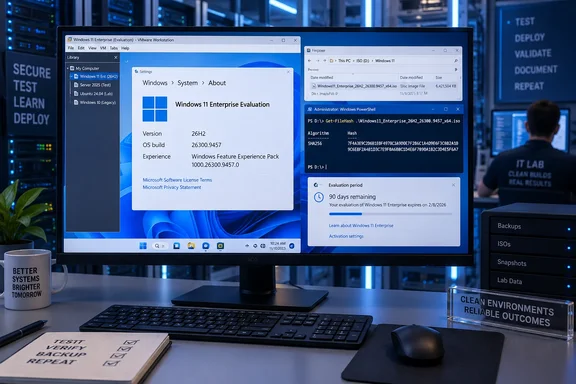
Microsoft’s Evaluation Center specifies a 90-day trial intended for IT professionals. Before installing, administrators should account for two consequential restrictions: Microsoft warns that returning to the previous operating system requires a clean installation, and the evaluation shuts down hourly after expiration. A disposable test environment is therefore a better fit than a primary workstation.
What the new ISO contains
Neowin identifies the evaluation image as an x64, English (United States) release with this filename:
26300.9457.260913-1737.26h2_ge_release_svc_refresh_CLIENTENTERPRISEEVAL_OEMRET_x64FRE_en-us.iso
The outlet reports that the image incorporates the September 14 out-of-band update, KB5129195. Microsoft’s Update Catalog independently confirms that KB5129195 exists for Windows 11 26H2 at build 26300.9457, with separate x64 and Arm64 packages classified under Windows Insider Pre-Release. That verifies the build-to-update relationship, although a catalog entry alone does not establish the contents of a downloaded ISO.
The Evaluation Center presents an important labeling wrinkle: its description and edition listing still identify Windows 11 Enterprise version 25H2. Its general offering includes x64 and Arm64 images in 11 languages, but that listing should not be treated as confirmation that every architecture and language has already switched to 26H2. The specifically reported evaluation file is x64 English (US).
For deployment records, retain the exact image filename and its verified hash rather than recording only “Windows 11 Enterprise.” The mismatch between the landing-page description and the reported download makes that distinction useful when different technicians obtain media at different times.
Downloading and checking the evaluation
Microsoft’s documented route is the Windows 11 Enterprise Evaluation Center. Select the standard Enterprise ISO rather than Enterprise LTSC, complete registration, and select the required language and architecture. The evaluation does not require a product key, but Microsoft says Windows prompts for activation during installation; “no product key required” does not mean activation can be ignored.
Before booting installation media, verify its integrity:
- Download the image through Microsoft’s evaluation offering.
- Open PowerShell and calculate the ISO’s SHA-256 hash.
- Compare the result with Microsoft’s entry for that exact image in its published Windows 11 Enterprise hash list.
- Proceed only when the expected value and calculated value match. Microsoft describes that match as confirmation that the download has not been corrupted or altered.
For the filename reported by Neowin, the command is:
Get-FileHash "$env:USERPROFILE\Downloads\26300.9457.260913-1737.26h2_ge_release_svc_refresh_CLIENTENTERPRISEEVAL_OEMRET_x64FRE_en-us.iso" -Algorithm SHA256
Adjust the path to the actual download location. This applies Microsoft’s documented Get-FileHash procedure to the reported image name; it is not a claim that WindowsForum downloaded or tested the ISO.
A mirror’s own hash is not an independent authenticity check. The useful comparison is against a trusted Microsoft reference for the same file. If a matching Microsoft reference is unavailable, the verification remains incomplete; a filename containing “26h2” is not a substitute. Nor does a matching hash establish that an evaluation is appropriate for a production PC—it establishes agreement with the reference image.
What KB5129195 establishes—and what it does not
Microsoft’s September 14 support article documents KB5129195 for Windows 11 24H2 and 25H2, identifying builds 26100.9457 and 26200.9457. The Update Catalog additionally lists the 26H2 packages at 26300.9457. Readers should preserve that difference between the support article’s stated applicability and the catalog’s broader package listing.
The support article says the update adds protections associated with CVE-2026-62721 and addresses Remote Desktop Services instability following the September security update, including connection and sign-in failures. It also documents fixes for host-folder sharing with certain HCS-managed Linux virtual machines using Plan9 and some USB Audio Class 1.0 multichannel audio configurations.
These release notes provide useful servicing context, but they are not evidence that every corresponding workload has been validated on the evaluation ISO. They also do not declare all related problems resolved: Microsoft still lists some USB Audio Class 1.0 failures and a domain-trust issue affecting particular Machine Identity Isolation configurations. Those warnings belong to the documented 24H2/25H2 scope; they should not automatically be relabeled as confirmed 26H2 defects.
Evaluation media, preview upgrades and consumer installation differ
Microsoft introduced 26H2 to the Release Preview Channel on August 27, 2026, at build 26300.9278, then updated its announcement on August 31 to say Insider ISOs were available. The newer Enterprise Evaluation image is a separate distribution development; it is not the first opportunity to test 26H2.
The routes serve different purposes:
| Route | Appropriate distinction |
|---|---|
| Enterprise Evaluation ISO | A full Enterprise installation for a time-limited organizational evaluation. |
| Release Preview | An Insider preview upgrade for eligible enrolled PCs; Microsoft documents selecting 26H2 through Settings → Windows Update. |
| Media Creation Tool | A consumer installation route that Neowin reports has been refreshed; its availability should not be confused with Enterprise evaluation licensing. |
| UUP-based image creation | A separately assembled image, rather than the specific Microsoft-published Enterprise Evaluation ISO discussed here. |
Microsoft documents the first two routes; Neowin reports the Media Creation Tool refresh. The evidence verified here does not establish a separate consumer-tool download at precisely build 26300.9457, so that should not be promised as an interchangeable alternative.
Microsoft describes 26H2 as an enablement-package release sharing a servicing branch with 24H2 and 25H2. Many features have already arrived through monthly updates, while some commercial experiences become enabled by default in 26H2. That makes testing organizational settings and workflows more informative than assuming a new version number represents an entirely new platform.
The separate 26H1 branch requires care. Windows Central reports that devices running 26H1 will not receive 26H2 because 26H1 uses a newer Windows platform. An available 26H2 ISO should therefore not be interpreted as an upgrade recommendation for those machines.
Plan the end of the trial before installation
Microsoft warns that the evaluation cannot simply be uninstalled and that the PC’s recovery partition cannot restore the previous Windows installation afterward. Back up files and settings first. If the evaluation expires—or activation fails—the documented consequences include a black desktop, a persistent non-genuine notification and hourly shutdowns.
For administrators, the practical choice is to reserve this image for a lab device or virtual machine, record the exact media used, and plan disposal or reinstallation before the trial ends. The download provides an Enterprise testing opportunity; Microsoft’s Release Preview announcement still frames general availability as later in 2026 rather than supplying a specific launch date.