

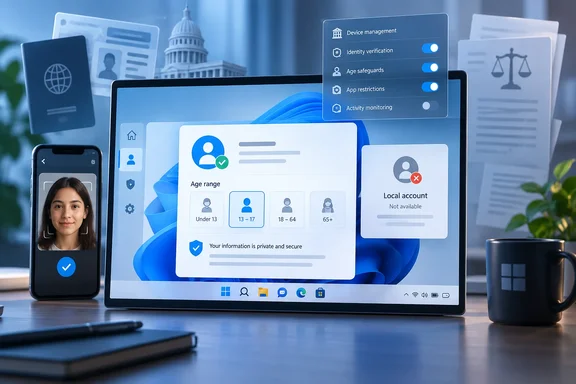
The distinction is important for Windows users and administrators. Microsoft has made the APIs available to Windows Insiders starting with build 26220.9472 and says broader Windows 11 availability is coming “soon,” without naming a general-release build, date, edition, or servicing channel. Microsoft has also separately enabled Microsoft-account age verification in Australia, Brazil, Singapore, and the United Kingdom, where a selfie, document upload, or government-system login can be among the available methods.
This is the early plumbing for a policy shift driven by laws in California, Colorado, and Illinois. It is also a more consequential change than another Store content-rating control: Windows is becoming a place where an app can request an age category from the operating system rather than independently asking every user for a birthday or identity document.
What the Windows Age APIs actually return
Microsoft’s developer documentation describes two Windows Runtime calls for the current user. One returns an age range: under 10, 10–12, 13–15, 16–17, or 18+. The other returns a verification state, including Verified, Unverified, OptedOut, TemporarilyUnavailable, or NotApplicable.
Apps do not receive an exact birth date or numerical age through this API. That is a meaningful privacy boundary, and it makes the PCMag Australia framing of every Windows user being asked to “show your ID to unlock Windows” too broad. Microsoft’s stated model is closer to a status check: an app can learn, for example, that the current user is in the 16–17 range and has not completed an external verification process.
The limitations are as important as the capabilities. The calling app must declare the userAccountInformation capability, and the user must allow apps to access account information in Windows privacy settings. If consent is not granted, the call can fail. Microsoft also requires developers to build fallback behavior because the signal may be unavailable, disabled, or unknown.
Most notably, Microsoft says identity-provider age signals currently come only from Microsoft accounts. On a local Windows account, or another account type without an administrator-configured default, the age-range call returns no result and the verification call returns NotApplicable. That leaves the existing local-account option intact as far as this API is concerned, even if the practical convenience of using age-restricted Microsoft services increasingly favors signing in.
Verification is real, but it is not yet a Windows-wide demand
Microsoft’s consumer support pages confirm that account-level verification is already available in Australia, Brazil, Singapore, and the UK. Depending on the country and the provider, a user may estimate age with a selfie, upload a document, or log in through a government identity system such as Singapore’s Singpass.
Microsoft says the result applies to the Microsoft account and Xbox account, and its FAQ says the verification information is processed by its verification partners, Yoti and VerifyMe, then deleted after the process completes. The company says the status normally needs to be established only once, though users may be asked again after changing personal account details or moving countries or regions.
There is a practical consequence for adults who decline. Microsoft says unverified accounts may be unable to view, buy, or download new games and apps rated 18+, while content already owned remains accessible and playable. That is a restriction on particular services and transactions, rather than a block on booting a PC, signing in to Windows, opening installed software, or using ordinary desktop applications.
Microsoft has not published a country-by-country table explaining exactly which verification method is offered in every case, which services will require it next, or when Windows apps beyond Microsoft’s own storefronts will begin relying on the status. It also has not identified the data-retention terms and independent audit arrangements for each verification partner in the Windows announcement. Saying that documents and selfies are deleted after verification describes Microsoft’s policy; it does not by itself answer every operational question administrators or privacy regulators may have about the verification flow.
California, Colorado, and Illinois put the operating system in the middle
The broader regulatory direction is not speculative. California’s Digital Age Assurance Act takes effect on January 1, 2027. It requires operating-system providers to present an account-setup interface through which an account holder indicates the device user’s birth date, age, or both, and to provide age-bracket signals to qualifying app developers through a reasonably consistent real-time API.
Colorado enacted Senate Bill 26-051 in June 2026, with an effective date of July 1, 2028. Its legislative materials describe a similar age-attestation framework and civil penalties of up to $2,500 per affected minor for negligent violations and $7,500 for intentional ones.
Illinois Governor J. B. Pritzker signed HB 5511, the Children’s Social Media Safety Act, on July 31, 2026. The Illinois General Assembly’s bill record says operating-system providers must, by January 1, 2028, provide an account-setup interface for age data and make a minimum-necessary age-category signal available to covered operators. The law then requires covered operators to request the signal when a user downloads or launches a covered platform, beginning July 1, 2028.
Those statutes explain why Microsoft is investing in an OS-level API before a single national U.S. rule exists. The technical pattern is designed to let apps request a common age signal rather than collect their own copies of highly sensitive identification data. In theory, that can reduce repeated demands for passports, driver’s licenses, or facial scans across an app catalog.
In practice, it shifts Windows into the role of an age-information broker. The data returned to an app may be coarse, but the presence of a standardized interface makes age status easier to query, and makes a verified Microsoft account more valuable to services that must distinguish an adult from an unverified user.
The enterprise controls change the story for managed PCs
For Windows Forum’s business and education readers, Microsoft’s MDM and Group Policy provisions deserve more attention than the consumer verification screens. Microsoft says administrators can configure a default age group or verification status; when such a policy is set, the API returns the policy-defined value. If the feature is disabled or unavailable, the API reports no usable signal instead.
That provides a way for organizations to keep an application functioning without exposing a personal employee or student’s Microsoft-account verification state. It also means an app developer cannot safely assume that a returned value always originated from an individual’s selfie, ID document, or government login. A managed device can supply an administrator-defined value, and Microsoft explicitly tells developers to handle unavailable signals with a fallback experience.
IT departments should begin by inventorying Windows apps that deal in mature-rated media, user-generated content, social features, in-app purchases, virtual currencies, or communications tools. Those are the use cases Microsoft itself highlights for the API. Organizations that distribute internal MSIX-packaged apps should also decide whether they have any legitimate business need to request account information at all; adding the capability simply because an API exists would create a new privacy and governance obligation.
For most enterprises, there is no immediate reason to ask staff to verify their age with a personal Microsoft account. The sensible near-term action is to test Insider builds only in a controlled ring, review whether MDM defaults are appropriate for shared devices and education deployments, and ensure that internal apps fail safely when the API reports no signal.
A privacy boundary exists, but it depends on implementation
Microsoft’s design avoids distributing an exact date of birth to every app that asks. It requires user consent for account-information access, limits identity-provider signals to Microsoft accounts, and supports policy-defined results on managed PCs. Those choices are more privacy-protective than a model in which every app vendor runs its own document-upload and biometric-age-estimation pipeline.
But the system creates a durable account attribute that can be reused across Windows and Microsoft services after a user verifies once. Microsoft’s September Windows announcement promotes precisely that reuse: a verified status stored with the Microsoft account that can support Windows and apps. The privacy question is therefore less about whether an individual Windows app sees a driver’s-license image—it should not—and more about which apps are permitted to request the resulting status, under what consent prompts, and how effectively users can refuse without being denied unrelated services.
For now, Windows 11 users should treat the feature as a forthcoming app-facing capability, not a new requirement to submit identification to start their PCs. The concrete milestone is Microsoft’s promised general availability beyond Insider build 26220.9472; California’s January 1, 2027 deadline is the nearer legal pressure point that will determine how quickly an optional age signal becomes an expected part of the Windows account setup experience.
References
- Show Your ID to Unlock Windows? Microsoft's Next Upgrade Gets Terrifyingly Personal - PCMag Australia PCMag Australia · 2026-09-16T13:59:15+00:00