

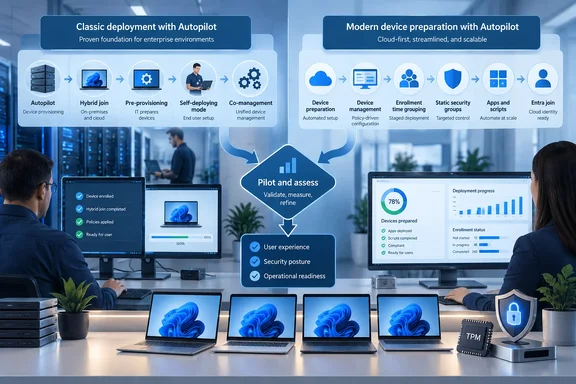
The important operational detail is that Windows Autopilot is not being retired. Microsoft explicitly says the two systems will coexist “for a while,” and its own documentation still says it is investing in classic Autopilot—particularly for deployment modes that device preparation does not yet cover. Enterprises should therefore make the move where the newer model fits, while retaining established Autopilot flows for hybrid join, pre-provisioning, self-deploying deployments, and co-management.
What Microsoft is asking administrators to do soon is start separating those two populations. That work matters now because moving the supported portion of an estate is less about changing a profile and more about replacing the group-targeting logic, Enrollment Status Page dependencies, and deployment assumptions that have accumulated around Autopilot over several years.
The recommendation has a narrower scope than the headline suggests
Microsoft’s recommended migration target is corporate-owned Windows 11 hardware using user-driven Microsoft Entra join. Windows 365 is also included in the company’s transition guidance, although the exact feature path depends on the Cloud PC scenario.
Several common Autopilot deployments are exclusions, not temporary inconveniences to wave away during planning:
- Pre-provisioning and self-deploying mode should remain on classic Windows Autopilot because device preparation does not currently support them.
- Microsoft Entra hybrid join remains a classic Autopilot scenario because device preparation supports Microsoft Entra join only.
- Autopilot into co-management should also remain on the existing service.
- Windows 10 cannot use Autopilot device preparation at all.
Microsoft’s FAQ says pre-provisioning and self-deploying support is planned for the future, but it offers no delivery date. That makes any migration schedule built around those capabilities speculative. For organizations that still need technicians to pre-stage devices before shipment, or that rely on shared-device and hybrid identity flows, classic Autopilot remains the production platform.
There is a tension in Microsoft’s messaging worth spelling out. Its September 16 transition post says future engineering investments will focus on Autopilot device preparation for eligible user-driven scenarios. Yet the FAQ, last updated May 1, says Microsoft will continue developing Autopilot in parallel because the initial device-preparation release lacks key modes, and may eventually add high-value device-preparation features back into Autopilot. The practical conclusion is straightforward: Microsoft is shifting its preferred architecture for cloud-native Windows 11 onboarding, not announcing an end-of-life date for Windows Autopilot.
Enrollment Time Grouping changes the deployment design
Autopilot device preparation condenses settings that often sit in separate Autopilot deployment profiles and Enrollment Status Page configurations into one device preparation policy. The policy can define the out-of-box experience, required applications, PowerShell scripts, device naming, blocking behavior, and enrollment-time targeting.
The core architectural change is Enrollment Time Grouping, or ETG. Rather than waiting for dynamic Microsoft Entra device-group rules to evaluate based on attributes such as a group tag, Intune adds the enrolling device directly to a designated static security group. Apps, scripts, and policies assigned to that group can then begin arriving during enrollment.
Microsoft says this eliminates dynamic-group queries and improves deployment speed and reliability. Its Intune documentation adds a useful measure of why this is significant: where enrollment grouping is not configured, inventory-based grouping can take up to eight hours after enrollment before devices receive all required apps and policies. That does not mean every classic Autopilot deployment takes eight hours, but it illustrates the delay ETG is meant to remove.
The trade-off is that administrators must rethink targeting. A direct translation of every existing group tag, dynamic group, deployment profile, and Enrollment Status Page object will recreate the complexity the newer flow is designed to avoid. Microsoft’s recommendation to begin with required outcomes rather than existing Autopilot objects is sensible: identify which device populations genuinely need a different application baseline, name template, support path, or compliance configuration, then create only the required static groups and policies.
There is also a constraint often missed in high-level migration summaries. During OOBE, device preparation handles only device-targeted configuration. Selected apps must install in the System context, and the required apps and PowerShell scripts must be assigned to the security group specified in the policy. User-targeted work can continue after setup, but it should not be counted on as part of the controlled provisioning stage.
The newer OOBE has better visibility, but a defined ceiling
Microsoft’s argument for device preparation rests partly on easier troubleshooting. Administrators can view near-real-time deployment phases, application status, PowerShell script status, policy details, profile information, and elapsed deployment time. Users get a “Setting up for work or school” screen with a percentage progress indicator and a completion page rather than the older Enrollment Status Page experience.
That reporting should be valuable to teams that have spent time correlating ESP failures, Intune Management Extension logs, application-install states, and dynamic-group membership. Microsoft also says it serializes configurations and apps to reduce conflicts, including mixed line-of-business and Win32 application deployments.
But the completion screen should not be confused with proof that every assigned workload has finished. Microsoft’s documentation says additional apps or scripts assigned to the device group but not specifically selected in the device-preparation policy can still be installing after OOBE reports completion. Security and support teams should decide which packages are genuinely essential for first sign-in, include only those in the controlled setup flow, and test the rest as post-enrollment workloads.
The app and script cap reinforces that discipline. Device preparation supports a maximum of 25 essential apps and 10 PowerShell scripts during OOBE. Microsoft says the limit is meant to improve stability and success rates, noting that its telemetry shows almost 90 percent of Autopilot deployments use 10 or fewer apps. That may be workable for standard knowledge-worker builds; it is less forgiving for device roles that require large application stacks before handoff.
For those heavier builds, the answer is not automatically to abandon the new model. It is to split true day-one dependencies from software that can safely install after the user reaches the desktop. If an environment cannot make that distinction—because a device must arrive fully configured for a lab, kiosk, manufacturing line, or specialist workflow—classic Autopilot or another deployment method may still be the better fit.
Device association adds capability—and operational obligations
The August addition of device association is separate from the basic device-preparation policy, although the two can be used together. Device association binds a physical Windows 11 PC to an organization before enrollment through TPM-backed attestation and a tenant-affinity marker written to UEFI firmware.
For administrators, that enables direct policy assignment to a specific device before a user signs in, automatic corporate ownership, device naming, and more OOBE customization. It also provides a stronger answer to a familiar Autopilot problem: how to ensure the correct experience lands on the correct corporate PC regardless of which employee authenticates first.
It is not universally applicable. Device association requires a physical device, TPM 2.0 in a healthy state, and Windows 11 24H2 or 25H2 with KB5120998 or a later cumulative update. Virtual machines are unsupported, and Microsoft says device association does not apply to Windows 365 devices because those are already treated as trusted corporate devices.
The removal process deserves particular attention in asset-lifecycle planning. Microsoft says removing an association through Intune is not supported; the tenant-affinity data must be cleared on the device itself with a local PowerShell script. Organizations using the feature for resale, reassignment, recycling, or tenant-change workflows should document that physical-access step before broadly adopting association.
Pilot before deregistering anything
Microsoft’s safest migration advice is also its most important: pre-associate eligible existing devices while they are still managed and in use, then let the device-preparation path take effect at the next planned or natural reset. There is no need to reset all machines merely to change architectures.
Administrators should not remove existing Windows Autopilot registrations early. Microsoft warns that deregistration can remove Autopilot properties and disrupt the dynamic-group membership that may still support the current configuration. A device that is both registered in Autopilot and associated through the new feature follows device association at its next OOBE, because association takes precedence.
That precedence makes testing mandatory. A representative pilot should cover each policy variant, network type, device model, app set, naming rule, security baseline, and support workflow before broader pre-association begins. In particular, verify that static ETG membership produces the expected app and policy assignments, that any user-targeted workloads do not block handoff, and that help-desk staff recognize the new device-preparation progress and reporting screens.
Microsoft’s September 14 improvements—such as prioritizing admin-configured BitLocker policy during OOBE, triggering an Intune Management Extension sync immediately after setup, and improving recovery after an OOBE network interruption—make device preparation more attractive for new pilots. They do not remove the need to retain classic Autopilot where the newer feature set does not yet match the deployment requirement.
The next practical milestone for IT is not a broad cutover date. It is a documented eligibility list: corporate Windows 11 devices using user-driven Entra join move into a pilot; Windows 10, hybrid join, pre-provisioning, self-deploying mode, and co-management remain on Autopilot. That boundary gives administrators a path toward Microsoft’s newer provisioning architecture without breaking the workflows that still depend on the old one.
Update: Device association reportedly reaches general availability (September 22, 2026)
According to Windows Report, Microsoft has now made Windows Autopilot device preparation’s device-association capability generally available alongside the Windows 11 26H1 KB5124006 preview update.
That status change means eligible organizations can move beyond limited testing of the TPM-backed pre-enrollment device identity feature, using it to recognize trusted corporate hardware before user sign-in and apply device-targeted policies or corporate ownership settings during provisioning.
For administrators, the practical next step is to validate the feature against production lifecycle processes—notably reassignment and retirement—before expanding use. General availability does not change the need for local, on-device removal of tenant-association data when hardware leaves the organization or moves to another tenant.
References
- Microsoft explains why admins must act soon to adopt Windows 11 Autopilot device preparation Neowin · 2026-09-17T06:18:01+00:00
- Windows 11 KB5124006 Introduces Autopilot Device Association, File History Fixes, and More Windows Report · 2026-09-22T19:25:17+00:00