

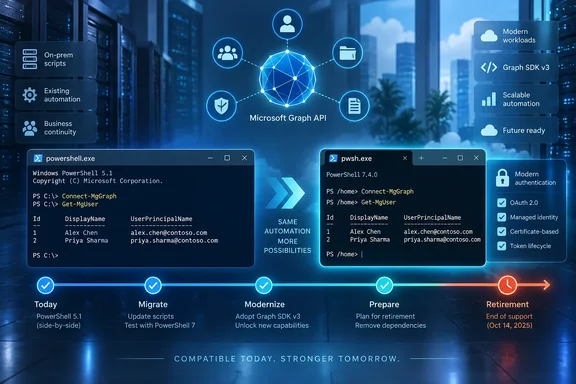
pwsh.exe, Microsoft’s modern PowerShell executable.Neowin first reported the change, and Microsoft confirmed it in a September 16 Microsoft 365 Developer Blog post. Microsoft says the decision is driven by dependency and assembly-loading problems associated with the .NET Framework-based Windows PowerShell 5.1 environment. PowerShell 7 runs on modern .NET, which Microsoft says gives its Graph engineering team a more dependable base for feature delivery and fixes.
For administrators, this is not a notice to uninstall Windows PowerShell 5.1. It is a warning that Graph automation still launched by powershell.exe now has an expiration date for meaningful maintenance, even if the modules appear healthy today.
Graph PowerShell v2 remains usable—for now
Microsoft’s wording is important. This is a retirement of maintenance for the Microsoft Graph PowerShell SDK on Windows PowerShell 5.1, rather than an immediate compatibility cutoff. The company says v2.x modules will remain compatible with Windows PowerShell 5.1 throughout the roughly 12-month transition and will receive security fixes when required.
That leaves organizations with legacy scheduled tasks, management servers, and automation runbooks some breathing room. A script using Connect-MgGraph, Get-MgUser, Get-MgGroup, or the SDK’s thousands of generated Graph cmdlets will not suddenly stop merely because it is invoked from the inbox Windows PowerShell host.
But the distinction between “runs” and “maintained” is where planning needs to begin. Microsoft says issues that reproduce only on Windows PowerShell 5.x will no longer be actively investigated or fixed. A tenant may therefore find that a future Graph capability works under PowerShell 7 but fails, hangs, or loads inconsistently under 5.1 without an available product fix.
This is particularly relevant in environments where scripts have been treated as infrastructure rather than software. A task that has run unchanged for years can conceal its PowerShell edition in a scheduled-task action, an Azure Automation setting, a deployment package, a ConfigMgr script, a CI runner, or a shortcut maintained by another team. Installing PowerShell 7 alone does not move any of those execution paths.
Microsoft Graph PowerShell 3.0 is the dividing line
Microsoft plans to release Microsoft Graph PowerShell v3.0.0 in the fourth quarter of calendar year 2026. When it does, the company says it will stop publishing routine new v2 releases; the stated exception is security fixes. Version 3.x will not explicitly support Windows PowerShell 5.x and is supported on PowerShell 7.x.
Neowin’s report correctly identifies the broad direction, but Microsoft’s own announcement adds a material qualification: v2 is not simply frozen with no possible future builds. Security maintenance remains possible during the retirement period. That matters for change-control teams that need to know whether staying on v2 means accepting every future security issue unpatched. It does not—but it does mean feature and platform maintenance have already shifted away from 5.1.
Microsoft has not yet published a complete v3 migration guide, cmdlet-breaking-change list, or public alpha schedule. In comments attached to the announcement, Microsoft Graph engineers said the intention is for v3 to be minimally disruptive and that existing cmdlet usage should generally continue without changes. They also acknowledged there will be deliberate divergences in some cases and said those will be documented as the release approaches.
Administrators should take that as a reason to test rather than a guarantee to defer. Generated SDK modules can expose large command surfaces, and even a small compatibility change in authentication, module loading, output types, serialization, or error handling can affect scripts that have grown around a particular v2 behavior.
The vendor’s timeline also creates a practical overlap: organizations can migrate their host environment to PowerShell 7 now while holding their current Graph v2 module version steady, then test v3 as its release candidates and documentation arrive. That separates two changes that should not be bundled casually in production: changing the PowerShell runtime and changing the Graph SDK major version.
The nearer authentication risk may be older Graph modules
The PowerShell 5.1 retirement is not the only Graph PowerShell deadline administrators should track. A GitHub notice from the Microsoft Graph PowerShell project says planned delegated-authentication changes will affect versions earlier than 2.36.1 when users rely on the default Microsoft Graph application. Those earlier releases will no longer be able to use delegated authentication except through Windows Account Manager, according to the project’s notice.
The project recommends moving to Graph PowerShell 2.37.0 or later. Scripts that pass their own Entra application client ID to Connect-MgGraph are not expected to be affected by that particular default-app change.
The two initiatives are independent, as Microsoft clarified in a response to the Graph SDK announcement, but they can collide in the same estate. An organization could complete a host migration from Windows PowerShell 5.1 to PowerShell 7 and still hit authentication failures because it retained an old Graph SDK release. Conversely, updating only the SDK may leave a working script on a host Microsoft no longer plans to validate.
A credible inventory therefore needs three fields, not one:
- The task or automation owner needs to identify whether it launches
powershell.exeorpwsh.exe, rather than assuming the installed PowerShell version determines its runtime. - The module inventory needs to record the actual Microsoft.Graph and Microsoft.Graph.Authentication versions in each execution environment.
- Delegated scripts need to distinguish use of Microsoft’s default application from scripts that authenticate through a tenant-controlled Entra app registration.
The third point is especially worth documenting. Client IDs, consented permissions, certificate handling, conditional access policies, and token-cache behavior often live outside the script repository. A runtime conversion that appears clean in a developer session can fail in a service account or unattended runner because its authentication assumptions were never written down.
Moving to PowerShell 7 does not replace 5.1
Microsoft’s PowerShell documentation makes clear that PowerShell 7 installs side by side with Windows PowerShell 5.1. On Windows, powershell.exe remains the Windows PowerShell 5.1 executable; PowerShell 7 uses pwsh.exe, has a separate installation path, profiles, event logs, remoting endpoints, and module paths.
That design is helpful for Graph migration. It allows an administrator to install PowerShell 7 on a management workstation or server, install the same Graph v2 module in the PowerShell 7 scope, and run an existing script in a controlled comparison before changing its production invocation. It also means compatibility dependencies on older Windows-only modules do not automatically disappear. Some environments will need a staged workflow where legacy cmdlets remain in Windows PowerShell 5.1 while Graph work moves to PowerShell 7.
The larger trap is tooling that still defaults to 5.1. Windows PowerShell ISE is tied to Windows PowerShell 5.1; installing PowerShell 7 does not turn ISE into a PowerShell 7 editor. Administrators who use ISE to test or manually run Graph scripts should plan a replacement workflow, commonly Visual Studio Code with the PowerShell extension, before enforcing pwsh.exe in jobs and deployment scripts.
Microsoft’s current lifecycle table lists PowerShell 7.6 as the supported long-term-support release through November 2028. PowerShell 7.4 and 7.5 both reach end of support in November 2026. For an estate starting this migration in September 2026, deploying an already-near-retirement 7.4 or 7.5 build would create a second avoidable upgrade project almost immediately.
What to change before Graph v3 arrives
The sensible goal for the next several months is not to rewrite every Graph script. It is to establish PowerShell 7 as the tested execution host for each supported Graph v2 workload, update Graph modules where authentication changes require it, and reserve v3 testing for when Microsoft publishes the preview and migration details.
Start by searching task definitions, source repositories, device-management scripts, and CI configurations for explicit calls to powershell.exe, Windows PowerShell paths, and version checks based on $PSVersionTable. A script launched by a file association or a generic shell command may also inherit the wrong host even after PowerShell 7 is deployed.
Next, test script behavior under pwsh.exe with production-equivalent authentication. Check module discovery, proxy settings, certificates, managed identities, interactive sign-in, paging, JSON serialization, and any direct .NET calls. Microsoft’s migration guidance notes that Windows PowerShell 5.1 is based on .NET Framework while PowerShell 7 uses modern .NET; scripts that use .NET APIs directly deserve closer inspection than scripts composed solely of standard Graph cmdlets.
Finally, avoid treating the announced 12 months as a reason to wait until late 2027. Microsoft has set the v3 release for Q4 2026, meaning feature demand may begin pulling teams toward a PowerShell 7-only module line well before the formal v2-on-5.1 transition ends. The durable configuration is clear: Graph scripts should run under a supported PowerShell 7 release, with Windows PowerShell 5.1 retained only where a separate legacy dependency still requires it.
References
- Microsoft is retiring Graph modules for Windows PowerShell 5.x - Neowin Neowin · 2026-09-17T04:50:01+00:00
- Microsoft Begins Retirement of Windows PowerShell Support for Graph SDK Petri IT Knowledgebase · 2026-09-29T06:49:15+00:00