

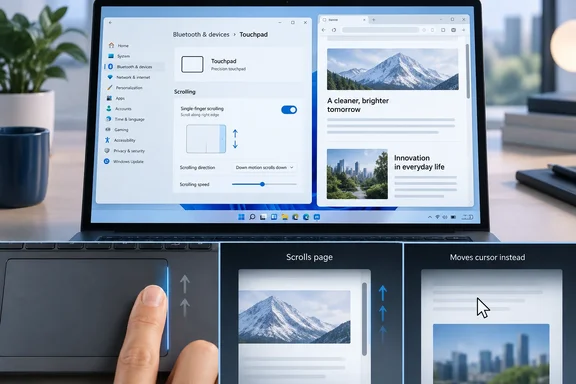
Neowin’s hands-on report identifies the practical risk: a gesture intended to scroll can instead move the pointer, especially while a user is retraining long-established two-finger muscle memory. That observation is so far a single-device test rather than a broad reliability finding, but it exposes the design trade-off Microsoft’s short feature description leaves unstated. A scroll command now begins in a narrow touchpad-edge zone that also has to coexist with ordinary one-finger pointer movement.
There is also a small but important correction to the build information circulating around the feature. KB5124010 is not limited to builds 26100.9539 and 26200.9539 if Windows 11 26H2 is included: Microsoft’s current Release Preview record also lists build 26300.9539. Windows Central and Pureinfotech independently reported the 24H2 and 25H2 Release Preview rollout, while Microsoft’s own release notes supply the complete three-build mapping.
The gesture has been in testing since May
Single-finger scrolling did not first appear in September’s Release Preview update. Microsoft introduced it in the Experimental channel on May 8, 2026, in build 26300.8376, alongside adjustable gesture speed, accelerated scrolling, and automatic scrolling. The September update is significant because it moves the control closer to the stable Windows servicing path, but it is the next rollout stage for a feature Microsoft has been testing for roughly four months.
That history matters for anyone reading the feature as a sudden redesign of Windows touchpad behavior. Microsoft has not changed the default interaction model for laptop users. Two-finger scrolling remains intact, while single-finger scrolling is a configurable alternative that can be assigned to either the left or right side of the pad—or disabled entirely.
The feature is limited to laptops with a Precision Touchpad. A device that relies on an older vendor-specific touchpad driver may expose different controls, or none at all, even after receiving the same Windows build. Microsoft says feature availability varies by device during the phased rollout, so being on build 26100.9539, 26200.9539, or 26300.9539 does not guarantee that the setting will be visible immediately.
A useful edge gesture can also be easy to trigger badly
The basic idea is familiar to users of older laptops and some Linux touchpad configurations: reserve a strip on one side of the pad for vertical scrolling. It can make sense on a large modern touchpad, where reaching for a two-finger gesture may be less convenient when one hand is occupied or when a user prefers a separated scroll zone.
But Windows touchpads use one-finger motion for the most fundamental action on the device: positioning the cursor. The usefulness of the new gesture therefore rests on Windows recognizing when a finger begins at the edge with intent to scroll, rather than merely passing near that edge while the user is moving the pointer. Neowin’s report of cursor movement instead of scrolling is exactly the failure mode that makes an edge zone feel less predictable than two-finger scrolling.
The consequence can be more irritating than a missed scroll. If the pointer moves outside the active document or browser window, the next attempt may occur over a different UI element—or nowhere useful at all. That does not make the feature defective on every PC; touchpad dimensions, firmware, driver behavior, palm-rejection tuning, and individual hand position all affect how it feels. It does mean that a feature designed to reduce finger count can increase correction work when recognition is inconsistent.
Microsoft has not published a sensitivity control specifically for the width of the scrolling edge, a per-app compatibility list, or a list of touchpad hardware it has validated. Those omissions are more relevant than the headline feature itself. A gesture that works reliably on a spacious glass touchpad may be much less comfortable on a compact business notebook where the pointer naturally travels close to the pad’s borders.
WinUI 3 remains an explicit compatibility caveat
Microsoft’s May announcement included a qualification missing from the newer Release Preview summary: the company said the touchpad gesture additions should work broadly across applications, but WinUI 3-based interfaces require newer Windows App SDK versions for complete functionality. Microsoft said at the time it was bringing the required changes to Windows App SDK 1.8 and 2.0.
That is not proof that every WinUI 3 app will mishandle the gesture in current builds. It is, however, a warning against treating “single-finger scrolling” as a universally identical input experience across all Windows software. Windows has a mix of traditional Win32 programs, web applications, UWP-era surfaces, modern WinUI 3 apps, and applications that implement custom scrolling regions. Input routing differences become visible quickest in a feature such as this one, where the operating system must distinguish pointer movement from scrolling before an app receives the result.
For IT administrators, this is not a deployment-worthy feature on its own. It has no obvious enterprise management benefit, and Microsoft has not documented an Intune policy, Group Policy setting, or supported fleet-wide configuration path for it in the release notes. Organizations that standardize help-desk procedures should keep two-finger scrolling as the baseline instruction and treat the new setting as a user preference during the preview period.
The setting also should not be used as a reason to distribute registry changes. Community documentation has identified a per-user Precision TouchPad configuration value that selects disabled, left-side, or right-side behavior, but the supported interface is Windows Settings. Direct registry deployment may create a configuration state that Microsoft changes as the feature continues through controlled rollout.
How to test it without changing the established workflow
On an eligible laptop where Microsoft has enabled the feature, open Settings > Bluetooth & devices > Touchpad, then expand the scrolling and zoom controls. Select the preferred side for single-finger scrolling rather than assuming the gesture is simply “on.” The current Settings implementation provides a choice of left side, right side, or disabled; right-side scrolling is the listed default.
A short test in File Explorer, a browser, Settings, and any frequently used line-of-business application will reveal whether the gesture works with the user’s normal grip and application mix. If the pointer repeatedly moves instead of the content scrolling, disable the option and return to two-finger scrolling. There is no productivity prize for adapting to an input method that adds accidental motion.
Automatic scrolling is a separate control and deserves separate testing. Microsoft describes it as continuing a scroll without lifting fingers when they move toward the edge of the touchpad. In its original May documentation, Microsoft also said a press-and-hold activation route would require compatible hardware. The September Release Preview notes omit that hardware qualification, so users should not assume every Precision Touchpad will offer the same activation behavior.
Release Preview is closer to public availability, not general availability
KB5124010’s placement in the Release Preview channel means Microsoft is testing a candidate servicing update with a broader but still opt-in audience before it reaches normal Windows Update channels. The company uses a controlled rollout for the new touchpad controls, allowing it to hold or expand availability based on telemetry and feedback. The feature may therefore arrive on one fully updated Windows 11 PC before another running the identical OS version.
The realistic outcome is modest: some large-touchpad laptop owners may find an edge-scrolling zone comfortable, while most users will continue using two fingers because it is universal, well-practiced, and less dependent on hitting a precise starting area. For now, the new setting is worth testing, but Neowin’s experience points to the standard Windows input rule: if a gesture occasionally makes the pointer go somewhere unexpected, the older gesture remains the faster one.