

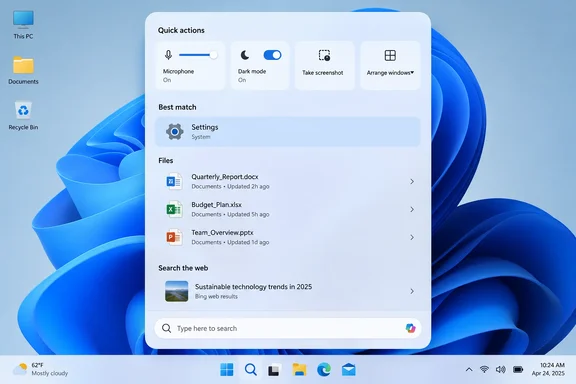
The headline "it changes your settings for you" overstates things a little. Based on the demos, Search doesn't change anything by itself. It puts the control in the results so you can change the setting without opening the Settings app.
What Microsoft announced
Windows Latest reported that Microsoft called the new Search "built from scratch," with faster results, "thousands of quick actions," and availability on all PCs later this year. Windows Central heard it the same way: starting this fall on Windows 11 PCs, users can take thousands of quick actions directly from Search in the Taskbar. BGR's liveblog recorded the same promise of "1,000 of quick actions" from the search bar. It also noted a way to connect to the Copilot app from Search.
Pavan Davuluri, Microsoft's Executive Vice President of Windows + Devices, presented the feature. Windows Central quotes him: "At its core, the new Windows search experience is quicker, more efficient, so you can find your files, settings, and apps faster." Windows Central called the new Search "a system composer. That means it can be used to control your PC." It also described the feature as a front-facing result of Microsoft's agentic approach to Windows 11.
In short: Three outlets independently confirm a new Search experience with built-in actions, due this fall. No outlet has reported a build number, Windows 11 version or rollout schedule yet.
The new layout
Windows Latest described the redesign from Microsoft's screenshots:
- Vertical panel: The flyout is tall, with rounded corners.
- Search box at the bottom: Results stack above the box in a single list instead of the current layout.
- Source labels: Each result has a small label such as "System settings," "Control panel" or "Photos," so you can see what kind of item you're about to open.
- File details: Image files show when they were last modified.
- Open button: The selected result gets an Open button in the lower-right corner.
In the demo, a search for "background image" showed these results in order:
- Background image settings
- A slideshow setting
- A Control Panel troubleshooter
- Local image files
The order suggests Microsoft is ranking settings above loose files for queries that sound like settings. That's an inference from one demo, though. Microsoft hasn't explained how ranking works or whether users can change it.
The labels may help more than they first appear to. Windows still has two settings systems, the modern Settings app and the old Control Panel. Telling you which one a result opens could save some confusion.
Bing is still there
The local results don't end the list. The same screenshot shows "Bing search suggestion · Edge" and "Search with Bing · Edge" below them.
So the new Search still sends web queries to Bing in Edge, just as the current one does. Microsoft hasn't said whether those entries can be turned off, whether they'll follow your default browser, or what Group Policy and Intune controls administrators will get. Anyone who has spent years disabling web results in Start should keep their scripts handy until Microsoft publishes the details.
Changing settings from the results
The demo most likely to matter day to day was a search for "increase mic vol." An Input volume slider appeared at the top of the results, with links to Sound settings and related options below it.
Davuluri described it this way: "You can turn up your mic volume and then use the inline slider to get to the exact level you want."
Here's where that helps. A colleague on a call says you sound faint. Today you'd open Settings, go to Sound, find your input device and adjust the level. With the new Search, you type a few words and drag a slider in the panel.
Microsoft also said Search will handle:
- Dark mode: switching the theme from the results
- Do Not Disturb: turning notifications off without opening Settings or the notification center
- Screenshots: taking a capture from Search
- Window arrangement: arranging open windows from the taskbar
BGR's Jacob Siegal summed up the appeal: "These quick actions from the search bar on Windows 11 have my ears perked up. There are so many silly inefficiencies throughout Windows, and this solves one of the biggest."
What we don't know yet
This analysis is based on general Windows knowledge, not on anything Microsoft has said:
- Multiple microphones: Will the slider change your default input device, the one in use, or let you pick? People with a headset, a USB mic and a webcam mic will want to know.
- Managed PCs: If an organization locks a setting through policy, will Search show the control greyed out, hide it, or show it and then fail?
- Accessibility: Sliders inside a search flyout need full keyboard and screen-reader support. Microsoft hasn't commented on this.
- "Thousands" of actions: Microsoft hasn't published a list, so it's unclear how many are distinct actions and how many are variations.
Sending texts from Search
Davuluri called messaging his personal favorite. In the demo, a message reading "running 5 mins late" was being written inside the Search panel while Word and PowerPoint sat open in the background. He said it lets you tell a friend or colleague you're late without taking your phone out of your pocket.
Microsoft hasn't explained how this works. It's not clear which app sends the message, whether a linked phone is required, whether it uses SMS or another service, or whether you need a Microsoft account. Windows already has phone-linking features, so a phone connection seems likely, but that's a guess and Microsoft hasn't confirmed it. Don't expect it to work on every PC without some setup.
How this compares with today's Search
How you search doesn't change much: you still type into a box on the taskbar. What changes is what you get back. Microsoft's Support documentation for current Windows Search says file search depends on an index. There are two modes:
| Indexing mode | What it covers by default | Trade-off |
|---|---|---|
| Classic | Documents, Pictures and Music folders, plus the desktop | Balances search performance against system resources |
| Enhanced | The entire PC, including all user folders and files | More complete results, but may use more system resources |
The same documentation says Copilot+ PCs add semantic indexing on top of the traditional index, and that this improved search is optimized for a limited set of languages.
None of the event coverage says the new Search replaces or changes the indexer. "Built from scratch" could mean the interface, the query engine, the ranking, or all three. Until Microsoft says, assume your current indexing settings, found under Settings > Privacy & security > Search, still control which files show up. If file search is slow or missing results today, check the indexing mode and indexed locations there first. A new interface won't find files that were never indexed.
Should you be excited?
The case for: People already use the search box to find settings, so turning results into controls is a sensible step. Fewer clicks for microphone levels, themes and Do Not Disturb is a real improvement, especially for people who don't know where those settings are.
The case for caution:
- It's all demo so far. Every detail comes from staged demos and screenshots. Nobody has published independent speed tests, preview builds or hands-on testing.
- "Faster" hasn't been measured. Microsoft has said Search would be faster before. Wait for independent tests.
- Web results remain. If Bing and Edge entries still sit under every local search, some users will see that as a downside. Admins will want clear controls to turn them off.
- Trust matters more. A search box that changes settings and sends messages carries more risk than one that only opens things. If it misreads a query, you could end up with a changed setting or a sent message. Confirmation prompts and undo will matter more than before.
In short: Inline controls could save real time on common tasks. Until Microsoft publishes rollout and admin details, treat this as an announced feature, not something you can plan around yet.
What's next
Microsoft hasn't announced a Windows Insider channel, build or KB update for the new Search, so Windows 11 users can't test it yet. Things worth watching for:
- Insider builds with the new Search flyout
- Documentation on policy controls for web results and quick actions
- A full list of supported actions
- Details on how messaging works and what it requires
If Microsoft ships what it showed, Windows 11 Search will become a place to change settings as well as find them. Whether it's actually faster and how well it respects admin policy will only be clear once preview builds arrive.
Update: Redesigned Windows Search reportedly begins Insider rollout (October 7, 2026)
Contrary to the earlier statement that users cannot test the redesigned Search yet, Windows Report says Microsoft began rolling it out to Windows Insiders on October 7, 2026. The report does not identify an Insider channel or build number, so it does not establish which testers can access it immediately.
Windows Report also says the redesign uses WinUI 3 and improves matching for typos and synonyms. Richer document and photo previews are reportedly planned for later in 2026, potentially helping users identify files without opening them. These additions should not be assumed to be included in the initial rollout.
The phone integration now has a clearer direction: according to Windows Report, Microsoft is developing Phone Link actions for tasks on a connected phone. That narrows the earlier uncertainty about messaging, but does not establish which messaging services will be supported or when those actions will arrive.
Finally, Windows Report says Microsoft plans to extend the redesigned experience to the Start menu in 2027. For now, the reported availability change concerns Insider testing, not general availability across Windows 11 PCs.
Update: Search preview builds identified, with English-only initial support (October 7, 2026)
According to Neowin’s October 7 report, the redesigned Search is beginning to roll out in Windows 11 Insider Experimental builds 26340.9616 and 28120.3181, with the latter identified as a 26H1 build. This fills the build-number and testing-channel gap left by the earlier rollout report, giving testers specific releases to check rather than an unspecified Insider preview.
Neowin reproduces release notes instructing testers to restart their device after upgrading before the New Windows Search Experience feature flag becomes visible. The notes describe a rollout beginning, not universal availability, so installing either build should not be treated as a guarantee of immediate access.
The reproduced Search notes for build 28120.3181 also specify that English is the only supported language for this initial release. That limits the preview’s usefulness for people expecting to test Search in other languages.
The listed inline actions add concrete examples beyond the earlier demos: according to Neowin, testers can turn Bluetooth on, adjust screen brightness and mute the device directly from Search. These are preview capabilities, not confirmation of general availability or enterprise policy support.
Update: Microsoft details how to enable the Search preview (October 7, 2026)
Microsoft’s Windows Insider blog now provides a more complete activation procedure for the redesigned Search, including a step missing from the previously reported instructions. After upgrading to Experimental build 26340.9616 or Experimental (26H1) build 28120.3181, testers must click Check for updates in Windows Update and then restart their device before the New Windows Search Experience feature flag becomes visible.
Microsoft says users who want to preview the experience sooner can enable it under Settings > Windows Update > Windows Insider Program > Feature flags. The rollout remains gradual, so this is an optional preview activation route rather than an announcement of universal availability.
The official post also clarifies that searching from the Start menu will continue to show the existing experience during these initial previews. The redesigned interface currently applies to taskbar Search; testers should not interpret the unchanged Start menu as a failed installation.
For later this year, Microsoft additionally plans category filters and rich inline web previews, including weather answers. These are forthcoming features, not capabilities testers should expect in the initial release.
References
- New Windows 11 Insider builds bring yet another Search redesign Neowin · 2026-10-07T18:38:01+00:00
- From searching to doing: Building a faster, more streamlined Windows Search Microsoft - Windows Insiders Blog · Wed, 07 Oct 2026 18:00:05 +0000
- Microsoft is revamping Windows 11 Search in a big way, here’s the first look Windows Report · 2026-10-07T18:31:02+00:00