

What changed
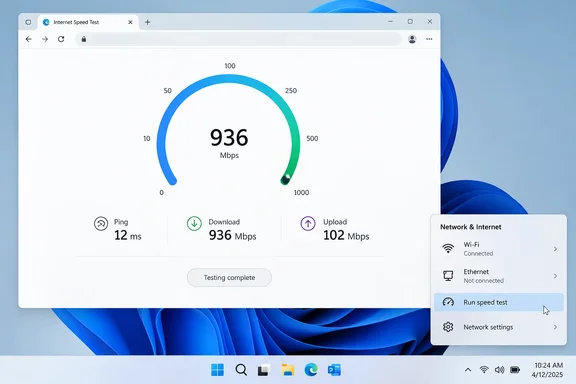
PCWorld reports that Microsoft has been distributing the feature through Windows Update since the end of February 2026. When you right-click the network or Wi‑Fi icon at the bottom right of the taskbar, the menu now includes Perform speed test. Clicking it opens your browser to a Bing page that runs Ookla's Speedtest. PCWorld describes the menu item as a link, not a test engine built into Windows.
Microsoft's own release notes give more detail. On February 17, 2026, the Windows Insider team released builds 26100.7918 and 26200.7918 (KB5077241) to the Release Preview Channel for Windows 11 versions 24H2 and 25H2. The notes said a built-in network speed test was available from the taskbar and could be opened in two ways:
- right-click the network icon in the system tray
- open the Wi‑Fi or Cellular page in Quick Settings
Microsoft says the test opens in the default browser and works with Ethernet, Wi‑Fi and cellular connections. It describes the feature as a way to check network performance and help with troubleshooting. An update to the same post on February 19 moved the release to builds 26100.7921 and 26200.7921.
The feature then shipped as an optional update. Windows Report said the KB5077241 Release Preview update added the taskbar test along with other changes. Earlier WindowsForum coverage noted that Microsoft folded it into the February 24, 2026 preview update KB5077241 for Windows 11 versions 24H2 and 25H2, and that it later moved into general rollout with March's Patch Tuesday servicing. That timeline matches PCWorld's "end of February" date.
Section summary: The speed test is a taskbar shortcut for Windows 11 24H2 and 25H2. It was tested with Insiders, shipped in the optional KB5077241 update in late February 2026, and rolled out gradually after that.
A longer path than it looks
The feature has been in testing for a while. On September 29, 2025, Microsoft added it to Dev Channel build 26220.6760 for Windows 11 25H2, with the same two entry points and the same browser handoff. Even at that stage, the network icon's menu put Diagnose network problems, Perform speed test and Network and Internet settings side by side.
At the time, Microsoft gave its usual Insider warning that features may change, be removed or never ship. This one did ship, about five months later.
How to run the test, step by step
- Right-click the network icon (Wi‑Fi or Ethernet) at the right end of the taskbar.
- Select Perform speed test. You can also open Quick Settings, go to the Wi‑Fi or Cellular page, and use the speed-test entry there.
- Wait for your default browser to open. It loads Bing's speed-test page, which PCWorld says is powered by Ookla.
- Click Start. PCWorld says the test measures ping to a server first, then download and upload speeds. The German original of its article happened to use a Telekom server.
- Read the results. A working test shows a ping figure plus download and upload speeds.
PCWorld also points out that you don't need Bing to run Ookla's test. It's available in the browser at speedtest.net and as a standalone app in the Microsoft Store.
If the option isn't there
- Check your Windows version. Microsoft's notes cover Windows 11 24H2 and 25H2. Open Settings > System > About to see which version you're running.
- Install the latest updates. The feature arrived with KB5077241 in February, and later cumulative updates carried it to more PCs. Run Settings > Windows Update and install everything that's offered.
- Allow for the gradual rollout. Microsoft listed the speed test under "gradual rollout," which means devices get it at different times. A fully updated PC may still be waiting.
- Look for a different label. Some coverage, including WindowsForum's earlier thread, says the entry may read Perform speed test or Test internet speed if that option appears.
- Check your default browser. The test opens in whatever browser is set as default. If that browser is broken or blocked by policy, the shortcut can't do much.
What "built-in" means here
This is where the marketing and the reality split. Microsoft's notes call the test "built-in," but the measuring happens on a web page. PCWorld's earlier coverage, citing Windows Latest, put it more bluntly: clicking the option opens your default browser to a Bing search for "internet speed test," which makes it a web shortcut rather than a local tool.
PCWorld also compared it with Windows 8, which it says had a more advanced network tool that showed connection details and kept a history of past tests. That comparison comes from PCWorld, not Microsoft. Either way, Windows 11's version keeps no history and doesn't analyse anything on your machine.
One warning about bad information: at least one aggregator article says the feature requires Windows 11 build 22621.2861 or later, specifically delivered through the KB5077241 cumulative update released in December 2023, and that it runs through Microsoft's infrastructure rather than third-party services. Microsoft's own notes contradict that. They tie KB5077241 to builds 26100 and 26200 in February 2026, and PCWorld identifies Ookla as the test provider. If you're writing internal support documentation, use Microsoft's release notes rather than copy from aggregators.
Section summary: The test is an online Ookla test reached through Bing. It doesn't keep records, measure your local network or diagnose problems.
What a result actually tells you
Based on general networking practice, not anything Microsoft promises, here's how to read the numbers:
| What you see | What it may mean | Next step |
|---|---|---|
| Slow on Wi‑Fi, normal on Ethernet | Wi‑Fi coverage or interference | Move closer to the router or test on a cable |
| Slow on both Wi‑Fi and Ethernet | The internet line or provider | Test again at a different time, then contact your provider |
| Normal speed, but one app is slow | That app or its service | Check the service's status |
| High ping, decent speed | Latency or a busy network | Pause large downloads and test again |
A single test only shows conditions at that moment. To learn more, run several tests under similar conditions and compare wired and wireless results if you can. When the problem is the connection itself rather than its speed, use the Diagnose network problems entry in the same menu.
For IT administrators
WindowsForum's earlier coverage advised fleet managers to update internal troubleshooting playbooks to reflect the browser‑based speed test's role. That's reasonable. Help desks can now ask users to "right-click the network icon and run the speed test" instead of reading out a website address.
Keep two limits in mind. First, the test checks the path from the PC to an internet test server, so it won't reveal problems inside your LAN, VPN or proxy. Second, because the test opens in the default browser, your browser policies and web filtering decide whether it works at all.
Bottom line
You can now start an internet speed test from the network icon in Windows 11 24H2 and 25H2. It's handy for quick checks. It is not a diagnostic tool, and Windows itself doesn't measure anything: the work happens on a Bing page running Ookla's test.
References
- Windows 11 just made testing your internet speed easier - PCWorld PCWorld · 2026-09-21T12:45:18+00:00
- Releasing Windows 11 Builds 26100.7918 and 26200.7918 to the Release Preview Channel | Windows Insider Blog blogs.windows.com
- Windows 11's new internet speed test is just a shortcut to Bing | PCWorld pcworld.com