

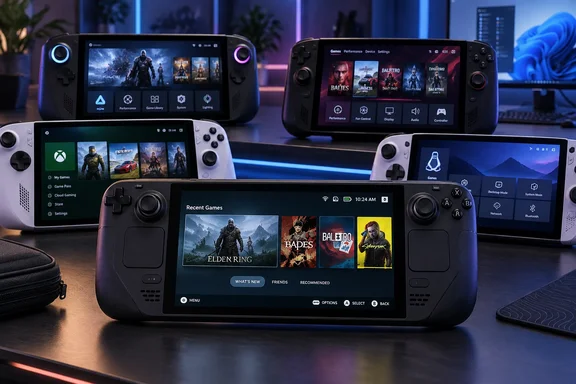
That is the persuasive argument in XDA’s September 22 analysis of Steam Deck’s influence. The product documentation supports a narrower, useful conclusion: ASUS, Lenovo, and MSI have all made dedicated handheld software central to their devices, while Microsoft has brought its own console-style interface to Windows 11. Calling software Steam Deck’s “biggest win” remains an editorial judgment, but the practical lesson is clear: choosing a handheld now means choosing how its software handles the time between games, too.
Steam Deck made the handheld interface part of the product
Valve’s original Steam Deck combined a custom AMD processor with four Zen 2 CPU cores and eight RDNA 2 graphics compute units. Its published processor power range was 4–15 watts. Those specifications describe a machine designed around a portable power budget, giving useful context to the hardware without pretending that its graphics-unit count explains the whole experience.
XDA contrasts that eight-unit GPU with AMD’s Radeon 660M and Radeon 680M, then suggests the more capable option would have improved the Deck. That comparison is unnecessary to the stronger argument. Establishing that another GPU configuration would have made a better handheld would require evidence about the resulting device, not merely a larger specification. Valve’s documented configuration establishes what it shipped; it supplies no measurement of that hypothetical alternative.
The important software decision was to make the handheld interface the normal starting point. Valve’s Steam Deck software description explicitly identifies gamepad navigation and a console-like experience as core features. The library, store, settings, game updates, and system maintenance belong inside that experience, while a desktop remains available for users who want it.
This changes the relationship between a PC and its owner. A desktop-oriented device asks the owner to assemble a convenient gaming routine around the operating system. Steam Deck presents that routine as the default. The distinction is particularly relevant when the controls already in the user’s hands are sticks, triggers, and buttons.
Suspend and resume illustrate the ambition more clearly than a launcher screenshot. Valve documents pressing the power button to suspend a game and put Steam Deck to sleep, then pressing it again to resume. Here, software behavior and a physical control form one feature: the owner is supposed to understand what the device will do without navigating a desktop power menu.
The SteamOS version of Lenovo Legion Go S shows that this approach travels beyond Valve’s hardware. In its review, TechRadar described dedicated access to the library and store alongside a Quick Access sidebar for performance settings, brightness, audio, and Wi-Fi. Its reviewer highlighted the ability to reach those controls without completely leaving a game. That is useful corroboration of the interface’s value on another manufacturer’s device, without claiming that every SteamOS handheld behaves identically.
Armoury Crate SE, Legion Space, and MSI Center M address the same problem
Windows handheld manufacturers have approached the interface problem by placing a device-specific application between the user and ordinary Windows workflows. ASUS calls its application Armoury Crate SE; Lenovo uses Legion Space; MSI provides MSI Center M. Their documented functions overlap in revealing ways: bringing games together, exposing performance controls, and making device settings accessible from the handheld.
ASUS’s Armoury Crate SE documentation provides a particularly detailed example. Its library displays installed games and applications, supports favorites and game-platform views, and allows individual game profiles. Those profiles can include control configurations, while the application’s settings provide performance options, calibration, connectivity, and an update center. This is a device-management interface as much as a game launcher.
The control configuration is important. Armoury Crate SE distinguishes Gamepad Mode from Desktop Mode and allows buttons to perform gamepad, keyboard, mouse, or shortcut functions. That is a practical acknowledgment that a Windows handheld must handle two kinds of interaction. Playing a controller-compatible game and operating a desktop application are different tasks, even when the same physical buttons perform both.
Lenovo’s original Legion Go announcement describes a similar division of labor. Legion Space gathers locally installed games and access to game platforms, while allowing users to adjust settings including resolution, refresh rate, and brightness. The benefit is straightforward: the manufacturer provides a common starting point for activities that would otherwise be spread across applications and settings.
MSI’s description of Center M 2.0 follows the same pattern. Its game library sits alongside performance-profile access and updates, while customizable Quick Settings expose system toggles. MSI also documents Xbox Game Bar integration. These are concrete software features, although the manufacturer’s claims of a more intuitive experience remain its own assessment.
The three approaches support XDA’s broader interpretation, but they establish convergence more firmly than causation. Their documentation demonstrates that handheld makers consider a dedicated interface necessary; it does not establish that Valve originated every idea or directly caused each design decision. For buyers, the useful comparison is how completely each implementation handles routine tasks—not whether a launcher resembles Steam Deck’s home screen.
Xbox mode takes the Windows response beyond manufacturer launchers
One part of XDA’s argument needs updating: saying that Windows itself has barely changed leaves out Microsoft’s own handheld work. On November 24, 2025, Microsoft announced that the Xbox full-screen experience was available for Windows 11 handhelds, with a preview extending to other PC form factors. Microsoft explicitly described the goal as a console-like experience that reduces friction when getting into games.
By April 30, 2026, Microsoft was calling that interface Xbox mode, formerly the full-screen experience, and announced the start of its rollout to Windows 11 PCs. These are dated availability milestones, not evidence that every PC received the feature simultaneously. They do establish that controller-first presentation has become a Windows platform initiative as well as a manufacturer customization.
This strengthens the central argument while changing its implications. Windows handhelds are no longer competing with Steam Deck solely through separate ASUS, Lenovo, or MSI launchers. Microsoft is also addressing the operating-system experience. A prospective owner therefore has a less binary choice than “keep the Windows desktop” or “install Linux.”
There is still a useful distinction between the jobs involved. A controller-oriented game interface addresses navigation and access to games. Manufacturer software can also expose device-specific controls: ASUS documents calibration and firmware checks, Lenovo documents display adjustments, and MSI documents performance profiles and customizable toggles. The practical question is how these pieces work together on the particular handheld, rather than which application occupies the entire screen.
That is the stronger way to evaluate the modern Windows response. A home screen is immediately visible, but the important interactions include changing a control profile, adjusting the display, finding an update, and returning to a game. The documented software increasingly accommodates those tasks; equal polish across devices would require comparative testing that this evidence does not supply.
Bazzite separates the Steam Deck experience from Steam Deck hardware
Bazzite takes a different approach. Instead of retaining Windows and building a handheld interface above it, the Fedora-based Linux project offers a handheld-oriented operating environment with Steam Gaming Mode. Its documentation describes a minimal gaming session centered on Steam’s gamepad interface, with Gamescope providing functions such as frame-rate limits and resolution scaling.
The distinction matters because Bazzite goes beyond copying the appearance of Steam Deck’s library. Its handheld installation documentation describes supported “-deck” images booting directly into Gaming Mode, while leaving a desktop accessible through the power menu. The intended arrangement is familiar: gaming first, desktop access when needed.
For a Windows handheld owner, that creates a different software choice without necessarily requiring a hardware purchase. The attraction can be the operating experience itself. However, the existence of Bazzite does not tell us how many users switch, why most of them switch, or whether a particular game will perform better afterward. XDA’s explanation of users’ motivations is plausible analysis, not a measured population finding.
Hardware support also needs to remain specific. Bazzite’s installation guidance ties its Gaming Mode recommendations to graphics support and flags limitations for Intel handhelds, including potentially missing thermal-design-power controls. Those controls govern the processor’s power allowance, so their availability is part of the handheld experience being sought—not a peripheral detail to discover after replacing the operating system.
Valve’s own expansion is a separate development. SteamOS has reached devices beyond Steam Deck, with Lenovo Legion Go S providing a shipping example reviewed by TechRadar. Bazzite remains its own project; installing it on a device is different from buying a manufacturer-supported SteamOS configuration. Treating those routes as interchangeable would conceal a meaningful difference in who supplies the software and how device support is delivered.
For the argument about Steam Deck’s influence, both routes are significant. Windows manufacturers reproduce the controller-first approach within Windows, while Bazzite makes Steam Gaming Mode available on other hardware and SteamOS appears on a Lenovo handheld. The shared direction is clear even though the operating systems, support arrangements, and implementation details differ.
SteamOS makes compatibility part of the interface decision
A console-style interface cannot, by itself, settle the operating-system choice. Valve’s Steam Deck software description explains that SteamOS includes Proton, the compatibility layer used to run Windows games on the Linux-based system. That helps explain how SteamOS can offer access to PC games while presenting a different operating environment.
The important word is compatibility. A game appearing in a library and a game working properly under a particular operating system are separate matters. Valve pairs its SteamOS description with its Deck Verified program precisely because users need information about how games work on the device, not merely whether they own them.
Anti-cheat provides a concrete example of why compatibility cannot be reduced to graphics capability. Valve’s Steamworks documentation says Proton supports middleware including Easy Anti-Cheat and BattlEye, while describing developer-side enablement requirements. Support for an anti-cheat technology therefore cannot be interpreted as a blanket promise covering every game that uses it.
This places a boundary around the appeal of an operating-system replacement. A preferred interface is valuable only alongside the games and functions the owner needs. For someone evaluating Bazzite, the decision must include the exact handheld’s support and the intended game library. A general description such as “AMD-powered handheld” is too broad to substitute for either assessment.
Conversely, the documented Windows improvements mean that dissatisfaction with desktop navigation need not immediately become an operating-system migration. Xbox mode addresses controller-first access, while manufacturer applications handle a range of device controls. Trying those supported interfaces first is the lower-commitment decision for an owner whose games and applications already work under Windows. That recommendation follows from the available software choices; it is not a claim that Windows and SteamOS now offer identical experiences.
The hardware and software questions should therefore be evaluated together. A processor specification describes one part of the machine. The operating system determines another set of choices, and device software determines how the owner reaches them. Steam Deck’s influence is most apparent in manufacturers treating that third part as something they must deliberately design.
Choose your handheld software around the games and controls you need
For an existing Windows handheld owner, start by evaluating the supplied controller-oriented interface before replacing the operating system. The evidence supports several routes to a less desktop-centered experience, but it does not support a universal recommendation to install SteamOS or Bazzite. Microsoft’s Windows interface, manufacturer utilities, and Linux-based alternatives solve overlapping problems with different boundaries.
On supported ROG Ally models, ASUS’s documentation provides concrete checks. Its current Armoury Crate SE guide applies to version 2.1.10.0 or later and distinguishes the controls used to open the application: RC71/RC72 devices use the Armoury Crate button, while RC73 devices open Command Center and then select Open Armoury Crate SE. Inside the application, Settings includes Performance, Calibration, and Update Center; the latter offers Check for Updates for applicable drivers and firmware. These are ASUS-specific instructions, not a workflow for Legion Go or MSI Claw.
Those details also provide a better purchasing checklist than a launcher screenshot. Can the interface reach the settings you expect to change? Does it distinguish game controls from desktop controls? Is the software configuration supported on the exact model under consideration? Manufacturer documentation establishes available functions; hands-on reviews can help assess their usability, as TechRadar’s Legion Go S review does for SteamOS quick access.
The most useful takeaways are these:
- Keep a working Windows installation while evaluating its handheld interfaces if your main complaint is desktop navigation. Microsoft’s Xbox mode and manufacturer utilities already address parts of that problem.
- Compare access to performance, display, and controller settings alongside the game-library interface. Legion Space and MSI Center M document substantial functions beyond launching games.
- Treat Bazzite as an operating-system choice with device-specific support requirements, especially where power controls or graphics support affect the intended experience.
- Evaluate game compatibility separately from the interface. Proton’s support for anti-cheat middleware includes developer requirements and does not guarantee every title using that middleware will work.
- Distinguish a shipping SteamOS handheld from a user-installed alternative. Lenovo’s SteamOS Legion Go S and Bazzite demonstrate different ways to obtain a gaming-first environment, with different software arrangements.
Steam Deck’s lasting influence is best understood as a higher expectation for the whole handheld experience. Its competitors increasingly give games, controller navigation, and quick settings priority over the desktop, and Microsoft now participates directly in that effort. The consequence for buyers is welcome: a handheld PC can remain a PC without making desktop operation the center of every gaming session—and software deserves a place beside the processor and screen in the buying decision.
References
- Steam Deck's biggest win wasn't hardware, and modern Windows handhelds prove it XDA · 2026-09-22T17:30:20+00:00
- Xbox full screen gaming experience now available for Windows 11 handhelds and in preview for PCs | Windows Experience Blog blogs.windows.com
- Xbox Mode Begins Rolling Out to Players on Windows 11 PCs Today - XBOX Wire news.xbox.com