

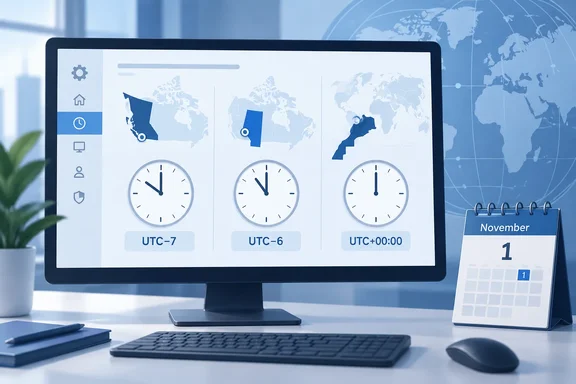
The three changes are different. They take effect on different dates, move to different offsets and need different Windows settings. Treat them as separate projects.
British Columbia: permanent UTC‑7 and a new Windows zone
British Columbia announced in March 2026 that the March 8 "spring forward" would be its last clock change. The province now keeps UTC‑7 all year, the offset it used to observe as Pacific Daylight Time. Microsoft's summary of the impact is simple: clocks will not be set back by an hour at 02:00 a.m. on November 1, 2026, and the British Columbia time zone will permanently shift to UTC‑7.
On September 17 the province added a naming detail that matters to software. The official abbreviation for the year-round zone is PCT (Pacific Time). The provincial government said it announced this before November so businesses would use it consistently in communications and operational systems. The province also noted that existing local Mountain time arrangements in parts of northern and southeastern B.C. don't change. Cranbrook and other East Kootenay communities that follow Mountain time will keep switching between standard and daylight time, so you may have staff in B.C. who are exceptions.
What changes in Windows:
- New display name: Microsoft tells users to select the applicable Windows display name: (UTC-07:00) Pacific Time (British Columbia) for most affected locations in British Columbia.
- New registry time-zone ID: British Columbia Standard Time.
- Deadline: Customers must install the update before permanent time changes take effect on November 1, 2026.
- Interim workaround: If a device can't get the update before November 1, Microsoft's temporary option is "(UTC-07:00) Yukon" (Yukon Standard Time). Microsoft warns that this is only an offset match. Its name, geographic mapping and historical rules differ, so it isn't a permanent replacement. Switch to the new B.C. zone once the update is installed.
Alberta: permanent UTC‑6 as "Alberta Time"
Alberta followed in June. The province has adopted Alberta Time (ABT) at UTC‑6, the offset it used during Mountain Daylight Time. The Alberta government says that beginning in November 2026, clocks will no longer reset to Mountain Standard Time, and Alberta will remain on Alberta Time year-round. The province also says it will review the first full year and collect feedback, which is a reminder that rules like this can change again.
Microsoft's Alberta post follows the same pattern as the B.C. one: clocks will not be set back by an hour at 02:00 a.m. on November 1st, 2026, for the Alberta time zone, which will permanently shift to UTC-6.
What changes in Windows:
- New display name: Pick (UTC-06:00) Mountain Time (Alberta) for Alberta and affected Northwest Territories locations, including Yellowknife and Inuvik.
- The Northwest Territories are included. Microsoft says the Alberta time zone also applies to affected Northwest Territories locations, including Yellowknife and Inuvik. If your organization has offices in Yellowknife, this affects you too.
- Deadline: The same as B.C. Customers must install the update before permanent time changes take effect on November 1st, 2026.
- Interim workaround: The Canadian IT firm Campfire reports that for devices that can't get patched in time, Microsoft's interim advice for Alberta is to temporarily switch to "(UTC-06:00) Saskatchewan" after the transition. The logic matches the Yukon workaround for B.C.: Saskatchewan already stays at UTC‑6 all year. Treat it as a temporary fix with the same caveats about name and history.
I couldn't confirm the registry ID for the new Alberta zone. Don't script against a guessed ID string. Details on how to look it up are below.
Morocco: the change already happened
Morocco is different from the other two, and it's the urgent one. Decree 2‑26‑530, adopted June 25 and published June 29, 2026, set clocks back 60 minutes at 02:00 on Sunday, September 20, 2026. That returned Moroccan legal time to GMT (UTC+00:00) and repealed the 2018 decree behind the previous rule. Microsoft's August 30 post covered the same change: from 02:00 on September 20, official time would go back one hour.
In Windows the zone keeps its name, Morocco Standard Time, which the Casablanca locale uses. Microsoft update documentation says Windows was updated to align Morocco Standard Time with permanent UTC+00:00 from September 20, 2026. Unlike the Canadian changes, this one adds a corrected rule to an existing zone rather than a new one.
That date has passed. Any Moroccan device that didn't get the corrected rule may have been showing the wrong time since last Sunday. I couldn't independently verify the Windows versions, KB numbers and interim workaround in Microsoft's Morocco post, so I won't list them here. Admins with Moroccan endpoints should check these details against Microsoft's official Morocco guidance today.
The Canadian update schedule
For the two Canadian provinces, Microsoft is releasing support in two waves. In early August, a post to the IANA tz mailing list quoted Microsoft's plan: Windows 11, version 26H2, 26H1, 25H2 and 24H2 get the change in the September 2026 non-security update, and remaining versions of Windows receive it as part of the October update.
| Wave | Platforms | Update | Scheduled date |
|---|---|---|---|
| 1 | Windows 11 26H2, 26H1, 25H2, 24H2 | September 2026 non-security (preview) update | September 22, 2026 |
| 2 | All other Windows versions, including Windows Server | October 2026 monthly quality update | October 13, 2026 |
Windows Server is in the second wave. One admin told Microsoft that their servers only take updates in November while client PCs update in September. That would put the fix on the servers after the November 1 change. On September 3 Microsoft responded that remaining versions of Windows, including Windows Server versions, will receive the update as part of the October 2026 monthly quality update, scheduled for October 13, 2026. If your server patch rings run late, change them now. Otherwise your servers could fall back on November 1 while the rest of the province stays put.
The dates in the table are Microsoft's schedule, not proof that your devices have installed anything. Wave 1 is also an optional preview release, which many organizations don't deploy widely. If you skip previews, the October 13 Patch Tuesday update is likely your real delivery date for every platform. That leaves under three weeks to deploy before November 1.
Summary: Windows 11 got the fix in the September preview. Everything else, including servers, gets it on October 13. The November 1 deadline doesn't move.
After you patch: checking and switching devices
Microsoft's steps after installation are the same for both provinces:
- Open Settings > Time & language > Date & time.
- If Set time zone automatically is on and location services are available, Windows will automatically select the appropriate time zone based on the device's location. No manual action is required.
- Otherwise, turn off Set time zone automatically, if it is enabled.
- Under Time zone, choose (UTC-07:00) Pacific Time (British Columbia) or (UTC-06:00) Mountain Time (Alberta).
- Confirm that the displayed date and time are correct.
Most managed fleets have location services turned off, so step 2 won't apply to them and you should script the change instead. Windows includes tzutil:
tzutil /gshows the device's current time-zone ID.tzutil /llists every zone on the device, with display names and IDs. After patching, use it to confirm the new zones exist and to get the exact Alberta ID.tzutil /s "British Columbia Standard Time"sets the new B.C. zone on a patched device.
One detail makes planning easier. Before the permanent-time transition takes effect on November 1st, 2026, the existing seasonal zones continue to provide the expected current offset. Moving a device to the new zone before November 1 won't change its current time. You can deploy it in October with little risk. Don't move devices to the Yukon or Saskatchewan workarounds early, though. Those zones sit an hour off today's local time until the transition.
Whatever you do, don't manually move the clock forward an hour after November 1. You'd be treating the symptom. Timestamps, Kerberos tickets (which reject clocks that drift too far), log correlation and scheduled tasks all rely on a correct UTC time and the right zone rule. A shifted clock damages the one thing that has to be correct.
Other systems you'll need to check
Patching Windows is only part of the job. Here's what's been reported so far:
- Outlook and Exchange Online: One customer said the new B.C. zone didn't appear in Outlook on the web, new Outlook or classic Outlook, even with the September preview installed. A Microsoft employee replied that classic Outlook should have it when the client's Windows is patched, and OWA and New Outlook should have it in about a week (the reply was posted September 24). Watch for the new zone to appear before you run bulk
Set-MailboxRegionalConfigurationchanges. - Microsoft Bookings: In a Microsoft Q&A thread, a developer said Bookings still treats a January 2027 B.C. appointment as Pacific Standard Time. The problem is that a 10:00 AM appointment in most of British Columbia after November 1, 2026 should correspond to 17:00 UTC (UTC-7). The reply noted that Microsoft hadn't yet published Bookings-specific guidance. The practical risk is future appointments landing an hour off, so audit recurring meetings and bookings that cross November 1.
- Application code: Developers using open-source time-zone libraries are asking whether the data is ready. In a moment-timezone GitHub issue, one user noted that the library had updated its data to IANA tzdata 2026d and released version 0.6.4 and asked whether that covers every Canadian change. If you ship software, check which tzdata version your runtime, container images and dependencies include.
- Non-Windows devices: According to Campfire, Apple pushes time zone data through regular macOS and iOS updates, and Linux servers get it through the tzdata package. Printers, door controllers, badge readers and older appliances are often forgotten, and they can fall back by themselves on November 1.
Analysis: two approaches to the same kind of change
This is general industry analysis, not something Microsoft has said. Its handling shows how differently a change can be absorbed. Morocco's change keeps the existing Morocco Standard Time zone and updates its rule. For B.C. and Alberta, Microsoft chose to create new zones. That's more work for admins, because devices have to be moved to the new zones. The benefit is that historical data stays correct: a timestamp from July 2025 in "Pacific Standard Time" still needs the old daylight-saving rules to read correctly. Changing the old zone in place would have altered every Pacific-zone device on the continent.
The approach hasn't pleased everyone. When Microsoft first posted, one contributor to the IANA tz list said the post was "fairly light on decisions" and that Microsoft had not yet decided what to call the zone or whether it would show as daylight saving time. The new display names and IDs have since settled some of that. The criticism still has a point: timing is tight, and preview updates, October Patch Tuesday and a November 1 deadline leave little slack for change boards.
Checklist before November 1
- Morocco: Check Moroccan devices now. The change took effect on September 20.
- Inventory: Find every device and mailbox in B.C., Alberta, Yellowknife and Inuvik, and note exceptions such as Cranbrook.
- Server patching: Bring server rings forward so the October 13 update installs before November 1.
- Scripted zone change: Test
tzutilchanges on patched test machines and confirm the Alberta ID withtzutil /l. - Calendars: Audit recurring meetings and Bookings appointments that cross November 1.
- Workaround devices: Keep a list of any devices you move to Yukon or Saskatchewan, and switch them back to the proper zones once they're patched.
- Manual clock changes: Don't shift clocks by hand.
November 1 should be a quiet Sunday for most people in B.C. and Alberta. For IT staff, it will only be quiet if the October work gets done.
References
- Interim guidance for British Columbia time zone changes 2026 | Microsoft Community Hub techcommunity.microsoft.com