

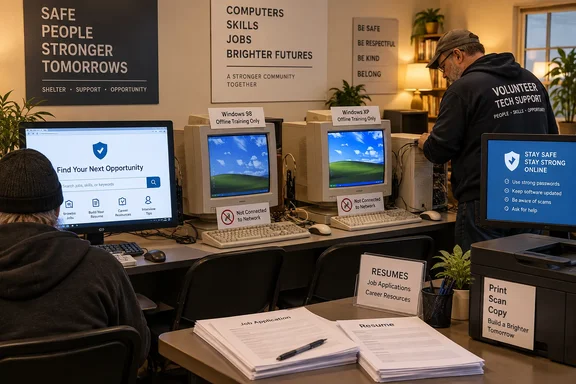
The Texarkana Gazette reported Friday that Judice, owner of Philip’s Computer Repair, restored eight of 10 surplus computers donated by a customer who moved away. Limited space meant five machines reached the Center of Hope’s computer lab: three intended for resumes and two for basic computer-skills training. Judice also donated a printer and offered free repair support.
The Salvation Army independently confirms that its Texarkana Center of Hope at 316 Hazel Street serves men, women and families. That makes a functioning, accessible computer lab more than a convenience. For residents who lack a phone, home broadband or a personal device, it provides a place to create documents, retrieve email, upload applications and print material employers still request.
But the report also says Judice installed “Windows 98, Windows XP, or Windows 10” depending on each computer’s hardware. Those are not interchangeable choices for systems that will handle job seekers’ names, addresses, employment histories, passwords and potentially Social Security numbers.
Five PCs solve a practical access problem
The strongest part of this donation is its focus. A general-purpose technology giveaway can leave recipients with hardware but no clear use case; these PCs have a designated home and specific employment-related roles. Major Tex Ellis told the Gazette that the computers will support the shelter’s work helping residents seek permanent housing and employment.
The difference is operational. A job search regularly requires a current email account, a browser capable of handling modern application portals, document creation and PDF uploads, and often a way to print a resume or identification paperwork. A printer is therefore a meaningful part of the donation rather than an accessory.
The local Salvation Army describes the Center of Hope as a shelter for men, women and families, while recent reporting by KSLA has also identified it as a Texarkana warming center during severe cold. The facility is serving people whose access to technology can be intermittent and whose time at a workstation may be limited. A ready-to-use, maintained lab removes a friction point that can otherwise turn a job application into a trip across town, a library waiting list, or an impossible task.
Judice’s offer to repair the machines at no charge is equally important. Refurbished hardware is often reliable enough for office work, but it needs an owner: someone to replace a failed drive, diagnose a printer problem, remove malware, renew an account or update a browser. The donor’s continuing involvement gives the lab a support path that many one-time equipment donations lack.
Windows 98 and XP cannot be job-search workstations
The operating-system disclosure is where the practical value of the story changes. Microsoft ended support for Windows 98 on July 11, 2006. Windows XP reached end of support on April 8, 2014. Neither operating system receives current security updates, and neither should be used to browse the open web or collect credentials from shelter residents.
This is not a theoretical concern about old software. Employment sites require users to create accounts, reset passwords through email, upload resumes and sometimes provide sensitive identity or background-check information. An unsupported computer can expose those accounts to unpatched flaws, and a decades-old browser may be unable to render or securely connect to application portals in the first place.
The Gazette did not specify which of the five installed systems are running Windows 10, which are running XP or Windows 98, whether all machines are connected to the internet, or whether the older systems have been set aside for offline instruction. That missing detail matters. A Windows XP PC can still have limited value for an offline typing lesson, basic keyboard practice or an old locally installed educational program. It should not be the machine a resident uses to sign into Gmail, a state workforce account, a job board or a prospective employer’s application site.
Windows 98 is even more clearly an offline-only system. Its software support ended more than 20 years ago, and its application compatibility belongs to a different era of the web. Putting it in the same lab as online job-search machines without a clear restriction risks confusing users who have no reason to know which desktop is safe for which task.
The Center of Hope should label every XP and Windows 98 computer as offline training equipment, or keep those systems physically disconnected from its network. The label should be plain: no email, no job applications, no passwords and no personal documents.
Windows 10 needs a support check too
Windows 10 is the obvious candidate for the lab’s connected machines, but “Windows 10” alone is no longer enough to establish that a computer is supported. Microsoft ended standard support for most Windows 10 editions on October 14, 2025. Its Extended Security Updates program can provide critical and important security updates for eligible enrolled devices, but it is a temporary bridge rather than a return to normal support.
As of September 2026, a Windows 10 system used by the public needs more than an installation that boots successfully. The shelter or its volunteer technician should verify the exact edition and version, confirm that current monthly updates are installing, and determine whether the machine is covered by the relevant Extended Security Updates path where applicable. The report does not say whether the donated computers are enrolled.
That distinction should be resolved before the PCs become regular job-application terminals. A public computer lab does not need expensive hardware to be useful, but it does need a current browser, working certificate support, a supported operating system and an update process. The ability to print a resume is valuable only if the user can safely reach the employer’s application page first.
There is also a more mundane issue with donated computers: former-owner data. The Gazette reported that the systems came from one customer, but it did not describe how drives were wiped or whether Windows installations were activated and licensed for reuse. A clean operating-system installation and a verified license are basic handoff requirements, especially when computers move from private ownership to a shared public setting.
A small checklist would protect the donation’s value
The donation can become a sustainable employment resource if its connected PCs are treated as managed public systems rather than simply restored devices. Judice’s continuing repair offer makes the following steps achievable without turning a local charity project into an enterprise IT deployment:
- The shelter should use only supported, fully patched operating systems for any computer that reaches the internet or handles a resident’s account credentials.
- The lab should reserve older Windows systems for offline instruction only, with network access removed rather than merely discouraged.
- Each online PC should use a standard, non-administrator account and a browser configured to clear local browsing data, downloads and saved passwords after each session.
- The shelter should use a password manager policy that prevents browsers from saving resident credentials, and staff should remind users to sign out of email and job portals when finished.
- The systems should have a documented monthly update and maintenance check, including printer testing, browser updates and a review of disk space and local files left behind by prior users.
- Each drive should be securely wiped and each Windows installation checked for legitimate activation before it is put into shared service.
None of these steps diminishes the goodwill behind the donation. They protect it. A computer lab serving people who are rebuilding housing and employment stability should reduce barriers without introducing a new risk around personal information.
The next donated machines need a clearer destination
Three of the restored computers did not fit in the Salvation Army lab, and Judice told the Gazette he plans to donate them to another Texarkana shelter. That gives the project a second chance to establish a repeatable standard: identify the hardware’s limits, install a currently supported system where possible, and designate legacy systems only for offline use.
Refurbishing equipment for community organizations is worth doing precisely because basic office tasks do not require new, high-end PCs. But age changes the terms of the donation. Hardware can be old; the public-facing software stack cannot be abandoned.
For the five systems already at the Center of Hope, the concrete payoff is clear: residents now have a place to prepare a resume, search for work and print application material. The operational task is just as clear: make sure the workstation used for that application is a supported, patched Windows 10 system—or another supported operating system—not a Windows 98 or Windows XP machine connected to the internet.