

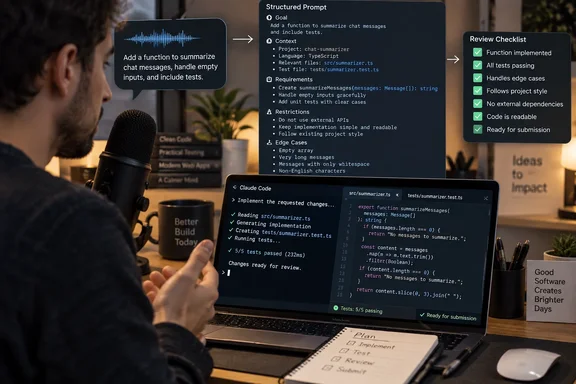
The more useful takeaway is the workflow: speak the task, previous attempts, restrictions, and edge cases while they are fresh, then review the cleaned-up text before submitting it to Claude Code. Wispr’s own release notes confirm work on dictated-text formatting and course correction, although they do not establish the productivity gain reported by XDA.
What Flow adds to the prompt-writing process
In XDA’s account, Wispr Flow acts as an input layer between the microphone and Claude Code. The writer places the cursor in the destination application, activates dictation, and speaks; Flow then inserts processed text into that application.
XDA reports that Flow removes filler words, adds punctuation and formatting, and handles spoken changes of mind. For that writer, the advantage over using Claude Code’s own voice input was receiving a more structured prompt rather than a relatively raw transcription. That is a comparison of one person’s experience, not a controlled assessment of either product’s recognition accuracy.
The important mechanism is the separation between composing an instruction and submitting it. Flow prepares the text; Claude Code receives the resulting prompt. Cleaner punctuation can improve readability, but the information and constraints still have to come from the developer.
XDA’s writer says speaking also reduced the temptation to omit details simply because another paragraph would take too long to type. Those details included what the project should do, what had already failed, and which files Claude Code should leave alone. The account suggests a plausible benefit for developers who routinely shorten their instructions to save effort: dictation can lower the cost of supplying context. It does not demonstrate that longer prompts automatically produce better code.
Coding-editor features do not all carry into Claude Code
XDA reports that Flow can use context from supported code editors to improve recognition of variable, function, class, and file names. The same account says automatic file tagging is limited to tools such as Cursor and Windsurf, rather than extending to Claude Code.
For Claude Code specifically, XDA describes automatic handling of lengthy terminal prompts through chunking, along with formatting that can turn several spoken requirements into bullet points. Those particular integration details remain single-outlet reporting; they are not independently corroborated by the release-note text available for this report.
That boundary is important when deciding what to expect. Recognition of identifiers in a supported editor, tagging files in an editor’s chat panel, and inserting text into a terminal are separate capabilities. A successful demonstration of one does not establish support for the others.
Windows readers should also keep the platform boundary intact. The reported five-minute-to-60-second experience was on a Mac. It does not establish equivalent insertion behavior in PowerShell, Windows Terminal, WSL, or a remote shell, and it supplies no verified Windows-specific setup procedure.
Review the cleanup, not just the spelling
Wispr’s release history provides a concrete reason to retain a review step. In its June 24 update, the company acknowledged earlier formatting problems involving missed course corrections, substituted words, ignored punctuation or edits, and inconsistent results. Wispr said older models had handled some dictations too conservatively or too aggressively, and that it had corrected those problems.
A July 9 update separately said an Auto Cleanup setting had been too aggressive for some users and had been fixed. These are vendor-reported fixes, not evidence that the problems persist. They do show that automated cleanup involves interpreting speech, rather than merely copying recognized words.
For a coding prompt, the sensible review target is therefore meaning. Before sending the text, check that:
- File names and code identifiers still refer to the intended objects.
- Restrictions such as “do not modify this file” remain explicit.
- A spoken correction replaced the earlier instruction rather than leaving contradictory requirements.
- Formatting preserved the relationship between a requirement and its exception.
This is a practical safeguard inferred from the workflow, not a claim that WindowsForum reproduced a transcription error. A polished paragraph can still contain the wrong instruction.
Where the reported time saving is useful
The workflow is most relevant to developers who already know what they want but find typing the explanation laborious. XDA’s experience supports treating voice input as a way to capture more of that explanation, especially prior attempts and project boundaries.
The headline timing should not become a purchasing promise. XDA does not provide a repeatable timing method, prompt-length comparison, or measurement of the time spent reviewing the result and correcting Claude Code’s subsequent work. It also does not establish a controlled advantage over Claude Code’s built-in voice mode.
For anyone evaluating the pairing, the useful measure is the time required to reach a correct, reviewable prompt—including cleanup—not merely the time spent speaking. On proprietary projects, approval to use Claude Code should not be assumed to cover an additional dictation service. Start with an approved, non-sensitive task and judge whether the final instruction preserves the details that typing used to leave out.