

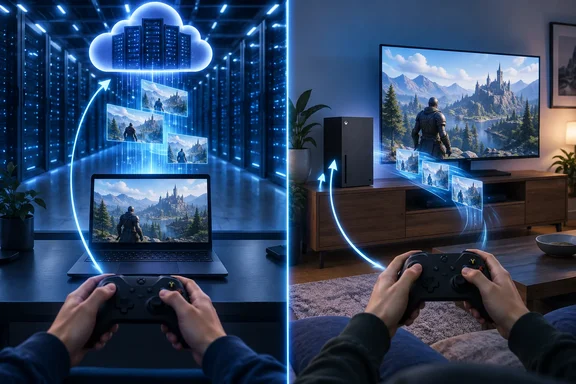
That distinction is useful when deciding whether to upgrade a PC, use Xbox Cloud Gaming, or stream from a console you already own. All three can put a game on your screen, but they depend on different hardware—and fail in different ways.
What happens when you press a button?
A cloud-gaming session is a continuous feedback loop:
- Your PC, phone, or other supported device sends a button press or movement to the service.
- The remote machine updates the game and renders the next image.
- The service sends encoded video and audio back.
- Your device decodes and displays the stream.
Your device still needs to handle input, networking, video decoding, and audio. It just does not need to do the game’s main rendering. That is why cloud gaming can reduce the need for a powerful local GPU without eliminating the need for a capable client and a reliable connection. Research into GeForce NOW describes remote rendering delivered as real-time video and treats latency, frame rate, and resolution as important measures of the experience.
The practical point: download speed alone cannot tell you how responsive a game will feel. A delayed or inconsistent round trip can make controls feel sluggish even when the picture eventually arrives clearly. This is an inference from the input-and-video loop, not a promise that any particular connection will perform well.
Cloud gaming versus Remote Play
Here is the distinction that matters most for Windows users: whose machine is running the game?
- Xbox Cloud Gaming: Microsoft says the game runs on an Xbox server in an Azure datacenter. The player connects to the service, and only games available for that cloud-streaming environment can be played there.
- Xbox Remote Play: The game runs on the player’s own Xbox console. A Windows PC or other supported client displays what that console is doing; games installed on the console are the relevant library.
Analytics Insight describes Remote Play as streaming to another screen “in the same home.” That is a helpful illustration, not a geographic rule: Microsoft describes connecting to your home console without saying the player must be inside the home. Remote Play extends a machine you own; cloud gaming uses provider-operated hardware instead.
What should you check before relying on the cloud?
Xbox provides a concrete example, though its requirements should not be treated as universal rules for every provider. Microsoft lists a 10 Mbps minimum download speed for Xbox Cloud Gaming and says best performance is achieved at 20 Mbps on PCs, consoles, and tablets. It recommends 5 GHz Wi-Fi and cautions that location, device, and connection quality also affect streaming. A supported device and compatible input method are necessary; select games offer touch controls.
Before treating streaming as a substitute for an installed game, check three things:
- The title: Owning a game does not automatically make every title cloud-playable. Xbox says only select owned or purchased games can be streamed, and availability varies by region, plan, and platform.
- The connection: If a session feels inconsistent, compare it over a wired connection or 5 GHz Wi-Fi where possible. That can help distinguish local wireless trouble from other limits, but it cannot guarantee low delay to the service.
- The features: Microsoft warns that streamed games may have limitations involving video resolution, audio, saves, companion apps, or accessories. Check the features you depend on rather than assuming the cloud version matches local play.
Cloud gaming is therefore less a magic replacement for a gaming PC than a change in where the expensive work happens. For a supported game on a steady connection, it can spare a Windows user a large local download and a hardware upgrade. For offline play, an unsupported title, or a session sensitive to delay, running the game locally still has a clear advantage.
References
- Cloud Gaming Explained: How Games Run Without a High-End PC or Console - Analytics Insight Analytics Insight · 2026-09-27T04:30:00+00:00
- Xbox Game Streaming vs. Xbox Remote Play - Microsoft Game Development Kit | Microsoft Learn learn.microsoft.com
- XBOX Cloud Gaming | XBOX xbox.com