

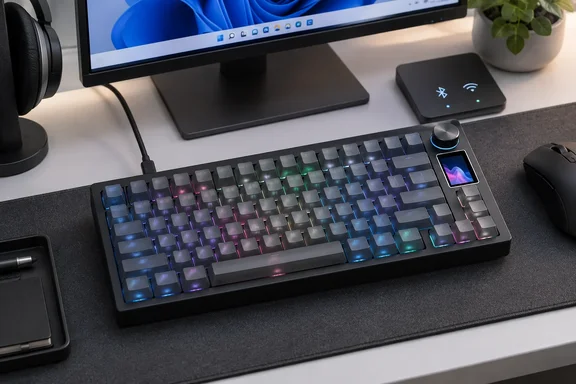
Yunzii IF75 adds a TFT screen and knob to an $84.99 75% keyboard
TechPowerUp reported the launch and describes the IF75 as a 75% mechanical keyboard with tri-mode connectivity, a built-in full-color TFT display and a detachable wrist strap. Yunzii's own launch post and product listing call that accessory a "detachable decorative ribbon," so treat it as decoration rather than an ergonomic wrist support. The listing also mentions two-stage adjustable kickstands.
The physical specs are the same across TechPowerUp and Yunzii's listing. The board uses a 79-key layout with a multifunction knob and measures 332.57 x 136.7 x 42.88 mm with a weight of around 945 g. Yunzii gives the weight as 945 ± 20 g. The screen is 135 × 240 pixels. Yunzii says the TFT screen shows battery status, time, GIFs, and custom photos, and that the knob enables quick volume control and customizable functions.
On price, Yunzii's storefront shows the IF75 at Sale price $84.99 Regular price $99.99. So the $84.99 figure in launch coverage is a launch discount, not the list price. Colors are pink, purple, white and black. Switches are Yunzii Candy linear or Onyx Gray tactile/clicky.
Being listed doesn't mean every version is ready to ship. On the US listing, the Pink / YUNZII Candy Linear Switch is backordered and will ship as soon as it is back in stock. Yunzii offers a one-year warranty. It says standard shipping is free on orders over $45, with delivery in 6–15 business days, and expedited shipping costs $25.
IF75 connectivity specs: Bluetooth 5.0, five devices and a 1000 Hz polling claim
Both outlets agree on the three connection modes. Yunzii's listing adds more detail: the keyboard offers Bluetooth 5.0, 2.4GHz, and USB-C connections with one-click switching, pairing with up to 5 devices for seamless transitions between PCs, laptops, tablets, and consoles. Yunzii also lists Windows, macOS and Linux compatibility, a 1000 Hz polling rate, and N-key rollover (NKRO). NKRO means each key press is registered even when many keys are held at once.
These are manufacturer specs. Yunzii doesn't say which connection modes reach 1000 Hz. That matters for gamers, because wired and 2.4 GHz dongle connections often behave differently from Bluetooth. That's general context about wireless keyboards, not something Yunzii has said about the IF75. If input latency over wireless is your deciding factor, wait for independent testing. No hands-on review, latency measurement or battery test of the IF75 has been published yet.
QMK/VIA on the IF75 works through a JSON file and a USB-C cable
The "QMK/VIA" in the product name is the main reason enthusiasts will look at this board. QMK is open-source keyboard firmware. VIA is a configuration app, usable in a browser, that talks to QMK-based boards and lets you change the keymap without recompiling firmware. Yunzii says the IF75 supports QMK/VIA open‑source firmware for in‑depth customization, including remapping, macros and layers.
There is one catch. As with many recent VIA-based boards, VIA doesn't recognise the IF75 automatically. You load a definition file that Yunzii publishes. Yunzii's software page has an IF75 entry with a JSON file dated September 11, 2026 (listed as version 20260911). It points to the VIA site at usevia.app and lists compatibility with Windows XP, 7, 8, 10 and 11 plus macOS. The page's tip for the IF75 is blunt: use the VIA site in wired mode.
Setting up the Yunzii IF75 in VIA
Yunzii's documented steps for the IF75 are:
- Download the IF75 JSON file from the IF75 entry on Yunzii's software page. The page tells users not to download files meant for other models, and says Yunzii won't take responsibility for problems caused by the wrong download.
- Connect the keyboard to the PC with USB-C in wired mode, not over 2.4 GHz or Bluetooth.
- Check that the keyboard types normally before continuing.
- Open VIA, go to the Design tab, and upload the IF75 JSON file.
- Customize the keymap, macros and layers in VIA.
If VIA recognises the board, it will display the IF75 layout and let you change keys. Yunzii's IF75 entry doesn't list a firmware reset or recovery tool. Some other Yunzii models on the same page do have "Resetting Firmware" or "Updating/Refreshing Toolbox" downloads. If a VIA change goes wrong, contact Yunzii support rather than flashing a firmware file made for a different model.
The IF75 screen uses its own Windows app
The TFT display isn't configured in VIA. According to TechPowerUp, the screen is fully customizable through Windows software or an online tool for Windows and macOS. Yunzii's software page matches this: the IF75 entry offers a Windows screen app and a separate screen-customization website for Windows and Mac. This is the tool for uploading images and GIFs.
In practice, a Windows user has two jobs, each in its own tool: key layout in VIA, and screen content in Yunzii's screen software. On Windows you can use either the installed app or the web tool. Mac users get the web tool. Yunzii lists no Linux screen tool, so on Linux you should expect basic keyboard function and plan on another computer for screen setup. That's a reading of Yunzii's software listing, not a confirmed limitation.
The IF75's instructions stress wired mode for VIA, but the software page doesn't say what connection the screen tool needs. Using USB-C for screen changes too is a reasonable precaution, though Yunzii doesn't require it.
IF75 battery claims: 30 hours with lighting on, 23 days with it off
Yunzii's listing and launch post confirm an 8,000 mAh battery. The runtime figures come from TechPowerUp, which reports that the battery is rated for up to 30 hours with RGB lighting and the display enabled, or up to 23 days with both disabled. TechPowerUp also notes a five-minute auto-off function. The Yunzii launch post and listing checked for this article don't state runtimes or test conditions.
The gap between the two figures is the useful part. If the TechPowerUp numbers hold, the south-facing RGB lighting (Yunzii advertises 16.8 million colors) and the screen account for most of the power draw. Someone who keeps both on all day would be charging roughly every few working days. Someone who types with the lights and screen off could go weeks between charges. The screen is a headline feature, so many buyers will be closer to the 30-hour end than they might expect.
Gasket mount and hot-swap sockets follow the IF68
TechPowerUp places the IF75 as the follow-up to the previous, more compact IF68 model launched in July. The two keyboards share a lot. Yunzii lists the IF68 at the same $84.99 sale price (regular $96.99), and its software page gives the IF68 the same VIA-plus-screen-tool setup, with a JSON file dated March 2026. The IF75 adds a function row and more keys at a similar sale price.
Inside, TechPowerUp says the IF75 uses a gasket-mounted structure with a flexible PCB and five layers of sound-dampening material. In a gasket mount, the plate and circuit board sit on soft mounts instead of being screwed straight to the case, which is meant to give a softer feel. Yunzii describes the result as a "creamy" sound profile and says the switches come pre-lubed. Those are descriptions of feel, and nobody has measured them.
The hot-swap sockets are worth more over time. The board has double-shot PBT, PC Cherry-profile keycaps and a hot-swappable PCB compatible with 3-pin and 5-pin mechanical switches. You can pull and replace switches without soldering, so you're not stuck with the two factory switch options. Yunzii's listing says the translucent PC keycaps are there to let the RGB lighting show through, alongside the PBT caps.
What this means for Windows buyers
Buy the IF75 if you want a screen, a knob and VIA remapping on a wireless 75% keyboard at this price, and you don't mind plugging in to configure it. Wait for independent reviews if you care most about measured wireless latency, real battery life, or how it actually sounds.
- The $84.99 price is a discount from a $99.99 list price, and at least one color/switch combination was backordered at launch, so check your exact version before ordering.
- VIA remapping needs Yunzii's IF75 JSON file (version 20260911) and a wired USB-C connection, according to Yunzii's own instructions.
- Screen images and GIFs are set in a separate Yunzii tool, either the Windows app or a web tool for Windows and macOS, not in VIA.
- The 30-hour and 23-day battery figures are rated claims reported by TechPowerUp. Lighting and screen use will largely decide which end you get.
- The 1000 Hz polling rate is a manufacturer figure with no stated connection mode, so gamers who plan to use wireless should wait for testing.
- Hot-swap sockets for 3-pin and 5-pin switches mean the switch choice at purchase can be changed later without soldering.
The IF75 gives Yunzii's IF68 formula a fuller layout, adding a function row and sticking with the VIA-plus-screen-app setup that works well on Windows. What's known so far comes from Yunzii and TechPowerUp's launch report. Independent reviews will be the first chance to check the battery figures, the polling-rate claim and the gasket sound, and those will decide whether the $84.99 launch price is a good deal.