

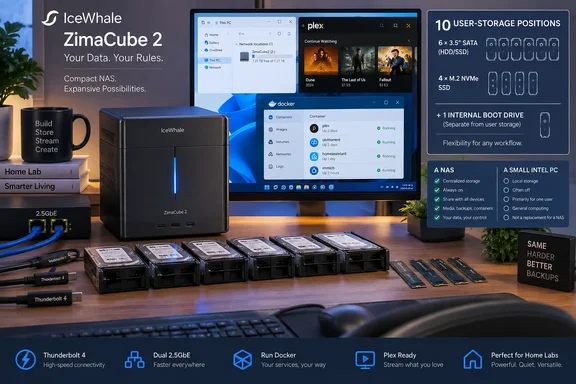
Neowin’s hands-on review, based on a sample supplied by IceWhale Technology, found the entry ZimaCube 2 compact, solidly built and capable of saturating a 2.5GbE connection in Windows 11 testing. That basic account is consistent with independent reviews from Phoronix, NAS Compares, Notebookcheck and ServeTheHome: this is a real retail product, rather than a new crowdfunding promise, and its appeal is less a polished appliance experience than unusually flexible x86 hardware for a home lab.
The important practical distinction is that ZimaCube 2 is both a NAS and a small Intel PC. That makes it attractive to Windows users who want a local Plex server, Docker host, backup target or direct-attached workspace without assembling a separate mini-PC and disk enclosure. It also makes the software choice—and the buyer’s appetite for maintaining it—more consequential than the specifications alone suggest.
Ten data drives, one system drive, and a naming problem
The supplied ZimaCube 2 configuration lists six 3.5-inch or 2.5-inch SATA bays and four M.2 SSD slots. Phoronix independently describes the same layout, while ServeTheHome’s teardown of the Pro model describes six hot-swap SATA trays and a separate compartment housing four M.2 SSDs. Both also note a distinct 256GB NVMe drive used for the operating system.
That yields three different ways sellers and reviewers can count storage:
- Six SATA drives can form the bulk-capacity tier for hard disks or 2.5-inch SATA SSDs.
- Four M.2 drives can serve as a fast cache, virtual-machine datastore, container volume or all-flash storage pool.
- One internal NVMe drive holds ZimaOS and is not ordinarily available as a user storage bay.
Notebookcheck calls it an 11-drive system when including the boot SSD. That is defensible as a count of installed storage devices, but it still does not reach 12. Calling the machine a “12-bay NAS” risks making buyers expect a dozen independently usable data positions. They will receive 10, organized into two very different storage classes.
This is more than terminology. A six-HDD RAID array can provide large, relatively inexpensive redundant capacity, while four M.2 slots invite high-IOPS workloads. Yet an NVMe-heavy build costs considerably more per terabyte, and it is not equivalent to having four more front-accessible HDD trays. Planning a ZimaCube 2 around the latter assumption would produce the wrong budget and likely the wrong disk purchase.
The standard model’s NVMe compartment is its bottleneck
The base ZimaCube 2 uses Intel’s Core i3-1215U, 8GB of DDR5 memory and a 256GB system SSD. Its list price is $799. The ZimaCube 2 Pro moves to a Core i5-1235U, 16GB of memory and adds a 10GbE port at $1,299; Neowin says its Creator Pack, with 64GB and an Nvidia RTX Pro 2000, carries a $1,999 MSRP.
Those are materially different machines, not merely memory options. The standard system’s four-NVMe compartment is specified at about 800MB/s, while the i5 model is specified at roughly 3,200MB/s. Notebookcheck reaches the same conclusion in its configuration table, and NAS Compares likewise flags the slower M.2 performance on the entry model.
For an owner copying files to a Windows PC through either onboard 2.5GbE port, that limitation is usually not the first constraint. A 2.5GbE link tops out well below 800MB/s after protocol overhead, so the standard model can still provide the full network speed that its built-in Ethernet exposes. Neowin’s Windows 11 test, conducted over a 2.5GbE mapped network drive, found that the NAS essentially maxed out that connection.
The limitation appears when the ZimaCube is used as more than a conventional network share. Four fast NVMe drives will not deliver four-drive Gen4 performance in the base unit, and the Thunderbolt 4 ports can theoretically carry far more bandwidth than the standard NVMe subsystem. Buyers planning direct-connected editing, dense virtual-machine workloads or a large all-flash pool should treat the Pro as the relevant model—or consider whether a different storage platform with native 10GbE is the better starting point.
Thunderbolt changes the role of the box
Dual Thunderbolt 4 ports are the ZimaCube 2’s most unusual feature in this price range. Phoronix reports 40Gbps connectivity for direct PC transfers, while ServeTheHome confirms that the Pro’s ports are certified Thunderbolt 4 and can be used for high-speed peripherals or Thunderbolt networking. IceWhale positions the same basic capability as a direct connection for a Mac or PC.
For Windows users, this offers an alternative to the usual NAS compromise: a file server is normally only as quick as the Ethernet path between the PC and the enclosure. A direct Thunderbolt connection can turn the ZimaCube into a closer analogue of a local external storage box while preserving its ability to serve other network clients. The machine also supplies HDMI 2.0 and DisplayPort 1.4 outputs, so initial setup and troubleshooting do not have to happen through a browser alone.
That flexibility is genuine, but it should not be confused with plug-and-play simplicity. A Thunderbolt cable does not erase filesystem permissions, container configuration, RAID planning or backup responsibilities. It also does not convert a 2.5GbE-only standard model into a 10GbE NAS for the rest of the network.
The chassis provides two physical PCIe expansion slots, though the electrical connectivity is constrained: Phoronix identifies them as PCIe 4.0 x4 and PCIe 3.0 x2. Those links are enough for many NICs, storage controllers and modest accelerators, but they are not the same as full-width desktop GPU slots. Notebookcheck further reports a 70W GPU limit. The Creator Pack’s RTX Pro 2000 option therefore deserves scrutiny from anyone buying it primarily for local AI or GPU transcoding rather than assuming workstation-class expansion.
ZimaOS is the trade-off against established NAS software
The hardware is more mature than the software proposition. ZimaCube 2 ships with ZimaOS, IceWhale’s browser-managed personal-cloud operating system, and ZimaClient can locate the appliance and map storage in Windows. Neowin found Plex installation straightforward and confirmed smooth playback of a Dolby Vision and Dolby Atmos Blu-ray rip, but also found that Windows Network Neighborhood did not expose the device normally; mapping shares required the Zima client in that test.
That is a small friction point, but it illustrates the broader trade-off. A Synology, QNAP, TerraMaster or Ugreen system may constrain hardware choices more tightly, but its software often has deeper administrative tooling and longer-established backup, monitoring, identity and mobile workflows. NAS Compares concluded that ZimaOS has improved yet remains behind competitors in areas including backup scheduling, VPN integration, fan control, security tools and monitoring.
IceWhale’s answer is openness. Phoronix successfully used the x86-64 system with Ubuntu releases and notes that the device is not locked down; Notebookcheck says the platform can run Windows, Linux, TrueNAS, Unraid or Proxmox. That is valuable for administrators who want to avoid a proprietary NAS operating system, but it shifts responsibility back to the owner. Installing Windows or Proxmox may unlock familiar management tools, but it also means providing one’s own licensing where applicable, storage design, patching routine and recovery plan.
The 8GB base-memory configuration is adequate for ordinary file sharing, media serving and a handful of containers, but it is a conservative starting point for the product’s more ambitious uses. Phoronix observed that the base unit’s 8GB DDR5 configuration runs single-channel. Anyone intending to host multiple services, virtual machines or a large media index should price a memory upgrade before treating the $799 figure as a finished system cost.
A compact home server rather than a turnkey NAS bargain
ZimaCube 2’s strongest case is clear: it packages six SATA positions, a four-drive M.2 compartment, Thunderbolt 4, dual 2.5GbE, display outputs and PCIe expansion into a relatively compact metal chassis. The move from the original non-Pro ZimaCube’s Intel N100 to the Core i3-1215U gives the entry version more credible headroom for containers, media workloads and Windows-adjacent direct-connect storage duties.
It is less persuasive for users who want a no-maintenance appliance. Neowin’s reviewer praised the evolving ZimaOS experience but still characterized it as bare-bones beside Synology DSM, TerraMaster TOS and Ugreen UGOS. NAS Compares independently came to the same conclusion: the hardware is compelling, while the operating environment remains the part that asks owners to do more work.
The buying decision comes down to whether the buyer needs the flexibility. For a Windows household that only needs reliable shared folders and photo backups, a simpler NAS with stronger native software may be easier to live with. For a user who wants a Windows-accessible storage server that can also run Docker services, Plex, an alternate operating system or a direct Thunderbolt workflow, ZimaCube 2 offers a rare configuration—so long as they budget for drives, backups and, if needed, more RAM rather than counting on “12 bays” to carry the value proposition.
References
- ZimaCube 2 is a compact Personal Cloud Home NAS with 12 bays for HDD and SSD Neowin · 2026-09-20T15:48:01+00:00