
Silberling
New Member
- Joined
- Sep 29, 2012
- Messages
- 4
- Thread Author
- #1
Hi.
I am working on a small and fast GUI wrapper for game and tool development. It has been a while that i worked with the win32 api.
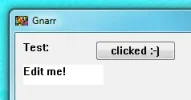
Everything works fine except of the displayed window elements. As you can see in the attached picture, the text looks like Win 3.x ^^.
I applied a manifest like this one:
And included it in the RC file
Added the following code (part) to the core ui-element class:
I really don't know how to get a nice Win7 UI, but this Win 3.x like style ^^.
Help is appreciated.
Thanx
Silberling
EDIT:
Oh i forgot:
TDM-GCC 4.7.1-tdm64-1, not Visual Studio
I am working on a small and fast GUI wrapper for game and tool development. It has been a while that i worked with the win32 api.
Everything works fine except of the displayed window elements. As you can see in the attached picture, the text looks like Win 3.x ^^.
I applied a manifest like this one:
Code:
<?xml version="1.0" encoding="UTF-8" standalone="yes"?><assembly xmlns="urn:schemas-microsoft-com:asm.v1" manifestVersion="1.0">
  <trustInfo xmlns="urn:schemas-microsoft-com:asm.v2">
    <security>
      <requestedPrivileges>
        <requestedExecutionLevel level="asInvoker" uiAccess="false"/>
      </requestedPrivileges>
    </security>
  </trustInfo>
  <dependency>
    <dependentAssembly>
      <assemblyIdentity type="Win32" name="Microsoft.Windows.Common-Controls" version="6.0.0.0" processorArchitecture="amd64" publicKeyToken="6595b64144ccf1df" language="*"/>
    </dependentAssembly>
  </dependency>
</assembly>
And included it in the RC file
Code:
...
#include <windows.h>
#include <commctrl.h>
#include <winuser.h>

CREATEPROCESS_MANIFEST_RESOURCE_ID RT_MANIFEST "Window.exe.manifest"
...
Added the following code (part) to the core ui-element class:
Code:
class UIElement {
...

protected:
    static INITCOMMONCONTROLSEX icc;


public:
    UIElement() {
        ...
        // FIXME: Better way for that :-S
        if (! (UIElement::icc.dwSize > 0)) {
            UIElement::icc.dwSize = sizeof(UIElement::icc);
            UIElement::icc.dwICC = ICC_WIN95_CLASSES | ICC_STANDARD_CLASSES | ICC_COOL_CLASSES;
            if (! InitCommonControlsEx(&UIElement::icc)) {
                MessageBox(NULL, TEXT("InitCommonControlsEx failed."), TEXT("Error"), MB_OK | MB_ICONINFORMATION);
            }
        }
        ...
    }

...
}
I really don't know how to get a nice Win7 UI, but this Win 3.x like style ^^.
Help is appreciated.
Thanx
Silberling
EDIT:
Oh i forgot:
TDM-GCC 4.7.1-tdm64-1, not Visual Studio
Attachments
Last edited:

